Skip to content

Chapter 4: Vehicle Motion Modeling and Simulation

Whether for the validation of new aircraft development or theoretical pre-exploration under extreme operational conditions, an accurate vehicle dynamics model remains the most critical bridge between low-level control and high-level AI systems. This chapter focuses on constructing multi-form dynamics models—from rotorcraft to unmanned ground/sea vehicles—based on MATLAB/Simulink and the RflySim toolbox, ultimately exporting cross-ecosystem-validated DLL hot-swappable assets.


4.1 Background and Theory

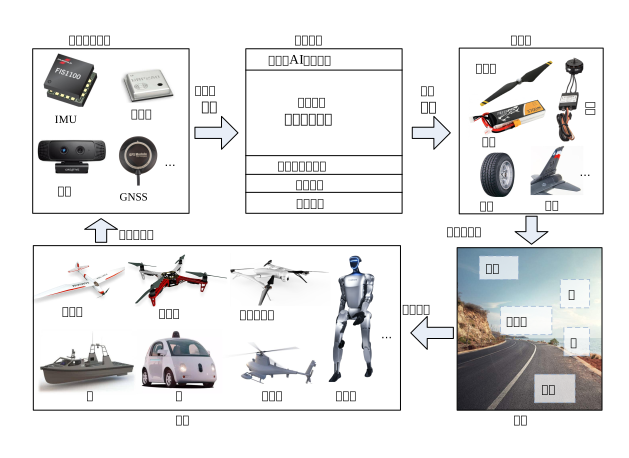
Precise mathematical and physical analysis forms the fidelity lower bound for simulation systems. Vehicle modeling involves not only solving six-degree-of-freedom spatial differential equations at the rigid-body mechanics level (including mass distribution inertia tensor, gravity characteristics, translation, and rotation matrices), but also encompassing powerplant and actuator model evaluations (e.g., nonlinear fitting laws for propeller thrust and torque under extreme flow fields, as well as disturbance characteristics of aerodynamic control surfaces under varying angles of attack).

Beyond the structural vehicle itself, stochastic simulation of environmental and sensor systems—such as geomagnetic field vector models at different latitudes and longitudes, barometric altitude errors caused by temperature gradients, and GNSS Gaussian-Markov noise—is equally vital to motion modeling. Only by fully integrating these mathematical principles can it be termed “true-to-life environment simulation.”

alt text


4.2 Framework and Interfaces

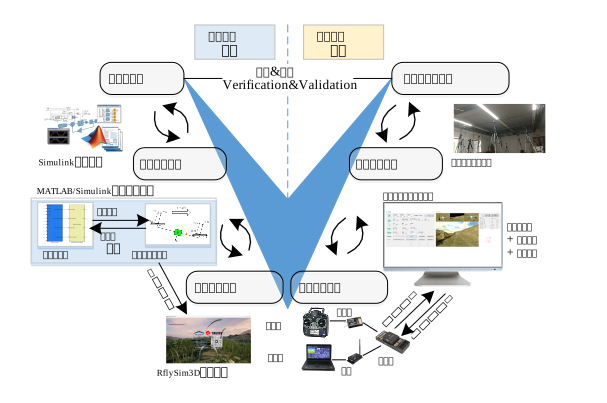
Within RflySim’s product portfolio, vehicle models are not only executed as mathematical formulas but also packaged as plug-and-play digital base interfaces with hot-swappable capability, thereby fully enabling seamless testing across software-in-the-loop and physical flight vehicle validation.
alt text

4.2.1 CopterSim Model Loading Architecture

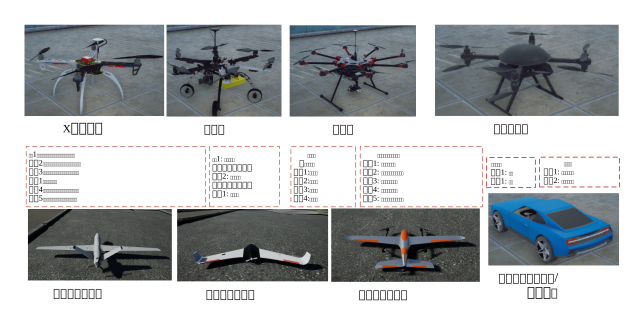
For standard quadcopters or octocopters, the CopterSim platform already embeds a highly optimized dynamics solver at the底层 (default operating based on standardized rotor aerodynamic coefficient equations), capable of millisecond-level rigid-body attitude updates. By simply loading via the GUI or configuring simple XML configuration data through command-line parameters, users can simulate body scaling and conventional parameter variations without rewriting source code.
alt text

For special, non-standard configurations—such as tiltrotors, ornithopters, or large airships—one can fully leverage MATLAB/Simulink’s graphical flowchart modules to construct the underlying power flow. Within this ecosystem, the platform exposes a set of底层 sensor noise generators and chassis motion equation input interfaces, allowing users to freely assemble vehicle characteristics with full proprietary intellectual property rights.

To facilitate researchers in脱离 (detaching from) the MATLAB environment and performing rapid distributed computation validation on low-performance machines, the toolbox supports one-click compilation of the aforementioned Simulink models into Windows dynamic link libraries (.dll). These DLLs seamlessly integrate into CopterSim or even RflySim3D scenes as drive kernels, with support for code encryption protection.


4.3 Showcase of Representative Cases


4.4 Course-Linked Video Lectures

Public Lecture Replay (Session 4: Vehicle Motion Modeling and Simulation):

4.5 Chapter Experiment Case

The verification experiments and guided cases related to this chapter are located in the [Installation Directory]\RflySimAPIs\4.RflySimModel folder.

4.5.1 Interface Learning Experiments

Located in the 4.RflySimModel\0.ApiExps folder, covering foundational interface tutorials for the platform and general introductions to various tools.

Experiment 1: Vehicle Motion Modeling and Simulation Interface

📝 Experiment Overview: Learn the vehicle motion modeling, hardware/software-in-the-loop (HIL/SIL) simulation workflow, and a quick-start guide to the UDP communication interface on the RflySim platform.

Experiment 2: Simulink Calling C Code Experiment

📝 Experiment Overview: Introduce multiple methods for Simulink models to call external C code via MATLAB Coder, including MATLAB Function blocks, DLLs, and S-Function Builder, to invoke existing C functions for specific computations and observe simulation results.

Experiment 3: Reading State Estimation Values via ExtCtrlAPI

📝 Experiment Overview: Learn to perform hardware/software-in-the-loop simulation on the RflySim platform using UDP_Full mode, receive PX4 internal state estimation values (ground truth) by listening on UDP port 20101, and master UDP communication protocols and state estimation principles.

Experiment 4: Collision Engine Validation Using inFloatsCollision Interface

📝 Experiment Overview: Familiarize with the inFloatsCollision collision model port on the RflySim platform, obtain UDP collision data from RflySim 3D via this interface, and implement physical engine functionality validation. Learn to perform collision detection and response in hardware/software-in-the-loop simulation using the DLL model interface.

Experiment 5: inSILIntsFloats External Data Input Interface

📝 Experiment Overview: Learn to use the inSILIntsFloats interface for external fault injection, sending integer and floating-point data to SIL simulation via Python or Simulink, enabling motor fault simulation and control.

Experiment 6: External DLL Comprehensive Model Loading Interface

📝 Experiment Overview: Load and invoke external DLL comprehensive models directly via external programs without launching CopterSim. Instantiate comprehensive models using the ModelLoad interface class, and control aircraft takeoff and forward flight using the SendPosNED and SendVelNED interfaces.

Experiment 7: Multi-Model Initialization Position and Attitude Control

📝 Experiment Overview: Learn to use batch scripts to set the initial position, altitude, and attitude for single or multiple unmanned vehicles, observe their free-fall and attitude change behaviors, supporting both software-in-the-loop and hardware-in-the-loop simulations.

Experiment 8: PX4 SIH Hardware-in-the-Loop Simulation
  • 📦 Version Requirement: Free Edition

    📝 Experiment Overview:
    Conducts Hardware-in-the-Loop (HITL) simulation testing to verify the integration of the PX4 flight controller with physical models, validate the coordinated operation between the flight control system and the dynamics model, and assess the accuracy and robustness of flight control performance.

Experiment 9: PX4 State Flag Input Interface Experiment

📝 Experiment Overview:
Uses the 5th dimension VTOL_STATE flag bit of the inCopterData input interface to master the observation method for VTOL aircraft mode-switching states and understand the application of PX4 state flags.

Experiment 10: ReqCopterSim Interface Library Usage

📝 Experiment Overview:
Learn to use the Python-based ReqCopterSim.py interface library to configure CopterSim initialization parameters, including DLL model selection, map scene switching, position/attitude setting, and UDP communication mode configuration.

Experiment 11: InFloatsCollision Collision Interface Verification

📝 Experiment Overview:
Verifies the collision detection and response functionality of RflySim3D using the InFloatsCollision interface, implementing a quadrotor collision test experiment.

Experiment 12: sendSILIntDouble Interface Invocation Experiment

📝 Experiment Overview:
Learn to use the Python sendSILIntDouble interface to send data to the inDoubCtrls input interface of the RflySim platform’s DLL model, and verify data transmission via Simulink monitoring.

Experiment 13: sendSILIntDouble Interface Invocation Experiment

📝 Experiment Overview:
Learn to use the Python sendSILIntDouble() function to send 28-dimensional double-type data to the inSIL28d input interface of the RflySim platform’s DLL model, and verify data transmission effectiveness through Software-in-the-Loop (SIL) simulation.

Experiment 14: Collision Data Input Interface Experiment

📝 Experiment Overview:
Learn to use the DLL model collision data input interfaces inFloatsCollision and inCollision20d, and master the implementation and application of the quadrotor collision detection module and motor fault triggering functionality.

Experiment 15: DLL Comprehensive Model External Loading Interface Experiment

📝 Experiment Overview:
Uses the DllSimCtrlAPI.ModelLoad interface class to achieve external loading and control of DLL comprehensive models, including demonstrations of CreateVehicle for vehicle initialization, StartExtCtrl for external control activation, and usage of control interfaces such as SendVelNED and SendPosNED.

Experiment 16: External Communication for Reading Simulation Ground Truth Data

📝 Experiment Overview:
This experiment listens on UDP port 30101 to receive ground truth data from CopterSim flight simulations, learning UDP communication protocols and external interface usage to enable data acquisition in Software/Hardware-in-the-Loop simulations.

Experiment 17: Automatic C/C++ Code Generation from Simulink Models
  • 📦 Version Requirement: Free Edition

    📝 Experiment Overview:
    Automatically generate C/C++ code from Simulink models using the Embedded Coder module. Learn to configure fixed-step solvers, the ert.tlc code template, and interface parameters to achieve compact and fast code generation for embedded processors.

Experiment 18: inSILInts and inSILFloats Interface Experiment

📝 Experiment Overview:
Familiarize yourself with the inSILInts and inSILFloats interfaces of the RflySim platform’s maximum system model. Use UDP port 30100 to receive external data for functionalities such as fault injection.

Experiment 19: DLL Integrated Model Accelerated Simulation

📝 Experiment Overview:
Accelerate simulation by loading DLL integrated models via external Python programs. Learn to control aircraft takeoff and flight using interfaces such as ModelLoad, CreateVehicle, and StartAutUpdate.

Experiment 20: SIH_FLY Software-in-the-Loop Simulation

📝 Experiment Overview:
Run PX4’s built-in SIH dynamics model on the RflySim platform to validate flight control algorithm performance in simulation. Supports multiple control modes, including waypoint, route, and Offboard control.

Experiment 21: inCopterData Remote Controller Channel Signal Interface

📝 Experiment Overview:
Receive remote controller channel signals (ch1–ch16) via the inCopterData input interface (9–24 dimensions). Master the usage of the DLL model’s remote controller signal input interface.

Experiment 22: UUV Initial Position and Attitude Setting

📝 Experiment Overview:
Set the initial depth, roll angle, pitch angle, and yaw angle of an underwater vehicle (UUV) via a .bat script. Supports SITL/HITL modes and multi-vehicle configurations. Introduces UUV dynamics modeling and initial position/attitude setup principles.

Experiment 23: Simulink External C Code Invocation

📝 Experiment Overview:
Learn how to invoke external C code in Simulink, including using the MATLAB Function block, the coder.ceval function to call C functions, and a complete tutorial on automatically generating embedded C/C++ code.

Experiment 24: inCollision20d Collision Engine Function Verification

📝 Experiment Overview:
Verify the inCollision20d model input interface (20-dimensional double-type) in RflySim v3.03. Use a DLL model to command a quadrotor to fly toward obstacles. Press 'P' to enter physical engine mode and observe collision rebound effects and printed object coordinates.

Experiment 25: inDoubCtrls Double-Precision Control Interface Experiment

📝 Experiment Overview:
Learn to send 28-dimensional double-precision control data to RflySim’s Simulink DLL model via Python using the sendSILIntDouble and sendInDoubCtrls interfaces, enabling closed-loop controller simulation.

Experiment 26: DLL Quadrotor Model Experiment with Collision Detection Module
  • 📦 Version Requirement: Free Edition

    📝 Experiment Overview: Implement collision detection for a quadrotor model using the InFloatsCollision interface, gain familiarity with adding and using the collision detection module, and complete SIL/HIL simulation experiments.

Experiment 27: Python sendInDoubCtrls Interface Usage

📝 Experiment Overview: Learn to use the RflySim platform’s sendInDoubCtrls Python interface to send data to the 28-dimensional double-type inDoubCtrls interface of a DLL model, and verify data transmission via Simulink monitoring.

Experiment 28: DLL Model External Input Interface inSIL28d Invocation Experiment

📝 Experiment Overview: Learn to use the RflySim platform’s Python sendInDoubCtrls() interface to send data to the 28-dimensional double-type input interface inSIL28d of a DLL model, and verify data transmission via software-in-the-loop (SIL) simulation.

Experiment 29: CopterSim Software-in-the-Loop Simulation Initialization without PX4

📝 Experiment Overview: This experiment initializes a quadrotor integrated model in mid-air via a .bat script, combines it with Simulink sending UDP desired-velocity commands, and enables single/multi-UAV direct mission execution.

Experiment 30: RflySim External Control UDP Communication

📝 Experiment Overview: Learn the UDP communication mechanism of the RflySim platform, and master methods for reading flight controller status, vehicle ground truth, and custom messages via ports 20101, 30101, and 40101.

Experiment 31: UDP40101 Reception of rfly_px4 Messages

📝 Experiment Overview: Perform hardware-in-the-loop (HIL) simulation by listening on UDP port 40101 series to receive rfly_px4 uORB messages from the platform, and learn external communication interfaces and DLL model data interaction methods.

Experiment 32: DLL Integrated Model External Loading Interface Extension

📝 Experiment Overview: Extend external loading and custom control of DLL integrated models by inheriting the ModelLoad class, enabling development of custom vehicle models (e.g., fixed-wing, VTOL) without launching CopterSim—DLL models can be invoked directly.

Experiment 33: PX4 SIH_SITL Model Software-in-the-Loop Simulation

📝 Experiment Overview: Learn and verify the software-in-the-loop (SITL) simulation mode of PX4’s official SIH model, which integrates flight control logic and a simplified dynamics model within the PX4 firmware, enabling closed-loop simulation without an external physics engine.

Experiment 34: Quadrotor Collision Detection and Motor Failure Simulation
  • 📦 Version Requirement: Free Edition

    📝 Experiment Overview: Learn the implementation of collision detection functionality for motor failure-induced crashes following a collision between two quadcopters, using a quadcopter DLL model equipped with collision detection and motor-failure-trigger modules.

Experiment 35: inSIL28d External Data Input Interface

📝 Experiment Overview: This experiment introduces the usage of Python interface functions sendSILIntDouble and sendInDoubCtrls for sending 28-dimensional double-precision data to the DLL model via UDP port, enabling external controller data input into large-scenario simulation models.

Experiment 36: Python-based inSIL Interface Experiment

📝 Experiment Overview: Use Python to call the inSILInts and inSILFloats input interfaces of the DLL model to dynamically modify 3D display parameters, achieving real-time vehicle type transformation during software-in-the-loop (SIL) simulation.

Experiment 37: rfly_px4 uORB Message Interface Experiment

📝 Experiment Overview: Monitor rfly_px4 uORB messages via the inCopterData (25–32 dimensional) input interface, helping users become proficient in using DLL model input interfaces and understand how PX4 internal data is transmitted externally via UDP or MAVLink protocols.

Experiment 38: RflySim Simulation Initialization API

📝 Experiment Overview: Learn to configure initial parameters of the RflySim simulation platform using Python interfaces and .bat scripts, including vehicle initial pose, communication mode, and multi-vehicle simulation settings, enabling flexible setup of simulation initial conditions.

Experiment 39: DLL Comprehensive Model Manual Update Interface

📝 Experiment Overview: Directly load DLL comprehensive models via external Python programs, call the ModelUpdate interface to manually set time-step updates for simulation state, achieving maximum-speed simulation. Master the DllSimCtrlAPI.ModelLoad interface, CreateVehicle for vehicle initialization, and control methods SendPosNED/SendVelNED.

Experiment 40: DLL Comprehensive Model Automatic Update Interface

📝 Experiment Overview: Learn to load DLL comprehensive models using the DllSimCtrlAPI.ModelLoad interface, and use StartAutoUpdate for automatic simulation updates to control aircraft takeoff and forward flight.

Experiment 41: ExtToUE4 Interface Custom Data Output Experiment

📝 Experiment Overview: Customize 16-dimensional data transmission via the DLL model’s ExtToUE4 interface to RflySim 3D, enabling visualization of actuator states in the 3D engine for validating the accuracy of the dynamic model.

Experiment 42: DLL Comprehensive Model Simulink External Control

📝 Experiment Overview: Load DLL comprehensive models using the DllSimCtrlAPI.ModelLoad interface, create a closed-loop simulation module via Python (equivalent to CopterSim + flight controller), and execute trajectory tracking tasks using a Simulink external control program. The interface supports both Hardware-in-the-Loop (HIL) and Software-in-the-Loop (SIL) simulations identically.

Experiment 43: ExtToPX4 Interface Validation Experiment
  • 📦 Version Requirement: Free Edition

    📝 Experiment Overview:
    Verify that the DLL model transmits 16-dimensional sensor data to the PX4 flight controller via the ExtToPX4 interface, and master the rfly_ext uORB message communication method.

Experiment 44: DLL Integrated Model Python-based Multi-Vehicle External Control

📝 Experiment Overview:
Without launching CopterSim, directly load multiple DLL integrated models via a Python program, initialize vehicles using CreateVehicle, start real-time simulation with StartAutUpdate, enable external control with StartExtCtrl, and perform a multi-vehicle control experiment where four aircraft fly along a circular trajectory using Mavlink communication.

Experiment 45: DLL Integrated Model Python-based External Control

📝 Experiment Overview:
Learn to directly load DLL integrated models and control aircraft via external Python programs. Master the usage of the ModelLoad interface, CreateVehicle initialization, StartAutUpdate for real-time simulation, and StartExtCtrl for external control—enabling flight missions without launching CopterSim.

Experiment 46: outCopterData Interface Data Logging Verification

📝 Experiment Overview:
Learn to use the outCopterData interface in the RflySim maximum system model to customize logging of 32-dimensional data during simulation, enabling recording and analysis of sensor data or motion states.

Experiment 47: CopterSim Loading DLL Integrated Model with Python-based External Control

📝 Experiment Overview:
Load DLL integrated models in CopterSim and control flight missions via an external Python program. Master the usage of DLL model loading and external control interfaces.

Experiment 48: inCopterData Flight Controller State Input Interface Verification

📝 Experiment Overview:
Verify the usage of the inCopterData interface in RflySim (32-dimensional double-type data), including input validation of PX4 status flags, RC channel signals, and rfly_px4 custom messages.

4.5.2 Basic Usage Experiments

Stored in the 4.RflySimModel\1.BasicExps folder, providing a complete set of supplementary teaching materials for beginners.

Experiment 1: Fundamentals of Unmanned Vehicle System Modeling

📝 Experiment Overview:
Introduce fundamental theories of unmanned vehicle system modeling, including classification and assembly principles of multi-rotor, fixed-wing, and other vehicle types, as well as unified modeling frameworks, reference coordinate systems (NED/FRD), and Euler angle-based motion state description methods.

Experiment 2: Introduction to the Minimal Template

📝 Experiment Overview:
Introduce the use of RflySim’s minimal template for software/hardware-in-the-loop simulation, including motor control input (inPWMs), terrain data input (TerrainIn15d), and three output signals: HILSensor30d, MavHILGPS, and VehileInfo60d, enabling generation of minimal-model DLL files and drone simulation testing.

Experiment 3: Multi-Rotor Model Using the Minimal System Template
  • 📦 Version Requirement: Free Edition

    📝 Experiment Overview: Build a multi-rotor model using the minimal template on the RflySim platform, generate the minimal model DLL file, and complete UAV software-in-the-loop (SIL)/hardware-in-the-loop (HIL) simulation. Learn data communication via interfaces such as HILSensor and GPS.

Experiment 4: Fixed-Wing Model Control

📝 Experiment Overview: Conduct a fixed-wing UAV modeling experiment using the RflySim toolchain. Implement dynamics and kinematics modeling of the fixed-wing UAV via PX4, and master SIL/HIL simulation methodologies.

Experiment 5: Ackermann Chassis UGV Model

📝 Experiment Overview: Build the Ackermann chassis UGV dynamics model using the minimal system template, compile and generate a DLL file, and perform SIL/HIL simulation testing under the official PX4 controller. Familiarize yourself with the platform’s Ackermann chassis UGV model usage.

Experiment 6: Differential Drive UGV Model Construction

📝 Experiment Overview: Build the differential drive UGV dynamics model using the minimal system template, generate a DLL file, and conduct SIL/HIL simulation under the official PX4 controller. Gain familiarity with kinematic constraints of differential steering and vehicle dynamics characteristics.

Experiment 7: Micro Fixed-Wing Model Modeling

📝 Experiment Overview: Understand the modeling principles of micro fixed-wing UAVs, become familiar with the platform’s micro fixed-wing model usage, and master the six-degree-of-freedom motion characteristics of fixed-wing UAVs and PX4 mixing control rules.

4.5.3 Advanced Development Experiments

Stored in the 4.RflySimModel\2.AdvExps folder, these experiments further familiarize users with certain low-level firmware ecosystem configurations.

Experiment 1: RflySim Maximum Template Usage

📝 Experiment Overview: Introduce the usage of the RflySim platform’s maximum system modeling template, including model parameter configuration, 12 input interfaces, 6DOF kinematics module, and SIL/HIL simulation workflow.

Experiment 2: RflySim Multi-Rotor Model Control

📝 Experiment Overview: Learn the implementation principles of collision detection and response for multi-rotor models. Master methods to extend input interfaces and physical collision modules based on the minimal modeling template in RflySim, enabling more complex multi-rotor simulations.

Experiment 3: Fixed-Wing Model Control Simulation Experiment

📝 Experiment Overview: An advanced fixed-wing model simulation experiment on the platform, covering collision detection, waypoint control, pitch angle control, and advanced functional modules such as speed/altitude/yaw control. Users should have prior knowledge of minimal system models and Simulink code generation fundamentals.

Experiment 4: VTOL Aircraft Control Experiment

📝 Experiment Overview: Conduct SIL/HIL simulation experiments for vertical takeoff and landing (VTOL) aircraft, including standard VTOL models and quad-rotor tail-sitter VTOL UAVs. Helps users become familiar with VTOL aircraft simulation workflows and usage methods.

Experiment 5: Ackermann Chassis UGV Control

📝 Experiment Overview: Learn position and velocity control of Ackermann chassis UGVs, and implement SIL/HIL simulation using Python/Matlab.

Experiment 6: Differential Unmanned Vehicle Control Experiment

📝 Experiment Overview: A software-in-the-loop (SIL)/hardware-in-the-loop (HIL) simulation experiment for differential-drive unmanned vehicles, implementing position and velocity control for single or multiple vehicles via Python/Matlab, with simulation exercises covering four control approaches.

Experiment 7: High-Precision Trailer Model Control Experiment

📝 Experiment Overview: This experiment focuses on generating DLL files for refined unmanned vehicle/trailer models in Matlab/Simulink and performing SIL/HIL simulation tests, designing a controller to form a comprehensive model for top-level control.

Experiment 8: Helicopter Model Simulation Experiment

📝 Experiment Overview: A series of helicopter model simulation experiments, including SIL/HIL simulation, offboard position control, and velocity control interface experiments, helping users become familiar with helicopter model simulation procedures and control interface usage.

Experiment 9: Differential Unmanned Surface Vehicle (USV) Model SIL/HIL Simulation

📝 Experiment Overview: Conducting SIL/HIL simulation tests on a differential USV model within the RflySim platform, becoming familiar with the platform’s USV model usage, and mastering PX4-based USV dynamics modeling and simulation techniques.

Experiment 10: Winged UAV Model Validation

📝 Experiment Overview: Compiling and generating DLL model files for a flying-wing UAV in Matlab/Simulink, followed by SIL/HIL simulation testing, to become familiar with the dynamics modeling and control characteristics of flying-wing models on the platform.

Experiment 11: Multirotor Power System Identification Experiment

📝 Experiment Overview: Learning multirotor power system identification methods, including identification experiments for the integrated static-thrust model, decomposed static-thrust model, and dynamic-thrust model, mastering the quantitative relationship modeling from motor PWM input to propeller thrust and counter-torque output.

Experiment 12: Multirotor Modeling and Parameter Identification

📝 Experiment Overview: Identifying aerodynamic drag coefficients of a multirotor in fixed attitude flight via wind tunnel experiments, mastering the full-vehicle modeling framework and parameter identification methods.

Experiment 13: MATLAB System Identification Toolbox Usage

📝 Experiment Overview: Becoming familiar with the MATLAB System Identification Toolbox, understanding data processing techniques, and learning how to perform prediction and validation based on datasets.

Experiment 14: Ackermann Chassis Unmanned Vehicle Python Position Control

📝 Experiment Overview: Implementing SIL/HIL simulation of an Ackermann chassis unmanned vehicle via Python external control interface, verifying single- or multi-vehicle position control functionality, and learning RflySim platform communication interfaces and offboard control mechanisms.

Experiment 15: Differential Unmanned Vehicle Python Position Control

📝 Experiment Overview: Using Python through the RflySim platform’s position control interface to achieve SIL/HIL simulation of a differential unmanned vehicle, supporting single- or multi-vehicle position control and waypoint tracking functionality.

Experiment 16: Fixed-Wing Aircraft Model Collision Detection Validation
  • 📦 Version Requirement: Free Edition

    📝 Experiment Overview: Generate a fixed-wing DLL model with collision detection using Simulink, conduct software-in-the-loop (SIL) and hardware-in-the-loop (HIL) simulation tests, and become familiar with the platform’s fixed-wing model usage.

Experiment 17: Helicopter Model SIL/HIL Simulation

📝 Experiment Overview: Gain familiarity with the RflySim platform architecture and the steps for helicopter model SIL/HIL simulation; learn about body-fixed coordinate system, NED coordinate system, six-degree-of-freedom motion, and PX4 mixing control mechanisms; verify responses to route missions and remote control commands.

Experiment 18: Example of Using MATLAB System Identification Toolbox

📝 Experiment Overview: Using air dryer experimental data, practice importing input-output data, removing mean values, and extracting data subsets; estimate FIR, FRD, and polynomial models; perform model validation and confidence interval analysis to master the fundamental workflow of MATLAB system identification.

Experiment 19: Quadrotor Model Validation Based on System Templates

📝 Experiment Overview: Learn to compile a Simulink quadrotor model into a DLL file and conduct SIL/HIL simulation tests, becoming familiar with the platform’s quadrotor model usage and verifying the model’s dynamic characteristics.

Experiment 20: Assembly and Use of Power System Test Bench

📝 Experiment Overview: Learn the assembly and operation of a static thrust test setup for multi-rotor power systems; master the installation, calibration of power test bench equipment, and use of associated software tools; acquire power system data including voltage, current, rotational speed, thrust, torque, and power.

Experiment 21: Static Thrust Measurement of Multi-Rotor Power Systems

📝 Experiment Overview: Learn to use the power test bench to measure the static thrust model of multi-rotor power systems; master the measurement method for the relationship between PWM input and propeller thrust and torque output.

Experiment 22: Fine-Grained Ground Vehicle Model Validation via TrailerModelCtrl

📝 Experiment Overview: Conduct SIL/HIL simulation tests on a fine-grained ground vehicle DLL model compiled from Simulink, become familiar with the platform’s fine-grained ground vehicle model usage, and master the implementation of SIL/HIL simulations.

Experiment 23: UUV Hardware-in-the-Loop Simulation

📝 Experiment Overview: Conduct hardware-in-the-loop simulation of a UUV model compiled from Simulink using a remote controller, become familiar with the platform’s UUV model usage and PX4 flight controller configuration, and learn the implementation mechanisms of SIL/HIL simulations.

Experiment 24: VTOL Model Control Experiment

📝 Experiment Overview: Conduct SIL/HIL simulation tests using the standard vertical takeoff and landing (VTOL) aircraft DLL model generated by Simulink, become familiar with its SIL/HIL simulation workflow, and master the underlying implementation principles and control methods.

Experiment 25: Wind Tunnel Drag Measurement and Identification
  • 📦 Version Requirement: Free Edition

    📝 Experiment Overview:
    Identify aerodynamic drag coefficients during fixed-attitude hover flight of multi-rotor UAVs by measuring the drone’s aerodynamic drag under a fixed flight attitude (i.e., fixed frontal area).

Experiment 26: Integrated PID Control with External Control for Hexarotor

📝 Experiment Overview:
Design a four-cascade PID controller (position loop, velocity loop, attitude loop, angular velocity loop) for a hexarotor using MATLAB/Simulink, construct a closed-loop simulation system, and perform software-in-the-loop (SIL) verification of position, velocity, and yaw angle commands via external control.

Experiment 27: Integrated Model Verification for Quad-Axis Octo-Rotor

📝 Experiment Overview:
Design a quad-axis octo-rotor controller based on MATLAB/Simulink and perform integrated control verification—including position, velocity, and yaw angle—using external control methods.

Experiment 28: Integrated Model Verification for Octo-Rotor

📝 Experiment Overview:
Design a four-cascade PID controller (position loop, velocity loop, attitude loop, angular velocity loop) for an octo-rotor using MATLAB/Simulink, and conduct SIL simulation verification of position, velocity, and yaw angle commands via UDP-based external control.

Experiment 29: Integrated Model Verification for Hybrid Multi-Rotor (Simulink External Control)

📝 Experiment Overview:
Verify the hybrid multi-rotor integrated model’s capability to dynamically switch among quad-rotor, hexarotor, octo-rotor, and quad-axis octo-rotor configurations using MATLAB/Simulink-based external control, and learn control methods for dynamic multi-rotor type switching.

Experiment 30: Integrated Model Verification for Hybrid Multi-Rotor (Python External Control)

📝 Experiment Overview:
Implement free switching and flight control among quad-rotor, hexarotor, octo-rotor, and quad-axis octo-rotor configurations for the hybrid multi-rotor integrated model via Python-based external control, verifying the dynamic switching functionality of multi-rotor types.

Experiment 31: Simulation and Testing of Tethered UAV Model

📝 Experiment Overview:
Validate the dynamic effects and control behavior of a tethered UAV connected to a ground anchor via a cable on the RflySim/CopterSim platform. Demonstrate tethered UAV simulation under varying altitudes, attitudes, and cable tensions, and learn the application of the tethered model DLL in software/hardware-in-the-loop simulation.

Experiment 32: Position Control of Ackermann Chassis UGV (Simulink)

📝 Experiment Overview:
Conduct software/hardware-in-the-loop simulation of position control for an Ackermann chassis UGV using MATLAB/Simulink, learning RflySim platform external control interfaces and multi-vehicle cooperative control methods.

Experiment 33: Simulink-Based Position Control of Differential-Drive UGV
  • 📦 Version Requirement: Free Edition

    📝 Experiment Overview: Based on the RflySim platform, this experiment uses MATLAB/Simulink to implement position control of a differential drive unmanned vehicle via an external control interface. In hardware-in-the-loop (HIL) and software-in-the-loop (SIL) simulation modes, multiple unmanned vehicles are configured to move along a circular trajectory, enabling learners to understand the data interaction mechanisms among platform communication interfaces, motion simulation models, and underlying controllers.

Experiment 34: Fixed-Wing Position Control (Python Waypoint Control)

📝 Experiment Overview: This experiment implements fixed-wing aircraft waypoint-following control using the RflySim platform’s fixed-wing position control interface in SIL/HIL simulation, helping learners master position control principles and trajectory planning methods.

Experiment 35: Multirotor Hardware-in-the-Loop Frequency Response Identification

📝 Experiment Overview: This experiment performs frequency response identification on the attitude loop of a multirotor nonlinear model via hardware-in-the-loop simulation, identifying transfer functions for the roll, pitch, and yaw channels.

Experiment 36: Helicopter Position Control Using Python

📝 Experiment Overview: This experiment implements offboard position control of a helicopter using Python programming, familiarizing users with the RflySim platform’s position control interface and verifying SIL/HIL simulations of circular trajectory flight.

Experiment 37: Measurement of Drag Torque Coefficient and Moment of Inertia for Multirotors

📝 Experiment Overview: This experiment measures the moment of inertia of an unmanned aerial vehicle using the double-pendulum method, identifies the harmonic oscillation decay coefficient from angular velocity data collected by the flight controller, and ultimately calibrates the drag torque coefficient and inertia model.

Experiment 38: Quadrotor Model Verification with Collision Detection

📝 Experiment Overview: This experiment generates a quadrotor DLL model with collision detection using system templates and conducts SIL/HIL simulation tests, enabling learners to understand six-degree-of-freedom dynamics modeling of quadrotors and the use of physical collision detection modules.

Experiment 39: Static Thrust Integration Model Identification

📝 Experiment Overview: This experiment identifies the static quantitative relationship model between motor PWM input and propeller thrust/torque using power test bench experimental data.

Experiment 40: Software/Hardware-in-the-Loop Simulation of Quadrotor Tailsitter VTOL Aircraft

📝 Experiment Overview: This experiment introduces software/hardware-in-the-loop simulation of a quadrotor tailsitter VTOL aircraft using the RflySim platform. It verifies the model using system templates, familiarizes users with PX4 flight controller configuration, mixing control settings, and QGroundControl (QGC) trajectory control, and implements the full flight process including takeoff, mode transition, forward flight, return-to-launch, and landing.

Experiment 41: Comprehensive Model Verification of Unmanned Ground Vehicle Based on PID Controller

📝 Experiment Overview: This experiment teaches the design of an unmanned ground vehicle controller using MATLAB/Simulink, constructs a comprehensive model, and achieves position and velocity command transmission via UDP external control, completing unmanned vehicle motion control simulation.

Experiment 42: UUV Software-in-the-Loop Simulation
  • 📦 Version Requirement: Free Edition

    📝 Experiment Overview: Build and compile the UUV model using Simulink files, verify basic path-following control functionality via software-in-the-loop (SIL) simulation, and observe the UUV’s motion in RflySim 3D.

Experiment 43: Getting Started with Small Wind Tunnel Equipment

📝 Experiment Overview: Understand the basic functions of the thrust/tension test bench for multi-rotor power systems and the composition of a small wind tunnel; master wind tunnel structure, data acquisition, and power system testing methods.

Experiment 44: Python-Based Speed Control for Ackermann Chassis UGV

📝 Experiment Overview: In hardware-in-the-loop (HIL) simulation mode, use Python to call the RflySim platform’s speed control interface to achieve speed control for a single or multiple Ackermann-chassis UGVs, completing circular trajectory tracking.

Experiment 45: Python-Based Speed Control for Differential Drive UGV

📝 Experiment Overview: In HIL simulation mode, use Python to call the platform’s speed control interface to achieve speed control for a single or multiple UGVs, and learn how to use RflySim’s external control interfaces.

Experiment 46: Comprehensive Quadcopter Model Validation Using PID + System Template

📝 Experiment Overview: Build a comprehensive quadcopter model (including four cascaded PID controllers and a DLL model) in Simulink, and perform software-in-the-loop (SIL) simulation by sending speed control commands externally via UDP.

Experiment 47: Fixed-Wing Model Validation (Python-Based Attitude Angle Control)

📝 Experiment Overview: Use Python to call the RflySim platform’s fixed-wing control interface to command the fixed-wing aircraft to fly with a 10° pitch angle; learn principles of hardware-in-the-loop simulation, MAVLink communication interfaces, and external control methods.

Experiment 48: Helicopter Python-Based Speed Control

📝 Experiment Overview: Implement offboard speed control for the helicopter using Python programming, become familiar with hardware-in-the-loop simulation mechanisms, and complete a circular flight control experiment.

Experiment 49: Six-DOF Modeling of a Quadcopter

📝 Experiment Overview: Construct a six-degree-of-freedom (6-DOF) dynamic model of a quadcopter in MATLAB/Simulink, module by module; learn modeling methods for power units, control efficiency, rigid-body dynamics, and kinematics modules, and understand the unified modeling framework for rotorcraft UAVs.

Experiment 50: Static Thrust Decomposition Model Identification

📝 Experiment Overview: Identify the motor PWM-to-rotational-speed static model and the propeller rotational-speed-to-thrust/torque static model separately using power test bench data, mastering the decomposition-based modeling approach for power systems.

Experiment 51: UUV Underwater VINS Fusion Localization Simulation
  • 📦 Version Requirement: Free Edition

    📝 Experiment Overview: Based on a Simulink-compiled UUV model, this experiment tests the stability and accuracy of the VINS-Fusion algorithm in an underwater simulation environment, and integrates a tether positioning system to enhance fault tolerance.

Experiment 52: VTOL Aircraft Mode Switching

📝 Experiment Overview: Investigates smooth mode switching between multirotor and fixed-wing modes for vertical takeoff and landing (VTOL) aircraft, and mastering precise flight trajectory control methods based on the MAVLink protocol.

Experiment 53: Ackerman Chassis UGV Speed Control (Matlab)

📝 Experiment Overview: Conducts hardware-in-the-loop (HIL) and software-in-the-loop (SIL) simulations of speed control for multiple Ackerman-steering UGVs using Matlab/Simulink. Learns RflySim platform’s external control interfaces and communication mechanisms, and masters UGV speed control techniques.

Experiment 54: Differential Drive UGV Speed Control (Simulink)

📝 Experiment Overview: Implements SIL/HIL simulations of speed control for multiple differential-drive UGVs via Matlab/Simulink, learning the motion simulation model, external control interfaces, and communication mechanisms of the RflySim platform.

Experiment 55: Dynamic Thrust Measurement of Multirotor Power Systems

📝 Experiment Overview: Collects dynamic thrust data of multirotor power systems via wind tunnel testing, establishes a relationship model between PWM input and propeller thrust/ torque outputs. This is an optional experiment.

Experiment 56: Hexacopter Model Validation and SIL/HIL Simulation

📝 Experiment Overview: Constructs a hexacopter Simulink model based on system templates, compiles it into a DLL file, and performs SIL/HIL simulation tests to become familiar with the usage and dynamic characteristics of the hexacopter model on the platform.

Experiment 57: Power System Identification Model Validation

📝 Experiment Overview: Replaces the power unit module in the rotor modeling framework with static RPM identification results to validate motor model controllability, using the FX450 aircraft as an example for simulation verification.

Experiment 58: Fixed-Wing Speed, Altitude, and Yaw Control (Python)

📝 Experiment Overview: Implements speed, altitude, and yaw control for fixed-wing aircraft in SIL/HIL simulation via the Python interface, mastering the usage of external control interfaces.

Experiment 59: Differential Drive UGV Speed Control via Python

📝 Experiment Overview: Builds a differential drive UGV dynamics model based on a minimal system template, generates a DLL via Simulink for software-in-the-loop simulation, and learns kinematic constraints and position control methods for differential steering vehicles.

Experiment 60: Dynamic Thrust Identification Experiment
  • 📦 Version Requirement: Free Edition

    📝 Experiment Overview: Measure motor-propeller dynamic thrust variations under different inflow velocities via wind tunnel testing, identify the dynamic thrust model, and analyze the influence of wind speed on propeller thrust, rotational speed, and torque.

Experiment 61: DLL Generation and SIL/HIL Experiments for a Quadcopter with Eight Rotors

📝 Experiment Overview: Construct a quadcopter with eight rotors model based on the Simulink system template, generate a DLL file, and conduct software-in-the-loop (SIL) and hardware-in-the-loop (HIL) simulations for verification.

Experiment 62: Simulink-Based Speed, Altitude, and Yaw Control for Fixed-Wing Aircraft

📝 Experiment Overview: Implement speed, altitude, and yaw control interfaces for fixed-wing aircraft using MATLAB/Simulink, and perform software-in-the-loop (SITL) and hardware-in-the-loop (HITL) simulations to enable the aircraft to follow desired commands.

Experiment 63: Integrated Fixed-Wing Model Simulation Validation (Simulink External Control)

📝 Experiment Overview: Design a fixed-wing controller using MATLAB/Simulink, integrate it with the dynamic model to form an integrated model, and achieve aircraft disarming, takeoff, position, and attitude control via UDP-based external control. Validate the functionality of the L1 position controller and TECS altitude/airspeed controller.

Experiment 64: Octocopter Model Validation (DLL Generation and SIL/HIL Experiments)

📝 Experiment Overview: Build an octocopter Simulink model based on system templates, generate a DLL file, and conduct SIL/HIL simulation tests to become familiar with the platform’s octocopter model and collision detection functionality.

Experiment 65: Fixed-Wing Model Adaptation Tutorial

📝 Experiment Overview: Based on the minimal system template, copy files and configure MATLAB parameters to perform PX4 software-in-the-loop (SITL) and hardware-in-the-loop (HITL) simulations for a fixed-wing UAV, learning six-degree-of-freedom dynamics and mixer configuration.

Experiment 66: Multirotor Model Adaptation Tutorial for Different Frames

📝 Experiment Overview: Adapt a quadcopter model to other configurations such as hexacopters and octocopters by modifying parameters, and perform SIL/HIL simulations to deepen understanding of multirotor models.

Experiment 67: FX 150 Quadcopter Model Validation Based on Power System Identification

📝 Experiment Overview: Conduct SIL/HIL simulation tests on the generated FX 150 identification model to become familiar with the platform’s FX 150 identification model.

Experiment 68: Dynamic Model Simulation of FSJ310 Aircraft

📝 Experiment Overview: Compile the Simulink file to generate a quadcopter DLL model and perform SIL/HIL simulation tests to become familiar with the platform’s quadcopter model and collision detection functionality.

Experiment 69: Dynamic Model Simulation of FSJ690 Quadcopter
  • 📦 Version Requirement: Free Edition

    📝 Experiment Overview: Compile and generate a quadrotor DLL model using Simulink to model the PX4 drone and implement collision detection, completing software-in-the-loop (SIL) and hardware-in-the-loop (HIL) simulation tests.

Experiment 70: Validation of FX200 Quadrotor Model Based on Dynamic System Identification

📝 Experiment Overview: Perform SIL/HIL simulation testing on the generated FX200 identified model, become familiar with using the FX200 identification model on the platform, and master model parameter configuration and simulation methodology.

Experiment 71: Validation of FX450 Quadrotor Model Based on Dynamic System Identification

📝 Experiment Overview: Perform SIL/HIL simulation testing on the generated FX450 identified model, become familiar with using the FX450 identification model on the platform, and understand model parameters, interfaces, and simulation workflows.

Experiment 72: CopterSim SIL UAV Type Configuration

📝 Experiment Overview: Learn how to select different UAV configurations—including tricopter, quadrotor, hexacopter, and octocopter layouts—in CopterSim SIL simulation by modifying the ModelParam_uavType variable in Init.m.

4.5.4 Advanced Development Experiments

Stored in the 4.RflySimModel\3.CustExps folder, these experiments are designed for advanced users engaged in custom development.

Experiment 1: Advanced Custom Model Interface Experiment

📝 Experiment Overview: A collection of advanced interface experiments on the RflySim platform, covering MATLAB and Python usage for model inCtrlExt series interfaces, initial GPS position configuration, dynamic parameter modification, fault injection, DLL model interfaces, inCopterData, and inFromUE input interfaces.

Experiment 2: High-Precision Helicopter Model Design and SIL/HIL Simulation

📝 Experiment Overview: Generate a helicopter DLL model file using MATLAB/Simulink, become familiar with SIL/HIL simulation procedures for helicopter models, and implement response to route missions and remote control commands.

Experiment 3: High-Precision Unmanned Surface Vehicle (USV) Model Design and Validation

📝 Experiment Overview: Compile Simulink files to generate a USV DLL model, import it into the platform, and conduct SIL/HIL simulation testing to become familiar with the platform’s USV model usage.

Experiment 4: UUV Model DLL Generation and SIL/HIL Simulation

📝 Experiment Overview: Compile and generate a UUV (Unmanned Underwater Vehicle) DLL model in MATLAB/Simulink, perform HIL simulation testing using a remote controller, and become familiar with the platform’s UUV model usage and hybrid control configuration.

Experiment 5: Sound Localization Experiment

📝 Experiment Overview: A sound sensor experiment based on built-in UE engine functionality, capturing and saving binaural audio data from the 3D scene via UDP. Covers principles of HRTF (Head-Related Transfer Function) and audio data processing workflows.

Experiment 6: Optical Flow Localization (UE-Based Computation)
  • 📦 Version Requirement: Full Version

    📝 Experiment Overview: Learn two methods for computing optical flow in UE: one based on ground truth and the other based on OpenCV. Understand the working principles and usage of optical flow sensors.

Experiment 7: VTOL Model Generation and Control

📝 Experiment Overview: Learn how to generate a VTOL (Vertical Take-Off and Landing) aircraft DLL model in MATLAB/Simulink and perform hardware-in-the-loop (HIL) and software-in-the-loop (SIL) simulations. Master VTOL modeling and usage.

Experiment 8: Fine-Grained UGV Model Control

📝 Experiment Overview: Generate a fine-grained unmanned ground vehicle (UGV) DLL model in MATLAB/Simulink and conduct SIL/HIL simulation tests to verify the integrated closed-loop control performance of the UGV controller and DLL model.

Experiment 9: Multirotor Comprehensive Model Simulation Verification Series

📝 Experiment Overview: RflySim comprehensive model development and simulation examples, covering multiple aircraft types including fixed-wing, quadcopter, hexacopter, octocopter (4×2), and octocopter (8-rotor). Design controllers via MATLAB/Simulink or Python and integrate them with dynamic models to achieve closed-loop simulation.

Experiment 10: Multirotor System Identification Model DLL Generation and SIL/HIL Experiments

📝 Experiment Overview: Compile Simulink files in MATLAB to generate FX 150/200/450 multirotor identification model DLL files, and perform SIL/HIL simulations. Familiarize yourself with the use of identification models on the platform.

Experiment 11: UE Blueprint Multirotor Comprehensive Model

📝 Experiment Overview: Learn how to use a multirotor comprehensive model based on UE’s physics engine (dynamics) and Blueprint controller. Master core logic including time increment handling, state switching, thrust calculation, and velocity/attitude control, while supporting terrain and collision response.

Experiment 12: UE Blueprint Vehicle Model Control

📝 Experiment Overview: Develop a vehicle model based on UE4’s built-in WheeledVehicle class. Master principles of vehicle physical simulation, suspension, and tire dynamics, and implement vehicle motion control logic with terrain and collision response support.

Experiment 13: UE Blueprint Fixed-Wing Model

📝 Experiment Overview: Simulate a simplified fixed-wing aircraft dynamics model using UE4’s built-in aircraft template. Conduct basic motion control and manipulation experiments for fixed-wing aircraft in RflySim 3D.

Experiment 14: FaultInParam Dynamic Parameter Modification Verification Experiment

📝 Experiment Overview: Dynamically modify the FaultInParams parameter using the PX4ExtMsgSender.slx model to set motor outputs to zero, observing the quadcopter’s crash to the ground. Learn the principles and procedures for dynamic parameter modification of platform system models.

Experiment 15: Fixed-Wing Comprehensive Model Design and Simulation Verification

📝 Experiment Overview: Design a fixed-wing controller using MATLAB/Simulink, construct a comprehensive closed-loop simulation, implement L1 and TECS controllers, and complete functions such as takeoff, return-to-launch, landing, and Offboard position/attitude control.

Experiment 16: Motor Fault Injection Test

📝 Experiment Overview: Inject motor faults into a flying aircraft via the platform’s fault injection interface to simulate aircraft crash due to fault. Learn to use Python scripts combined with the PX4MavCtrlV4.py library to send fault injection commands via UDP ports, thereby mastering the fault injection mechanism of the RflySim platform.

Experiment 17: Matlab Usage of RflySim inCtrlExt Interface

📝 Experiment Overview: Demonstrate the Matlab configuration method for the 28-dimensional inCtrlExt input interface using the MulticopterNoCtrl.slx model, enabling dynamic modification of the RflySim 3D display aircraft type via the 3DType parameter in software-in-the-loop (SIL) simulation.

Experiment 18: PX4 Status Flag Experiment

📝 Experiment Overview: Using VTOL (Vertical Take-Off and Landing) aircraft simulation, read and verify the VTOL_STATE status flag via the inCopterData interface to help learners master the usage of this interface.

Experiment 19: Modeling and Simulation of Tethered UAV

📝 Experiment Overview: Validate the dynamic impact of tethered UAV cables on the RflySim platform, demonstrating Simulink model compilation into DLL and conducting software/hardware-in-the-loop (SIL/HIL) simulations.

Experiment 20: Design and Validation of Refined Tracked Vehicle Model via TrailerModelCtrl

📝 Experiment Overview: Learn to compile Simulink files into refined tracked vehicle DLL models in Matlab and perform SIL/HIL simulation tests, becoming familiar with the usage of refined tracked vehicle models on the platform.

Experiment 21: VTOL Model Control

📝 Experiment Overview: Design a high-precision standard VTOL aircraft model based on system templates, compile Simulink files into DLL in Matlab, and conduct SIL/HIL simulation tests to master VTOL aircraft modeling and validation methods.

Experiment 22: Dynamic Modification of InitInParams via CSV Injection

📝 Experiment Overview: Dynamically modify the FaultParamAPI.InitInParams parameters via CSV file injection, enabling flexible adjustment of the model’s initial state (e.g., position, velocity) during simulation, helping users become familiar with file-based parameter dynamic modification.

Experiment 23: inFromUE Input Interface Experiment

📝 Experiment Overview: Demonstrate the interaction method between the RflySim 3D engine’s inFromUE input interface (32-dimensional double-type data) and UE scene outputs. Learn the complete workflow of modifying Simulink models, compiling them into DLLs, and establishing data communication with UE scenes.

Experiment 24: Matlab Fault Parameter Interface Experiment
  • 📦 Version Requirement: Full Version

    📝 Experiment Overview:
    Introduces an experimental method for injecting 32-dimensional fault parameters into the FaultParamAPI.FaultInParams interface of an RflySim platform DLL model via MATLAB, enabling simulation of quadrotor motor failure (e.g., motor shutdown leading to crash).

Experiment 25: inCtrlExt Interface Python Control Experiment

📝 Experiment Overview:
Uses Python’s DLLSimCtrlAPI library to send 28-dimensional inCtrlExt series interface data to the RflySim platform, dynamically modifying the 3DType parameter to achieve real-time vehicle type switching during software-in-the-loop (SIL) simulation.

Experiment 26: Integrated Quadrotor Model Design and Simulation

📝 Experiment Overview:
Designs a quadrotor controller using MATLAB/Simulink, implementing four cascaded PID controllers for position, velocity, attitude, and angular rate control, and performs top-level control simulation via MAVLink Offboard mode.

Experiment 27: Tailsitter with Dual-Rotor Tail-Rotor Model Design and Validation

📝 Experiment Overview:
This experiment helps users become familiar with the usage of the tailsitter dual-rotor tail-rotor model and the steps for software/hardware-in-the-loop (SIL/HIL) simulation. Key concepts covered include vehicle dynamics, force synthesis, six-degree-of-freedom (6-DOF) decomposition, and control channel mapping. The experiment concludes with DLL generation and SIL/HIL experimental validation.

Experiment 28: PID + System Template-Based Fine-Tuning of Integrated Ground Vehicle Model Simulation and Validation

📝 Experiment Overview:
Teaches how to design an integrated ground vehicle model in Simulink, implements top-level control via external control, and covers DLL generation, UDP communication, and usage of the inFromUE interface.

Experiment 29: Dynamic Modification of FaultParamAPI.InitInParams Parameters

📝 Experiment Overview:
Dynamically modifies the FaultParamAPI.InitInParams parameters within the model using Python, enabling changes to the vehicle’s initial state (e.g., position, velocity) during simulation, thereby familiarizing users with Python-based dynamic model parameter modification techniques.

Experiment 30: Dynamic Parameter Modification Interface Experiment

📝 Experiment Overview:
Introduces the dynamic parameter input interface FaultParamAPI.DynModiParams for RflySim platform DLL models. Demonstrates dynamic parameter modification and 3D model switching during simulation using Python’s sendDynModiParams() function.

Experiment 31: Integrated Hexarotor Model Design and Simulation Validation

📝 Experiment Overview:
Designs a hexarotor controller using MATLAB/Simulink, integrates the controller with the dynamics model to build an integrated simulation model, and implements Offboard position and attitude control, covering tasks such as takeoff, landing, and return-to-home.

Experiment 32: MATLAB Interface for FaultParamAPI Parameter Initialization
  • 📦 Version Requirement: Full Version

    📝 Experiment Overview:
    Introduces how to pass 32-dimensional parameters to the FaultParamAPI.InitInParams interface of an RflySim platform DLL model via MATLAB, enabling switching of 3D display models (from quadcopter to fixed-wing aircraft).

Experiment 33: Dll Model Interface FaultParamAPI.InitInParams Python Interface Experiment

📝 Experiment Overview:
This experiment introduces how to call the sendInitInParams() function in the DllSimCtrlAPI.py library to pass data to the FaultParamAPI.InitInParams interface, achieving vehicle display model switching in RflySim 3D.

Experiment 34: Dll Model Interface FaultParamAPI.FaultInParams Python Interface Experiment

📝 Experiment Overview:
This experiment introduces how to call the sendModelInParams() function in the DllSimCtrlAPI.py library to pass data to the FaultParamAPI.FaultInParams interface, enabling fault injection simulation for a quadcopter UAV, and learning interaction between Python interfaces and DLL models.

Experiment 35: VTOL Vertical Takeoff and Landing Aircraft Model Design and Validation

📝 Experiment Overview:
Constructs a VTOL aircraft model in MATLAB/Simulink based on system templates, compiles it into a DLL file, and performs hardware-in-the-loop (HIL) and software-in-the-loop (SIL) simulations, mastering VTOL aircraft modeling and usage.

Experiment 36: Octocopter Integrated Model Offboard Control

📝 Experiment Overview:
Designs an octocopter controller based on MATLAB/Simulink, constructs a closed-loop simulation system, and implements Offboard control functions such as position and attitude control.

Experiment 37: Quadcopter Tailsitter Model Design and Validation

📝 Experiment Overview:
Designs and validates a high-precision quadcopter tailsitter model based on system templates, covering six-degree-of-freedom motion analysis, moment calculation, control mixing mapping, and code generation, while mastering the SIL/HIL simulation workflow.

Experiment 38: Octocopter Integrated Model Design and Simulation

📝 Experiment Overview:
Designs an octocopter controller based on MATLAB/Simulink, constructs a closed-loop simulation system, and implements attitude control, hover functionality, and Offboard mode, validating the performance of a four-stage cascade PID controller.

Experiment 39: Real-Time Parameter Modification for RflySim Models

📝 Experiment Overview:
Uses the FaultParamAPI series of interfaces to achieve real-time parameter modification and fault injection for DLL dynamic models generated from Simulink code.

Experiment 40: Composite Multirotor Model Switching Simulation
  • 📦 Version Requirement: Full Version

    📝 Experiment Overview:
    Implements a comprehensive model supporting dynamic switching among four types of multirotors: quadcopter, hexacopter, octocopter, and quadcopter-octocopter hybrid configuration. Multirotor type switching and simulation validation are achieved via external UDP command control using MATLAB/Simulink.

Experiment 41: Design and Simulation Verification of a Composite Multirotor Comprehensive Model

📝 Experiment Overview:
Achieves dynamic switching simulation among quadcopter, hexacopter, octocopter, and quadcopter-octocopter hybrid multirotor models via external Python control. Supports takeoff-hovering, position control, and in-flight model switching verification.

Experiment 42: SimScape Quadcopter Comprehensive Model Simulation

📝 Experiment Overview:
Constructs a comprehensive quadcopter UAV model using SimScape’s graphical modeling approach, mastering the model compilation and DLL generation workflow, and runs the simulation on the RflySim platform.

Experiment 43: DLL Generation and SIL/HIL Experiments for FSJ150 Identification Model

📝 Experiment Overview:
Compiles Simulink files in MATLAB to generate the DLL file for the FSJ150 identification model, followed by Software-in-the-Loop (SIL) and Hardware-in-the-Loop (HIL) simulation testing to become familiar with using this identification model.

Experiment 44: DLL Generation and SIL/HIL Experiments for FSJ200 Identification Model

📝 Experiment Overview:
Compiles Simulink files in MATLAB/Simulink to generate the DLL file for the FSJ200 quadcopter identification model, followed by SIL and HIL simulation testing to become familiar with the platform’s identification model usage.

Experiment 45: DLL Generation and SIL/HIL Experiments for FX150 Quadcopter Identification Model

📝 Experiment Overview:
Compiles Simulink files in MATLAB/Simulink to generate the DLL file for the FX150 quadcopter identification model, followed by SIL/HIL simulation testing to become familiar with the platform’s identification model usage and parameter configuration.

Experiment 46: DLL Generation and SIL/HIL Experiments for FX200 Quadcopter Identification Model

📝 Experiment Overview:
Compiles Simulink files in MATLAB to generate the DLL file for the FX200 identification model, followed by SIL/HIL simulation testing to become familiar with the FX200 identification model usage on the platform.

Experiment 47: DLL Generation and SIL/HIL Experiments for FX450 Quadcopter Identification Model

📝 Experiment Overview:
Learns to compile Simulink files in MATLAB to generate the DLL file for the FX450 identification model, followed by SIL/HIL simulation testing to become familiar with the FX450 identification model usage on the platform.

Experiment 48: BAT Script Configuration for Initial Position and GPS Origin

📝 Experiment Overview:
Configures vehicle initial position (NED x-y coordinates or GPS latitude/longitude) and GPS reference origin via BAT script, enabling precise GPS coordinate system setup for SITL/HITL simulations.