uORB Write Advanced_dai Module Documentation
Toolbox: uORB Read and Write
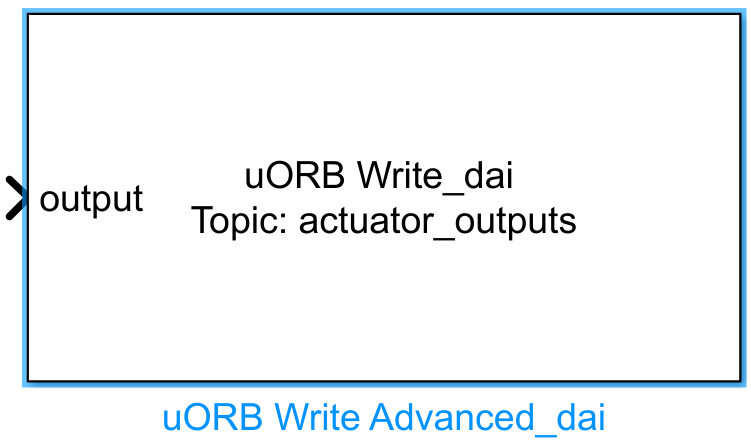
Introduction
One-sentence description: An advanced uORB message publishing interface module that supports custom uORB message ID matching and allows control of message transmission timing via input signals.
This module is an advanced extension of the uORB Write functionality within the RflySim toolchain's uORB communication interface library, designed for development scenarios requiring flexible control over uORB message transmission logic. It supports setting uORB message IDs that differ from the filename and introduces a new isSend control port compared to the basic advanced version. Developers can use this input signal to flexibly control whether a message is sent, making it suitable for applications such as single-trigger command-type messages or custom message transmission frequency adjustments.
Running in the Simulink environment, this module enables uORB communication and interaction with the PX4 flight controller when paired with CopterSim. Developers can design custom control logic in Simulink and publish processed messages to the PX4 flight controller via this module. It can also be combined with RflySim3D for simulation visualization verification, serving as one of the core functional modules in the RflySim toolchain for achieving custom bidirectional interaction between Simulink and PX4.
Port Descriptions
Input Ports (Inputs)
| Port Name | Data Type | Dimension | Description |
|---|---|---|---|
isSend |
double |
1×1 |
Transmission control signal; a non-zero value triggers uORB message sending at the current sampling instant, while zero indicates no transmission |
| Custom field ports | Determined by configuration | Determined by configuration | Each port corresponds to a message field of the selected uORB topic; port name, data type, and dimension match the message field configuration |
Output Ports (Outputs)
This module has no output ports.
Parameter Configuration (Parameters)
The Mask dialog box (opened by double-clicking the module) allows configuration of the following parameters:
| Parameter Name | Type | Default Value | Available Values/Range | Description |
|---|---|---|---|---|
uORB Topic |
string |
vehicle_gps_position |
Any valid uORB message filename | Target uORB topic name; can be auto-configured by selecting a .msg file via the button |
Variable Name |
cell array |
Auto-filled | - | Names of the uORB message fields, corresponding to input port names |
Data Type |
cell array |
Auto-filled | double/single/int8/uint8/int16/uint16/int32/uint32/boolean |
Data type of each input port corresponding to a message field |
Dimension |
cell array |
Auto-filled | Positive integer / [rows columns] | Dimension of each input port corresponding to a message field |
Advertisement Queue |
int |
1 |
integer ≥ 1 |
Message queue priority; 0 indicates no message queue usage; valid values start from 1 |
Sample time |
double |
0.01 |
>0 |
Module sampling time in seconds |
Parameter Setting Notes
uORB Topic
Clicking the Select.msg file button opens a list of uORB messages to select the target topic. Clicking Open.msg file displays the detailed field definitions of the selected message. After modification, clicking Apply automatically populates the field names, data types, and dimensions. This module supports scenarios where the uORB message ID differs from the filename, offering broader adaptability for custom message scenarios compared to the basic advanced version.
isSend Port Control
This module adds an additional isSend input port, enabling control over whether the message is transmitted in the current sampling period. This is ideal for single-trigger command-type messages or for limiting message transmission frequency via external logic. In usage examples, time-based logic can be used to achieve fixed-frequency transmission control (e.g., 1 Hz).
Module Characteristics (Block Characteristics)
| Characteristic | Value |
|---|---|
| Supported Data Types | double, single, int8, int16, int32, uint8, uint16, uint32, bool |
| Direct Feedthrough | Yes |
| Sample Time | Discrete |
| Code Generation Support | No |
Data Communication Protocol
This module communicates with the PX4 flight controller process via the uORB interface, publishing configured uORB topic data to the flight controller's message bus. It adheres to the native PX4 uORB message queue communication rules, with message queue priority configured via the module parameter Advertisement Queue.
Related Modules
| Module Name | Description |
|---|---|
uORB Read |
Basic uORB message reading module; reads message data from a specified uORB topic |
uORB Write |
Basic uORB message publishing module; publishes input data to a specified uORB topic |
uORB Read Advanced |
Advanced uORB message reading module; supports custom multi-field message reading configuration |
uORB Write Advanced |
Advanced uORB message publishing module; supports custom multi-field message publishing configuration |
Usage Examples
For related usage examples, refer to the following path:
Please refer to
Readme.pdfin the path above for complete example descriptions and operational steps.
Notes and Common Issues
- Initialization Order: Before use, the corresponding uORB Topic must be loaded first. After modifying a uORB Topic, you must click the
Applybutton in the parameter interface to apply the configuration; otherwise, the module's input ports will not update to the corresponding message fields, leading to port mismatch errors. - Message Queue Configuration: The
Advertisement Queueparameter values start from 1 and increment sequentially; entering 0 indicates no message queue. Priority must be configured according to PX4 flight controller message publishing rules. Incorrect values will cause message publishing failures. - isSend Port Usage: The module publishes the current message only when the
isSendinput is true (non-zero), making it suitable for controlling single-shot transmission or reducing transmission frequency. To continuously publish messages, connect theisSendport directly to a constant high-level signal. - Sample Time Matching: The module's sample time must match the base sample time of the Simulink model. If transmission frequency is controlled via
isSend, ensure the module's sample time is higher than the target transmission frequency to avoid missed triggers. For example, to achieve 1 Hz transmission, set the module's sample time to 0.1 s or shorter. - Topic Naming Convention: If the uORB message ID differs from the filename, the actual message ID must be entered in the
uORB Topicparameter; the filename alone cannot be used, otherwise the corresponding topic will not be found, resulting in publishing failure.
Changelog
v4.2.0(2024-08-09): Added theuORB Write Advanced_daimodule, supporting configuration where the uORB message ID differs from the filename; added theisSendinterface to enable message transmission control, suitable for command-type message transmission and transmission frequency control scenarios.