Chapter 6: External Control and Trajectory Planning
After completing the development of the low-level filtering and control system, the unmanned system needs to receive commands from the upper-level decision-making layer to achieve higher-level motion control. External control and trajectory planning serve as the critical bridge connecting low-level control with upper-level intelligent decision-making. This chapter introduces the design and usage of external control interfaces, as well as the development and validation of trajectory planning algorithms.
6.1 Background and Theory
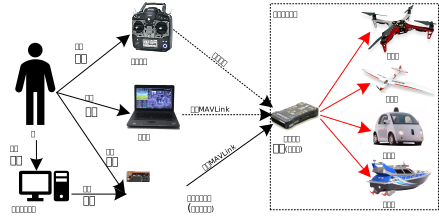
As an autonomous flying vehicle, the external control capability of an unmanned aerial vehicle (UAV) is essential for achieving precise flight missions and safe flight operations. Common control methods include: remote controller control, ground station control, semi-autonomous control, and computer interface-based control. Among these, external control theory primarily concerns flight stability in the air, generally understood as position and attitude control of the UAV.
6.1.1 External Control Modes
External control (Offboard Control) refers to a mode where control commands are sent to the flight controller from a ground station or onboard computer. In this mode, the flight controller acts as an actuator, receiving position, velocity, or attitude commands generated by external systems and converting them into low-level motor control signals. The MAVLink protocol is the mainstream communication protocol for external control, supporting multiple control modes and message types. Common external control modes supported by remote controllers include:
- Position Mode: Send target positions to the flight controller; the UAV autonomously plans a path to reach the target point.
- Velocity Mode: Send velocity commands to control the UAV's movement at a specified speed.
- Attitude Mode: Send desired attitude angles to control the UAV to achieve a specified orientation.
6.1.2 Fundamentals of Trajectory Planning
Trajectory planning is a critical issue at the decision-making level for multi-rotor UAVs, referring to the process of finding an optimal flight trajectory from a starting point to a target point under specific constraints, while satisfying the UAV's maneuverability and environmental limitations. It is a key technology for multi-rotor mission planning systems and a technical guarantee for autonomous flight.
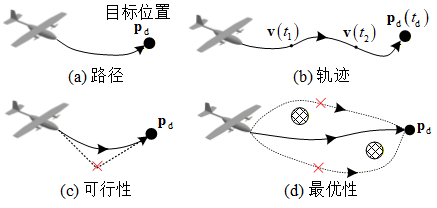
The main functions of trajectory planning include: during pre-flight, assisting mission planners in selecting an optimal path for the multi-rotor UAV to execute its mission; and during flight, enabling online path replanning to some extent based on real-time situational data. The planned path serves as a reference trajectory for UAV flight, guiding the multi-rotor to complete its mission under the action of the control law.
6.2 Framework and Interfaces
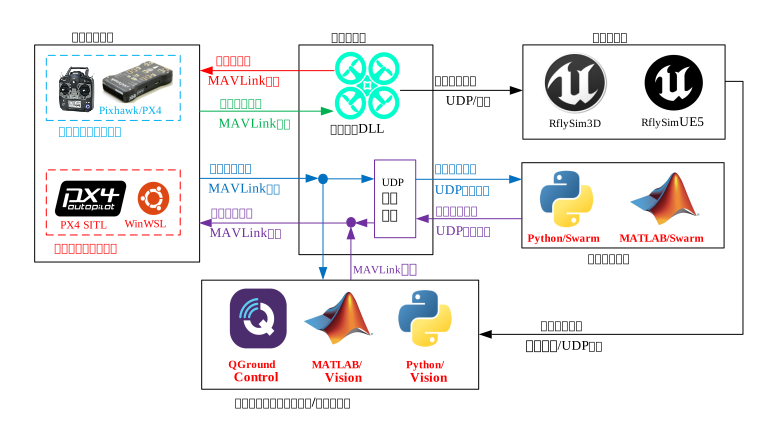
The RflySim toolchain provides rich external control and trajectory planning interfaces, supporting multiple development environments such as Python and MATLAB/Simulink.
6.2.1 MAVLink Control Interface
RflySim supports external control via the MAVLink protocol. MAVLink (Micro Air Vehicle Link) is a lightweight UAV communication protocol that has become an industry standard. Through MAVLink, developers can send various types of control commands—including position, velocity, and attitude—to the flight controller, enabling precise UAV control.
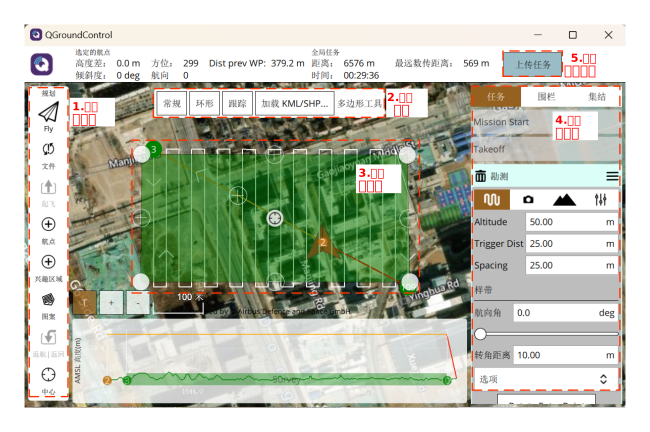
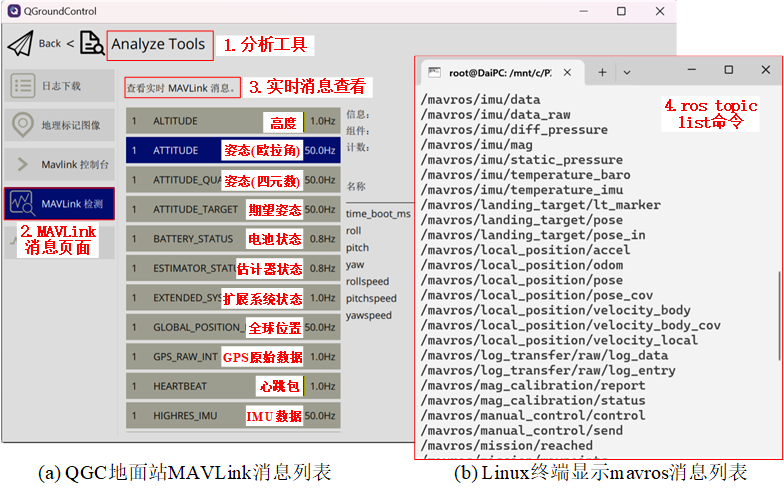 The toolchain provides a Python-based MAVLink control interface (RflySimSDK) and a Simulink block library. Users can select the appropriate development tools based on project requirements. Using these interfaces, users can:
- Implement automatic takeoff and landing commands
- Send waypoint mission queues
- Dynamically adjust flight speed and altitude in real time
- Retrieve real-time UAV status information
6.2.2 Trajectory Planning Algorithm Interface
For trajectory planning, RflySim provides interfaces to integrate mainstream planning algorithms. Users can implement various planning algorithms in Python or MATLAB environments, including:
- Global Path Planning: Optimal path search based on environmental maps
- Local Obstacle Avoidance Planning: Real-time obstacle avoidance based on sensor data
- Time-Optimal Trajectory Generation: Shortest-time trajectory considering dynamic constraints
- Smooth Trajectory Optimization: Smooth trajectory generation based on differential flatness

6.2.3 External Control Development Workflow
A complete external control program includes core steps: communication connection, mode setting and arming, publishing desired commands, state monitoring, and ending with return-to-home.
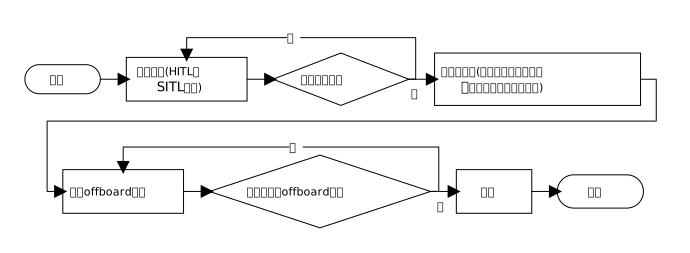
As illustrated in the flowchart above, when conducting physical hardware-in-the-loop (HITL) or software-in-the-loop (SITL) simulations, the program first establishes a stable communication connection with the flight controller. After confirming successful connection (e.g., by receiving heartbeat packets), it begins continuously sending desired target values—such as position, velocity, angular velocity, or attitude—to the flight controller at a certain frequency (recommended ≥10 Hz). It is crucial to note that only after ensuring stable transmission of target commands can the program, through loop-based judgment, request and successfully switch the flight controller to Offboard control mode. Once the mode switch succeeds, the program issues an arm command to activate the motors and initiate closed-loop control tasks with state monitoring. Finally, after mission completion, it issues landing, return-to-home, and disarm commands to safely recover the vehicle.
6.3 Showcase of Representative Cases
Air-Ground Cooperative External Trajectory Planning and Control:
Multi-rotor Virtual Pipe Flight:
6.4 Course-Related Videos
Public Lecture Replay for This Chapter (Session 5: External Control and Trajectory Planning):
6.5 Chapter Experiment Cases
The verification experiments and guided case studies related to this chapter are located in the [Installation Directory]\RflySimAPIs\6.RflySimExtCtrl folder.
6.5.1 Interface Learning Experiments
These are stored in the 6.RflySimExtCtrl\0.ApiExps folder, covering foundational platform interface tutorials and general introductions to various tools.
Experiment 1: External Control Development Telemetry Communication Experiment
- 📦 Version Requirement:
Free Edition - 📁 File Path: e0_ComConnDemo/Readme.pdf
📝 Experiment Overview: This experiment introduces wired connection between the flight controller and computer via a USB-TTL module to achieve external control in hardware-in-the-loop (HITL) simulations, covering telemetry communication configuration, ground station connection, and custom communication data frequency settings.
Experiment 2: PX4MavCtrl API Validation Experiment
- 📦 Version Requirement:
Free Edition - 📁 File Path: e1_PX4MavCtrlAPITest/Readme.pdf
📝 Experiment Overview: Using the Python external control library PX4MavCtrl, this experiment implements UAV offboard mode control, state data acquisition, and the use of RflySim3D control interfaces in the RflySim simulation environment, while understanding the SITL communication framework.
Experiment 3: PX4 Flight Controller Hardware-in-the-Loop Communication Experiment
- 📦 Version Requirement:
Free Edition - 📁 File Path: e2_PX4ComAPITest/Readme.pdf
📝 Experiment Overview: Demonstrates hardware-in-the-loop simulation by connecting a Pixhawk 6C flight controller via MicroUSB, using the RflySim platform, and achieving data communication and control command transmission between the flight controller and computer via the MAVLink serial protocol.
Experiment 4: PX4 UAV GPS Position Control Interface Test
- 📦 Version Requirement:
Free Edition - 📁 File Path: e3_PX4MavGPSCtrlTest/Readme.pdf
📝 Experiment Overview: Through the SendPosGlobal function interface of the RflySim platform, this experiment achieves UAV position control in the GPS coordinate system, learning MAVLink communication and position command transmission in Offboard mode.
Experiment 5: PX4RcCtrlAPITest
- 📦 Version Requirement:
Free Edition - 📁 File Path: e4_PX4RcCtrlAPITest/Readme.pdf
📝 Experiment Overview: Through the SendRCPwms function interface of the RflySim platform, this experiment controls UAV motor PWM values to achieve UAV arming, takeoff, and a 60-second flight, learning the usage of the RC PWM control interface.
Experiment 6: PX4 Multi-UAV SITL Control Experiment
- 📦 Version Requirement:
Free Edition - 📁 File Path: e5_PX4MultiUavTest/Readme.pdf
📝 Experiment Overview: This experiment utilizes the RflySim toolchain to control four UAVs in Offboard mode for position and velocity control via the Python interface, observing flight trajectories in RflySim3D and learning multi-UAV SITL simulation control methods.
Experiment 7: PX4MavAccCtrlTest Acceleration Control Interface Validation Experiment
- 📦 Version Requirement:
Free Edition - 📁 File Path: e6_PX4MavAccCtrlTest/Readme.pdf
📝 Experiment Overview: Through the RflySim platform interface function SendAccPX4, this experiment sends acceleration commands to the UAV to validate the acceleration control interface functionality, learning acceleration control methods in Offboard mode.
Experiment 8: PX4MavAttCtrlTest Attitude-Throttle Control
- 📦 Version Requirement:
Free Edition - 📁 File Path: e7_PX4MavAttCtrlTest/Readme.pdf
📝 Experiment Overview: Using the SendAttPX4 interface of the RflySim platform, this experiment sends desired attitude and throttle data to the PX4 flight controller to achieve UAV attitude and throttle control, validating flight control performance in Offboard mode.
Experiment 9: UE Map Coordinate System and UAV Coordinate System Transformation Experiment
- 📦 Version Requirement:
Free Edition - 📁 File Path: e8_GeoAPITest/Readme.pdf
📝 Experiment Overview: By setting the GPS origin and using coordinate transformation interfaces, this experiment enables multiple UAVs to fly to the same target position in the UE map, mastering coordinate system transformation methods.
Experiment 10: Vision-Based Control for Ball Collision Experiment
- 📦 Version Requirement:
Free Edition - 📁 File Path: e9_UDPMode1TestShootBall/Readme.pdf
📝 Experiment Overview: Through the RflySim platform vision interface, this experiment captures images, uses OpenCV for image processing and control command calculation, and achieves a vision-based control experiment where the UAV collides with a red ball.
Experiment 11: UAV Control via UDP_Full Communication Mode Experiment
- 📦 Version Requirement:
Free Edition - 📁 File Path: e10_UDPMode0Test/Readme.pdf
📝 Experiment Overview: This experiment uses RflySim platform interface functions to send control commands to the UAV via UDP_Full communication mode, achieving takeoff, flight, and landing, and learning position and velocity control in Offboard mode.
Experiment 12: UAV Control via UDP_Simple Communication Mode
- 📦 Version Requirement:
Free Edition - 📁 File Path: e11_UDPMode1Test/Readme.pdf
📝 Experiment Overview: This experiment uses the UDP_Simple communication interface provided by the RflySim platform to send control commands to the PX4 flight controller, achieving UAV takeoff, flight, and landing, and learning position and velocity control in Offboard mode.
Experiment 13: UAV Control via MAVLink_Full Communication Mode Experiment
- 📦 Version Requirement:
Free Edition - 📁 File Path: e12_UDPMode2DefaultTest/Readme.pdf
📝 Experiment Overview: This experiment uses RflySim platform interface functions to send commands to the UAV via MAVLink_Full communication mode, achieving takeoff, forward flight, and landing, and learning position and velocity control in Offboard mode.
Experiment 14: UAV Control via MAVLink_Simple Communication Mode Experiment
- 📦 Version Requirement:
Free Edition - 📁 File Path: e13_UDPMode3Test/Readme.pdf
📝 Experiment Overview: This experiment uses RflySim platform interface functions to send control commands to the UAV via MAVLink_Simple communication mode, achieving basic flight actions such as takeoff, forward flight, and landing, and learning position and velocity control methods in Offboard mode.
Experiment 15: UAV Control via MAVLink_NoSend Communication Mode Experiment
- 📦 Version Requirement:
Free Edition - 📁 File Path: e14_UDPMode4Test/Readme.pdf
📝 Experiment Overview: This experiment uses RflySim platform interface functions to send commands to the UAV via MAVLink_NoSend mode combined with Pixhawk 6X flight controller hardware-in-the-loop simulation, achieving UAV command transmission and control, and learning position and velocity control in Offboard mode.
Experiment 16: Python Interface for Acquiring Aircraft, Object, and Camera Information
- 📦 Version Requirement:
Free Edition - 📁 File Path: e15_CamObjGet/Readme.pdf
📝 Experiment Overview: This experiment acquires information about aircraft, objects, and cameras via the Python interface, learning the usage of vision sensor interfaces and UE control interfaces.
Experiment 17: Timestamp Data Acquisition
- 📦 Version Requirement:
Free Edition - 📁 File Path: e16_ReadTimeStmpGet/Readme.pdf
📝 Experiment Overview: This experiment acquires timestamp data from the CopterSim simulation software via the Python interface, learning to use the getTimeStmp interface to read heartbeat packet sequence numbers, simulation start timestamps, and current timestamps.
Experiment 18: MAVSDK Control Algorithm Design and Validation
- 📦 Version Requirement:
Free Edition - 📁 File Path: e17_MAVSDKExps/Readme.pdf
📝 Experiment Overview: Based on official MAVSDK examples adapted for the RflySim platform, this experiment designs and validates MAVLink control algorithms, covering takeoff/landing, Offboard waypoint, and trajectory file flight experiments, and familiarizing users with Python control methods.
Experiment 19: MAVROS Cross-Platform Control of Software-in-the-Loop UAV
- 📦 Version Requirement:
Free Edition - 📁 File Path: e18_MavrosExps/Readme.pdf
📝 Experiment Overview: This experiment starts MAVROS in an Ubuntu environment to control a Windows-side RflySim software-in-the-loop UAV, validating the cross-platform control link and Offboard control process, and learning arming, position reception, and pose control.
Experiment 20: MAVSDK Official Example Adaptation Experiment
- 📦 Version Requirement:
Free Edition - 📁 File Path: e17_MAVSDKExps/0.OtherOfficalExp/Readme.pdf
📝 Experiment Overview: A comprehensive experiment adapting the RflySim platform based on official MAVSDK examples, covering parameter acquisition, calibration, camera control, waypoint missions, external control, telemetry monitoring, RTK positioning, and other functions, supporting SITL and HITL simulations.
Experiment 21: C++ ROS Forwarding Node Experiment
- 📦 Version Requirement:
Free Edition - 📁 File Path: e21.RosTransExps/1.C++Demo/Readme.pdf
📝 Experiment Overview: This experiment uses a C++ ROS forwarding node (udp_ros_bridge) to convert RflySim comprehensive model UDP data into ROS topics, replacing basic mavros functions, achieving multi-UAV state subscription and control, and supporting ROS1/ROS2 environments.
Experiment 22: Large Language Model Cloud API Invocation
- 📦 Version Requirement:
Free Edition - 📁 File Path: e20.LLMUsage/1.CloudAPIinvocation/Readme.pdf
📝 Experiment Overview: This experiment teaches methods for invoking Large Language Model (LLM) cloud APIs via Python, including key application, environment variable configuration, OpenAI-compatible SDK invocation, and response parsing, laying the foundation for integrating AI capabilities into UAV simulations.
Experiment 23: PX4 and ROS2 uXRCE-DDS Network Port Communication and Control Experiment
- 📦 Version Requirement:
Free Edition - 📁 File Path: e19_uXRCE-DDS_ROS2CtrlExps/1.NetPortComm/Readme.pdf
📝 Experiment Overview: This experiment achieves direct communication between PX4 and ROS2 via uXRCE-DDS, learning to configure the WSL/ROS2 environment, start the MicroXRCEAgent proxy, view message lists, and complete automatic and manual configuration based on PX4 official Offboard control, achieving autonomous UAV flight control.
Experiment 24: ROS Environment Single-UAV Flight Control via PX4MavCtrlV4ROS Library Experiment
- 📦 Version Requirement:
Free Edition - 📁 File Path: e18_MavrosExps/1.RflyRosAPIOneUav/Readme.pdf
📝 Experiment Overview: This experiment uses the PX4MavCtrlV4ROS library in ROS1 and ROS2 environments to control a single UAV for hardware-in-the-loop flight, observing ROS information exchange and validating the control effect of the algorithm under different ROS versions.
Experiment 25: MAVSDK Takeoff and Landing Experiment
- 📦 Version Requirement:
Free Edition - 📁 File Path: e17_MAVSDKExps/1.TakeOff&LandExp/Readme.pdf
📝 Experiment Overview: Based on official MAVSDK examples adapted for the RflySim platform, this experiment achieves UAV takeoff and landing, covering SITL and HITL experimental steps, and learning MAVSDK control commands and simulation workflows.
Experiment 26: Large Language Model Generation of UAV Control Code
- 📦 Version Requirement:
Free Edition - 📁 File Path: e20.LLMUsage/2.LLMGenUAVCtrlCode/Readme.pdf
📝 Experiment Overview: This experiment explores using a large language model (e.g., DeepSeek) to assist in developing UAV control programs, generating control logic through natural language descriptions and template code to achieve flight tasks such as takeoff, hovering, and trajectory tracking, validating the application value of AI in UAV control algorithm development.
Experiment 27: MAVSDK Offboard Waypoint Flight Experiment
- 📦 Version Requirement:
Free Edition - 📁 File Path: e17_MAVSDKExps/2.OffboardPosNEDExp/Readme.pdf
📝 Experiment Overview: Based on official MAVSDK examples adapted for the RflySim platform, this experiment achieves UAV flight along world coordinate system (North-East-Down) waypoints in Offboard mode, covering SITL and HITL simulation steps.
Experiment 28: Python ROS Forwarding Program for Bidirectional Bridging between RflySim Comprehensive Model and ROS Topics
- 📦 Version Requirement:
Free Edition - 📁 File Path: e21.RosTransExps/2.PythonDemo/Readme.pdf
📝 Experiment Overview: This experiment uses a Python ROS forwarding program to replace mavros, achieving bidirectional bridging between the RflySim comprehensive model and ROS topics, supporting ROS1/ROS2 multi-UAV control, and validating multi-UAV takeoff and state acquisition through example scripts.
Experiment 29: ROS Multi-UAV Flight Control
- 📦 Version Requirement:
Free Edition - 📁 File Path: e18_MavrosExps/2.RflyRosAPIMultiUav/Readme.pdf
📝 Experiment Overview: This experiment conducts multi-UAV SITL simulation experiments using the PX4MavCtrlV4ROS library in ROS 1 and ROS 2 environments, learning the configuration and operation methods of multi-UAV control algorithms.
Experiment 30: PX4+ROS2 uXRCE-DDS Serial Port Communication and Control Experiment
- 📦 Version Requirement:
Free Edition - 📁 File Path: e19_uXRCE-DDS_ROS2CtrlExps/2.SerPortComm/Readme.pdf
📝 Experiment Overview: This experiment masters the serial port communication method between the PX4 flight controller and the ROS2 system based on uXRCE-DDS, understands data interaction methods and message types, practices UAV offboard control functions based on ROS2, and familiarizes with debugging methods in the HIL simulation environment.
Experiment 31: Comprehensive Model ROSTrans Control Experiment
- 📦 Version Requirement:
Free Edition - 📁 File Path: e21.RosTransExps/3.BasicRosTopicCtrlNoPx4/Readme.pdf
📝 Experiment Overview: This experiment demonstrates loading a comprehensive dynamics model via CopterSim without relying on PX4 firmware, and using the RosTrans middleware to bridge it into a MAVROS-style ROS interface, achieving UAV figure-8 flight control and learning seamless migration of ROS control code.
Experiment 32: Large Language Model-Based Direct UAV Control Simulation Experiment
- 📦 Version Requirement:
Free Edition - 📁 File Path: e20.LLMUsage/3.LLMDiretCtrlUAV/Readme.pdf
📝 Experiment Overview: This experiment integrates the DeepSeek large language model API to build a system that can understand natural language instructions and control UAV flight, enabling learners to master skills such as LLM application in control systems, instruction parsing, UAV Offboard control, and PyQt interface programming.
Experiment 33: Offboard Mode Waypoint Flight Experiment
- 📦 Version Requirement:
Free Edition - 📁 File Path: e17_MAVSDKExps/3.OffboardFromCSVExp/Readme.pdf
📝 Experiment Overview: Based on official MAVSDK examples adapted for the RflySim platform, this experiment achieves heart-shaped trajectory flight according to a CSV waypoint file after UAV takeoff, covering SITL and HITL experimental steps and key code analysis.
Experiment 34: Local LLM UAV Control Experiment
- 📦 Version Requirement:
Free Edition - 📁 File Path: e20.LLMUsage/4.LocalLLMUAVCtrl/Readme.pdf
📝 Experiment Overview: This experiment deploys a shallow LLM locally (Ollama loading qwen3.06b) to drive natural language UAV control, and calls a deep LLM online (Volcano Ark) to complete trajectory reasoning, validating the correctness and stability of instruction parsing, UDP control link, route planning, and visualization processes.
Experiment 35: Comprehensive Model ROSTrans Vision Image Forwarding Experiment
- 📦 Version Requirement:
Free Edition - 📁 File Path: e21.RosTransExps/4.VisionSitlRostransNoPx4/Readme.pdf
📝 Experiment Overview: This experiment forwards RflySim3D vision sensor data to ROS topics via the RosTrans middleware, achieving Rviz visualization of RGB images, LiDAR point clouds, and other data, and controlling the UAV for random flight to dynamically demonstrate the visual acquisition effect.
Experiment 36: Six-Rotor PX4-Free Formation Flight
- 📦 Version Requirement:
Free Edition - 📁 File Path: e21.RosTransExps/5.SixCopterSwarmNoPx4/Readme.pdf
📝 Experiment Overview: This experiment demonstrates ROS-based leader-follower longitudinal line formation circular flight of 6 UAVs without relying on PX4 firmware, learning multi-UAV data links, ROS communication interfaces, formation control strategies, and multi-UAV synchronization operation workflows.
6.5.2 Basic Usage Experiments
Stored in the 6.RflySimExtCtrl\1.BasicExps folder, these experiments provide a complete set of supplementary teaching materials for beginners.
Experiment 1: MAVLink External Control Interface Development Experiment
- 📦 Version Requirement:
Free Edition - 📁 File Path: e0_ExtAPIUsage/Readme.pdf
📝 Experiment Overview: Complete the development of the MAVLink external control interface in the MATLAB/Simulink environment, understand message encapsulation, parsing, and joint debugging workflows, and provide foundational interface capabilities for subsequent complex control experiments.
Experiment 2: System Identification Model vs. Nonlinear Model Comparison Experiment
- 📦 Version Requirement:
Free Edition - 📁 File Path: e7_Idenfication/e1.1/Readme.pdf
📝 Experiment Overview: By exciting a transfer function model and a multirotor nonlinear model with a sweep signal and comparing the output results, understand the modeling and system identification process.
Experiment 3: Multirotor System Identification Experiment
- 📦 Version Requirement:
Free Edition - 📁 File Path: e7_Idenfication/e1.2/Readme.pdf
📝 Experiment Overview: Use CIFER software to perform system identification on a multirotor nonlinear model, obtain a four-channel transfer function model, and verify the model's accuracy.
Experiment 4: Multirotor System Identification Experiment
- 📦 Version Requirement:
Free Edition - 📁 File Path: e7_Idenfication/e1.3/Readme.pdf
📝 Experiment Overview: Perform system identification on a multirotor nonlinear model by adding an external controller. Use CIFER software to obtain transfer functions
Experiment 1: External Control Development Telemetry Communication Experiment
- 📦 Version Requirement:
Free Edition - 📁 File Path: e0_ComConnDemo/Readme.pdf
📝 Experiment Overview: This experiment introduces wired connection between the flight controller and computer via a USB-TTL module to achieve external control in hardware-in-the-loop (HITL) simulations, covering telemetry communication configuration, ground station connection, and custom communication data frequency settings.
Experiment 2: PX4MavCtrl API Validation Experiment
- 📦 Version Requirement:
Free Edition - 📁 File Path: e1_PX4MavCtrlAPITest/Readme.pdf
📝 Experiment Overview: Using the Python external control library PX4MavCtrl, this experiment implements UAV offboard mode control, state data acquisition, and the use of RflySim3D control interfaces in the RflySim simulation environment, while understanding the SITL communication framework.
Experiment 3: PX4 Flight Controller Hardware-in-the-Loop Communication Experiment
- 📦 Version Requirement:
Free Edition - 📁 File Path: e2_PX4ComAPITest/Readme.pdf
📝 Experiment Overview: Demonstrates hardware-in-the-loop simulation by connecting a Pixhawk 6C flight controller via MicroUSB, using the RflySim platform, and achieving data communication and control command transmission between the flight controller and computer via the MAVLink serial protocol.
Experiment 4: PX4 UAV GPS Position Control Interface Test
- 📦 Version Requirement:
Free Edition - 📁 File Path: e3_PX4MavGPSCtrlTest/Readme.pdf
📝 Experiment Overview: Through the SendPosGlobal function interface of the RflySim platform, this experiment achieves UAV position control in the GPS coordinate system, learning MAVLink communication and position command transmission in Offboard mode.
Experiment 5: PX4RcCtrlAPITest
- 📦 Version Requirement:
Free Edition - 📁 File Path: e4_PX4RcCtrlAPITest/Readme.pdf
📝 Experiment Overview: Through the SendRCPwms function interface of the RflySim platform, this experiment controls UAV motor PWM values to achieve UAV arming, takeoff, and a 60-second flight, learning the usage of the RC PWM control interface.
Experiment 6: PX4 Multi-UAV SITL Control Experiment
- 📦 Version Requirement:
Free Edition - 📁 File Path: e5_PX4MultiUavTest/Readme.pdf
📝 Experiment Overview: This experiment utilizes the RflySim toolchain to control four UAVs in Offboard mode for position and velocity control via the Python interface, observing flight trajectories in RflySim3D and learning multi-UAV SITL simulation control methods.
Experiment 7: PX4MavAccCtrlTest Acceleration Control Interface Validation Experiment
- 📦 Version Requirement:
Free Edition - 📁 File Path: e6_PX4MavAccCtrlTest/Readme.pdf
📝 Experiment Overview: Through the RflySim platform interface function SendAccPX4, this experiment sends acceleration commands to the UAV to validate the acceleration control interface functionality, learning acceleration control methods in Offboard mode.
Experiment 8: PX4MavAttCtrlTest Attitude-Throttle Control
- 📦 Version Requirement:
Free Edition - 📁 File Path: e7_PX4MavAttCtrlTest/Readme.pdf
📝 Experiment Overview: Using the SendAttPX4 interface of the RflySim platform, this experiment sends desired attitude and throttle data to the PX4 flight controller to achieve UAV attitude and throttle control, validating flight control performance in Offboard mode.
Experiment 9: UE Map Coordinate System and UAV Coordinate System Transformation Experiment
- 📦 Version Requirement:
Free Edition - 📁 File Path: e8_GeoAPITest/Readme.pdf
📝 Experiment Overview: By setting the GPS origin and using coordinate transformation interfaces, this experiment enables multiple UAVs to fly to the same target position in the UE map, mastering coordinate system transformation methods.
Experiment 10: Vision-Based Control for Ball Collision Experiment
- 📦 Version Requirement:
Free Edition - 📁 File Path: e9_UDPMode1TestShootBall/Readme.pdf
📝 Experiment Overview: Through the RflySim platform vision interface, this experiment captures images, uses OpenCV for image processing and control command calculation, and achieves a vision-based control experiment where the UAV collides with a red ball.
Experiment 11: UAV Control via UDP_Full Communication Mode Experiment
- 📦 Version Requirement:
Free Edition - 📁 File Path: e10_UDPMode0Test/Readme.pdf
📝 Experiment Overview: This experiment uses RflySim platform interface functions to send control commands to the UAV via UDP_Full communication mode, achieving takeoff, flight, and landing, and learning position and velocity control in Offboard mode.
Experiment 12: UAV Control via UDP_Simple Communication Mode
- 📦 Version Requirement:
Free Edition - 📁 File Path: e11_UDPMode1Test/Readme.pdf
📝 Experiment Overview: This experiment uses the UDP_Simple communication interface provided by the RflySim platform to send control commands to the PX4 flight controller, achieving UAV takeoff, flight, and landing, and learning position and velocity control in Offboard mode.
Experiment 13: UAV Control via MAVLink_Full Communication Mode Experiment
- 📦 Version Requirement:
Free Edition - 📁 File Path: e12_UDPMode2DefaultTest/Readme.pdf
📝 Experiment Overview: This experiment uses RflySim platform interface functions to send commands to the UAV via MAVLink_Full communication mode, achieving takeoff, forward flight, and landing, and learning position and velocity control in Offboard mode.
Experiment 14: UAV Control via MAVLink_Simple Communication Mode Experiment
- 📦 Version Requirement:
Free Edition - 📁 File Path: e13_UDPMode3Test/Readme.pdf
📝 Experiment Overview: This experiment uses RflySim platform interface functions to send control commands to the UAV via MAVLink_Simple communication mode, achieving basic flight actions such as takeoff, forward flight, and landing, and learning position and velocity control methods in Offboard mode.
Experiment 15: UAV Control via MAVLink_NoSend Communication Mode Experiment
- 📦 Version Requirement:
Free Edition - 📁 File Path: e14_UDPMode4Test/Readme.pdf
📝 Experiment Overview: This experiment uses RflySim platform interface functions to send commands to the UAV via MAVLink_NoSend mode combined with Pixhawk 6X flight controller hardware-in-the-loop simulation, achieving UAV command transmission and control, and learning position and velocity control in Offboard mode.
Experiment 16: Python Interface for Acquiring Aircraft, Object, and Camera Information
- 📦 Version Requirement:
Free Edition - 📁 File Path: e15_CamObjGet/Readme.pdf
📝 Experiment Overview: This experiment acquires information about aircraft, objects, and cameras via the Python interface, learning the usage of vision sensor interfaces and UE control interfaces.
Experiment 17: Timestamp Data Acquisition
- 📦 Version Requirement:
Free Edition - 📁 File Path: e16_ReadTimeStmpGet/Readme.pdf
📝 Experiment Overview: This experiment acquires timestamp data from the CopterSim simulation software via the Python interface, learning to use the getTimeStmp interface to read heartbeat packet sequence numbers, simulation start timestamps, and current timestamps.
Experiment 18: MAVSDK Control Algorithm Design and Validation
- 📦 Version Requirement:
Free Edition - 📁 File Path: e17_MAVSDKExps/Readme.pdf
📝 Experiment Overview: Based on official MAVSDK examples adapted for the RflySim platform, this experiment designs and validates MAVLink control algorithms, covering takeoff/landing, Offboard waypoint, and trajectory file flight experiments, and familiarizing users with Python control methods.
Experiment 19: MAVROS Cross-Platform Control of Software-in-the-Loop UAV
- 📦 Version Requirement:
Free Edition - 📁 File Path: e18_MavrosExps/Readme.pdf
📝 Experiment Overview: This experiment starts MAVROS in an Ubuntu environment to control a Windows-side RflySim software-in-the-loop UAV, validating the cross-platform control link and Offboard control process, and learning arming, position reception, and pose control.
Experiment 20: MAVSDK Official Example Adaptation Experiment
- 📦 Version Requirement:
Free Edition - 📁 File Path: e17_MAVSDKExps/0.OtherOfficalExp/Readme.pdf
📝 Experiment Overview: A comprehensive experiment adapting the RflySim platform based on official MAVSDK examples, covering parameter acquisition, calibration, camera control, waypoint missions, external control, telemetry monitoring, RTK positioning, and other functions, supporting SITL and HITL simulations.
Experiment 21: C++ ROS Forwarding Node Experiment
- 📦 Version Requirement:
Free Edition - 📁 File Path: e21.RosTransExps/1.C++Demo/Readme.pdf
📝 Experiment Overview: This experiment uses a C++ ROS forwarding node (udp_ros_bridge) to convert RflySim comprehensive model UDP data into ROS topics, replacing basic mavros functions, achieving multi-UAV state subscription and control, and supporting ROS1/ROS2 environments.
Experiment 22: Large Language Model Cloud API Invocation
- 📦 Version Requirement:
Free Edition - 📁 File Path: e20.LLMUsage/1.CloudAPIinvocation/Readme.pdf
📝 Experiment Overview: This experiment teaches methods for invoking Large Language Model (LLM) cloud APIs via Python, including key application, environment variable configuration, OpenAI-compatible SDK invocation, and response parsing, laying the foundation for integrating AI capabilities into UAV simulations.
Experiment 23: PX4 and ROS2 uXRCE-DDS Network Port Communication and Control Experiment
- 📦 Version Requirement:
Free Edition - 📁 File Path: e19_uXRCE-DDS_ROS2CtrlExps/1.NetPortComm/Readme.pdf
📝 Experiment Overview: This experiment achieves direct communication between PX4 and ROS2 via uXRCE-DDS, learning to configure the WSL/ROS2 environment, start the MicroXRCEAgent proxy, view message lists, and complete automatic and manual configuration based on PX4 official Offboard control, achieving autonomous UAV flight control.
Experiment 24: ROS Environment Single-UAV Flight Control via PX4MavCtrlV4ROS Library Experiment
- 📦 Version Requirement:
Free Edition - 📁 File Path: e18_MavrosExps/1.RflyRosAPIOneUav/Readme.pdf
📝 Experiment Overview: This experiment uses the PX4MavCtrlV4ROS library in ROS1 and ROS2 environments to control a single UAV for hardware-in-the-loop flight, observing ROS information exchange and validating the control effect of the algorithm under different ROS versions.
Experiment 25: MAVSDK Takeoff and Landing Experiment
- 📦 Version Requirement:
Free Edition - 📁 File Path: e17_MAVSDKExps/1.TakeOff&LandExp/Readme.pdf
📝 Experiment Overview: Based on official MAVSDK examples adapted for the RflySim platform, this experiment achieves UAV takeoff and landing, covering SITL and HITL experimental steps, and learning MAVSDK control commands and simulation workflows.
Experiment 26: Large Language Model Generation of UAV Control Code
- 📦 Version Requirement:
Free Edition - 📁 File Path: e20.LLMUsage/2.LLMGenUAVCtrlCode/Readme.pdf
📝 Experiment Overview: This experiment explores using a large language model (e.g., DeepSeek) to assist in developing UAV control programs, generating control logic through natural language descriptions and template code to achieve flight tasks such as takeoff, hovering, and trajectory tracking, validating the application value of AI in UAV control algorithm development.
Experiment 27: MAVSDK Offboard Waypoint Flight Experiment
- 📦 Version Requirement:
Free Edition - 📁 File Path: e17_MAVSDKExps/2.OffboardPosNEDExp/Readme.pdf
📝 Experiment Overview: Based on official MAVSDK examples adapted for the RflySim platform, this experiment achieves UAV flight along world coordinate system (North-East-Down) waypoints in Offboard mode, covering SITL and HITL simulation steps.
Experiment 28: Python ROS Forwarding Program for Bidirectional Bridging between RflySim Comprehensive Model and ROS Topics
- 📦 Version Requirement:
Free Edition - 📁 File Path: e21.RosTransExps/2.PythonDemo/Readme.pdf
📝 Experiment Overview: This experiment uses a Python ROS forwarding program to replace mavros, achieving bidirectional bridging between the RflySim comprehensive model and ROS topics, supporting ROS1/ROS2 multi-UAV control, and validating multi-UAV takeoff and state acquisition through example scripts.
Experiment 29: ROS Multi-UAV Flight Control
- 📦 Version Requirement:
Free Edition - 📁 File Path: e18_MavrosExps/2.RflyRosAPIMultiUav/Readme.pdf
📝 Experiment Overview: This experiment conducts multi-UAV SITL simulation experiments using the PX4MavCtrlV4ROS library in ROS 1 and ROS 2 environments, learning the configuration and operation methods of multi-UAV control algorithms.
Experiment 30: PX4+ROS2 uXRCE-DDS Serial Port Communication and Control Experiment
- 📦 Version Requirement:
Free Edition - 📁 File Path: e19_uXRCE-DDS_ROS2CtrlExps/2.SerPortComm/Readme.pdf
📝 Experiment Overview: This experiment masters the serial port communication method between the PX4 flight controller and the ROS2 system based on uXRCE-DDS, understands data interaction methods and message types, practices UAV offboard control functions based on ROS2, and familiarizes with debugging methods in the HIL simulation environment.
Experiment 31: Comprehensive Model ROSTrans Control Experiment
- 📦 Version Requirement:
Free Edition - 📁 File Path: e21.RosTransExps/3.BasicRosTopicCtrlNoPx4/Readme.pdf
📝 Experiment Overview: This experiment demonstrates loading a comprehensive dynamics model via CopterSim without relying on PX4 firmware, and using the RosTrans middleware to bridge it into a MAVROS-style ROS interface, achieving UAV figure-8 flight control and learning seamless migration of ROS control code.
Experiment 32: Large Language Model-Based Direct UAV Control Simulation Experiment
- 📦 Version Requirement:
Free Edition - 📁 File Path: e20.LLMUsage/3.LLMDiretCtrlUAV/Readme.pdf
📝 Experiment Overview: This experiment integrates the DeepSeek large language model API to build a system that can understand natural language instructions and control UAV flight, enabling learners to master skills such as LLM application in control systems, instruction parsing, UAV Offboard control, and PyQt interface programming.
Experiment 33: Offboard Mode Waypoint Flight Experiment
- 📦 Version Requirement:
Free Edition - 📁 File Path: e17_MAVSDKExps/3.OffboardFromCSVExp/Readme.pdf
📝 Experiment Overview: Based on official MAVSDK examples adapted for the RflySim platform, this experiment achieves heart-shaped trajectory flight according to a CSV waypoint file after UAV takeoff, covering SITL and HITL experimental steps and key code analysis.
Experiment 34: Local LLM UAV Control Experiment
- 📦 Version Requirement:
Free Edition - 📁 File Path: e20.LLMUsage/4.LocalLLMUAVCtrl/Readme.pdf
📝 Experiment Overview: This experiment deploys a shallow LLM locally (Ollama loading qwen3.06b) to drive natural language UAV control, and calls a deep LLM online (Volcano Ark) to complete trajectory reasoning, validating the correctness and stability of instruction parsing, UDP control link, route planning, and visualization processes.
Experiment 35: Comprehensive Model ROSTrans Vision Image Forwarding Experiment
- 📦 Version Requirement:
Free Edition - 📁 File Path: e21.RosTransExps/4.VisionSitlRostransNoPx4/Readme.pdf
📝 Experiment Overview: This experiment forwards RflySim3D vision sensor data to ROS topics via the RosTrans middleware, achieving Rviz visualization of RGB images, LiDAR point clouds, and other data, and controlling the UAV for random flight to dynamically demonstrate the visual acquisition effect.
Experiment 36: Six-Rotor PX4-Free Formation Flight
- 📦 Version Requirement:
Free Edition - 📁 File Path: e21.RosTransExps/5.SixCopterSwarmNoPx4/Readme.pdf
📝 Experiment Overview: This experiment demonstrates ROS-based leader-follower longitudinal line formation circular flight of 6 UAVs without relying on PX4 firmware, learning multi-UAV data links, ROS communication interfaces, formation control strategies, and multi-UAV synchronization operation workflows.
6.5.2 Basic Usage Experiments
Stored in the 6.RflySimExtCtrl\1.BasicExps folder, these experiments provide a complete set of supplementary teaching materials for beginners.
Experiment 1: MAVLink External Control Interface Development Experiment
- 📦 Version Requirement:
Free Edition - 📁 File Path: e0_ExtAPIUsage/Readme.pdf
📝 Experiment Overview: Complete the development of the MAVLink external control interface in the MATLAB/Simulink environment, understand message encapsulation, parsing, and joint debugging workflows, and provide foundational interface capabilities for subsequent complex control experiments.
Experiment 2: System Identification Model vs. Nonlinear Model Comparison Experiment
- 📦 Version Requirement:
Free Edition - 📁 File Path: e7_Idenfication/e1.1/Readme.pdf
📝 Experiment Overview: By exciting a transfer function model and a multirotor nonlinear model with a sweep signal and comparing the output results, understand the modeling and system identification process.
Experiment 3: Multirotor System Identification Experiment
- 📦 Version Requirement:
Free Edition - 📁 File Path: e7_Idenfication/e1.2/Readme.pdf
📝 Experiment Overview: Use CIFER software to perform system identification on a multirotor nonlinear model, obtain a four-channel transfer function model, and verify the model's accuracy.
Experiment 4: Multirotor System Identification Experiment
- 📦 Version Requirement:
Free Edition - 📁 File Path: e7_Idenfication/e1.3/Readme.pdf
📝 Experiment Overview: Perform system identification on a multirotor nonlinear model by adding an external controller. Use CIFER software to obtain transfer functions for four channels: horizontal forward, horizontal lateral, altitude, and yaw. The identification criterion is a cost function \( J \leq 50 \). Compare model differences between the design and analysis experiments using Bode plots.
Experiment 5: Multirotor Position and Yaw Channel System Identification
- 📦 Version Requirement:
Free Edition - 📁 File Path: e7_Idenfication/e1.4/Readme.pdf
📝 Experiment Overview: Perform system identification on the position and yaw channels of a multirotor with an external controller. Use CIFER software to obtain a transfer function model with time delay, and verify the model's accuracy.
Experiment 6: UAV Position Control Experiment
- 📦 Version Requirement:
Free Edition - 📁 File Path: e1_PosCtrl/Readme.pdf
📝 Experiment Overview: Based on the RflySim toolchain and Simulink, implement UAV position control in Offboard mode. Observe the UAV's position changes by modifying position signal quantities, and verify the position control interface.
Experiment 7: Kalman Filter Design Experiment
- 📦 Version Requirement:
Free Edition - 📁 File Path: e8_KalmanFiltre/e2.1/Readme.pdf
📝 Experiment Overview: Learn the principles of the Kalman filter algorithm, compare filtering effects in RflySim Simulation 1.0 and 2.0, and master parameter adjustment methods.
Experiment 8: Kalman Filter Design Experiment
- 📦 Version Requirement:
Free Edition - 📁 File Path: e8_KalmanFiltre/e2.2/Readme.pdf
📝 Experiment Overview: This experiment adjusts the measurement noise and process noise parameters of the Kalman filter, observes the filtering effect, and compares filtering performance under transfer function and nonlinear models to understand the Kalman filter principle and parameter adjustment methods.
Experiment 9: Kalman Filter Design with Time Delay Experiment
- 📦 Version Requirement:
Free Edition - 📁 File Path: e8_KalmanFiltre/e2.3/Readme.pdf
📝 Experiment Overview: This experiment designs a Kalman filter with a two-basic-sampling-period time delay, performs closed-loop control comparisons in Simulation 1.0 and 2.0, and conducts hardware-in-the-loop simulation to master the design method of time-delay filters.
Experiment 10: Real-Flight Kalman Filter Experiment Based on Dimension Expansion Method
- 📦 Version Requirement:
Free Edition - 📁 File Path: e8_KalmanFiltre/e2.4/Readme.pdf
📝 Experiment Overview: Design a Kalman filter based on the dimension expansion method for velocity feedback to solve the sensor signal time delay problem in real flight. Apply the filtered velocity to closed-loop control and compare control effects.
Experiment 11: UAV Velocity Control Interface Verification Experiment
- 📦 Version Requirement:
Free Edition - 📁 File Path: e2_VelCtrl/Readme.pdf
📝 Experiment Overview: This experiment uses a Simulink model to control the UAV's velocity in Offboard mode, verifies the effectiveness of the velocity control interface, and teaches the basic principles and operation methods of velocity control.
Experiment 12: e3.1
- 📦 Version Requirement:
Free Edition - 📁 File Path: e9_TrajectoireFollowing_Segment/e3.1/Readme.pdf
📝 Experiment Overview:
Experiment 13: Multirotor Trajectory Tracking Control Analysis Experiment
- 📦 Version Requirement:
Free Edition - 📁 File Path: e9_TrajectoireFollowing_Segment/e3.2/Readme.pdf
📝 Experiment Overview: Design a multirotor trajectory tracking controller based on frequency-domain methods, satisfying performance requirements: velocity loop phase margin > 65° and cutoff frequency > 3 rad/s; position loop phase margin > 60° and cutoff frequency > 2 rad/s. Compare the simulation tracking performance between linear and nonlinear models.
Experiment 14: Trajectory Tracking Controller Design Experiment
- 📦 Version Requirement:
Free Edition - 📁 File Path: e9_TrajectoireFollowing_Segment/e3.3/Readme.pdf
📝 Experiment Overview: Improve the trajectory tracking controller by adding yaw angle tracking. Design an additive decomposition controller to control the multirotor to track a circular trajectory, and conduct Simulation 1.0, Simulation 2.0, and hardware-in-the-loop simulations.
Experiment 15: Simulated Remote Controller Single-Drone Flight Control Experiment
- 📦 Version Requirement:
Free Edition - 📁 File Path: e3_RCCtrl/Readme.pdf
📝 Experiment Overview: This experiment uses a Simulink controller to replace the remote controller, achieving single-drone flight control through control channel mapping, and teaches the principles of flight control in remote controller mode.
Experiment 16: Path Following Control Basic Experiment
- 📦 Version Requirement:
Free Edition - 📁 File Path: e10_TrajectoirePlanning/e4.1/Readme.pdf
📝 Experiment Overview: Learn the theoretical basis of path following, design a controller to implement multirotor straight-line path following, and perform simulation verification on transfer function models and six-degree-of-freedom models.
Experiment 17: Path Following Control Analysis Experiment
- 📦 Version Requirement:
Free Edition - 📁 File Path: e10_TrajectoirePlanning/e4.2/Readme.pdf
📝 Experiment Overview: By modifying the parameters of the path following controller, compare the changes in the straight-line path following trajectory, and summarize the influence patterns of parameters on tracking performance.
Experiment 18: Circular Trajectory Path Following Controller Design Experiment
- 📦 Version Requirement:
Free Edition - 📁 File Path: e10_TrajectoirePlanning/e4.3/Readme.pdf
📝 Experiment Overview: Design and verify a circular trajectory path following algorithm, analyze the influence of controller parameters, and complete Simulation 1.0, Simulation 2.0, and hardware-in-the-loop simulation experiments.
Experiment 19: Path Following Controller Design Experiment (Real Flight Experiment)
- 📦 Version Requirement:
Free Edition - 📁 File Path: e10_TrajectoirePlanning/e4.4/Readme.pdf
📝 Experiment Overview: Based on the transfer function model identified in Chapter 4, design a circular trajectory path following controller. First verify its effectiveness in simulation, then apply it to a real drone, learning PID tuning and real-flight operations.
Experiment 20: Offboard External Control Interface Verification Experiment
- 📦 Version Requirement:
Free Edition - 📁 File Path: e4_OffboardCtrl/Readme.pdf
📝 Experiment Overview: Use a Simulink model to control the UAV's velocity and position in PX4 Offboard mode, verify the external control interface, and learn top-level vision and swarm algorithm development.
Experiment 21: Artificial Potential Field Method Multirotor Obstacle Avoidance Control
- 📦 Version Requirement:
Free Edition - 📁 File Path: e11_Avoidance_Segment/e5.1/Readme.pdf
📝 Experiment Overview: Use the artificial potential field method to guide a multirotor to avoid obstacles and reach a target position. Compare obstacle avoidance trajectories under different target positions through simulation, and verify the algorithm's feasibility across multiple models.
Experiment 22: Obstacle Avoidance Control Basic Experiment
- 📦 Version Requirement:
Free Edition - 📁 File Path: e11_Avoidance_Segment/e5.2/Readme.pdf
📝 Experiment Overview: Understand the theory of the artificial potential field method, implement single-drone obstacle avoidance control, analyze the influence of parameters on the obstacle avoidance path, and compare simulation results between linear models and six-degree-of-freedom models.
Experiment 23: Multi-Drone Cooperative Obstacle Avoidance Algorithm Design Experiment
- 📦 Version Requirement:
Free Edition - 📁 File Path: e11_Avoidance_Segment/e5.3/Readme.pdf
📝 Experiment Overview: Design a multirotor multi-drone cooperative obstacle avoidance controller based on the artificial potential field method, enabling two multirotors to avoid each other and fly around static obstacles to reach target positions. Compare Simulation 1.0 and 2.0 model results, and conduct hardware-in-the-loop simulation.
Experiment 24: Obstacle Avoidance Controller Design Experiment (Real Flight Experiment)
- 📦 Version Requirement:
Free Edition - 📁 File Path: e11_Avoidance_Segment/e5.4/Readme.pdf
📝 Experiment Overview: This experiment aims to deeply understand the theory and derivation of the artificial potential field method, and apply it to the design and real-flight verification of a multirotor obstacle avoidance controller. Master the implementation of multi-drone obstacle avoidance algorithms through simulation and real-flight experiments.
Experiment 25: Turntable Quadrotor Flight Control Experiment
- 📦 Version Requirement:
Free Edition - 📁 File Path: e5_RackFlyCtrl/Readme.pdf
📝 Experiment Overview: This experiment builds a multirotor flight controller using MATLAB/Simulink, uses MAVLINK communication to control the attitude of a quadrotor UAV on a turntable, and teaches attitude control principles and PID parameter tuning methods.
Experiment 26: External Fixed-Point Controller Design and Verification Experiment
- 📦 Version Requirement:
Free Edition - 📁 File Path: e6_PointCtrl/Readme.pdf
📝 Experiment Overview: Based on a three-channel multirotor linearized transfer function model, design and verify a fixed-point controller, covering numerical simulation, nonlinear model simulation, hardware-in-the-loop simulation, and real-flight experiments.
Experiment 27: Kalman Filter Design Experiment
- 📦 Version Requirement:
Free Edition - 📁 File Path: e8_KalmanFiltre/Readme.pdf
📝 Experiment Overview: This experiment helps users master the methods of modeling, parameter tuning, and real-flight migration of Kalman filters in UAV control feedback through four stages: basic, analysis, fixed-point control, and real flight.
Experiment 28: Trajectory Tracking Controller Design Experiment
- 📦 Version Requirement:
Free Edition - 📁 File Path: e9_TrajectoireFollowing_Segment/Readme.pdf
📝 Experiment Overview: This experiment helps users master multirotor linearization models, frequency-domain controller design, and circular trajectory tracking control methods through three stages: basic, analysis, and design.
Experiment 29: Path Tracking Controller Design Experiment
- 📦 Version Requirement:
Free Edition - 📁 File Path: e10_TrajectoirePlanning/Readme.pdf
📝 Experiment Overview: This experiment organizes routines for different stages of path following controller design, covering theoretical foundations, parameter analysis, controller design, and real-flight migration workflows, helping users master the design and verification methods of path following controllers.
Experiment 30: Obstacle Avoidance Controller Design Experiment
- 📦 Version Requirement:
Free Edition - 📁 File Path: e11_Avoidance_Segment/Readme.pdf
📝 Experiment Overview: This experiment implements single-drone and multi-drone cooperative obstacle avoidance control using the artificial potential field method, covering the complete workflow from simulation to real flight, helping users master obstacle avoidance controller design, parameter analysis, and engineering verification methods.
Experiment 31: RflySim Extended API Usage
- 📦 Version Requirement:
Free Edition - 📁 File Path: e0_ExtAPIUsage/0.ResourcesFile/Readme.pdf
📝 Experiment Overview: This experiment is a basic introductory experiment for the RflySim external control API. It mainly introduces the installation and configuration of the Visual Studio 2017 compiler, as well as the setup of the experimental environment for the RflySim toolchain with the Pixhawk 6X flight controller, laying the foundation for subsequent external control API development.
Experiment 32: MAVLink Module Encapsulation Experiment
- 📦 Version Requirement:
Free Edition - 📁 File Path: e0_ExtAPIUsage/1.MavLinkPackSimulink/Readme.pdf
📝 Experiment Overview: Encapsulate the MAVLink protocol's HIL_ACTUATOR_CONTROLS message sending and parsing modules based on Simulink, learning the MAVLink communication protocol and the use of S-Function Builder.
Experiment 33: MAVLink Data Send and Receive Experiment
- 📦 Version Requirement:
Free Edition - 📁 File Path: e0_ExtAPIUsage/2.MavlinkCodeDecode/Readme.pdf
📝 Experiment Overview: This experiment is based on the MAVLink protocol, using Simulink modules to simulate sending and receiving HIL_ACTUATOR_CONTROLS messages, learning the encapsulation and parsing principles of MAVLink messages and the MAVLink 1/2 data packet format.
6.5.3 Advanced Development Experiments
Stored in the 6.RflySimExtCtrl\2.AdvExps folder, these experiments further familiarize users with configurations of certain low-level firmware ecosystems.
Experiment 1: MAVLink Control Experiment
- 📦 Version Requirement:
Free Edition - 📁 File Path: e1_MavlinkCtrl/Readme.pdf
📝 Experiment Overview: Implement drone arming and attitude control via MATLAB/Simulink and the MAVLink protocol, familiarizing with interface encapsulation and joint debugging workflows in hardware-in-the-loop (HIL) scenarios.
Experiment 2: RflyUdpRaw Communication Module Single-Drone Control Experiment
- 📦 Version Requirement:
Free Edition - 📁 File Path: e2_MavlinkUdp/Readme.pdf
📝 Experiment Overview: Receive drone status information via the RflyUdpFast transmission module, use Simulink to model single-drone local position motion control, and conduct software-in-the-loop and hardware-in-the-loop simulation experiments.
Experiment 3: RflyMavlinkSerial Single-Drone Control Experiment
- 📦 Version Requirement:
Free Edition - 📁 File Path: e3_MavlinkSerial/Readme.pdf
📝 Experiment Overview: Receive drone status information via the RflySerialRaw module, model and send control commands in Simulink, and achieve local position motion control and hardware-in-the-loop simulation for a single drone.
Experiment 4: Training a Drone to Follow a Circular Platform Based on IsaacSim
- 📦 Version Requirement:
Free Edition - 📁 File Path: e6.IsaacSimExps/Readme.pdf
📝 Experiment Overview: This experiment uses IsaacSim to train a drone for visual following of a circular platform. Images are acquired through a visual interface, control commands are computed, and real-time following is achieved. Suitable for teaching visual control and simulation validation.
Experiment 5: Straight-Line Trajectory Planning Experiment
- 📦 Version Requirement:
Free Edition - 📁 File Path: e4.TrajPlanExps/1.LineTrajMotion/Readme.pdf
📝 Experiment Overview: This experiment helps users master the fundamental principles of trajectory planning, Python control methods, Offboard mode control, and yaw angle control strategies by commanding the drone to execute straight-line trajectory flight missions.
Experiment 6: MAVLink Arming HIL Experiment
- 📦 Version Requirement:
Free Edition - 📁 File Path: e1_MavlinkCtrl/1.MavSfunTest_Arm/Readme.pdf
📝 Experiment Overview: Using CopterSim hardware-in-the-loop simulation, MAVLink encapsulation modules, and UDP, display and verify flight controller arming information in Simulink.
Experiment 7: DDPG-Based Position Control Reinforcement Learning Experiment
- 📦 Version Requirement:
Free Edition - 📁 File Path: e5.RLExps/1.Simulink/Readme.pdf
📝 Experiment Overview: Understand and practice the application of DDPG in drone position control, familiarize with the RflySim toolchain and MATLAB/Simulink software-in-the-loop workflow, and master the control logic and evaluation method for generating X-axis acceleration commands via RL Agent.
Experiment 8: MAVLink Control HIL Experiment
- 📦 Version Requirement:
Free Edition - 📁 File Path: e1_MavlinkCtrl/2.MavSfunTest_Con/Readme.pdf
📝 Experiment Overview: Based on CopterSim hardware-in-the-loop simulation, achieve drone attitude control via MAVLink encapsulation modules over UDP, learning the MAVLink communication protocol and the use of Simulink models.
Experiment 9: Multi-Point Trajectory Planning and Velocity Control Experiment
- 📦 Version Requirement:
Free Edition - 📁 File Path: e4.TrajPlanExps/2.MutilPointTrajMotion/Readme.pdf
📝 Experiment Overview: This experiment helps users master key technologies such as multi-point trajectory planning, velocity control, dynamic yaw angle control, and deceleration mechanisms by commanding the drone to execute multi-point trajectory flight missions.
Experiment 10: Reinforcement Learning-Driven Quadrotor Acceleration Hover Control
- 📦 Version Requirement:
Free Edition - 📁 File Path: e5.RLExps/2.Python/Readme.pdf
📝 Experiment Overview: Master the end-to-end reinforcement learning workflow (PPO) from multi-environment simulation to policy training, understand the hierarchical relationship between acceleration-level control and attitude/motor-level PID, construct embodied drone simulation tasks, inject noise to enhance generalization, and validate the training policy in a SIL environment.
Experiment 11: Circular Trajectory Planning and Real-Time Velocity Control Experiment
- 📦 Version Requirement:
Free Edition - 📁 File Path: e4.TrajPlanExps/3.CirularTrajMotion/Readme.pdf
📝 Experiment Overview: This experiment helps users learn circular trajectory planning principles, real-time velocity control techniques, and the relationship between tangential velocity and angular velocity by commanding the drone to execute circular trajectory flight missions, mastering the complete workflow for complex continuous trajectory control in Offboard mode.
Experiment 12: Spiral Trajectory Planning and Real-Time Velocity Control Experiment
- 📦 Version Requirement:
Free Edition - 📁 File Path: e4.TrajPlanExps/4.SpiralTrajMotion/Readme.pdf
📝 Experiment Overview: This experiment helps users learn spiral trajectory planning principles, real-time velocity control techniques, and multi-dimensional velocity synthesis methods by commanding the drone to execute spiral trajectory flight missions, mastering the complete workflow for complex 3D continuous trajectory control in Offboard mode.
6.5.4 High-Level Development Experiments
Stored in the 6.RflySimExtCtrl\3.CustExps folder, these are custom development experiments designed for advanced users.
Experiment 1: UAV Task Execution Based on the smolagents Intelligent Agent Framework
- 📦 Version Requirement:
Full Edition - 📁 File Path: e2.AI_AgentUAVCtrl/Readme.pdf
📝 Experiment Overview: Leveraging the CodeAgent from smolagents combined with large language models, this experiment converts natural language instructions into Python control code, enabling UAVs to execute complex multi-step tasks and achieving the goal of "language as task code."
Experiment 2: Large Model Instruction-Based Software-in-the-Loop Experiment
- 📦 Version Requirement:
Full Edition - 📁 File Path: e1.LLM_CtrlUAVExps/1.CommandCtrlUAVSim/Readme.pdf
📝 Experiment Overview: Integrate large language models with PX4 flight controller software-in-the-loop (SITL) simulation to achieve Chinese natural language instruction parsing, standardized control command generation, and UDP waypoint protocol transmission, completing closed-loop control of UAV takeoff, flight, and landing.
Experiment 3: Ros2CtrlDemoPX4 Integrated Control
- 📦 Version Requirement:
Full Edition - 📁 File Path: e0_AdvApiExps/1.Ros2CtrlDemo/Readme.pdf
📝 Experiment Overview: Learn direct communication between the PX4 flight controller and ROS2 via the uXRCE-DDS protocol, and master the configuration and methodology for offboard control in ROS2 within a software-in-the-loop simulation environment.
Experiment 4: Large Model Instruction-Based Real-Flight UAV Control
- 📦 Version Requirement:
Full Edition - 📁 File Path: e1.LLM_CtrlUAVExps/2.CommandCtrlUAVFly/Readme.pdf
📝 Experiment Overview: Validate the real-flight performance of the large-model-based natural language parsing module integrated with the flight control system in a hardware-in-the-loop setup, learn how to convert natural language instructions into standardized control commands, and master key technologies such as API invocation, UDP communication, and the MAVLink protocol.
Experiment 5: Large Model Voice-Controlled Software-in-the-Loop Experiment
- 📦 Version Requirement:
Full Edition - 📁 File Path: e1.LLM_CtrlUAVExps/3.VoiceCtrlUAVSim/Readme.pdf
📝 Experiment Overview: Explore the collaborative workflow of real-time speech command recognition (ASR) and large-model control, achieving voice-command UAV control through Volcengine speech recognition and the Doubao large model, and learn key technologies such as audio capture, WebSocket communication, instruction parsing, and UDP control packet transmission.
Experiment 6: Voice-Controlled UAV Flight
- 📦 Version Requirement:
Full Edition - 📁 File Path: e1.LLM_CtrlUAVExps/4.VoiceandCtrlUAVFly/Readme.pdf
📝 Experiment Overview: This experiment validates the feasibility of closed-loop control for indoor real UAVs using speech recognition combined with large language models, controlling the UAV to complete takeoff, position control, and landing via voice commands, covering key knowledge such as MAVLink communication, HIL configuration, and motion capture positioning.
Experiment 7: Large Model-Based Multi-UAV Obstacle Avoidance Test
- 📦 Version Requirement:
Full Edition - 📁 File Path: e1.LLM_CtrlUAVExps/5.ObsAvoidance/Readme.pdf
📝 Experiment Overview: Validate obstacle avoidance planning for multiple indoor rotary-wing UAVs based on large-model-driven natural language or voice commands, and learn large-model-driven obstacle avoidance path planning, semantic-level task description with spatial constraint joint understanding, and multi-UAV coordination mechanisms.
Experiment 1: UAV Task Execution Based on the smolagents Intelligent Agent Framework
- 📦 Version Requirement:
Full Edition - 📁 File Path: e2.AI_AgentUAVCtrl/Readme.pdf
📝 Experiment Overview: Leveraging the CodeAgent from smolagents combined with large language models, this experiment converts natural language instructions into Python control code, enabling UAVs to execute complex multi-step tasks and achieving the goal of "language as task code."
Experiment 2: Large Model Instruction-Based Software-in-the-Loop Experiment
- 📦 Version Requirement:
Full Edition - 📁 File Path: e1.LLM_CtrlUAVExps/1.CommandCtrlUAVSim/Readme.pdf
📝 Experiment Overview: Integrate large language models with PX4 flight controller software-in-the-loop (SITL) simulation to achieve Chinese natural language instruction parsing, standardized control command generation, and UDP waypoint protocol transmission, completing closed-loop control of UAV takeoff, flight, and landing.
Experiment 3: Ros2CtrlDemoPX4 Integrated Control
- 📦 Version Requirement:
Full Edition - 📁 File Path: e0_AdvApiExps/1.Ros2CtrlDemo/Readme.pdf
📝 Experiment Overview: Learn direct communication between the PX4 flight controller and ROS2 via the uXRCE-DDS protocol, and master the configuration and methodology for offboard control in ROS2 within a software-in-the-loop simulation environment.
Experiment 4: Large Model Instruction-Based Real-Flight UAV Control
- 📦 Version Requirement:
Full Edition - 📁 File Path: e1.LLM_CtrlUAVExps/2.CommandCtrlUAVFly/Readme.pdf
📝 Experiment Overview: Validate the real-flight performance of the large-model-based natural language parsing module integrated with the flight control system in a hardware-in-the-loop setup, learn how to convert natural language instructions into standardized control commands, and master key technologies such as API invocation, UDP communication, and the MAVLink protocol.
Experiment 5: Large Model Voice-Controlled Software-in-the-Loop Experiment
- 📦 Version Requirement:
Full Edition - 📁 File Path: e1.LLM_CtrlUAVExps/3.VoiceCtrlUAVSim/Readme.pdf
📝 Experiment Overview: Explore the collaborative workflow of real-time speech command recognition (ASR) and large-model control, achieving voice-command UAV control through Volcengine speech recognition and the Doubao large model, and learn key technologies such as audio capture, WebSocket communication, instruction parsing, and UDP control packet transmission.
Experiment 6: Voice-Controlled UAV Flight
- 📦 Version Requirement:
Full Edition - 📁 File Path: e1.LLM_CtrlUAVExps/4.VoiceandCtrlUAVFly/Readme.pdf
📝 Experiment Overview: This experiment validates the feasibility of closed-loop control for indoor real UAVs using speech recognition combined with large language models, controlling the UAV to complete takeoff, position control, and landing via voice commands, covering key knowledge such as MAVLink communication, HIL configuration, and motion capture positioning.
Experiment 7: Large Model-Based Multi-UAV Obstacle Avoidance Test
- 📦 Version Requirement:
Full Edition - 📁 File Path: e1.LLM_CtrlUAVExps/5.ObsAvoidance/Readme.pdf
📝 Experiment Overview: Validate obstacle avoidance planning for multiple indoor rotary-wing UAVs based on large-model-driven natural language or voice commands, and learn large-model-driven obstacle avoidance path planning, semantic-level task description with spatial constraint joint understanding, and multi-UAV coordination mechanisms.