Chapter 3: 3D Environment Modeling and Simulation
This chapter primarily introduces how to build realistic 3D and physical environment simulations based on Unreal Engine (UE4 / UE5). The learning focus centers on the working principles of RflySim3D and RflySimUE5 engines, the customized import process for 3D vehicles and scene models, and ultimately achieving visual closed-loop control, complex climate switching, and even ultra-large-scale global terrain construction based on GIS and Cesium.
3.1 Background and Theory
RflySim3D is the core engine within the RflySim system responsible for visual rendering and high-fidelity sensor physical feedback. In advanced development scenarios for unmanned systems—such as machine vision (e.g., SLAM, deep reinforcement learning), infrared sensing, and LiDAR-based point cloud obstacle avoidance—the purely dynamical computation (e.g., provided by CopterSim) cannot satisfy the data requirements of the perception layer; thus, a highly realistic 3D physical world simulation becomes essential.
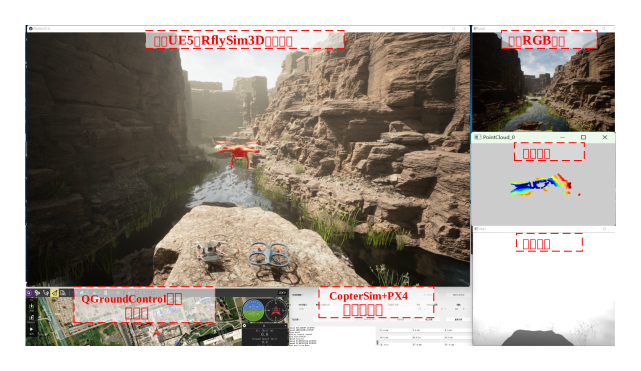
The engine acquires the six-degree-of-freedom (6-DOF) pose data of the aircraft, computed by the autopilot, via a UDP communication architecture and maps this data onto the virtual scene. Internally, it deeply integrates real-time ray tracing, customizable artificial rain and particle system effects, and supports high-flexibility XML parameter configuration—covering all aspects of perception environment simulation, from material lighting to weather and time evolution.
3.2 Framework and Interfaces
Building one's own interactive 3D scenes often involves certain barriers related to artistic design and C++ programming. To lower the development threshold, RflySim has developed a modular 3D interface and a precompiled component mounting logic system.
3.2.1 Engine Communication and Control Model
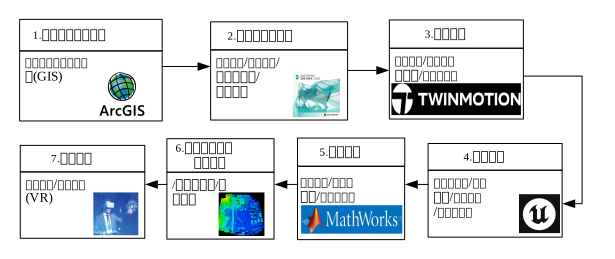
At the framework level, RflySim3D communicates with external computation systems using an extremely lightweight local area network multicast UDP or shared memory protocol, enabling zero-copy integration. Developers can not only issue control commands directly via Python/Simulink, but also utilize predefined XML nodes (e.g., RefPoints) to determine default terrain coordinates, aircraft skins, default sensor offset orientations, and even obstacle matrices.
3.2.2 High-Fidelity Perception and Specialized Component Library
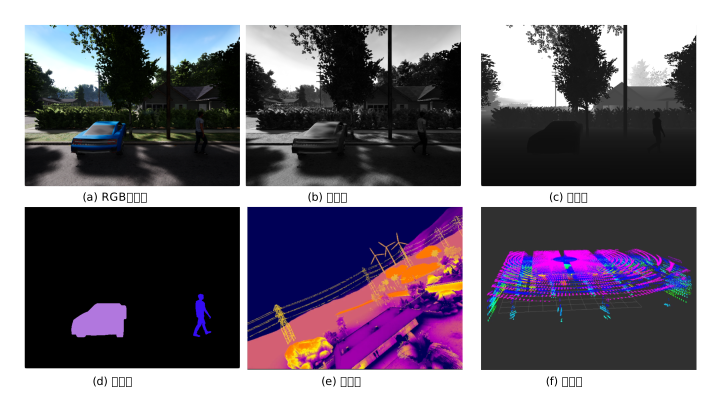
The system's underlying interface supports a full suite of sensor ecosystems, including RGB cameras, global depth maps, semantic segmentation masks, and 360° LiDAR (with multi-line microsecond-level scanning echo simulation). Additionally, it provides prebuilt modules such as infrared pod lock-on guidance effects and multi-aircraft formation trail collision effects. These can be directly exposed to ROS via the built-in Visual/AirSim mapping interface.
3.2.3 Wide-Area GIS and Physical Extension Integration
For large-scale simulation tasks, the toolchain includes a Cesium-based loading interface and associated plugins. Developers can use this interface to dynamically stitch oblique photogrammetry models, high-resolution satellite imagery, or elevation terrain data (DEM) into the UE map in real time. Coupled with the dynamic weather module library and mechanisms such as V-REP-based physical gravity collision skeleton import, this enables the creation of the most realistic geographical confrontation environments for unmanned clusters.

3.3 Showcase of Outstanding Cases
3.4 Course-Linked Video Resources
Public Lecture Replay (Session 3: In-Depth Development of 3D Scenes):
3.5 Chapter Experiment Cases
The verification experiments and guided cases related to this chapter are located in the [Installation Directory]\RflySimAPIs\3.RflySim3DUE folder.
3.5.1 Interface Learning Experiments
Located in the 3.RflySim3DUE\0.ApiExps folder, covering foundational interface tutorials for the platform and general introductions to various tools.
Experiment 1: Getting Started with RflySim 3D Development Tools
- 📦 Version Requirement:
Free Edition - 📁 File Path: e0_DevToolsUsage/Readme.pdf
📝 Experiment Overview: Learn to use 3D engine development tools such as UE Blueprints, 3ds Max, Cesium for Unreal, SketchUp, and Twinmotion, and master the fundamental workflows for creating 3D models and building scenes.
Experiment 2: Using RflySim3D Scene Models
- 📦 Version Requirement:
Free Edition - 📁 File Path: e0_RflySim3DUsage/Readme.pdf
📝 Experiment Overview: Learn to view existing 3D models and scene indexes in RflySim3D, master methods for loading specified scenes and models, and learn how to use the Python interface to create obstacles within the scene.
Experiment 3: RflySim 3D Keyboard Shortcut Interaction Experiment
- 📦 Version Requirement:
Free Edition - 📁 File Path: e1_KeyboardAPI/Readme.pdf
📝 Experiment Overview: Familiarize yourself with simple interaction methods between RflySim 3D keyboard shortcuts and different objects in the scene, including features such as help menus, data export, vehicle removal, information display/hiding, map switching, view adjustment, and vehicle model switching.
Experiment 4: RflySim 3D Console Command Interface
- 📦 Version Requirement:
Free Edition - 📁 File Path: e2_CommandAPI/Readme.pdf
📝 Experiment Overview: Learn to use the RflySim 3D console command interface, and master real-time control techniques for different objects in the scene via console commands, including core functionalities such as console variables, command registration, and interactive design.
Experiment 5: RflySim 3D Initialization Script (txt) Configuration
- 📦 Version Requirement:
Free Edition - 📁 File Path: e3_InitAPI/Readme.pdf
📝 Experiment Overview: Learn to configure RflySim 3D scene startup and automatic level loading using txt scripts, including reading/writing txt files via FFileHelper and executing console commands via IConsoleManager to rapidly deploy and initialize simulation scenes.
Experiment 6: RflySim Vehicle 3D Model Adjustment Interface Experiment
- 📦 Version Requirement:
Free Edition - 📁 File Path: e4_UAVCtrl/Readme.pdf
📝 Experiment Overview: Bind actuator components and achieve motion-level control of UAV 3D models via XML configuration files and Python/Simulink interfaces, and learn the application of forward kinematics in 3D visualization.
Experiment 7: UE Map Object and Terrain Matching Control
- 📦 Version Requirement:
Free Edition - 📁 File Path: e5_UEMapCtrl/Readme.pdf
📝 Experiment Overview: This experiment covers RflySim3D scene map setup and teaches how to achieve high-fidelity object-terrain elevation matching via keyboard shortcuts, Python interfaces, and MATLAB/Simulink, including target creation, trajectory generation, and dynamic object-terrain interaction functions.
Experiment 8: RflySim 3D Scene Control Interface Experiment
- 📦 Version Requirement:
Free Edition - 📁 File Path: e6_RflySim3DCtrlAPI/Readme.pdf
📝 Experiment Overview: Learn to use the UE4CtrlAPI Python library to control the RflySim 3D simulation environment, including common interface functions such as sending commands, updating UAV states, retrieving object information, and scene interaction.
Experiment 9: RflySim3D GIS Service Interface Experiment
- 📦 Version Requirement:
Free Edition - 📁 File Path: e7_RflySim3DGIS/Readme.pdf
📝 Experiment Overview:
Familiarize yourself with methods for importing high-precision global large scenes using Cesium and performing 3D simulation with arbitrarily specified aircraft GPS start coordinates.
Experiment 10: Common Effect Interfaces in RflySim3D
- 📦 Version Requirement:
Free Edition - 📁 File Path: e8_RflySim3DEffect/Readme.pdf
📝 Experiment Overview:
Learn implementation methods for communication effects, virtual pipelines, explosion effects, roller compactor motion, VTOL wing control, and weather management in RflySim3D. Master techniques for 3D scene interaction and effect generation via Python APIs interfacing with UE4.
Experiment 11: Collision Detection in RflySim3D
- 📦 Version Requirement:
Free Edition - 📁 File Path: e9_RflySim3DCollision/Readme.pdf
📝 Experiment Overview:
Learn the principles of collision detection in the RflySim platform. Master methods for receiving collision messages via Python API and CopterSim, covering three experimental scenarios: ground collisions, static object collisions, and aircraft collisions.
Experiment 12: Custom 3D Scene Construction in RflySim
- 📦 Version Requirement:
Free Edition - 📁 File Path: e10_BuildCusScene/Readme.pdf
📝 Experiment Overview:
Learn how to construct repeatable and version-controllable custom 3D simulation scenes within the RflySim 3D toolchain. Master script-based (JSON/Python) configuration methods for scene elements including terrain, objects, lighting, cameras, and entities.
Experiment 13: Actuator Binding
- 📦 Version Requirement:
Free Edition - 📁 File Path: e4_UAVCtrl/1.ActuatorBinding/Readme.pdf
📝 Experiment Overview:
Learn how to configure actuator binding relationships via XML files, using the AttatchToOtherActuator tag to achieve mutual attachment between actuator components, demonstrating hierarchical binding of 8-degree-of-freedom actuators.
Experiment 14: High-Precision Large Scene Import and GPS Binding in Cesium
- 📦 Version Requirement:
Free Edition - 📁 File Path: e7_RflySim3DGIS/1.CesiumPlugin/Readme.pdf
📝 Experiment Overview:
Familiarize yourself with importing high-precision large scenes and binding arbitrary GPS start coordinates to 3D simulation; verify coordinate consistency between RflySim 3D and ground stations (QGC)/Mavlink.
Experiment 15: UAV Communication Effects
- 📦 Version Requirement:
Free Edition - 📁 File Path: e8_RflySim3DEffect/1.Comm/Readme.pdf
📝 Experiment Overview:
Learn to create communication effects between UAVs in RflySim 3D, master the usage of the sendUE4ExtAct API and communication effect parameter settings (vehicleType=802), including attribute configuration such as effect style and duration.
Experiment 16: RflySim3D Startup Script Auto-Loading
- 📦 Version Requirement:
Free Edition - 📁 File Path: e3_InitAPI/1.TXTAllCrtlScript/Readme.pdf
📝 Experiment Overview:
Learn to make RflySim 3D automatically load the RflySim 3D.txt script file and execute console commands upon startup, mastering operations such as map switching and frame rate setting.
Experiment 17: RflySim3D Keyboard Shortcut Target Creation and Terrain Matching
- 📦 Version Requirement:
Free Edition - 📁 File Path: e5_UEMapCtrl/1.TargetCreateKey/Readme.pdf
📝 Experiment Overview:
Learn to quickly create objects in RflySim 3D using keyboard shortcuts (O key + ClassID), and by modifying the CenterHeightAboveGroundCm attribute in the XML configuration file, make the bottom of the created target fit the ground, achieving object-terrain matching.
Experiment 18: UE Blueprint Programming Basics
- 📦 Version Requirement:
Free Edition - 📁 File Path: e0_DevToolsUsage/1.UEBlueprintUsage/Readme.pdf
📝 Experiment Overview:
Learn the blueprint system of the Unreal Engine, master the basics of UE blueprint programming by creating blueprint classes and controlling objects for rotation and circular motion.
Experiment 19: RflySim3D Python Interface Control
- 📦 Version Requirement:
Free Edition - 📁 File Path: e6_RflySim3DCtrlAPI/1.UECtrlPy/Readme.pdf
📝 Experiment Overview:
Learn to control the RflySim 3D scene through the Python interface, implementing operations such as sending commands, updating UAV states, and attaching UAVs. Master the usage of functions like sendUE4Cmd, sendUE4ExtAct, and sendUE4PosNew in the UE4CtrlAPI library.
Experiment 20: RflySim 3D Console Command Operations
- 📦 Version Requirement:
Free Edition - 📁 File Path: e2_CommandAPI/1.command/Readme.pdf
📝 Experiment Overview:
Learn to control objects such as aircraft, maps, and cameras in the scene in real-time through the RflySim 3D console command interface, including operations like text display, script loading, model adjustment, and position setting.
Experiment 21: Python Acquisition of 3D Scene Aircraft/Object/Camera Information
- 📦 Version Requirement:
Free Edition - 📁 File Path: e6_RflySim3DCtrlAPI/10.GetCamObjDemo/Readme.pdf
📝 Experiment Overview:
Learn to obtain information about aircraft, scene objects, and cameras in RflySim3D through the Python interface, mastering the basic process of requesting and receiving data from RflySim3D.
Experiment 22: 3ds Max Basic Modeling Experiment
- 📦 Version Requirement:
Free Edition - 📁 File Path: e0_DevToolsUsage/2.3dsMaxUsage/Readme.pdf
📝 Experiment Overview:
Master basic 3ds Max modeling operations, including creating cubes, splitting and merging models, and exporting FBX files to UE.
Experiment 23: Multi-Dimensional Actuator Binding Control Experiment
- 📦 Version Requirement:
Free Edition - 📁 File Path: e4_UAVCtrl/2.ActuatorCtrl/Readme.pdf
📝 Experiment Overview:
By modifying the XML configuration file to copy existing actuators and set attachment relationships, achieve control of actuators exceeding 8 dimensions (16 dimensions), verifying the actuator extension method for multi-motor UAVs.
Experiment 24: RflySim3D bat Script Model Loading
- 📦 Version Requirement:
Free Edition - 📁 File Path: e6_RflySim3DCtrlAPI/2.LoadModelsOnBat/Readme.pdf
📝 Experiment Overview:
Learn to quickly set up RflySim 3D scenes using bat scripts and Python scripts. By automatically running the UEImportScript.py file to send model position information to the scene, load objects such as characters and targets.
Experiment 25: RflySim 3D Map Script Control
- 📦 Version Requirement:
Free Edition - 📁 File Path: e3_InitAPI/2.TXTMapCrtlScript/Readme.pdf
📝 Experiment Overview:
Learn to use TXT scripts to make RflySim 3D automatically execute control commands when entering a specific map, enabling automatic scene creation and log reuse functionality.
Experiment 26: Python Target Creation and Ground Fitting
- 📦 Version Requirement:
Free Edition - 📁 File Path: e5_UEMapCtrl/2.TargetCreatePy/Readme.pdf
📝 Experiment Overview:
Learn to create target models in the RflySim 3D scene using Python, and adjust object coordinates to make the bottom fit the ground.
Experiment 27: RflySim3D Pipeline Creation Experiment
- 📦 Version Requirement:
Free Edition - 📁 File Path: e8_RflySim3DEffect/2.Tunnel/Readme.pdf
📝 Experiment Overview:
Learn to create pipelines in RflySim 3D, mastering methods for setting pipeline appearance types (circular/square), position, scale, color, and transparency.
Experiment 28: Model Scene Enumeration and Export
- 📦 Version Requirement:
Free Edition - 📁 File Path: e2_CommandAPI/2.enumerate/Readme.pdf
📝 Experiment Overview:
Understand how to enumerate 3D models and scenes in the RflySim platform, learn to export ModelData.csv and MapData.csv data, and master methods for configuring UAV models and map scenes using CSV data.
Experiment 29: BatAPI Batch Script Scene Configuration
- 📦 Version Requirement:
Free Edition - 📁 File Path: e2_CommandAPI/3.BatAPI/Readme.pdf
📝 Experiment Overview:
Master the usage of command-line parameters in the RflySim 3D platform. Quickly switch scenes and set simulation runtime properties using batch scripts, including -cmd initialization commands and -key shortcut key configurations.
Experiment 30: Cesium for Unreal 3D Globe Development
- 📦 Version Requirement:
Free Edition - 📁 File Path: e0_DevToolsUsage/3.CesiumForUnrealUsage/Readme.pdf
📝 Experiment Overview:
Learn to install and configure the Cesium for Unreal plugin in UE, import Cesium ion's earth imagery and terrain data, and load the white-box building model of Chicago, USA, mastering the method of creating a geographically accurate virtual earth in Unreal Engine.
Experiment 31: EastBomberSU24 Explosion Effect Control
- 📦 Version Requirement:
Free Edition - 📁 File Path: e8_RflySim3DEffect/3.EastBomberSU24/Readme.pdf
📝 Experiment Overview:
Learn to control aircraft explosion effects in RflySim 3D, master the usage of the UE4CtrlAPI's sendUE4Pos and sendUE4ExtAct interfaces, and trigger explosion effects using both Python and Simulink methods.
Experiment 32: RflySim3D Loading Models via TXT
- 📦 Version Requirement:
Free Edition - 📁 File Path: e6_RflySim3DCtrlAPI/3.LoadModelsByTxt/Readme.pdf
📝 Experiment Overview:
Learn to use the RflyLoad 3DFile interface to create and move objects by reading a TXT file, mastering 3D scene interaction methods.
Experiment 33: Python Experiment for Creating Ground-Fitting Objects
- 📦 Version Requirement:
Free Edition - 📁 File Path: e5_UEMapCtrl/3.TargetPlace/Readme.pdf
📝 Experiment Overview:
Learn to use the sendUE4Pos and sendUE4Pos2Ground interfaces to measure scene terrain height and create ground-fitting objects at corresponding positions.
Experiment 34: Vehicle Binding Simulation
- 📦 Version Requirement:
Free Edition - 📁 File Path: e4_UAVCtrl/3.VehicleAttachSim/Readme.pdf
📝 Experiment Overview:
Learn to use Simulink/Python to send the VehicleAttach25 structure to RflySim 3D, achieving binding and relative motion relationships between multiple UAVs, and master the differences and applications of the four attachment modes (0-3).
Experiment 35: MATLAB Terrain Interaction Interface
- 📦 Version Requirement:
Free Edition - 📁 File Path: e5_UEMapCtrl/4.GetTerrainMAT/Readme.pdf
📝 Experiment Overview:
Learn to obtain terrain elevation and call RflySim 3D command control interfaces through MATLAB interface functions, including loading terrain png height maps, obtaining height values at specified coordinates, and setting camera perspectives.
Experiment 36: RflySim 3D Roller Compactor Control
- 📦 Version Requirement:
Free Edition - 📁 File Path: e8_RflySim3DEffect/4.RoadRollerDemo/Readme.pdf
📝 Experiment Overview:
Learn to create a roller compactor vehicle model in the RflySim 3D scene and control vehicle movement by sending commands via Python or Simulink, including an engineering vehicle movement control experiment.
Experiment 37: SketchUp 3D Modeling Introduction
- 📦 Version Requirement:
Free Edition - 📁 File Path: e0_DevToolsUsage/4.SketchUpUsage/Readme.pdf
📝 Experiment Overview:
Familiarize yourself with the SketchUp editing interface and basic operations, master the process of building simple 3D models, laying the foundation for subsequent complex model scene construction.
Experiment 38: RflySim3D Object Trajectory Control Experiment
- 📦 Version Requirement:
Free Edition - 📁 File Path: e6_RflySim3DCtrlAPI/4.TrajDemo/Readme.pdf
📝 Experiment Overview:
Use the Python interface to call the sendUE4Pos function, cyclically sending UDP position information to create dynamic moving objects, achieving 3D scene interaction control.
Experiment 39: RflySim3D Vehicle Binding Experiment
- 📦 Version Requirement:
Free Edition - 📁 File Path: e4_UAVCtrl/4.VehicleAttachPy/Readme.pdf
📝 Experiment Overview:
Use the Python interface sendUE4Attatch to achieve binding and attachment relationships between multiple vehicles in RflySim3D, learning the VehicleAttatch25 structure definition and configuration methods for the four binding modes.
Experiment 40: StandardVtol Vertical Takeoff and Landing Wing Vehicle Experiment
- 📦 Version Requirement:
Free Edition - 📁 File Path: e8_RflySim3DEffect/5.StandardVtol/Readme.pdf
📝 Experiment Overview:
Learn how to create a vertical takeoff and landing wing vehicle in the RflySim 3D scene, implement VTOL vehicle control demonstrations using both Python and Simulink, and master the usage of key APIs such as sendUE4PosNew and sendUE4ExtAct.
Experiment 41: Simulink Terrain-Fitting Trajectory Generation
- 📦 Version Requirement:
Free Edition - 📁 File Path: e5_UEMapCtrl/5.TrajGen/Readme.pdf
📝 Experiment Overview:
Learn to obtain terrain height map matrices in MATLAB for mountain scenes, use Simulink modules to generate various models that fit the ground motion, and master single-model control methods for 3D scene interaction interfaces.
Experiment 42: Twinmotion Operation Introduction
- 📦 Version Requirement:
Free Edition - 📁 File Path: e0_DevToolsUsage/5.TwinmotionUsage/Readme.pdf
📝 Experiment Overview:
Learn to install Twinmotion and familiarize yourself with its editing interface, master the model import and export process, including SKP model import, material modification, and export in .tm and .datasmith formats, ultimately used for custom scene creation on the RflySim platform.
Experiment 43: RflySim 3D UDP Communication Interface Test
- 📦 Version Requirement:
Free Edition - 📁 File Path: e6_RflySim3DCtrlAPI/5.UE4RecUE4APITest/Readme.pdf
📝 Experiment Overview:
Verify the interface for controlling RflySim 3D through UDP communication between Simulink and Python, mastering real-time communication and 3D scene interaction methods.
Experiment 44: Epic Fab Asset Download and Usage
- 📦 Version Requirement:
Free Edition - 📁 File Path: e0_DevToolsUsage/6.EpicFabUsage/Readme.pdf
📝 Experiment Overview:
Learn to download and manage Unreal Engine assets through the Epic Fab platform, mastering the operational methods for registering an account, downloading assets, and importing them into the Unreal library.
Experiment 45: RflySim3D Viewport Perspective Control
- 📦 Version Requirement:
Free Edition - 📁 File Path: e6_RflySim3DCtrlAPI/6.RflySim3DViewPortDemo/Readme.pdf
📝 Experiment Overview:
Learn to use the Python API to control the observation perspective in RflySim 3D, including camera position, angle, FOV adjustment, and functions like switching between god's-eye view and follow view via keyboard shortcuts.
Experiment 46: Multi-Model Terrain-Fitting Trajectory Generation
- 📦 Version Requirement: Free Edition
Experiment 1: Getting Started with RflySim 3D Development Tools
- 📦 Version Requirement:
Free Edition - 📁 File Path: e0_DevToolsUsage/Readme.pdf
📝 Experiment Overview: This experiment introduces the use of RflySim3D development tools, including basic operations of 3D engine secondary development tools such as UE Blueprint programming, 3ds Max modeling, Cesium for Unreal, SketchUp, and Twinmotion, laying the foundation for building complex model scenes.
Experiment 2: RflySim3D Scene Model Resource Usage Tutorial
- 📦 Version Requirement:
Free Edition - 📁 File Path: e0_RflySim3DUsage/Readme.pdf
📝 Experiment Overview: Learn how to view the available 3D models and scenes in RflySim3D, and master the methods for loading selected scenes and models.
Experiment 3: RflySim 3D Keyboard Shortcut Interaction Experiment
- 📦 Version Requirement:
Free Edition - 📁 File Path: e1_KeyboardAPI/Readme.pdf
📝 Experiment Overview: Familiarize yourself with simple interaction methods between RflySim 3D keyboard shortcuts and different objects in the scene, including features such as help menus, data export, vehicle removal, information display/hiding, map switching, view adjustment, and vehicle model switching.
Experiment 4: RflySim3D Console Command Interface Experiment
- 📦 Version Requirement:
Free Edition - 📁 File Path: e2_CommandAPI/Readme.pdf
📝 Experiment Overview: Familiarize yourself with the RflySim3D console command interface, built-in scene model navigation methods, and batch initialization processes, and master the basic methods for real-time control of scene objects, maps, viewpoints, and running states via console commands.
Experiment 5: RflySim3D Initialization Script Experiment
- 📦 Version Requirement:
Free Edition - 📁 File Path: e3_InitAPI/Readme.pdf
📝 Experiment Overview: This experiment introduces how RflySim3D automatically loads console commands via txt scripts to achieve rapid configuration of scene layout and simulation settings, covering UE txt read/write, console command execution, and startup parameter configuration.
Experiment 6: RflySim3D Vehicle Model Hierarchical Binding Experiment
- 📦 Version Requirement:
Free Edition - 📁 File Path: e4_UAVCtrl/Readme.pdf
📝 Experiment Overview: Master the hierarchical organization of vehicle 3D models in RflySim3D, actuator component binding, and vehicle-to-vehicle attachment relationship interfaces, and understand the methods for driving complex 3D model visualization via XML, Python, and Simulink.
Experiment 7: RflySim3D Scene Map and Terrain Services
- 📦 Version Requirement:
Free Edition - 📁 File Path: e5_UEMapCtrl/Readme.pdf
📝 Experiment Overview: Master the basic principles of scene maps and terrain services in RflySim3D, and learn to use terrain elevation maps, registration files, Python, and MATLAB/Simulink interfaces to achieve object ground-fitting placement, terrain height query, and ground-fitting trajectory generation.
Experiment 8: RflySim3D Scene Control Interface
- 📦 Version Requirement:
Free Edition - 📁 File Path: e6_RflySim3DCtrlAPI/Readme.pdf
📝 Experiment Overview: Familiarize yourself with the usage of common scene control interfaces in RflySim3D, and master the basic processes of sending commands, creating objects, controlling viewpoints, displaying labels, triggering explosion effects, and receiving state feedback via Python, bat, txt scripts, and UDP messages.
Experiment 9: RflySim3D Geographic Information Service Experiment
- 📦 Version Requirement:
Free Edition - 📁 File Path: e7_RflySim3DGIS/Readme.pdf
📝 Experiment Overview: Familiarize yourself with the usage of Cesium-based global large scenes in RflySim3D, and master the processes of GPS start coordinate binding, online GIS scene usage, and OSGB data conversion to 3D Tiles for import into Cesium for Unreal.
Experiment 10: RflySim3D Effects Experiment
- 📦 Version Requirement:
Free Edition - 📁 File Path: e8_RflySim3DEffect/Readme.pdf
📝 Experiment Overview: Learn to call UE4 effects and blueprint capabilities via the Python interface, and master the basic generation methods for visual and motion effects such as communication effects, virtual pipelines, explosions, vehicle motion, vertical takeoff and landing wings, weather control, custom laser explosions, and robot dog control.
Experiment 11: Collision Detection in RflySim3D
- 📦 Version Requirement:
Free Edition - 📁 File Path: e9_RflySim3DCollision/Readme.pdf
📝 Experiment Overview: Learn the principles of collision detection in the RflySim platform, and master the methods for receiving collision messages via the Python API and CopterSim, covering three experimental scenarios: ground collisions, static object collisions, and aircraft collisions.
Experiment 12: Custom 3D Scene Construction in RflySim
- 📦 Version Requirement:
Free Edition - 📁 File Path: e10_BuildCusScene/Readme.pdf
📝 Experiment Overview: Learn to build repeatable and version-controllable custom 3D simulation scenes within the RflySim 3D toolchain, and master the scripted (JSON/Python) configuration methods for scene elements (terrain, objects, lighting, cameras, entities).
Experiment 13: Actuator Binding
- 📦 Version Requirement:
Free Edition - 📁 File Path: e4_UAVCtrl/1.ActuatorBinding/Readme.pdf
📝 Experiment Overview:
Learn to configure actuator binding relationships via XML files, using the AttatchToOtherActuator tag to achieve mutual attachment between actuator components, demonstrating hierarchical binding of 8-dimensional actuators.
Experiment 14: Cesium High-Precision Large Scene Import and GPS Binding
- 📦 Version Requirement:
Free Edition - 📁 File Path: e7_RflySim3DGIS/1.CesiumPlugin/Readme.pdf
📝 Experiment Overview: Familiarize yourself with importing high-precision large scenes and binding arbitrary GPS start coordinates to 3D simulation, and verify the coordinate consistency between RflySim 3D and the ground station (QGC)/Mavlink.
Experiment 15: UAV Communication Effects
- 📦 Version Requirement:
Free Edition - 📁 File Path: e8_RflySim3DEffect/1.Comm/Readme.pdf
📝 Experiment Overview: Learn to create communication effects between UAVs in RflySim 3D, master the usage of the sendUE4ExtAct API and communication effect parameter settings (vehicleType=802), including attribute configuration such as effect style and duration.
Experiment 16: RflySim3D Startup Script Auto-Loading
- 📦 Version Requirement:
Free Edition - 📁 File Path: e3_InitAPI/1.TXTAllCrtlScript/Readme.pdf
📝 Experiment Overview: Learn to make RflySim 3D automatically load the RflySim 3D.txt script file and execute console commands upon startup, mastering operations such as map switching and frame rate setting.
Experiment 17: RflySim3D Keyboard Shortcut Target Creation and Terrain Matching
- 📦 Version Requirement:
Free Edition - 📁 File Path: e5_UEMapCtrl/1.TargetCreateKey/Readme.pdf
📝 Experiment Overview:
Learn to quickly create objects in RflySim 3D using keyboard shortcuts (O key + ClassID), and by modifying the CenterHeightAboveGroundCm attribute in the XML configuration file, make the bottom of the created target fit the ground, achieving object-terrain matching.
Experiment 18: UE Blueprint Programming Basics
- 📦 Version Requirement:
Free Edition - 📁 File Path: e0_DevToolsUsage/1.UEBlueprintUsage/Readme.pdf
📝 Experiment Overview: Learn the blueprint system of the Unreal Engine, and master the basics of UE blueprint programming by creating blueprint classes and controlling objects for rotation and circular motion.
Experiment 19: RflySim3D Python Interface Control
- 📦 Version Requirement:
Free Edition - 📁 File Path: e6_RflySim3DCtrlAPI/1.UECtrlPy/Readme.pdf
📝 Experiment Overview:
Learn to control the RflySim 3D scene through the Python interface, implementing operations such as sending commands, updating UAV states, and attaching UAVs. Master the usage of functions like sendUE4Cmd, sendUE4ExtAct, and sendUE4PosNew in the UE4CtrlAPI library.
Experiment 20: RflySim 3D Console Command Operations
- 📦 Version Requirement:
Free Edition - 📁 File Path: e2_CommandAPI/1.command/Readme.pdf
📝 Experiment Overview: Learn to control objects such as aircraft, maps, and cameras in the scene in real-time through the RflySim 3D console command interface, including operations like text display, script loading, model adjustment, and position setting.
Experiment 21: RflySim3D Aircraft/Object/Camera Information Acquisition Interface Verification Experiment
- 📦 Version Requirement:
Free Edition - 📁 File Path: e6_RflySim3DCtrlAPI/10.GetCamObjDemo/Readme.pdf
📝 Experiment Overview: Learn to obtain aircraft, scene object, and camera information from RflySim3D through the Python interface, and master the basic process, protocol, and precautions for requesting and receiving data.
Experiment 22: 3ds Max Basic Modeling Experiment
- 📦 Version Requirement:
Free Edition - 📁 File Path: e0_DevToolsUsage/2.3dsMaxUsage/Readme.pdf
📝 Experiment Overview: Master basic 3ds Max modeling operations, including creating cubes, splitting and merging models, and exporting FBX files to UE.
Experiment 23: Multi-Dimensional Actuator Binding Control Experiment
- 📦 Version Requirement:
Free Edition - 📁 File Path: e4_UAVCtrl/2.ActuatorCtrl/Readme.pdf
📝 Experiment Overview: By modifying the XML configuration file to copy existing actuators and set attachment relationships, achieve control of actuators exceeding 8 dimensions (16 dimensions), verifying the actuator extension method for multi-motor UAVs.
Experiment 24: RflySim3D bat Script Model Loading
- 📦 Version Requirement:
Free Edition - 📁 File Path: e6_RflySim3DCtrlAPI/2.LoadModelsOnBat/Readme.pdf
📝 Experiment Overview: Learn to quickly set up RflySim 3D scenes using bat scripts and Python scripts. By automatically running the UEImportScript.py file to send model position information to the scene, load objects such as characters and targets.
Experiment 25: Building Cesium Global Large Scenes Based on OSGB
- 📦 Version Requirement:
Free Edition - 📁 File Path: e7_RflySim3DGIS/2.ObliModelMap/Readme.pdf
📝 Experiment Overview: Learn to convert aerial OSGB models into the 3D Tiles format recognizable by Cesium for Unreal, and import them into RflySim3D, completing the full process of map origin configuration and terrain height matching.
Experiment 26: RflySim 3D Map Script Control
- 📦 Version Requirement:
Free Edition - 📁 File Path: e3_InitAPI/2.TXTMapCrtlScript/Readme.pdf
📝 Experiment Overview: Learn to use TXT scripts to make RflySim 3D automatically execute control commands when entering a specific map, enabling automatic scene creation and log reuse functionality.
Experiment 27: Python Target Creation and Ground Fitting
- 📦 Version Requirement:
Free Edition - 📁 File Path: e5_UEMapCtrl/2.TargetCreatePy/Readme.pdf
📝 Experiment Overview: Learn to create target models in the RflySim 3D scene using Python, and adjust object coordinates to make the bottom fit the ground.
Experiment 28: RflySim3D Pipeline Creation Experiment
- 📦 Version Requirement:
Free Edition - 📁 File Path: e8_RflySim3DEffect/2.Tunnel/Readme.pdf
📝 Experiment Overview: Learn to create pipelines in RflySim 3D, mastering methods for setting pipeline appearance types (circular/square), position, scale, color, and transparency.
Experiment 29: Model Scene Enumeration and Export
- 📦 Version Requirement:
Free Edition - 📁 File Path: e2_CommandAPI/2.enumerate/Readme.pdf
📝 Experiment Overview: Understand how to enumerate 3D models and scenes in the RflySim platform, learn to export ModelData.csv and MapData.csv data, and master methods for configuring UAV models and map scenes using CSV data.
Experiment 30: RflySim3D Command Line Parameters and Batch Script Configuration
- 📦 Version Requirement:
Free Edition - 📁 File Path: e2_CommandAPI/3.BatAPI/Readme.pdf
📝 Experiment Overview: Learn to configure RflySim3D command line parameters through batch scripts to achieve scene switching, frame rate control, and shortcut key simulation, mastering methods for simulation initialization and runtime efficiency optimization.
Experiment 31: Cesium for Unreal 3D Globe Development
- 📦 Version Requirement:
Free Edition - 📁 File Path: e0_DevToolsUsage/3.CesiumForUnrealUsage/Readme.pdf
📝 Experiment Overview: Learn to install and configure the Cesium for Unreal plugin in UE, import Cesium ion's earth imagery and terrain data, and load the white-box building model of Chicago, USA, mastering the method of creating a geographically accurate virtual earth in Unreal Engine.
Experiment 32: EastBomberSU24 Explosion Effect Control
- 📦 Version Requirement:
Free Edition - 📁 File Path: e8_RflySim3DEffect/3.EastBomberSU24/Readme.pdf
📝 Experiment Overview: Learn to control aircraft explosion effects in RflySim 3D, master the usage of the UE4CtrlAPI's sendUE4Pos and sendUE4ExtAct interfaces, and trigger explosion effects using both Python and Simulink methods.
Experiment 33: RflySim3D Loading Models via TXT
- 📦 Version Requirement:
Free Edition - 📁 File Path: e6_RflySim3DCtrlAPI/3.LoadModelsByTxt/Readme.pdf
📝 Experiment Overview: Learn to use the RflyLoad 3DFile interface to create and move objects by reading a TXT file, mastering 3D scene interaction methods.
Experiment 34: Python Experiment for Creating Ground-Fitting Objects
- 📦 Version Requirement:
Free Edition - 📁 File Path: e5_UEMapCtrl/3.TargetPlace/Readme.pdf
📝 Experiment Overview: Learn to use the sendUE4Pos and sendUE4Pos2Ground interfaces to measure scene terrain height and create ground-fitting objects at corresponding positions.
Experiment 35: Vehicle Binding Simulation
- 📦 Version Requirement:
Free Edition - 📁 File Path: e4_UAVCtrl/3.VehicleAttachSim/Readme.pdf
📝 Experiment Overview: Learn to use Simulink/Python to send the VehicleAttach25 structure to RflySim 3D, achieving binding and relative motion relationships between multiple UAVs, and master the differences and applications of the four attachment modes (0-3).
Experiment 36: MATLAB Terrain Interaction Interface
- 📦 Version Requirement:
Free Edition - 📁 File Path: e5_UEMapCtrl/4.GetTerrainMAT/Readme.pdf
📝 Experiment Overview: Learn to obtain terrain elevation and call RflySim 3D command control interfaces through MATLAB interface functions, including loading terrain png height maps, obtaining height values at specified coordinates, and setting camera perspectives.
Experiment 37: RflySim 3D Roller Compactor Control
- 📦 Version Requirement:
Free Edition - 📁 File Path: e8_RflySim3DEffect/4.RoadRollerDemo/Readme.pdf
📝 Experiment Overview: Learn to create a roller compactor vehicle model in the RflySim 3D scene and control vehicle movement by sending commands via Python or Simulink, including an engineering vehicle movement control experiment.
Experiment 38: SketchUp Operation Introduction
- 📦 Version Requirement:
Free Edition - 📁 File Path: e0_DevToolsUsage/4.SketchUpUsage/Readme.pdf
📝 Experiment Overview: Familiarize yourself with the SketchUp editing interface and basic operations, master the process of building simple 3D models, laying the foundation for subsequent complex model scene construction.
Experiment 39: RflySim3D Object Trajectory Control Experiment
- 📦 Version Requirement:
Free Edition - 📁 File Path: e6_RflySim3DCtrlAPI/4.TrajDemo/Readme.pdf
📝 Experiment Overview: Use the Python interface to call the sendUE4Pos function, cyclically sending UDP position information to create dynamic moving objects, achieving 3D scene interaction control.
Experiment 40: RflySim3D Vehicle Binding Experiment
- 📦 Version Requirement:
Free Edition - 📁 File Path: e4_UAVCtrl/4.VehicleAttachPy/Readme.pdf
📝 Experiment Overview: Use the Python interface sendUE4Attatch to achieve binding and attachment relationships between multiple vehicles in RflySim3D, learning the VehicleAttatch25 structure definition and configuration methods for the four binding modes.
Experiment 41: StandardVtol Vertical Takeoff and Landing Wing Vehicle Experiment
- 📦 Version Requirement:
Free Edition - 📁 File Path: e8_RflySim3DEffect/5.StandardVtol/Readme.pdf
📝 Experiment Overview: Learn how to create a vertical takeoff and landing wing vehicle in the RflySim 3D scene, implement VTOL vehicle control demonstrations using both Python and Simulink, and master the usage of key APIs such as sendUE4PosNew and sendUE4ExtAct.
Experiment 42: Simulink Terrain-Fitting Trajectory Generation
- 📦 Version Requirement:
Free Edition - 📁 File Path: e5_UEMapCtrl/5.TrajGen/Readme.pdf
📝 Experiment Overview: Learn to obtain terrain height map matrices in MATLAB for mountain scenes, use Simulink modules to generate various models that fit the ground motion, and master single-model control methods for 3D scene interaction interfaces.
Experiment 43: Twinmotion Operation Introduction
- 📦 Version Requirement:
Free Edition - 📁 File Path: e0_DevToolsUsage/5.TwinmotionUsage/Readme.pdf
📝 Experiment Overview: Learn to install Twinmotion and familiarize yourself with its editing interface, master the model import and export process, including SKP model import, material modification, and export in .tm and .datasmith formats, ultimately used for custom scene creation on the RflySim platform.
Experiment 44: RflySim 3D UDP Communication Interface Test
- 📦 Version Requirement:
Free Edition - 📁 File Path: e6_RflySim3DCtrlAPI/5.UE4RecUE4APITest/Readme.pdf
📝 Experiment Overview: Verify the interface for controlling RflySim 3D through UDP communication between Simulink and Python, mastering real-time communication and 3D scene interaction methods.
Experiment 45: Epic Fab Asset Download and Usage
- 📦 Version Requirement:
Free Edition - 📁 File Path: e0_DevToolsUsage/6.EpicFabUsage/Readme.pdf
📝 Experiment Overview: Learn to download and manage Unreal Engine assets through the Epic Fab platform, mastering the operational methods for registering an account, downloading assets, and importing them into the Unreal library.
Experiment 46: RflySim3D Viewport Perspective Control
- 📦 Version Requirement:
Free Edition - 📁 File Path: e6_RflySim3DCtrlAPI/6.RflySim3DViewPortDemo/Readme.pdf
📝 Experiment Overview: Learn to use the Python API to control the observation perspective in RflySim 3D, including camera position, angle, FOV adjustment, and functions like switching between god's-eye view and follow view via keyboard shortcuts.
Experiment 47: Multi-Model Terrain-Fitting Trajectory Generation
- 📦 Version Requirement:
Free Edition - 📁 File Path: e5_UEMapCtrl/6.TrajGenMulti/Readme.pdf
📝 Experiment Overview: Obtain terrain height map matrices via MATLAB, generate multiple models that fit the terrain motion in Simulink, achieving multi-UAV formation terrain-following flight.
Experiment 48: RflySim3D Weather Control
- 📦 Version Requirement:
Free Edition - 📁 File Path: e8_RflySim3DEffect/6.Weather/Readme.pdf
📝 Experiment Overview: Learn to control weather in RflySim 3D through the Python interface, master the use of the ClassID 804 weather controller and the 16-dimensional blueprint interface, achieving weather switching effects such as clear, cloudy, and rainy.
Experiment 49: 3D Model Import and Laser Explosion Effect Control Experiment
- 📦 Version Requirement:
Free Edition - 📁 File Path: e8_RflySim3DEffect/7.3DlasersBomb/Readme.pdf
📝 Experiment Overview: Learn to import custom 3D models and scene resources into the RflySim3D platform, and use Python scripts to call UE4 interfaces to achieve UAV coordinate transmission, laser triggering, and explosion effects for 3D visual display and motion control.
Experiment 50: 3D Scene Interaction Interface Explosion Effect Trigger Experiment
- 📦 Version Requirement:
Free Edition - 📁 File Path: e6_RflySim3DCtrlAPI/7.DamageModel/Readme.pdf
📝 Experiment Overview: Send extended outputs to RflySim3D via the Python API sendUE4ExtAct, trigger model actions with explosion effects, and observe the interaction results.
Experiment 51: Multi-Object Terrain-Fitting Trajectory Generation
- 📦 Version Requirement:
Free Edition - 📁 File Path: e5_UEMapCtrl/7.HeterTrajGenMulti/Readme.pdf
📝 Experiment Overview: Obtain terrain height maps via MATLAB and generate multi-object motion trajectories that fit the ground in Simulink, achieving differentiated motion control of heterogeneous models in mountain scenes.
Experiment 52: RflySim 3D Label Message Display
- 📦 Version Requirement:
Free Edition - 📁 File Path: e6_RflySim3DCtrlAPI/8.RflySim3DMsgDispDemo/Readme.pdf
📝 Experiment Overview: Demonstrate sending display label (Label) messages to RflySim 3D via Python, creating and controlling aircraft/character labels and custom messages in the simulation for observing and debugging the simulation scene and communication flow.
Experiment 53: Robot Dog 24-Dimensional Control Channel Experiment
- 📦 Version Requirement:
Free Edition - 📁 File Path: e8_RflySim3DEffect/8.RobotDog/Readme.pdf
📝 Experiment Overview: Control the robot dog model in RflySim via Python scripts, demonstrating 24-dimensional control channel capabilities, including sinusoidal oscillation of 8 independent joints, built-in action triggering, and continuous gait walking with yaw control.
Experiment 54: Vehicle Fleet Circular Trajectory Control
- 📦 Version Requirement:
Free Edition - 📁 File Path: e5_UEMapCtrl/8.TenCarCircleCtrl/Readme.pdf
📝 Experiment Overview: Learn to generate a ground-fitting vehicle fleet circular formation motion in a mountain scene using Simulink, mastering the method of using MATLAB to obtain terrain height map matrices and controlling 10 vehicles to achieve a circular trajectory.
Experiment 55: RflySim3D Object Position Acquisition
- 📦 Version Requirement:
Free Edition - 📁 File Path: e6_RflySim3DCtrlAPI/9.RflySim3DPosGet/Readme.pdf
📝 Experiment Overview: Obtain the position and collision data of dynamic objects in the RflySim 3D scene through the Python interface, verifying state acquisition and collision detection logic.
3.5.2 Basic Usage Experiments
Stored in the 3.RflySim3DUE\1.BasicExps folder, this section provides a complete set of supplementary teaching materials for beginners.
Experiment 1: RflySim 3D Basic 3D Scene Import Experiment
- 📦 Version Requirement:
Free Edition - 📁 File Path: e0_StarterContent/Readme.pdf
📝 Experiment Overview: Learn to import UE4 and UE5.8 scenes into the RflySim platform, become familiar with the workflow of baking and importing into RflySim 3D and CopterSim, and generate terrain files.
Experiment 2: Loading Custom Multirotor Models in RflySim 3D
- 📦 Version Requirement:
Free Edition - 📁 File Path: e1_CusLoadDroneyeeX680/Readme.pdf
📝 Experiment Overview: Learn how to import custom multirotor 3D models based on XML and static meshes into RflySim 3D, mastering the core workflow involving 3ds Max model processing, UE baking, and XML configuration.
Experiment 3: Terrain Point Cloud Elevation Reading in RflySim3D
- 📦 Version Requirement:
Free Edition - 📁 File Path: e3_RflySim3DTerrainPcd/Readme.pdf
📝 Experiment Overview: Learn to acquire terrain data by scanning 3D scenes in RflySim 3D, and master the use of Python interfaces to compute terrain elevation and point cloud information, enabling reading, visualization, and saving of terrain point cloud data.
Experiment 4: Importing UE4 Default Scenes into RflySim 3D
- 📦 Version Requirement:
Free Edition - 📁 File Path: e0_StarterContent/1.UE4StarterContent/Readme.pdf
📝 Experiment Overview: Familiarize yourself with the workflow of baking scenes in UE4 and importing them into RflySim 3D and CopterSim; learn to create UE projects, bake scenes, import resources, generate map heightmaps, and coordinate multi-simulation platforms.
Experiment 5: Importing PNG Images into RflySim3D
- 📦 Version Requirement:
Free Edition - 📁 File Path: e4_CusLoadObj/1.loadPng/Readme.pdf
📝 Experiment Overview: Learn to import images directly into the RflySim3D platform without using the UE editor, master rapid loading and display of Aruco calibration boards, and understand the RflySim3D custom object loading mechanism and core functions of UE4CtrlAPI.
Experiment 6: UE5.8 Basic Scene Creation, Baking, and Import into RflySimUE5
- 📦 Version Requirement:
Free Edition - 📁 File Path: e0_StarterContent/2.UE5StarterContent/Readme.pdf
📝 Experiment Overview: This experiment guides users to create a reproducible small-scale scene using UE5.8 built-in geometry without relying on the starter content pack, complete baking, deploy it to RflySim3D, and generate CopterSim terrain files for integrated verification.
Experiment 7: Directly Importing 3D Models into RflySimUE5 Without the UE Editor
- 📦 Version Requirement:
Free Edition - 📁 File Path: e4_CusLoadObj/2.loadSimpleMesh/Readme.pdf
📝 Experiment Overview: This experiment introduces how to use Datasmith Runtime technology to directly import GLB 3D models into RflySimUE5 without the UE editor, and configure custom ClassIDs and blueprint assets to dynamically load models as scene obstacles at runtime.
Experiment 8: UE Material Usage Guidelines
- 📦 Version Requirement:
Free Edition - 📁 File Path: e0_StarterContent/3.MaterialContent/Readme.pdf
📝 Experiment Overview: This experiment aims to help users become familiar with material usage in UE4.27 and UE5.8, and solve the issue of materials becoming invalid after importing into RflySim3D, including checking material references, handling Nanite support, and creating and optimizing materials.
Experiment 9: Rapid Import of 3D Models and Accompanying XML into RflySim3D
- 📦 Version Requirement:
Free Edition - 📁 File Path: e4_CusLoadObj/3.loadMeshXML/Readme.pdf
📝 Experiment Overview: This experiment teaches how to import FBX 3D models into the UE editor and bake them, configure the accompanying XML files, and finally load and display custom models in RflySim3D, enabling rapid import of scene elements.
Experiment 10: Scene Origin Setting
- 📦 Version Requirement:
Free Edition - 📁 File Path: e0_StarterContent/4.SetSceneOrigin/Readme.pdf
📝 Experiment Overview: Learn to set the origin for small scenes and world scenes in UE, including temporarily and permanently adjusting the pivot point of static mesh actors, aligning to the world coordinate origin, and using grid alignment and snapping tools for precise placement.
Experiment 11: UE Custom Scene Import
- 📦 Version Requirement:
Free Edition - 📁 File Path: e0_StarterContent/5.UE_CustomImport/Readme.pdf
📝 Experiment Overview: Learn to create, save, and load custom 3D simulation scenes within the RflySim3D toolchain through manual or scripted (JSON/Python) methods, and master scene element and parameterized design techniques.
3.5.3 Advanced Development Experiments
Stored in the 3.RflySim3DUE\2.AdvExps folder, these experiments further familiarize users with certain low-level firmware ecosystem configurations.
Experiment 1: Importing Twinmotion Scenes into RflySim Platform
- 📦 Version Requirement:
Free Edition - 📁 File Path: e1_TwinmotionContent/Readme.pdf
📝 Experiment Overview: Learn the complete workflow of importing Twinmotion scenes into UE4 using the Datasmith plugin, baking them, and finally integrating them into the RflySim 3D and CopterSim platforms.
Experiment 2: Blueprint Model Construction and Simulation Experiment
- 📦 Version Requirement:
Free Edition - 📁 File Path: e2_BlueprintModel/Readme.pdf
📝 Experiment Overview: Learn to import custom blueprint models such as multi-rotor and fixed-wing aircraft into RflySim3D, and control model movement through blueprint interfaces to achieve simulation interaction.
Experiment 3: RflySim3D Extended GIS Service Interface Experiment
- 📦 Version Requirement:
Free Edition - 📁 File Path: e3_CusGIS/Readme.pdf
📝 Experiment Overview: Learn the workflow of converting OSGB models generated from aerial survey data into 3D Tiles format in Cesium Lab and importing them into RflySim3D to achieve global large-scene construction.
Experiment 4: LiDAR Point Cloud Data Import
- 📦 Version Requirement:
Free Edition - 📁 File Path: e4_LidarPointClound/Readme.pdf
📝 Experiment Overview: Familiarize and master the workflow of importing LiDAR point cloud data into the RflySim platform, learn how to enable the Lidar Point Cloud Support plugin in UE4.27, import .las point cloud data, generate collisions, and bake them into RflySim 3D.
Experiment 5: 3D Map and Model Import Development
- 📦 Version Requirement:
Free Edition - 📁 File Path: e0_DevWorkflow/1.3DMap_Model_Import_Dev/Readme.pdf
📝 Experiment Overview: This experiment introduces the workflow for importing custom 3D scenes and vehicle models into the RflySim simulation platform, covering core steps such as asset acquisition, UE configuration, baking and export, and deployment verification.
Experiment 6: Importing 3D Scanned Models into RflySim
- 📦 Version Requirement:
Free Edition - 📁 File Path: e5_LiDAR-UE/1.3DScannerModel/Readme.pdf
📝 Experiment Overview: Learn the complete workflow of performing 3D scanning using iPhone/iPad LiDAR, repairing mesh defects and holes in the model using MeshLab, and finally importing the scanned model into the RflySim platform.
Experiment 7: Importing Blueprint Models into RflySim 3D
- 📦 Version Requirement:
Free Edition - 📁 File Path: e2_BlueprintModel/1.BlueprintBuild/Readme.pdf
📝 Experiment Overview: Learn to import multi-rotor models with blueprint interfaces created in UE4/UE5 into RflySim3D, and use console commands to call blueprint interfaces to control rotor rotation and positional offsets.
Experiment 8: Converting OSGB Oblique Photography Models to 3D Tiles
- 📦 Version Requirement:
Free Edition - 📁 File Path: e3_CusGIS/1.ObliModelMap/Readme.pdf
📝 Experiment Overview: Learn the complete workflow of converting OSGB models obtained from aerial photogrammetry into 3D Tiles format recognizable by Cesium for Unreal, and importing them into RflySim 3D scenes.
Experiment 9: Indoor 3D Scanned Scene Import Experiment
- 📦 Version Requirement:
Free Edition - 📁 File Path: e5_LiDAR-UE/2.3DScannerScene/Readme.pdf
📝 Experiment Overview: Learn the complete workflow of performing indoor environment 3D scanning using LiDAR devices (iPhone/iPad), processing the models with MeshLab, and importing them into Unreal Engine.
Experiment 10: Importing Fixed-Wing Blueprint Models into RflySim3D Experiment
- 📦 Version Requirement:
Free Edition - 📁 File Path: e2_BlueprintModel/2.BPModelLoad/Readme.pdf
📝 Experiment Overview: Learn how to obtain a fixed-wing blueprint model from the Unreal Engine Marketplace, import it into RflySim3D, create actuator input events, configure XML files, and test the workflow to ensure the model functions correctly.
Experiment 11: Importing Custom Animated Blueprint Models into RflySim 3D
- 📦 Version Requirement:
Free Edition - 📁 File Path: e2_BlueprintModel/3.CusLoadBP/Readme.pdf
📝 Experiment Overview: Familiarize yourself with the full workflow for importing a custom animated multi-rotor blueprint model into RflySim 3D and ensuring its proper functionality. The experiment covers the complete process including 3ds Max model processing, UE4 skeletal mesh import, animation blueprint creation, event graph interface programming, and packaging/exporting the model to RflySim 3D.
Experiment 12: Bomb Explosion Effect Implementation
- 📦 Version Requirement:
Free Edition - 📁 File Path: e2_BlueprintModel/4.BombEfffect/Readme.pdf
📝 Experiment Overview:
Learn how to create impact-triggered explosion effects in UE4, master the OnComponentHit collision event, Spawn Emitter particle generation, and audio effect binding, and cook/package the project for import into the RflySim 3D platform.
Experiment 13: Laser Hit Scanning and Effect Destruction
- 📦 Version Requirement:
Free Edition - 📁 File Path: e2_BlueprintModel/5.LasersEffect/Readme.pdf
📝 Experiment Overview: This experiment uses RflySim platform custom events to drive an emitter Actor to cast rays, implementing hit-scan logic. Upon a hit, it triggers a Niagara explosion effect and destroys both the target and the emitter, teaching UE blueprint raycasting and effect generation.
3.5.4 Advanced Development Experiments
Located in the 3.RflySim3DUE\3.CustExps folder, these experiments are designed for advanced users engaged in custom development.
Experiment 1: RflySim3D Extended Interface Usage
- 📦 Version Requirement:
Full Edition - 📁 File Path: e0_AdvApiExps/Readme.pdf
📝 Experiment Overview:
This experiment introduces the usage of RflySim3D extended interfaces, including LAN control experiments and weather effect experiments, aiming to teach how to remove LAN restrictions and add weather effect support to maps.
Experiment 2: RflySim 3D Local Area Network Control
- 📦 Version Requirement:
Full Edition - 📁 File Path: e0_AdvApiExps/e1_CtrlAllUEinLAN/Readme.pdf
📝 Experiment Overview:
Learn distributed multi-machine simulation in RflySim 3D over a local area network using the UDP protocol. Master techniques for toggling LAN isolation and multi-end control.
Experiment 3: Custom 3D Scene Loading in RflySim 3D
- 📦 Version Requirement:
Full Edition - 📁 File Path: e1_CusContent/Readme.pdf
📝 Experiment Overview:
Learn to create custom 3D scenes using SketchUp and Twinmotion, import them into Unreal Engine via Datasmith, and finally load and render the scenes in RflySim3D.
Experiment 4: Custom Complex Vehicle Import in RflySim3D
- 📦 Version Requirement:
Full Edition - 📁 File Path: e2_CusLoadFixWing/Readme.pdf
📝 Experiment Overview:
Learn the workflow for importing custom fixed-wing models (static mesh or blueprint) into RflySim3D, including model adjustment, assembly, baking, and XML configuration, ensuring the model displays and functions correctly.
Experiment 5: Custom Weather Effects Integration in RflySim 3D
- 📦 Version Requirement:
Full Edition - 📁 File Path: e0_AdvApiExps/e2_WeartherCtrl/Readme.pdf
📝 Experiment Overview:
Learn how to add custom weather effects to RflySim 3D maps, including importing weather asset packages, configuring weather parameters, modifying materials to support rain/snow effects, and exporting and testing the scene.
Experiment 6: RflySim3D Complete GIS Service
- 📦 Version Requirement:
Full Edition - 📁 File Path: e3_CusGIS/e3_CityEngineExp/Readme.pdf
📝 Experiment Overview:
Learn to use CityEngine to construct 3D building models and create urban scenes based on geographic information data, achieving a complete GIS service.
Experiment 7: RflySim3D Collision Mode Comparison
- 📦 Version Requirement:
Full Edition - 📁 File Path: e0_AdvApiExps/e3_CollisionMode/Readme.pdf
📝 Experiment Overview:
This experiment aims to understand the data feedback principles of different collision modes in RflySim3D, compare the performance differences between P1 and P3 collision detection modes through performance consumption statistics, and learn how to optimize large-scale swarm simulation performance.
Experiment 8: RflySim3D Complete GIS Service
- 📦 Version Requirement:
Full Edition - 📁 File Path: e3_CusGIS/Readme.pdf
📝 Experiment Overview:
This experiment introduces GIS-related functions in RflySim3D, including CityEngine large-scale building scene construction, multi-level imagery overlap white edge processing, and Cesium offline large-scene deployment, aiming to help users master the integration of 3D engines with GIS data.
Experiment 9: Multi-Level Imagery Overlap White Edge Processing
- 📦 Version Requirement:
Full Edition - 📁 File Path: e3_CusGIS/e4_MultOverlapareasProcess/Readme.pdf
📝 Experiment Overview:
Learn multi-level imagery overlap processing using two GIS software tools—Global Mapper and ArcGIS—and master key technologies such as image registration, edge detection, and image fusion to eliminate white edge occlusion in tiled data.
Experiment 10: Cesium Offline Large-Scene Deployment
- 📦 Version Requirement:
Full Edition - 📁 File Path: e3_CusGIS/e5_CesiumOffline/Readme.pdf
📝 Experiment Overview:
Learn to configure Cesium offline scenes in RflySim3D, including using CesiumLab to tile imagery and elevation data, publishing data with Nginx, installing the Cesium plugin in UE, and replacing the online map with an offline map.
Experiment 11: CityEngine CGA Rule-Based Building Modeling
- 📦 Version Requirement:
Full Edition - 📁 File Path: e3_CusGIS/e3_CityEngineExp/1.CityEngineUsage/Readme.pdf
📝 Experiment Overview:
Learn to use CityEngine software to programmatically generate 3D building models via CGA rule files, and master methods for creating projects, importing rule assets, generating street networks, and constructing building models.
Experiment 12: Custom Scene Creation Using SketchUp + Twinmotion
- 📦 Version Requirement:
Full Edition - 📁 File Path: e1_CusContent/1.CusContentSU/Readme.pdf
📝 Experiment Overview:
Learn to model a villa scene in SketchUp, import it into Twinmotion via the Datasmith plugin for high-fidelity material rendering, add dynamic effects and lighting in Unreal Engine, bake the scene, and finally import it into the RflySim 3D platform.
Experiment 13: Fixed-Wing Static Mesh Model Import
- 📦 Version Requirement:
Full Edition - 📁 File Path: e2_CusLoadFixWing/1.CusLoadActs/Readme.pdf
📝 Experiment Overview:
This experiment teaches how to import a custom fixed-wing aircraft model (e.g., MQ-9 Reaper) from 3ds Max into RflySim 3D, covering the complete workflow including aircraft coordinate system alignment, fuselage and actuator grouping, center of gravity positioning, model export, and XML configuration.
Experiment 14: CityEngine Urban Scene Creation
- 📦 Version Requirement:
Full Edition - 📁 File Path: e3_CusGIS/e3_CityEngineExp/2.CitySceneBuild/Readme.pdf
📝 Experiment Overview:
Learn to use Esri CityEngine software to construct a 3D urban model using CGA rules based on geographic information (imagery and elevation data) and road/building vector data, and export it for use in engines such as UE.
Experiment 15: Custom Multirotor Blueprint Model Import into RflySim3D
- 📦 Version Requirement:
Full Edition - 📁 File Path: e2_CusLoadFixWing/2.CusLoadBP/Readme.pdf
📝 Experiment Overview:
Learn to import a custom multirotor blueprint model into RflySim3D in the form of an animation blueprint, covering 3ds Max model processing, UE animation blueprint development, and XML parameter configuration, ensuring the model displays and is controlled correctly.
Experiment 16: Twinmotion to Unreal Engine Workflow
- 📦 Version Requirement:
Full Edition - 📁 File Path: e1_CusContent/2.TwinmotionUE5/Readme.pdf
📝 Experiment Overview:
Master the complete workflow of importing Twinmotion scenes into Unreal Engine in Datasmith format and integrating them into RflySim3D, including exporting, importing, baking, and map configuration.