Quick Start: RflySim Intelligent Unmanned Systems Ecosystem
Welcome to RflySim! This chapter serves as the central hub for exploring the RflySim intelligent unmanned systems toolchain. Before proceeding to specific environment installation and development/testing, we will help you build a comprehensive understanding of the RflySim ecosystem and guide you through running your first simulation experiment.
🌟 RflySim Platform Positioning and Core Capabilities
The RflySim Intelligent Unmanned Swarm System Automated Design and Development Toolchain (RflySim Toolchain) is a professional, free, and open-source development toolchain jointly developed by Zhuoyi Intelligent FlyLab (Beijing), Professor Xunhua Dai's team (Central South University), and Professor Quan Quan's team (Beihang University). It provides an end-to-end automated solution for unmanned systems, covering the entire workflow from algorithm development, to hardware-in-the-loop (HITL) simulation, to real-platform deployment experiments. The toolchain adopts a Model-Based Design (MBD) philosophy and is built upon software systems such as PX4, MATLAB/Simulink, and ROS, along with relevant intelligent hardware. It enables simulation and practical experimentation in areas including (but not limited to) unmanned vehicle control, swarm coordination, and vision-based perception.
- Cross-Domain Multi-Platform Simulation: Supports simulation of various unmanned platforms, including aerial (multi-rotors, fixed-wing, etc.), ground (unmanned vehicles, robots), surface, and underwater systems.
- Single-Agent to Swarm Coordination: Beyond single-agent intelligent control validation, it further supports large-scale intelligent unmanned swarm systems (IUSS), enabling cooperative formation, multi-agent confrontation, and reinforcement learning.
- Embodied Intelligence and Vision Perception: Integrating high-fidelity 3D rendering from Unreal Engine (UE), it builds an end-to-end verification environment supporting physical interaction simulation and advanced vision perception.
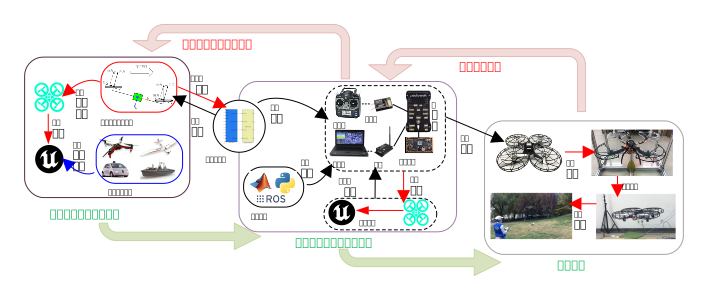
🏗️ Core Technical Architecture and Component Diagram
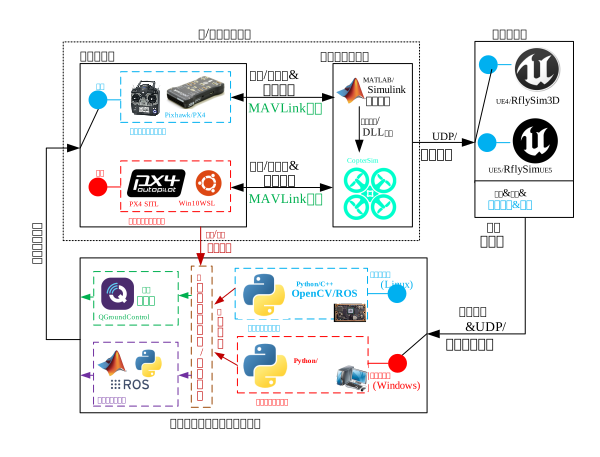
The overall architecture of the RflySim toolchain consists of multiple functional modules, primarily including: "Software/Hardware Simulation Nodes" (comprising the Vehicle Dynamics Simulator and Low-Level Controller), the 3D Simulator, and the Upper-Level Controller for vision and swarm control. Together, these modules form a complete closed-loop system compatible with both Software-in-the-Loop (SITL) and Hardware-in-the-Loop (HITL) simulations, fully covering the entire workflow of unmanned systems—from algorithm development to verification and testing.
-
Vehicle Dynamics Simulator: This is one of the core modules of the RflySim toolchain, primarily used to achieve high-accuracy modeling and simulation of vehicle dynamics. Developed within the MATLAB/Simulink environment, it constructs an unmanned system modeling framework with six-degree-of-freedom kinematics and dynamics, suitable for multi-rotor drones, fixed-wing drones, unmanned ground vehicles, and other heterogeneous mobile platforms. After modeling, the system automatically generates high-performance C/C++ source code from the model via Simulink's code generation functionality, which is further compiled into a dynamic-link library (DLL) file for efficient integration with the simulation platform. During runtime, this DLL file is loaded into CopterSim, the core scheduler of the RflySim toolchain, and works together with real-time scheduling mechanisms to perform periodic solving, thereby forming a closed-loop operation with the Low-Level Controller and supporting collaborative simulation in both SITL and HITL modes.
-
Low-Level Controller: In the RflySim toolchain, the Vehicle Dynamics Simulator simulates response behaviors in real-world physical environments, including kinematics, sensor, and actuator modeling; whereas the Low-Level Controller is responsible for receiving sensor data and generating control commands to drive the simulated vehicle to operate stably. This module includes both control software and hardware systems, possessing complete closed-loop capabilities for pose control.
-
3D Simulator (Virtual Visual World): This module provides drones with a pair of "eyes" and a realistic operational space. Based on extensive customization of the powerful Unreal Engine (UE4 or UE5), the RflySim3D / RflySimUE5 3D simulation engine receives "simulation ground truth" (i.e., the precise position and attitude of the drone in space) from CopterSim via the UDP protocol, then moves the drone model in real time within the virtual 3D world. It supports mounting and simulating various complex visual sensors, such as monocular cameras, stereo cameras, LiDAR, and gimbals. Finally, it transmits the rendered 3D visual images to the upper-level controller below.
-
Upper-Level Controller for Vision and Swarm (Advanced Decision "Brain"): This module acts as the "cerebral cortex" of the drone, handling "intelligent" tasks such as visual navigation and formation flight. It receives real-time images from the 3D simulator (shared memory technology is employed here to ensure high frame rates and low latency). It similarly supports two modes: ① Vision Software-in-the-Loop: Run Python/computer vision algorithms directly on a standard desktop (Windows). ② Vision Hardware-in-the-Loop: Deploy algorithms onto real onboard computers (e.g., Raspberry Pi or Jetson platforms running Linux/ROS) to test whether computational power can keep up. The Swarm Networking and Data Interaction Submodule is responsible for simulating communication networks among multiple drones; it receives physical state information from drones upward and distributes visual perception information laterally. The Swarm Decision Controller and Ground Station Decision Layer are high-level algorithm programs written in ROS, Python, or MATLAB. Based on visual recognition results (e.g., "obstacle detected ahead") or formation requirements, they compute the next action plan. Meanwhile, the ground station uses QGroundControl (QGC) for manual monitoring, route planning, and parameter tuning.
🗺️ Learning Path and Practical Navigation
We have designed a complete progression path for you, from "basic concepts" to "Hardware-in-the-Loop (HITL)/Software-in-the-Loop (SITL)" execution, and finally to "advanced development":

🗂️ Chapter Navigation
Please follow the sequence below to begin your RflySim exploration journey:
| Section | Description |
|---|---|
| 1. Toolchain Overview | Gain deep insight into cutting-edge developments in unmanned systems, the origin of the RflySim name, and core design philosophy |
| 2. Installation and Environment Configuration | Covers rapid standardized deployment of Windows host, WSL subsystem, and related development dependencies |
| 3. 5-Minute Quick Start | Easily launch and complete your first multi-rotor SITL/HITL simulation workflow |