uORB Read Async Module Documentation
Toolbox: uORB Read and Write
Introduction
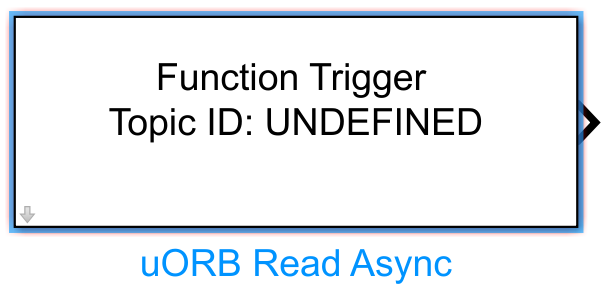
One-sentence Description: Reads the latest data of a specified topic from the PX4 uORB communication bus and triggers execution of the asynchronous subsystem containing this module.
This module is the core read component in the RflySim toolchain for enabling uORB communication between Simulink and the PX4 flight controller. It belongs to the uORB Read and Write interface library and allows users to directly access uORB topic data from within PX4 during custom control algorithm development in Simulink. By specifying a uORB topic name and its corresponding bus object, the module outputs structured data conforming to any topic defined in the PX4 flight controller, which can be directly used as input for Simulink control logic.
This module is primarily used in asynchronous simulation development scenarios. When the corresponding uORB topic in PX4 is updated, it triggers the execution of the asynchronous subsystem containing this module. Combined with CopterSim, it enables communication and interaction between Simulink and the PX4 flight controller, supporting users in developing custom flight control logic, state estimation, or data analysis functions in Simulink. It can also be used together with RflySim3D for visualized simulation. Users can combine this module with other uORB read/write modules to implement customized Pixhawk flight controller hardware-in-the-loop simulation or pure software-in-the-loop simulation.
Port Descriptions
Input Ports (Inputs)
This module has no input ports.
Output Ports (Outputs)
| Port Name | Data Type | Dimension | Description |
|---|---|---|---|
uORB Data |
Defined by Bus Object | Defined by Bus Object | Latest simulated data corresponding to the specified uORB topic, used to drive downstream control logic |
Parameter Configuration (Parameters)
The following parameters can be configured in the Mask dialog box opened by double-clicking the module:
| Parameter Name | Type | Default Value | Available Values/Range | Description |
|---|---|---|---|---|
Delected Topic |
string |
None | Determined by uORB topics defined in the project | Specifies the name of the uORB topic to be read |
Enter Bus Object |
BusObject |
None | Determined by bus objects defined in the project | Specifies the bus object associated with the uORB topic, defining the structure and data types of the output data |
Parameter Setting Instructions
Delected Topic
This parameter specifies the name of the uORB topic whose data needs to be asynchronously read. The topic name is automatically matched to actual communication topics present in the project via callback registration. Ensure the selected topic matches the actual communication topic; otherwise, data cannot be read correctly.
Enter Bus Object
This parameter specifies the bus object corresponding to the target uORB topic. The bus object defines the message structure and field data types for the topic's output. The dimension and data type of the module's output port are determined by this bus object. When using this module, ensure the bus object matches the message structure of the actual uORB topic and is consistent with the bus definition of the outer triggering module of the asynchronous subsystem.
Module Characteristics (Block Characteristics)
| Characteristic | Value |
|---|---|
| Supported Data Types | double, single, uint8, uint16, uint32, int8, int16, int32 |
| Direct Feedthrough | No |
| Sample Time | Inherited |
| Code Generation Support | No |
Data Communication Protocol
This module reads PX4 internal topic data based on the uORB inter-process communication protocol. No external network port configuration is required; the module directly accesses the uORB topic shared data area in the PX4 simulation environment to obtain the latest data for the specified topic.
Related Modules
| Module Name | Description |
|---|---|
uORB Read Sync |
Synchronously reads data from a specified uORB topic, suitable for fixed-step simulation polling scenarios |
uORB Write |
Writes Simulink simulation data to a specified uORB topic for consumption by PX4 flight control logic |
Usage Example
For related usage examples, refer to the following path:
Please refer to
Readme.pdfin the above path for complete example descriptions and operational steps.
Notes and Common Issues
- Initialization Order: This module must be initialized and bound to the RflySim UAV flight control simulation environment before it can read data correctly. Ensure that the PX4 simulation environment is configured and uORB topics are registered before running the simulation; otherwise, the module may output empty data or trigger bus type mismatch errors.
- Bus Consistency Requirement: The
Enter Bus Objectbus object specified in this module must exactly match the message structure of the actual uORB topic and remain consistent with the bus definition of the outer triggering module of the asynchronous subsystem; otherwise, data parsing errors or Simulink compilation errors may occur. - Asynchronous Trigger Logic: This module is designed to drive asynchronous subsystem execution and outputs the latest updated data for the specified uORB topic. Avoid placing it inside synchronous sampling loop subsystems for repeated reading, as this may cause data timing disorders.
- Topic Name Matching: The
Delected Topicparameter's topic name is automatically generated via uORB registration callbacks. Do not manually modify this parameter, as doing so may result in the topic not being found and data read failure. - Empty Data Handling: During the initial phase of simulation, before the uORB topic has undergone its first update, this module outputs all-zero initial data. Downstream control logic should include initial state checks to prevent simulation divergence caused by abnormal initial control commands.
Change Log
v4.3.0(2024-08-08): Added the uORB Read Async asynchronous read module, supporting triggering of asynchronous subsystems via uORB topics and outputting the latest topic data.