TorqueThrustCtrls Module Documentation
Toolbox: RflySim APIs
Introduction
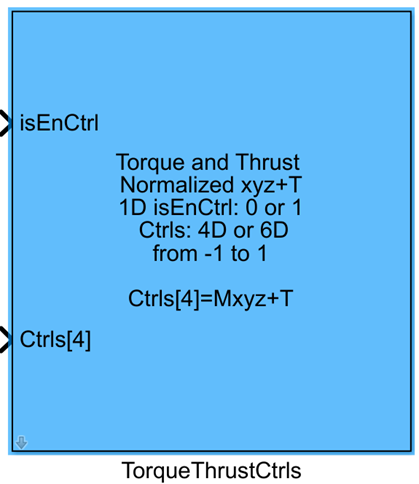
One-sentence Description: This module sends normalized force and torque control commands to the PX4 flight controller; after mixing by the PX4 mixer, the resulting motor speeds drive the UAV, supporting offline simulation and real-flight control for various configurations such as multirotors and VTOL (Vertical Take-Off and Landing) aircraft.
This module serves as the core interface for Offboard force/torque-level control within the RflySim toolchain. It is compatible with all PX4 versions from v1.7 to v1.14, automatically selecting the appropriate uORB message format based on the detected PX4 version. The module supports customizable torque dimensions and can enable a second control channel to accommodate special configurations like VTOL aircraft, which require additional control groups. Additionally, it provides features such as automatic arming, PX4 output blocking, and automatic switching to Loiter mode, enabling seamless and safe switching between Simulink custom controllers and PX4 native controllers.
In the RflySim simulation workflow, users can design custom offline controllers in Simulink, connect their normalized force/torque outputs to this module, and the resulting motor control signals will be sent to the CopterSim dynamics simulation model to drive UAV motion during simulation. In real-flight scenarios, the control commands output by this module can directly drive actual UAVs, enabling seamless integration between RflySim3D visual simulation and the PX4 flight control toolchain.
Port Descriptions
Input Ports
| Port Name | Data Type | Dimension | Description |
|---|---|---|---|
isEnCtr |
boolean |
1×1 |
Control enable signal. When input is true, normalized control commands are sent; when false, zero control commands are sent, and the PX4 flight mode is switched accordingly. |
Ctrls |
single |
N×1 | Normalized force and torque control commands. Dimension depends on parameter configuration (options: 4/6/8/12). See parameter description for protocol details. |
Output Ports
| Port Name | Data Type | Dimension | Description |
|---|---|---|---|
CtrlS |
double |
1×16 |
PWM control signals computed by the PX4 mixer, directly outputtable to the inPWMs input port of CopterSim. |
Parameter Configuration
The following parameters can be configured in the Mask dialog box opened by double-clicking the module:
| Parameter Name | Type | Default Value | Available Values/Range | Description |
|---|---|---|---|---|
Thrust dimension |
int |
1 |
1/3 |
Selects the dimension of thrust components in a single control channel: 1 for single-axis thrust, 3 for three-axis thrust. |
Enable 2nd channel |
bool |
false |
true/false |
Enables/disables the second control channel for vehicles (e.g., VTOL) requiring multiple mixing groups. |
Auto arm |
bool |
true |
true/false |
When enabled, automatically sends the UAV arming command when isEnCtr is true. |
Auto block PX4 |
bool |
true |
true/false |
When enabled, blocks PX4 native controller output and activates the Simulink custom controller when isEnCtr is true. |
Auto Loiter |
bool |
true |
true/false |
When enabled, unblocks PX4 output and automatically switches PX4 to Loiter mode (hovering) when isEnCtr is false. |
Sample Time(s) |
double |
0.008 |
>0 |
Module sample time in seconds. |
Parameter Setting Details
Thrust dimension
This parameter defines the dimension of the thrust component within a single control channel:
- When set to
1, a single control channel includes 3 torque components (around X/Y/Z axes) + 1 Z-axis thrust component, totaling 4 dimensions. - When set to
3, a single control channel includes 3 torque components (around X/Y/Z axes) + 3 XYZ-axis thrust components, totaling 6 dimensions.
When the second channel is enabled, the total control dimension doubles: 4 becomes 8, and 6 becomes 12.
Enable 2nd channel
For vehicles such as VTOL (Vertical Take-Off and Landing fixed-wing aircraft) that require two independent mixing groups, enabling this option allows input of a second set of force and torque control commands. The module then sends a second uORB control message (actuator_controls_1 or vehicle_torque_setpoint1).
Control Command Protocol
All inputs to the Ctrls port are normalized values conforming to PX4 control specifications. The mapping between dimensions and command components is as follows:
- Second channel disabled, thrust dimension = 1 (total dimension = 4):
[Torque X, Torque Y, Torque Z, Z-axis Thrust] - Second channel disabled, thrust dimension = 3 (total dimension = 6):
[Torque X, Torque Y, Torque Z, X-axis Thrust, Y-axis Thrust, Z-axis Thrust] - Second channel enabled, thrust dimension = 1 (total dimension = 8):
[Channel 1 Torque X, Channel 1 Torque Y, Channel 1 Torque Z, Channel 1 Z-axis Thrust, Channel 2 Torque X, Channel 2 Torque Y, Channel 2 Torque Z, Channel 2 Z-axis Thrust] - Second channel enabled, thrust dimension = 3 (total dimension = 12):
[Channel 1 Torque X, Channel 1 Torque Y, Channel 1 Torque Z, Channel 1 X-axis Thrust, Channel 1 Y-axis Thrust, Channel 1 Z-axis Thrust, Channel 2 Torque X, Channel 2 Torque Y, Channel 2 Torque Z, Channel 2 X-axis Thrust, Channel 2 Y-axis Thrust, Channel 2 Z-axis Thrust]
All torques are defined in the body-fixed coordinate frame. Thrust directed along the positive Z-axis indicates upward force, consistent with multirotor flight conventions.
Module Characteristics
| Characteristic | Value |
|---|---|
| Supported Data Types | double, single |
| Direct Feedthrough | Yes |
| Sample Time | Discrete |
| Code Generation Support | No |
Data Communication Protocol
This module communicates with the PX4 flight controller via uORB:
- Protocol Format: The input Ctrl control quantities are divided by dimension as follows:
- First control channel (second channel disabled):
- 4D format: [X-axis torque, Y-axis torque, Z-axis torque, Z-axis thrust] (1D thrust mode)
- 6D format: [X-axis torque, Y-axis torque, Z-axis torque, X-axis thrust, Y-axis thrust, Z-axis thrust] (3D thrust mode)
-
After enabling the second control channel (for VTOL vehicles):
- 8D format: Append second channel data after the first channel’s 4D format: [X1-axis torque, Y1-axis torque, Z1-axis torque, Z1-axis thrust]
- 12D format: Append second channel data after the first channel’s 6D format: [X1-axis torque, Y1-axis torque, Z1-axis torque, X1-axis thrust, Y1-axis thrust, Z1-axis thrust]
-
uORB Message Rules:
- PX4 v1.7 ~ v1.13: The first control channel sends the
actuator_controls_0message; the second control channel sends theactuator_controls_1message. - PX4 v1.14 and later: The first control channel sends the
vehicle_torque_setpointandvehicle_thrust_setpointmessages; the second control channel sends thevehicle_torque_setpoint1andvehicle_thrust_setpoint1messages.
Related Modules
| Module Name | Description |
|---|---|
SendPWMs |
Outputs normalized PWM signals to the PX4 flight controller, directly controlling motor output |
SetOffboardMode |
Controls the PX4 flight controller to switch to Offboard flight mode |
VehicleAttitudeGetter |
Retrieves the current attitude information of the UAV from the PX4 flight controller |
VehicleStateGetter |
Retrieves the current position, velocity, and other state information of the UAV from the PX4 flight controller |
Usage Examples
For related usage examples, refer to the following path:
Please refer to
Readme.pdfin the above path for complete example descriptions and operational procedures.
Notes and Common Issues
- Initialization Sequence: This module relies on successful initialization of the PX4 flight controller and CopterSim before it can send control messages properly. Ensure that the flight controller and visualization engine are connected before enabling Simulink-side control output at simulation startup; otherwise, control messages may be lost, causing the UAV to be unresponsive.
- PX4 Version Matching: Different PX4 versions correspond to different uORB message formats. The module automatically adapts to the corresponding version's messages, but when using custom PX4 firmware, ensure that the corresponding version's
actuator_controls_0/1(v1.7~v1.13) orvehicle_torque/thrust_setpoint(v1.14 and later) messages are enabled in the firmware; otherwise, control commands will not take effect. - Control Dimension Matching: The dimension of the input
Ctrlssignal must match the torque dimension selected in the module parameters and whether the second channel is enabled. For example, when the second channel is enabled and 3D thrust is selected, the input dimension must be 12. A dimension mismatch will cause control quantity parsing errors, leading to UAV yaw or loss of control. - Sample Time Matching: The module's
Sample Time(s)must match the control cycle of the PX4 flight controller. It is recommended to set it to 0.001s~0.005s. An excessively large sample time will cause discontinuous control output, leading to UAV oscillation. - Auto Function Logic: When
Auto Loiteris checked, the module will automatically switch PX4 to Loiter hover mode whenisEnCtrisfalse. If this function is not needed, do not check it; otherwise, manual flight mode may behave abnormally. When bothAuto block PX4andAuto armare checked, the UAV will only automatically arm and enable Simulink control whenisEnCtristrue, eliminating the need for manual arming in QGroundControl. - Control Normalization Requirements: The input torque and thrust values must be normalized, with their range kept within [-1, 1]. Positive thrust indicates upward force along the corresponding Z-axis. Values outside this range will result in abnormal motor speeds after PX4 mixing, leading to loss of control in simulation or real flight.
- Second Channel Usage Scenarios: The second control channel is only applicable to special UAV configurations such as VTOL. Ordinary multirotors/fixed-wing aircraft do not need to enable it. Enabling it erroneously will cause redundant control quantities to occupy mixing channels, leading to abnormal UAV output.
- Output Port Connection: The module's output
CtrlS[16]must be fully connected to theinPWMsinput port of the CopterSim DLL model. Do not intercept only a subset of channels; otherwise, the motor speed transmission after mixing will be incorrect.
Changelog
v4.20(2024-08-07): Added support for PX4 v1.14'svehicle_torque/thrust_setpointmessages. Added the second control channel function to support VTOL multi-control channel applications. Completed the initial version release.