RGB_LED Module Documentation
Toolbox: Sensors and Actuators
Introduction
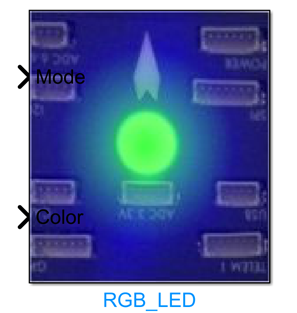
One-sentence Description: This module controls the blinking patterns and light colors of RGB LEDs mounted on drones, providing state visualization feedback for the simulation system.
This module belongs to the Sensors and Actuators interface library of the RflySim toolchain. It interfaces with peripheral driver logic for PX4 flight controllers and simulation systems, enabling flexible configuration of RGB LED states within user-defined Simulink control algorithms. The module supports multiple preset blinking modes and multi-level color selections, allowing developers to directly specify parameters via enumeration-type inputs for rapid deployment.
The module's state output is synchronized to the CopterSim and RflySim3D rendering engines, ultimately presenting the drone's LED status intuitively within the 3D simulation scene. Typical use cases include drone flight status indication, flight controller mode-switching prompts, and custom alert notifications during development and debugging, helping developers visually monitor the drone's current operational state during simulation.
Port Descriptions
Input Ports (Inputs)
| Port Name | Data Type | Dimension | Description |
|---|---|---|---|
Mode |
double or enumeration |
1×1 | RGB LED operating mode, corresponding to the RGBLED_MODE_ENUM enumeration type; input values map to different blinking patterns |
Color |
double or enumeration |
1×1 | RGB LED display color, corresponding to the RGBLEDCOLOR_ENUM enumeration type; input values map to different display colors |
Output Ports (Outputs)
This module has no output ports.
Parameter Configuration (Parameters)
The Mask dialog box, opened by double-clicking the module, allows configuration of the following parameters:
| Parameter Name | Type | Default Value | Available Values/Range | Description |
|---|---|---|---|---|
CopterID |
int |
1 |
1~255 |
ID of the target drone, used to specify which drone's RGB LED should be controlled [To be confirmed] |
Parameter Configuration Notes
CopterID
This parameter specifies the drone number whose RGB LED is to be controlled. In multi-drone simulation scenarios, only the drone whose ID matches this parameter will receive and execute the RGB LED control commands output by this module.
Mode Value Options
The input mode parameter supports the following enumeration values:
MODE_OFF: Turn off the RGB LEDMODE_ON: Constant-on modeMODE_BLINK_SLOW: Slow blinking modeMODE_BLINK_NORMAL: Normal-speed blinking modeMODE_BLINK_FAST: Fast blinking modeMODE_BREATHE: Breathing light modeMODE_PATTERN: Custom pattern mode
Color Value Options
The input color parameter supports the following enumeration values:
COLOR_OFF: Disable displayCOLOR_RED: RedCOLOR_YELLOW: YellowCOLOR_PURPLE: PurpleCOLOR_GREEN: GreenCOLOR_BLUE: BlueCOLOR_WHITE: WhiteCOLOR_AMBER: AmberCOLOR_DIM_RED: Dim redCOLOR_DIM_YELLOW: Dim yellowCOLOR_DIM_PURPLE: Dim purpleCOLOR_DIM_GREEN: Dim greenCOLOR_DIM_BLUE: Dim blueCOLOR_DIM_WHITE: Dim whiteCOLOR_DIM_AMBER: Dim amber
You can enter enumeration('RGBLEDCOLOR_ENUM') in the MATLAB command window to view all valid color enumerations, and enumeration('RGBLED_MODE_ENUM') to view all valid mode enumerations.
Module Characteristics (Block Characteristics)
| Characteristic | Value |
|---|---|
| Supported Data Types | double, single, enumeration types |
| Direct Feedthrough | Yes |
| Sample Time | Inherited |
| Code Generation Support | No |
Data Communication Protocol
This module does not involve network communication.
Related Modules
| Module Name | Description |
|---|---|
Buzzer |
Actuator module for controlling buzzer sound patterns |
PX4CtrlFeedback |
Module for acquiring sensor and state feedback data from the PX4 flight controller |
GPS |
Simulation module for GPS sensor data output |
IMU |
Simulation module for IMU sensor data output |
Barometer |
Simulation module for barometer sensor data output |
Magnetometer |
Simulation module for magnetometer sensor data output |
RangeFinder |
Simulation module for rangefinder sensor data output |
OpticalFlow |
Simulation module for optical flow sensor data output |
ViconPose |
Module outputting drone pose data obtained from motion capture systems |
Joystick |
Human-machine interaction module for reading keyboard joystick inputs |
EscPWMOut |
Actuator module for outputting motor ESC PWM control signals |
ServoPWMOut |
Actuator module for outputting servo PWM control signals |
Usage Example
For related usage examples, please refer to the following path:
Please refer to
Readme.pdfin the path above for complete example descriptions and operational steps.
Notes and Common Issues
- Initialization Sequence: This module relies on the flight controller's underlying hardware drivers for initialization. After simulation starts, RGB LED control commands must be sent only after the onboard peripherals of the flight controller board have completed initialization; otherwise, control commands sent before initialization completes will not take effect.
- Enum Value Input Specification: The mode and color input ports support only valid members of the corresponding enumeration types
RGBLED_MODE_ENUMandRGBLED_COLOR_ENUM. Inputting custom numeric values or strings will cause control failure. You can query all valid enumeration values in the MATLAB command line by executingenumeration('RGBLED_MODE_ENUM')andenumeration('RGBLED_COLOR_ENUM'). - Mode Parameter Adaptation: When selecting
MODE_PATTERN(custom pattern mode), additional custom blink pattern timing parameters must be provided via the input port; otherwise, the module will default to outputting the "off" mode. - Simulation Environment Compatibility: This module is compatible only with the onboard RGB LED peripheral simulation for the PX4 flight controller firmware. For custom RTL flight controllers or other firmware, corresponding driver interfaces must be pre-adapted; otherwise, LED state control will not function properly.
- Sample Time Matching: The module defaults to matching the flight controller's 100 Hz peripheral update frequency. If the custom simulation sampling rate exceeds 1000 Hz, excess control commands will not be processed by the underlying hardware. It is recommended to set the module's input update frequency within the range of 1 Hz to 100 Hz.
Changelog
v4.1.0(2024-08-12): Initial release of the RGB_LED module, supporting multiple LED blinking modes and color control, with function invocation implemented via enumeration-type inputs.