OffboardAttCtrlAPI Module Documentation
Toolbox: RflySim APIs
Introduction
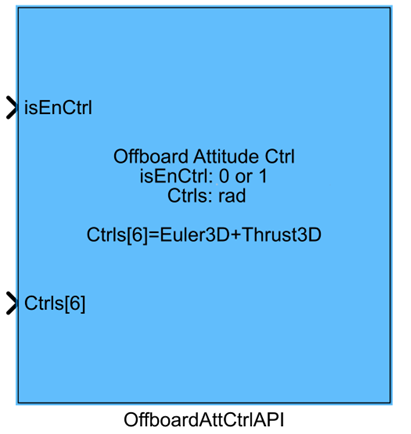
One-sentence Description: This module enables the PX4 flight controller to enter Offboard mode, supports multiple formats of attitude command inputs for custom attitude control, and provides auxiliary functions such as automatic arming and mode switching.
This module belongs to the RflySim APIs library and serves as the core interface module for implementing custom upper-level attitude control development within the RflySim toolchain. It is designed for algorithm developers to simulate and validate custom Offboard attitude control algorithms. It interacts with CopterSim's physical simulation engine and the PX4 flight control firmware, transmitting attitude control commands generated in Simulink to the PX4 flight controller via the MAVLink protocol. Additionally, based on enable signals, it automatically performs arming, Offboard mode switching, PX4 output blocking, and reverts to Loiter mode upon deactivation to ensure safety and stability during simulation. Developers can rapidly validate custom attitude control algorithms without manually handling the low-level logic of PX4 Offboard communication and mode switching.
Port Descriptions
Input Ports (Inputs)
| Port Name | Data Type | Dimension | Description |
|---|---|---|---|
isEnCtrl |
boolean |
1×1 |
Control enable signal: when input is true, control commands are sent and Simulink-side control is activated; when input is false, no control commands are sent, and PX4 automatically switches to Loiter mode |
Ctrls |
double |
Variable [to be confirmed] | Offboard attitude control commands; dimension varies with parameter configuration: for total thrust + attitude command format, Euler angle mode is 1×6, quaternion mode is 1×7; for angular rate-only control, dimension equals the number of selected angular rate channels plus 1 (thrust channel) [to be confirmed], with thrust range 1000~2000, mapped to the normalized range of the CopterSim model |
Output Ports (Outputs)
This module has no output ports.
Parameter Configuration (Parameters)
The Mask dialog box, opened by double-clicking the module, allows configuration of the following parameters:
| Parameter Name | Type | Default Value | Available Values / Range | Description |
|---|---|---|---|---|
AttitudeType |
Enum | Euler |
Euler, Quaternion |
Selects the format of attitude control commands: Euler angles or quaternions |
RollRate |
bool |
false |
true, false |
Enables roll angular rate control (unit: rad/s) when checked |
PitchRate |
bool |
false |
true, false |
Enables pitch angular rate control (unit: rad/s) when checked |
YawRate |
bool |
false |
true, false |
Enables yaw angular rate control (unit: rad/s) when checked |
Auto arm |
bool |
false |
true, false |
When checked, the module automatically sends the vehicle arming command when isEnCtrl is true |
Auto block PX4 |
bool |
false |
true, false |
When checked, the module blocks the native PX4 controller output and uses Simulink-side controller output to control the vehicle when isEnCtrl is true |
Auto Loiter |
bool |
false |
true, false |
When checked, the module unblocks PX4 output and automatically switches the vehicle to Loiter mode when isEnCtrl is false, ensuring stable hover |
SampleTime |
double |
0.01 |
>0 |
Sampling time for sending control signals to the flight controller (unit: s) |
Parameter Setting Notes
AttitudeType
Selects the format of attitude information in the input control commands. When set to Euler, the attitude portion is a 3D Euler angle vector [roll_body, pitch_body, yaw_body] in the body frame (unit: rad). When set to Quaternion, the attitude portion is in quaternion format [w, x, y, z].
Angular Rate Control Options (RollRate/PitchRate/YawRate)
When a channel is checked, that channel accepts angular rate commands (unit: rad/s) instead of angle/attitude commands. Individual or multiple channels can be configured for angular rate control.
Automatic Function Options (Auto arm/Auto block PX4/Auto Loiter)
These three options, in conjunction with the isEnCtrl input, automate the control sequence: upon activation, they automatically perform arming, PX4 output blocking/unblocking, and mode switching based on the control enable signal, eliminating the need for users to manually handle mode-switching logic.
SampleTime
The sampling time for sending control commands to the flight controller via communication. It must match the Simulink simulation step size. The default value of 0.01 s corresponds to a 100 Hz control frequency.
Module Characteristics (Block Characteristics)
| Characteristic | Value |
|---|---|
| Supported Data Types | double, single |
| Direct Feedthrough | Yes |
| Sample Time | Discrete, user-configurable |
| Code Generation Support | No |
Data Communication Protocol
This module communicates Offboard control commands with the PX4 simulation firmware via UDP. By default, it uses the unified UDP communication port of RflySim. The data format is as follows:
- Enable control bit: 1 byte; set to 1 if
isEnCtrlistrue, otherwise 0 - Mode control commands: configuration codes corresponding to Auto arm, Auto block PX4, and Auto Loiter
- Attitude control data: based on module parameter settings, control quantities (Euler angles/quaternions/angular rates) and thrust commands are sent in single-precision floating-point format, sequentially transmitted in order
Related Modules
| Module Name | Description |
|---|---|
OffboardPosCtrlAPI |
Offboard position control module for sending position and velocity commands to control vehicle motion |
VelocityToPositionAPI |
Converts desired velocity into desired position, aiding position control closed-loop implementation |
SetOffboardMode |
Controls vehicle entry into or exit from Offboard mode |
ReadIMUAPI |
Reads IMU sensor data of the vehicle in simulation for controller feedback |
ReadGNSSAPI |
Reads GNSS position and velocity data of the vehicle in simulation for navigation feedback |
Usage Examples
For usage examples, please refer to the following path:
Please refer to
Readme.pdfin the above path for complete example descriptions and operational steps.
Notes and Common Issues
-
Initialization Order: This module depends on the completion of initialization of the RflySim simulation environment and the PX4 firmware communication framework to function properly. Ensure that the base initialization modules of the RflySim platform (e.g., VehicleSimModel) within the entire simulation model are initialized before this module; otherwise, issues such as Offboard mode enablement failure and command ineffectiveness may occur.
-
Sample Time Matching: The
Sample Time(s)specified for the module must match the communication cycle of the PX4 Offboard control. It is recommended to set it to 0.05 s (20 Hz) or 0.1 s (10 Hz); if the sample time is set too large, it will trigger the PX4 Offboard timeout exit mechanism, causing the vehicle to automatically switch back to Loiter mode; if the sample time is set significantly smaller than the platform's communication cycle, it will result in redundant command transmissions, increasing the simulation runtime burden. -
Control Command Dimension Matching: The dimension of the input signal to the Ctrl port must match the module's parameter configuration: when selecting Euler angle attitude control, a 4-dimensional signal is required (the first three dimensions are attitude commands, and the fourth is the thrust command); when selecting quaternion control, a 5-dimensional signal is required (the first four dimensions are quaternion commands, and the fifth is the thrust command); when enabling angular rate control, the corresponding number of angular rate commands plus one thrust dimension must be input. Dimension mismatches will lead to control chaos and simulation errors.
-
Units and Thrust Convention: The units for input attitude angles and angular rates must be rad and rad/s, respectively; using degrees will cause command amplitude errors, resulting in vehicle attitude instability. Thrust must follow the specified convention: for multirotors, only Thrust[2] is valid as a negative throttle request; for fixed-wing aircraft, only Thrust[0] is valid as a throttle request. Incorrect allocation of thrust channels will cause abnormal power output.
-
Mode Switching Logic: When the
isEnCtrlinput is false, the module automatically exits Offboard mode and enters Loiter mode. Do not expect Offboard control to function whileisEnCtrlremains continuously false. To maintain Offboard control, ensureisEnCtrlremains continuously true and that control commands are sent stably at the agreed-upon cycle. -
Auto Function Conflicts: If
Auto block PX4is checked,Auto Loitercannot be checked simultaneously, as the two functions are mutually exclusive; checking both will cause confusion in the PX4 output control logic, leading to uncontrolled vehicle behavior. If you need to block PX4 output during Offboard control and automatically switch to Loiter hover when exiting Offboard, keeping bothAuto block PX4andAuto Loiterchecked as the default configuration is incorrect. The correct configuration is to enable both options; only whenisEnCtrlis true will PX4 output be blocked and Offboard control be activated, and whenisEnCtrlis false, the block will be released and the vehicle will enter Loiter, without causing conflicts. -
Numerical Range Matching: The numerical range of input control commands must comply with conventions: for all vehicle types, the output range of Ctrls control quantities corresponds to 1000~2000, matching the normalized range of the model. If commands exceed this range, output saturation will occur, preventing the desired control effect from being achieved.
Changelog
v4.0(2024-08-07): Initial version release, supporting Euler angle/quaternion attitude commands and angular rate commands in Offboard mode, supporting Auto arm, Auto block PX4, and Auto Loiter function configuration, compatible with multirotor and fixed-wing vehicles.