Toolchain Protocol Summary
I. Fundamental Protocols of the Simulation Platform (Universal Across the Entire Workflow)
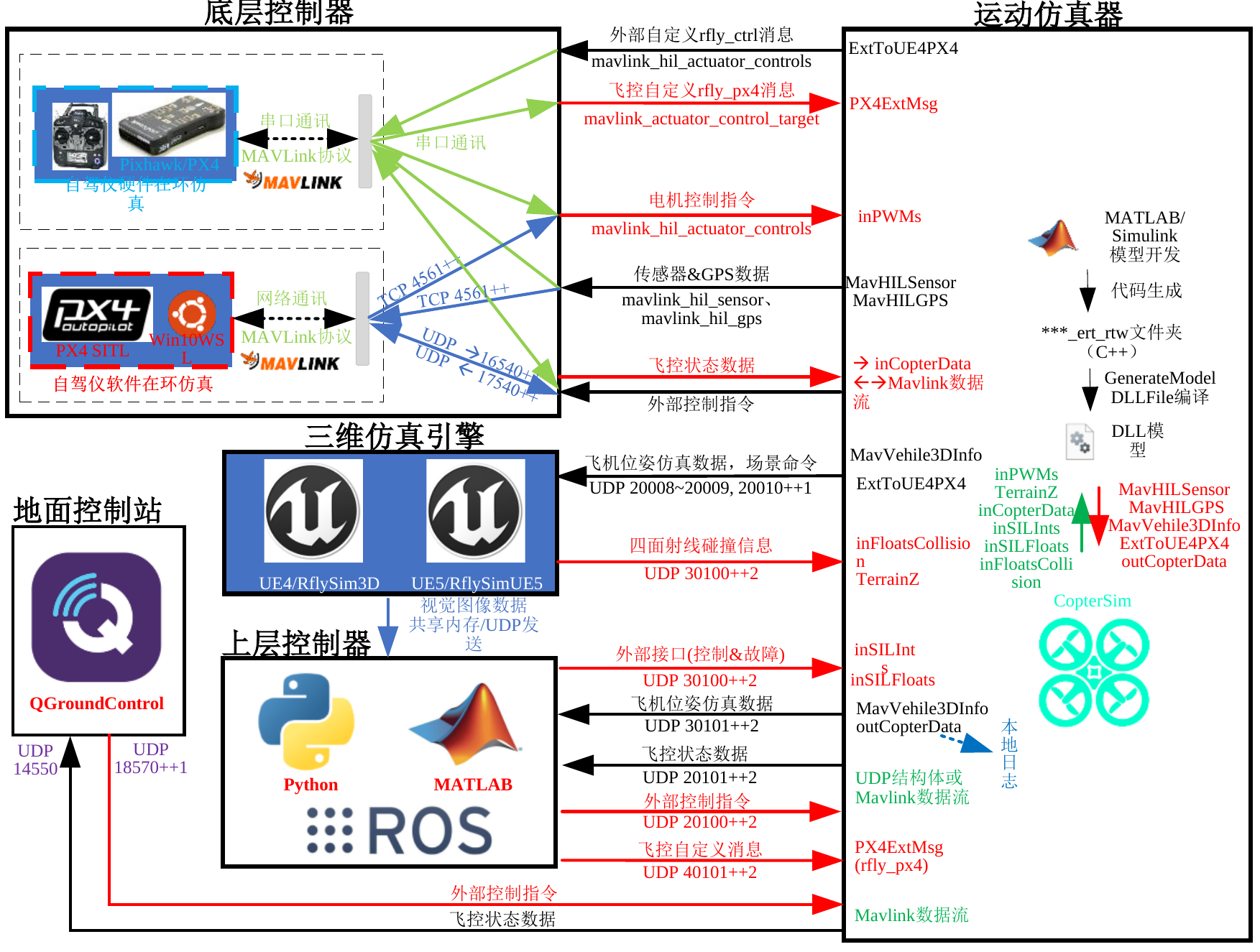
The above figure illustrates the typical data flow interactions between the motion simulation module and various external interfaces within the RflySim platform, covering autopilot software/hardware-in-the-loop modules, the 3D simulation engine, controller and sensor feedback paths, etc. To support this interactive architecture, the RflySim platform defines a series of standardized protocols, including control command transmission, sensor data feedback, configuration and driver execution, log recording, etc. The following table summarizes these foundational protocols along with their applicable platforms and core functionalities.
| Protocol Name | Target Platform or Module | Functional Description |
|---|---|---|
| [UDP/TCP Communication Ports] | RflySim Main Program, Control Module, Feedback Module | Uniformly specifies the port number range used for simulation communication; typically allocated internally by the RflySim main program (e.g., CopterSim), with port configurations exposed to upper-layer controllers and other external programs detailed in the port field of corresponding interfaces. |
| [UDP Control Command Protocol] | Simulink, Python Controllers | Real-time transmission of control commands (e.g., desired attitude, velocity, trajectory points), supporting multi-vehicle broadcast or single-vehicle control. |
| [UDP Sensor Feedback Protocol] | Python/ROS Clients | Real-time feedback of simulated IMU, GPS, image, and other sensor data. |
| [Automated Simulation Configuration Protocol] | RflySim Main Program Configuration Generation / Command Generation | Standardized structured format for task and simulation scenario configuration, supporting one-click startup and batch experiment automation. |
| [Log Recording Protocol] | Simulation Data Logging System | Structured logging of flight states, sensor data, and control commands with timestamps, supporting export to formats such as CSV. |
II. RflySim Protocols for Integration with Unmanned Systems / Robotics Platforms
RflySim supports integration with multiple mainstream unmanned system platforms and their communication middleware, including the PX4 flight controller, Robot Operating System ROS1/ROS2, and motion capture systems such as VRPN. These protocols provide foundational support for seamless interoperability between systems and serve as critical bridges for system integration and hardware-software co-debugging.
| Protocol Name | Applicable Platforms | Functional Description |
|---|---|---|
| [MAVLink] | PX4, ArduPilot, QGroundControl | Lightweight flight controller communication protocol supporting position/attitude/state transmission and control command delivery. |
| [VRPN (Virtual-Reality Peripheral Network)] | Motion Capture Systems (e.g., OptiTrack, NOKOV) | Provides stable 6DoF pose transmission, supporting subscription and closed-loop control on platforms such as MATLAB and Simulink. |
| [ROS Topic / Service / Action] | ROS1, ROS2 | Publish-subscribe messaging, service invocation, and behavior tree decision-making mechanisms, enabling end-to-end integration from perception to decision-making to control. |
| [DDS (Data Distribution Service)] | ROS2 (Foxy/Galactic, etc.) | High-performance real-time communication middleware supporting reliable, low-latency transmission across multiple nodes. |
III. Network Communication and Grouping Protocols (For Unmanned System Swarm Control Development)
In multi-vehicle swarm control and distributed cooperative research, network communication efficiency and protocol flexibility are crucial. This section compiles the mainstream communication protocols supported by the RflySim platform, including Redis, MQTT, NS-3, as well as the platform’s custom coarse-grained network topology simulation mechanisms.
| Protocol Name | Primary Use Case | Functional Description |
|---|---|---|
| Custom Grouping Communication | Multi-vehicle formation, heterogeneous system joint control | Implements information exchange among controllers via UDP broadcast/unicast combined with custom message structures. |
| [MQTT] | Multi-vehicle communication in cloud/edge low-bandwidth environments | Topic-based publish-subscribe mechanism supporting QoS control and reconnection upon disconnection. |
| Redis Publish-Subscribe | Efficient multi-vehicle state broadcasting and command synchronization within LAN | Key-value storage combined with channel subscription mechanism, offering low latency and simple structure, suitable for rapid prototyping experiments. |
| [Custom Coarse-Grained Grouping Simulation] | Communication strategy validation and latency testing | Constructs simplified network topologies and communication strategies to test robustness against packet loss and delay. |
| [NS-3 Protocol Stack Simulation] | Network behavior modeling within simulated swarms | Enables construction of TCP/IP, UDP, 802.11, and other network protocol models for communication behavior testing. |
IV. User Guidance
Different types of developers interact with distinct interface modules when using RflySim. This section categorizes typical users—control algorithm developers, perception and decision-making developers, and swarm & networking researchers—based on their usage objectives, and recommends suitable interfaces and implementation pathways to facilitate efficient integration and rapid validation.
1. Control Algorithm Developers (Implementing Flight Control via Simulink / Python)
| Application Objective | Example Interfaces |
|---|---|
| Command Transmission | Implement control logic in Simulink / Python and send commands to the simulation platform via UDP |
| Flight State & Sensor Data Reception | Listen on return ports (e.g., 14550/14600) to receive real-time data streams such as /imu, /gps, /odom |
| Integration with Real Flight Controllers / Hardware-in-the-Loop | Connect to PX4 via QGroundControl and leverage MAVLink to unify simulation and physical hardware control workflows |
2. Perception & Decision Module Developers (Using Python + ROS1 / ROS2)
| Application Objective | Example Interfaces |
|---|---|
| Perception Data Publishing/Subscribing (Images, IMU) | Use VisionCaptureApi.py to publish simulated image/IMU data as ROS Topics for tasks such as YOLO detection or SLAM |
| Control Command Feedback | Subscribe to perception results, generate control commands based on decision strategies, and feed them back to the simulation platform via UDP/MAVLink interfaces |
3. Unmanned Swarm Control & Networking Researchers
| Application Objective | Example Interfaces |
|---|---|
| Multi-UAV Information Synchronization / Command Broadcasting (Networking Communication) | Use Redis/MQTT to share target states and path information across multiple nodes, ensuring swarm consistency |
| Protocol Behavior Validation in Simulation Environment (Networking Simulation) | Use NS-3 to simulate channel loss, bandwidth constraints, and interference, evaluating the impact of communication mechanisms on swarm mission execution |
| Multi-UAV Collaborative Planning / Scheduling (Centralized / Decentralized Control) | Leverage custom networking communication interfaces in Python to implement centralized schedulers or local collaborative strategies |
Appendix: Typical Workflow Templates
Communication Ports and Protocol Details
The RflySim platform uses a unified UDP/TCP port system and hardware serial ports, supporting hardware flight controller HIL, PX4 SITL, 3D engine, vision sensors, and multi-vehicle parallel simulation.
Numbering Rules
In the table, n represents CopterID, typically starting from 1. ++(n-1) indicates incrementing by the aircraft number, and ++2*(n-1) indicates an interval of 2 ports per aircraft.
| Communication Category | Interface/Protocol | Default Port or Serial Port | Data Direction | Purpose |
|---|---|---|---|---|
| HITL Serial | /dev/ttyUSBn or COMn |
Baud rate 921600 |
Bidirectional between flight controller and CopterSim | Hardware-in-the-loop MAVLink and HIL data |
| PX4 SITL MAVLink | TCP | 4561++(n-1) |
PX4 SITL to CopterSim/QGC | PX4 SITL main MAVLink link |
| PX4 SITL Sensor HIL | UDP | 17540++(n-1) |
CopterSim to PX4 | HIL sensor input |
| PX4 SITL Actuator HIL | UDP | 16540++(n-1) |
PX4 to CopterSim | Motor/surface control output |
| State Return | UDP | 20101++2*(n-1) |
CopterSim to external programs | Flight controller state, MAVLink data, or control feedback |
| External Control Reception | UDP | 20100++2*(n-1) |
External programs to CopterSim/PX4 | Python, Simulink, or external control input |
| Ground Truth Data Output | UDP | 30101++2*(n-1) |
CopterSim to external programs | Pose, velocity, Euler angles, sensor ground truth, etc. |
| Fault/Integrated Model Control | UDP | 30100++2*(n-1) |
External programs to CopterSim/Model | Fault injection, model parameters, integrated model input |
| Low-Level Bridging | UDP | 40100++2*(n-1) |
PX4, CopterSim, external programs | Low-level PX4 data bridging |
| QGroundControl | UDP/TCP | UDP 14550, TCP 18570++(n-1) |
Bidirectional between QGC and flight controller | Ground station connection |
| 3D Scene Synchronization | UDP | 20008, 20009, 20010++(n-1) |
CopterSim/Python to RflySim3D | Scene commands, vehicle poses, object states |
| Vision Image Stream | Shared Memory or UDP | Configured via Config.json |
RflySim3D to vision programs | RGB, depth, segmentation, point cloud, etc. |
Port Configuration
If the vision data stream uses UDP, the IP and port must be configured in the SendProtocol field of Config.json. External control ports can be modified via Config.json, Simulink module parameters, or Python interface parameters, but data in the same direction for the same aircraft should not be listened to by multiple processes simultaneously.
Main Data Links
| Link | Typical Message | Description |
|---|---|---|
| Flight Controller Actuator to Model | mavlink_hil_actuator_controls |
PX4 outputs actuator control values (e.g., motors, servos) into the model's inPWMs |
| Model Sensors to Flight Controller | mavlink_hil_sensor, mavlink_hil_gps |
CopterSim/Simulink model outputs IMU, barometer, magnetometer, GPS |
| Python/Simulink External Control | Offboard control, position/velocity/attitude control structures | Enters CopterSim or PX4 bridge module via 20100 series ports |
| Ground Truth and Log Output | VehileInfo60d, outCopterData |
Outputs to Python, Simulink, or logging system via 30101 series ports |
| RflySim3D Scene Interaction | Pose packets, console commands, collision/sensor feedback | 20008, 20009, 20010 series ports handle scene synchronization |
Protocol Topic Index
| Topic | Key Content | Suggested Reference |
|---|---|---|
| MAVLink / MAVROS | Mode switching, arming, setpoint, state feedback between PX4/APM, QGC, ROS | Python SDK, ROS/ROS2 Interface |
| ROS / DDS | High-frequency state, sensors, control loop, and ROS2 underlying real-time communication | ROS/ROS2 Interface, Vision Communication Protocol |
| MQTT | Low-frequency state, mission commands, monitoring panel, and cloud collaboration | comm Network Communication, Swarm Control |
| NS-3 | Node ID, link quality, latency, packet loss, bandwidth, and routing strategy | Swarm Communication and Networking Simulation |
| Log / Sensor / Ctrl / Coa | Logging, sensors, external control, collaborative control topics | PHM, Simulink Toolbox, Swarm SDK |
MAVLink and MAVROS Interface Mapping
External control, ROS bridging, and ground station integration typically involve both MAVLink messages and MAVROS topics/services. The table below lists common mappings to help locate corresponding data links in Python, ROS1/ROS2, or MAVROS nodes.
| Category | MAVLink Message | MAVROS Topic/Service | Functional Description |
|---|---|---|---|
| Status and Position Information | HEARTBEAT |
/mavros/state |
System connection status, flight mode, and arming status |
| Status and Position Information | SYS_STATUS |
/mavros/battery |
Battery level, power status, and sensor status |
| Status and Position Information | GPS_RAW_INT |
/mavros/global_position/raw/fix |
GPS raw latitude/longitude, satellite count, etc. |
| Status and Position Information | GLOBAL_POSITION_INT |
/mavros/global_position/global |
Global position, altitude, and attitude-related information |
| Status and Position Information | LOCAL_POSITION_NED |
/mavros/local_position/pose |
Local NED coordinate position and attitude |
| Status and Position Information | ATTITUDE |
/mavros/imu/data |
Quaternion attitude derived from IMU |
| Control Commands | COMMAND_LONG |
/mavros/cmd/command |
General commands such as takeoff, return, reset |
| Control Commands | SET_MODE |
/mavros/set_mode |
Switch flight modes like OFFBOARD, AUTO.MISSION |
| Control Commands | MANUAL_CONTROL |
/mavros/rc/override |
Simulate remote control input |
| Control Commands | RC_CHANNELS_OVERRIDE |
/mavros/rc/override |
Override remote control channels |
| Parameter Management | PARAM_REQUEST_LIST |
/mavros/param/get |
Retrieve parameter list or specific parameter value |
| Parameter Management | PARAM_SET |
/mavros/param/set |
Set PX4 parameters |
| Mission Management | MISSION_REQUEST_LIST |
/mavros/mission/pull |
Download current mission waypoint list |
| Mission Management | MISSION_ITEM_INT |
/mavros/mission/push |
Upload mission waypoints |
| Sensor Data | HIGHRES_IMU |
/mavros/imu/data |
High-precision accelerometer, gyroscope, and magnetometer data |
| Sensor Data | RAW_IMU |
/mavros/imu/data_raw |
Raw unfiltered IMU data |
| Sensor Data | OPTICAL_FLOW |
/mavros/px4flow/raw/optical_flow_rad |
PX4Flow optical flow velocity estimation |
| Control Output | POSITION_TARGET_LOCAL_NED |
/mavros/setpoint_position/local |
Local position or velocity setpoint |
| Control Output | SERVO_OUTPUT_RAW |
/mavros/actuator_control |
PWM output channels for motors, servos, etc. |
| System Status Information | STATUSTEXT |
/mavros/diagnostics |
System text status and diagnostic information |
| System Status Information | TIMESYNC |
/mavros/time_reference |
Time synchronization between companion computer and flight controller |
NS-3 Networking Simulation Key Points
NS-3 communication simulation requires a clear mapping between node IDs and CopterID, along with synchronized recording of link latency, packet loss rate, bandwidth, routing strategy, and flight log timestamps. When evaluating swarm missions, both flight status and network status should be saved; otherwise, it is difficult to determine whether mission failure is due to control issues or communication link problems.
Port Conflict Troubleshooting
netstat -ano | findstr ":14550"
netstat -ano | findstr ":20100"
netstat -ano | findstr ":30100"
netstat -ano | findstr ":40100"
If a port is found to be occupied, terminate the corresponding PID or modify the port in the script/configuration. For automated testing and batch simulations, it is recommended to clean up residual processes uniformly before startup.