HIL16CtrlsNorm Module Documentation
Toolbox: RflySim APIs
Introduction
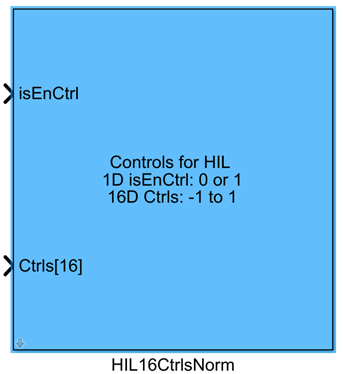
One-sentence Description: This module is used in RflySim hardware-in-the-loop (HIL) simulation to send 16-dimensional normalized control signals generated by Simulink to CopterSim, supporting mode switching between Simulink custom controllers and native PX4 controllers.
This module is a core API component in the RflySim toolchain for hardware-in-the-loop simulation development with custom controllers, primarily designed for control signal exchange in Simulink-based controller development scenarios. Developers can connect the 16-dimensional normalized control signals output by their custom algorithms to this module, which will forward the signals to the CopterSim DLL physics simulation model, enabling the custom controller to control the drone's dynamics model.
The module supports configuration for automatic arming, PX4 output blocking/unblocking, and mode switching, and can cooperate with the PX4 flight controller to perform HIL simulation: when the enable input is valid, the drone is controlled by the custom Simulink controller; when the enable input is invalid, it automatically switches to the native PX4 Loiter mode to maintain hover. This facilitates developers in verifying the control performance of their custom controllers during simulation, interfacing CopterSim's dynamics simulation with the PX4 flight controller, and simultaneously supports real-time visualization simulation via RflySim3D.
Port Descriptions
Input Ports
| Port Name | Data Type | Dimension | Description |
|---|---|---|---|
isEnCtrl |
boolean |
1×1 |
Enable control signal input flag. When input is true, the normalized control signal provided at the input is sent; when false, a zero control signal is sent. |
CtrlS |
double |
1×16 |
16-dimensional normalized control signal, ranging from -1 to 1, used for HIL simulation. |
Output Ports
| Port Name | Data Type | Dimension | Description |
|---|---|---|---|
CtrlS_out |
double |
1×16 |
Processed 16-dimensional normalized control signal, to be sent to the inPWM interface of the CopterSim DLL model. |
Parameter Configuration
The following parameters can be configured in the Mask dialog box opened by double-clicking the module:
| Parameter Name | Type | Default Value | Optional Values / Range | Description |
|---|---|---|---|---|
Auto arm |
bool |
false |
true/false |
When checked, the module automatically sends an arming command when control is enabled. |
Auto block PX4 |
bool |
false |
true/false |
When checked, the module automatically blocks PX4 output when control is enabled, allowing the Simulink controller to control the vehicle. |
Auto Loiter |
bool |
false |
true/false |
When checked, the module automatically unblocks PX4 output and switches PX4 to automatic Loiter mode when control is disabled, maintaining the vehicle in hover. |
Sample Time(s) |
double |
0.01 |
>0 |
Module sampling time in seconds. |
Parameter Setting Descriptions
Auto arm
When this option is checked, the module automatically sends an arming command to the flight controller when isEnCtrl is true (control enabled), eliminating the need for users to handle arming logic separately and simplifying the takeoff process in HIL simulation.
Auto block PX4
This parameter enables switching between Simulink user controllers and native PX4 controllers: when checked, if isEnCtrl is true, the module sends a signal to block PX4 output, allowing the vehicle to be fully controlled by the user controller built in Simulink; if unchecked, the enable state of PX4 output remains unchanged.
Auto Loiter
This parameter ensures vehicle safety when switching back to PX4 control: when checked, if isEnCtrl is false (user control disabled), the module automatically unblocks PX4 output and commands PX4 to switch to Loiter (hover) mode, ensuring stable hover and avoiding loss-of-control risks during mode transitions.
Sample Time(s)
This parameter specifies the sampling period for sending control signals by the module and must match the Simulink simulation step size. The default value of 0.01 s corresponds to a 100 Hz control frequency, satisfying the requirements of most drone controllers.
Block Characteristics
| Characteristic | Value |
|---|---|
| Supported Data Types | double, single |
| Direct Feedthrough | Yes |
| Sample Time | Discrete |
| Code Generation Support | No |
Data Communication Protocol
The module communicates with CopterSim via UDP, sending normalized control signals to CopterSim. By default, it follows the communication port rules of the RflySim platform, with the data format consisting of 16 double-type normalized control values plus configuration command data.
Related Modules
| Module Name | Description |
|---|---|
getStatesFromCopterSim |
Retrieves vehicle state data from CopterSim |
setPX4OffboardNorm |
Sends normalized offboard control commands to PX4 |
HIL8CtrlsNorm |
Sends 8-dimensional normalized HIL control signals to CopterSim |
VehicleCtrlRaw |
Sends raw PWM control signals to CopterSim for HIL simulation |
Usage Example
For related usage examples, please refer to the following path:
Please refer to
Readme.pdfin the path above for complete example descriptions and operational steps.
Notes and Common Issues
- Initialization Sequence: This module relies on CopterSim completing the HIL simulation environment initialization before it can send control signals normally. Ensure that CopterSim has finished hardware-in-the-loop connection configuration before starting the simulation; otherwise, control signals may fail to be correctly transmitted to the PX4 flight controller.
- Normalization Range Constraint: The input 16-dimensional control signal
CtrlS[16]must be constrained to the range [-1, 1]. Even the throttle channel must comply with this range; exceeding it will cause CopterSim to misinterpret the control signal, leading to abnormal flight control. Control signal ranges must match the specific aircraft type: for multirotors, control signals are typically constrained to [0, 1]; for fixed-wing aircraft, the full range [-1, 1] may be used. - Function Option Logic Matching: After checking
Auto Loiter, whenisEnCtrlisfalse, the module automatically switches PX4 to Loiter hover mode. Do not send additional mode-switching commands via other modules, as this may cause mode command conflicts and result in abnormal flight controller operation. If full control by the Simulink controller is required throughout, do not enableAuto Loiter. - Sample Time Matching: The module's
Sample Time(s)parameter must match the overall Simulink model step size and CopterSim's simulation step size. Excessive step size mismatches can cause control signal transmission timing disorders, resulting in control delays or signal packet loss. - Enable Signal Logic: When
isEnCtrlisfalse, the module outputs all-zero signals. IfAuto block PX4is enabled, PX4 output will also be blocked simultaneously. Do not leave the simulation idle withisEnCtrlset tofalse, as this may cause the aircraft to lose control and crash.
Changelog
v4.24(2024-08-07): Initial release. Implements sending 16-dimensional normalized control signals to CopterSim's hardware-in-the-loop simulation, supporting automatic arming, PX4 output blocking, and automatic Loiter mode switching configuration.