Chapter 7: Health Management and Safety Assessment
Intelligent unmanned systems are typical complex systems, where "complex systems" generally refer to systems with large scale, complex structure, diverse functions, varied fault modes, and unknown or dynamically changing external environments. Unmanned systems typically exhibit characteristics such as nonlinearity, dynamic variability, large scale, multiple hierarchical levels, and decentralization. As system complexity increases, the number of components that may fail and the probability of failure also rise significantly. Therefore, how to reduce failure probability and mitigate the consequences of failures is a key consideration in system health and safety assessment.
7.1 Background and Theory
Health management and safety assessment are critical for intelligent unmanned systems. Health management emphasizes real-time monitoring of system status and predictive maintenance, whereas safety assessment focuses on risk identification, probability calculation, and hazard control.
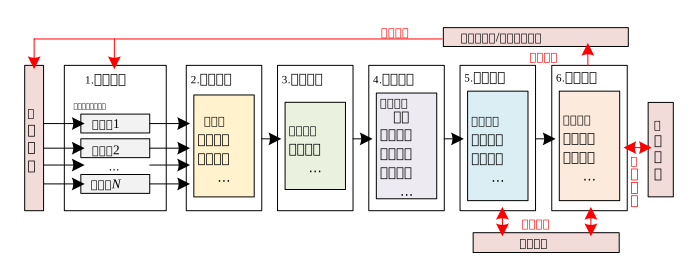
7.1.1 Safety Requirements for Unmanned Systems
Safety requirements vary significantly across different types of unmanned systems: Embodied intelligent systems (e.g., quadruped robots) operate indoors at low speeds, thus having relatively lower safety requirements; autonomous vehicles operate at high speeds on roads, demanding extremely high safety standards; drones operate in complex three-dimensional meteorological environments and face the dual threat of "potential energy + kinetic energy," making low-altitude safety a key bottleneck constraining industry development.
7.1.2 Core Value of Health Management and Safety Assessment
Constructing a systematic and standardized framework for health management and safety assessment is not only an essential technical pathway to ensure stable and reliable operation of unmanned systems, but also a core strategic initiative for building a trustworthy intelligent system framework for the future—enabling unmanned systems to transition from "functional" to "trustworthy."
7.2 Framework and Interfaces
RflySim provides a comprehensive support system for health management and safety assessment, enabling rapid testing under extreme conditions, a closed-loop evaluation framework integrating hardware-in-the-loop and software-in-the-loop, real-time state monitoring with indicator visualization, data-driven predictive health management, and high-consistency "simulation-to-reality" transfer capabilities.
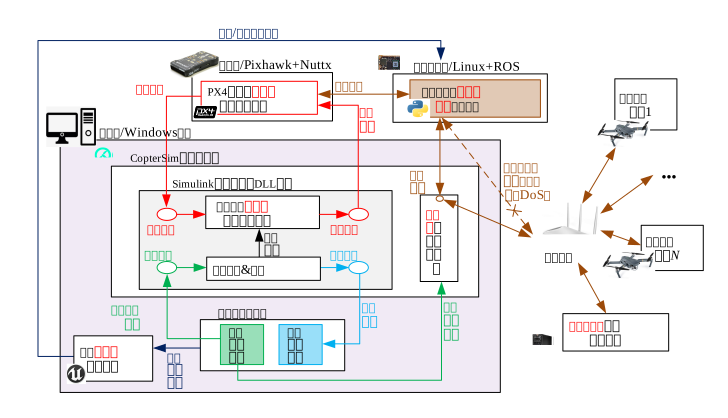
7.2.1 Fault Modeling and Injection Framework
The fault modeling and injection framework supports multi-layer fault injection across model, firmware, environment, communication, intelligent algorithm, and swarm task layers. It accommodates typical fault scenarios—including sensor failures, motor malfunctions, and communication interruptions—enabling multi-dimensional, multi-level validation of system robustness.
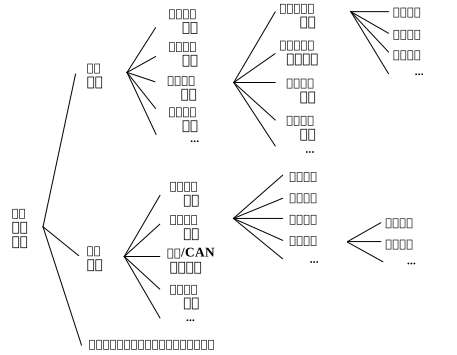
7.2.2 Evaluation and Diagnosis Algorithm Development Framework
Leveraging dual-channel interfaces for Simulink/DLL models and flight controllers, this framework enables structured test case design and automatic triggering mechanisms, supporting a unified evaluation workflow across simulation and real-world phases. Through flight controller log parsing and safety metric computation, it facilitates multi-dimensional performance analysis—including mission success rate, fault recovery capability, and more.
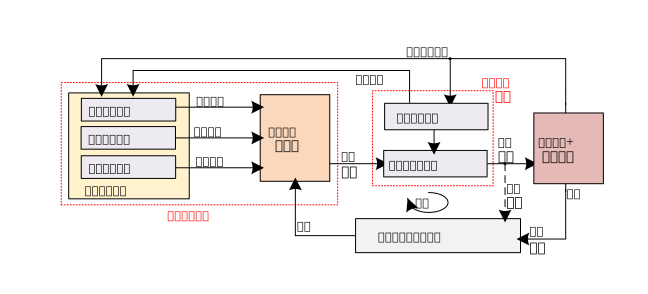
7.3 Showcase of Representative Cases
Fault Injection Experiment:
Fault Injection and Diagnosis Algorithm Validation:
7.4 Course-Linked Video Lectures
Public Lecture Replay for This Chapter (Session 6: Health Management and Societal Safety Assessment):
7.5 Chapter Experiment Cases
The relevant verification experiments and guided cases for this chapter are stored in the [Installation Directory]\RflySimAPIs\7.RflySimPHM folder.
7.5.1 Interface Learning Experiments
Stored in the 7.RflySimPHM\0.ApiExps folder, these experiments cover foundational platform interface tutorials and general introductions to various tools.
Experiment 1: Signal Tag Module Usage Example
- 📦 Version Requirement:
Free Edition - 📁 File Path: e1_SignTAG/Readme.pdf
📝 Experiment Overview:
Learn the usage of Goto and From blocks in Simulink, master the method of broadcasting and receiving data via tag labels, and observe the message after the From tag.
Experiment 2: Fault Parameter Encapsulation Structure
- 📦 Version Requirement:
Free Edition - 📁 File Path: e2_FaultParamStruct/Readme.pdf
📝 Experiment Overview:
Learn how to read required fault parameters from the MATLAB workspace by creating encapsulated parameters, and master the method of referencing workspace variables using the Constant block in Simulink.
Experiment 3: RflySim Fault Injection MATLAB API Test
- 📦 Version Requirement:
Free Edition - 📁 File Path: e3_FaultInjectAPITest_mat/Readme.pdf
📝 Experiment Overview:
Send fault injection parameters via UDP mode using MATLAB/Simulink, learn the method of setting fault IDs and fault parameters, and master fault injection techniques for motors, propellers, batteries, GPS, etc.
Experiment 4: Fault Injection API Test
- 📦 Version Requirement:
Free Edition - 📁 File Path: e4_FaultInjectAPITest_py/Readme.pdf
📝 Experiment Overview:
Learn to send fault injection parameters via UDP mode, achieve multiple fault injections by modifying fault IDs and parameters, and verify the fault effects.
Experiment 5: PX4 External Message Sending and Receiving
- 📦 Version Requirement:
Free Edition - 📁 File Path: e5_ExtMsgSender/Readme.pdf
📝 Experiment Overview:
Learn to send external messages to PX4 and receive status information via MATLAB/Simulink, and master the usage of the UDP Receiver block (port 30100 is used for fault injection).
Experiment 6: Using the Fault Injection Library
- 📦 Version Requirement:
Free Edition - 📁 File Path: e6_UseFaultLib/Readme.pdf
📝 Experiment Overview:
Learn to use a Simulink model with a motor fault injection module from scratch, and master the method of setting fault switches and adjusting parameters.
Experiment 7: Fault Injection Minimal Template
- 📦 Version Requirement:
Free Edition - 📁 File Path: e7_NoFaultModelMinTemplate/Readme.pdf
📝 Experiment Overview:
Learn to use the RflySim fault injection minimal template, compile the Simulink model to generate a DLL file, and run hardware-in-the-loop simulation in CopterSim to implement UAV fault injection experiments.
Experiment 8: Motor Fault Injection Based on Minimal Template
- 📦 Version Requirement:
Free Edition - 📁 File Path: e8_BaseMotorFault/Readme.pdf
📝 Experiment Overview:
Learn to use a motor fault injection model based on the minimal template, compile with Simulink and generate a DLL, and simulate UAV motor faults in software-in-the-loop simulation.
Experiment 9: Fault Simulation Data Collection Experiment
- 📦 Version Requirement:
Free Edition - 📁 File Path: e9_data_collect/Readme.pdf
📝 Experiment Overview:
Collect UAV flight data under different fault conditions using automated scripts, providing training and validation data for fault diagnosis, predictive maintenance, and intelligent decision-making systems.
Experiment 10: PHM Flight Data Processing
- 📦 Version Requirement:
Free Edition - 📁 File Path: e10_data_process/Readme.pdf
📝 Experiment Overview:
Convert ULog flight logs to CSV format using Python scripts, perform data filtering, cleaning, time alignment, and feature engineering, and generate a processed_data.csv table directly usable for neural network training.
Experiment 11: RflySimPHM Model Validation and Data Collection
- 📦 Version Requirement:
Free Edition - 📁 File Path: e11_moder_ver/Readme.pdf
📝 Experiment Overview:
Conduct UAV health management (PHM) experiments using the RflySim toolchain, learn to use machine learning models for fault prediction and health status assessment, and support software/hardware-in-the-loop simulation.
Experiment 12: Health Assessment Basic Experiment
- 📦 Version Requirement:
Free Edition - 📁 File Path: e12_health_basic/Readme.pdf
📝 Experiment Overview:
Collect UAV operational data through simulation, learn the implementation method of health assessment algorithms, including fault judgment and fault injection functionality.
Experiment 13: Model Training
- 📦 Version Requirement:
Free Edition - 📁 File Path: e13_model_train/Readme.pdf
📝 Experiment Overview:
Train a model using a neural network to verify the health status of the flight control system, and learn to build and train a two-layer hidden layer neural network using Keras.
Experiment 14: Automated Generation of UAV Sensor Fault Test Cases
- 📦 Version Requirement:
Free Edition - 📁 File Path: e14_DBExp/Readme.pdf
📝 Experiment Overview:
Implement automated generation and database import of UAV sensor fault test cases. Use Python scripts to automatically generate test cases for accelerometers, gyroscopes, magnetometers, barometers, GPS, etc., and store them in an SQLite database.
Experiment 15: Custom Control Sequence Configuration and Usage
- 📦 Version Requirement:
Free Edition - 📁 File Path: e15_CmdExp/Readme.pdf
📝 Experiment Overview:
Learn to configure and run custom control sequences using the RflySim toolchain, generate UAV control commands by parsing the db.json file, and implement hardware or software-in-the-loop simulation.
Experiment 16: QGC Log Automatic Download
- 📦 Version Requirement:
Free Edition - 📁 File Path: e16_QGCLoadExp/Readme.pdf
📝 Experiment Overview:
Implement automatic download of QGC ground station logs using Python scripts, master the usage of the qgc.ReqQgcLog() function, and learn the acquisition and management of UAV flight logs.
Experiment 17: Visual Custom Control Sequence Configuration and Usage
- 📦 Version Requirement:
Free Edition - 📁 File Path: e17_VisCmdExp/Readme.pdf
📝 Experiment Overview:
Learn how to configure and use custom control sequences with vision, map control commands by parsing the db.json file, and verify execution effects in the simulation environment.
Experiment 18: Fault Log Timestamp Acquisition Experiment
- 📦 Version Requirement:
Free Edition - 📁 File Path: e18_FaultLogTimestamp/Readme.pdf
📝 Experiment Overview:
Master the method of obtaining fault injection timestamps from flight controller logs, and learn to use the RflySim toolchain for fault injection and log parsing.
7.5.2 Basic Usage Experiments
Stored in the 7.RflySimPHM\1.BasicExps folder, these experiments provide a comprehensive set of supplementary teaching materials for beginners.
Experiment 1: Maximum Fault Injection Template
- 📦 Version Requirement:
Free Edition - 📁 File Path: e1_NoFaultModelMaxTemplate/Readme.pdf
📝 Experiment Overview:
Learn the usage of the maximum fault injection template, including initialization, compilation, DLL file generation, and running software-in-the-loop simulation. Understand the differences between the minimum and maximum templates and the types of injectable faults.
Experiment 2: GPS Module Fault Injection
- 📦 Version Requirement:
Free Edition - 📁 File Path: e2_GPSFault/Readme.pdf
📝 Experiment Overview:
Learn to use the GPS fault injection module in the maximum template of the RflySim toolchain. Compile the Simulink model to generate a DLL file, inject GPS faults using a Python script, and observe the drone's automatic landing process after losing the GPS signal.
Experiment 3: Motor Module Fault Injection
- 📦 Version Requirement:
Free Edition - 📁 File Path: e3_MotorFault/Readme.pdf
📝 Experiment Overview:
Based on the principle of motor module fault injection using the maximum template, compile the Simulink model to generate a DLL file, inject motor faults using a Python script, and observe drone crashes or motor failure phenomena.
Experiment 4: Sensor Module Fault Injection
- 📦 Version Requirement:
Free Edition - 📁 File Path: e4_SensorFault/Readme.pdf
📝 Experiment Overview:
Learn the principles of fault injection for four sensor types (accelerometer, gyroscope, magnetometer, barometer) based on the maximum template. Implement fault injection via Simulink model compilation and Python scripts, and verify the effects by reading logs.
Experiment 5: Environmental Wind Fault Injection
- 📦 Version Requirement:
Free Edition - 📁 File Path: e5_WindFault/Readme.pdf
📝 Experiment Overview:
Learn environmental wind module fault injection based on the maximum template. Use Python scripts to inject four types of wind faults (steady wind, gust wind, turbulent wind, and shear wind) into the Simulink simulation and observe the drone's response.
Experiment 6: Load Module Fault Injection
- 📦 Version Requirement:
Free Edition - 📁 File Path: e6_LoadFault/Readme.pdf
📝 Experiment Overview:
Learn the method of load module fault injection based on the maximum template, including the principles and implementation of load fault, load drift fault, and load leakage fault.
Experiment 7: Propeller Module Fault Injection
- 📦 Version Requirement:
Free Edition - 📁 File Path: e7_PropFault/Readme.pdf
📝 Experiment Overview:
Learn propeller module fault injection based on the maximum template. Compile the Simulink model to generate a DLL file and use a Python script to inject propeller efficiency faults, observing the drone crash phenomenon.
Experiment 8: Battery Module Fault Injection Based on Maximum Template
- 📦 Version Requirement:
Free Edition - 📁 File Path: e8_BatteryFault/Readme.pdf
📝 Experiment Overview:
Learn to use the RflySim toolchain and the maximum template method. Generate a DLL file from the Simulink model to implement battery failure, low voltage, and low battery fault injection, and perform simulation verification in CopterSim.
7.5.3 Advanced Development Experiments
Stored in the 7.RflySimPHM\2.AdvExps folder, these experiments further familiarize users with the configuration of certain underlying firmware ecosystems.
Experiment 1: Full Fault Module Template Experiment
- 📦 Version Requirement:
Free Edition - 📁 File Path: e1_FullFaultModelTemplate/Readme.pdf
📝 Experiment Overview:
Model all fault modules based on the maximum template. Export the model as a DLL file, load it via CopterSim, and inject fault codes using the UDP protocol to achieve concurrent multi-fault simulation.
Experiment 2: Fault Generation and Injection GUI Application
- 📦 Version Requirement:
Free Edition - 📁 File Path: e2_FailureGeneratorGUIAPP/Readme.pdf
📝 Experiment Overview:
Based on the maximum template for various fault injections, design a MATLAB APP that can inject various fault parameters into the model. Inject the generated faults into the software-in-the-loop simulation to achieve the fault injection effect.
Experiment 3: PX4 Fault Injection Experiment
- 📦 Version Requirement:
Free Edition - 📁 File Path: e3_PX4FailureGenerator/Readme.pdf
📝 Experiment Overview:
This experiment implements fault injection by directly modifying the PX4 source code, compiling the firmware and flashing it to the flight controller. Use hardware-in-the-loop simulation and Python scripts to send fault parameters, demonstrating the fault injection effect.
Experiment 4: Single-Unit Single-Instance Automated Testing
- 📦 Version Requirement:
Free Edition - 📁 File Path: e4_SingFramSingleInsExp/Readme.pdf
📝 Experiment Overview:
Master the basic structure and workflow of the automated testing platform. Through a single-drone, single-instance automated testing experiment, learn simulation environment initialization, Python script execution, and test data verification.
Experiment 5: Single-Unit Multi-Instance Automated Testing
- 📦 Version Requirement:
Free Edition - 📁 File Path: e5_SingFrameMultiInsExp/Readme.pdf
📝 Experiment Overview:
Master the basic structure and workflow of single-unit multi-instance automated testing on the automated testing platform. Configure simulation parameters and run Python scripts to achieve multi-drone automated testing and data recording.
Experiment 6: Multi-Model Single-Instance Automated Testing
- 📦 Version Requirement:
Free Edition - 📁 File Path: e6_MultiFrameSingleInsExp/Readme.pdf
📝 Experiment Overview:
Master the basic structure and workflow of multi-model single-instance automated testing on the RflySim automated testing platform. Configure one quadcopter and one fixed-wing aircraft, automatically execute test cases, and record data.
Experiment 7: Multi-Model Multi-Instance Automated Testing
- 📦 Version Requirement:
Free Edition - 📁 File Path: e7_MultiFrameMultiInsExp/Readme.pdf
📝 Experiment Overview:
Master the basic structure and workflow of multi-model multi-instance automated testing on the RflySim automated testing platform, including steps such as configuring simulation parameters, running Python scripts, and checking test data.
Experiment 8: Safety Assessment Experiment
- 📦 Version Requirement:
Free Edition - 📁 File Path: e8_SafetyAssExp/Readme.pdf
📝 Experiment Overview:
Master the basic structure and workflow of the safety assessment algorithm. Use Python scripts to set parameters and call the API to output the drone's safety score and level.
Experiment 9: Trajectory Tracking Experiment
- 📦 Version Requirement:
Free Edition - 📁 File Path: e9_SetpointCtrlExp/Readme.pdf
📝 Experiment Overview:
Master the basic structure and workflow of trajectory tracking. Configure control sequences and parameters using Python scripts to achieve automatic drone trajectory tracking simulation.
Experiment 10: Single-Unit Multi-Instance Automated Testing on Automated Testing Platform
- 📦 Version Requirement:
Free Edition - 📁 File Path: e5_SingFrameMultiInsExp/BK/Readme.pdf
📝 Experiment Overview:
Master the basic structure and workflow of single-unit multi-instance automated testing on the automated testing platform. Modify Python scripts to achieve multi-drone automated testing.
Experiment 11: Automated Testing Trajectory Tracking
- 📦 Version Requirement:
Free Edition - 📁 File Path: e9_SetpointCtrlExp/BK/Readme.pdf
📝 Experiment Overview:
Master the basic structure and workflow of trajectory tracking. Use Python scripts for parameter setting and algorithm implementation to achieve trajectory tracking.
7.5.4 High-Level Development Experiments
Stored in the 7.RflySimPHM\3.CustExps folder, these experiments are custom development experiments for advanced users.
Experiment 1: Virtual Simulation Experiment for UAV Fault Diagnosis Based on Digital Twin and Deep Learning
- 📦 Version Requirement:
Full Edition - 📁 File Path: e1_DigitalTwinExp/Readme.pdf
📝 Experiment Overview:
By constructing a digital twin system for UAVs, this experiment utilizes a virtual-virtual simulation mode and a bidirectional LSTM deep learning model to analyze sensor data discrepancies, enabling automatic detection and classification of typical UAV faults.
Experiment 1: Usage of Signal Tag Modules
- 📦 Version Requirement:
Free Edition - 📁 File Path: e1_SignTAG/Readme.pdf
📝 Experiment Overview:
Learn the usage of Goto and From blocks in Simulink, master the method of broadcasting and receiving data via tag labels, and observe the message reception after the From tag.
Experiment 2: Learning and Using Fault Parameters and Module Encapsulation Parameter References
- 📦 Version Requirement:
Free Edition - 📁 File Path: e2_FaultParamStruct/Readme.pdf
📝 Experiment Overview:
Learn to read required fault parameters from the MATLAB workspace by creating encapsulated parameters and reference them in Simulink to achieve fault injection and parameter management.
Experiment 3: RflySim Fault Injection MATLAB API Test
- 📦 Version Requirement:
Free Edition - 📁 File Path: e3_FaultInjectAPITest_mat/Readme.pdf
📝 Experiment Overview:
Send fault injection parameters via UDP mode using MATLAB/Simulink, learn the method of setting fault IDs and fault parameters, and master fault injection techniques for motors, propellers, batteries, GPS, etc.
Experiment 4: Fault Injection API Test
- 📦 Version Requirement:
Free Edition - 📁 File Path: e4_FaultInjectAPITest_py/Readme.pdf
📝 Experiment Overview:
Learn to send fault injection parameters via UDP mode, master the usage of the sendSILIntFloat function in the PX4MavCtrlV4 library, and achieve fault injection effects.
Experiment 5: PX4 External Message Sending and Receiving
- 📦 Version Requirement:
Free Edition - 📁 File Path: e5_ExtMsgSender/Readme.pdf
📝 Experiment Overview:
Learn to send external messages to PX4 and receive status information via MATLAB/Simulink, and master the usage of the UDP Receiver block (port 30100 is used for fault injection).
Experiment 6: Learning and Using the Motor Fault Injection Module
- 📦 Version Requirement:
Free Edition - 📁 File Path: e6_UseFaultLib/Readme.pdf
📝 Experiment Overview:
Learn to use a Simulink model with a motor fault injection module from scratch, master the steps of initialization, opening the model, setting fault switches and parameters, and implementing motor fault injection.
Experiment 7: Fault Injection Minimal Template
- 📦 Version Requirement:
Free Edition - 📁 File Path: e7_NoFaultModelMinTemplate/Readme.pdf
📝 Experiment Overview:
Learn the usage of the fault injection minimal template, including data initialization, model compilation, DLL file generation, and running hardware-in-the-loop simulation scripts to achieve normal UAV takeoff.
Experiment 8: Motor Fault Injection Based on Minimal Template
- 📦 Version Requirement:
Free Edition - 📁 File Path: e8_BaseMotorFault/Readme.pdf
📝 Experiment Overview:
Learn the motor fault injection method based on the minimal template, observe UAV fault behavior by modifying fault parameters and simulating, and master the configuration and usage of the fault injection model.
Experiment 9: Fault Simulation Data Collection Experiment
- 📦 Version Requirement:
Free Edition - 📁 File Path: e9_data_collect/Readme.pdf
📝 Experiment Overview:
Simulate UAV fault scenarios in SITL or HITL simulation environments using automated scripts, collect flight data for training and validation of fault diagnosis, predictive maintenance, and intelligent decision-making systems.
Experiment 10: PHM Flight Data Processing
- 📦 Version Requirement:
Free Edition - 📁 File Path: e10_data_process/Readme.pdf
📝 Experiment Overview:
Convert ULog flight logs to CSV format using Python scripts, perform data filtering, cleaning, time alignment, and feature engineering, and generate a processed_data.csv table directly usable for neural network training.
Experiment 11: UAV Health Status Prediction and Fault Injection Experiment Based on Machine Learning
- 📦 Version Requirement:
Free Edition - 📁 File Path: e11_moder_ver/Readme.pdf
📝 Experiment Overview:
This experiment uses the RflySim toolchain and a TensorFlow model to predict UAV health status, and supports software/hardware-in-the-loop simulation and fault injection to verify the accuracy of the fault model.
Experiment 12: Health Assessment Basic Experiment
- 📦 Version Requirement:
Free Edition - 📁 File Path: e12_health_basic/Readme.pdf
📝 Experiment Overview:
Collect UAV operational data through simulation, master the implementation method of health assessment algorithms, including fault judgment and fault injection functionality.
Experiment 13: Neural Network Training Model
- 📦 Version Requirement:
Free Edition - 📁 File Path: e13_model_train/Readme.pdf
📝 Experiment Overview:
Train a two-layer hidden layer neural network model by running the Model-training.ipynb file to determine system health status, and learn neural network structure, compilation, and optimization methods.
Experiment 14: Automated Generation of UAV Sensor Fault Test Cases
- 📦 Version Requirement:
Free Edition - 📁 File Path: e14_DBExp/Readme.pdf
📝 Experiment Overview:
Implement automated generation and database import of UAV sensor fault test cases. Use Python scripts to automatically generate test cases for accelerometers, gyroscopes, magnetometers, barometers, GPS, etc., and store them in an SQLite database.
Experiment 15: Custom Control Sequence Configuration and Usage
- 📦 Version Requirement:
Free Edition - 📁 File Path: e15_CmdExp/Readme.pdf
📝 Experiment Overview:
Learn how to configure and use custom control sequences, map control commands by parsing the db.json file, and implement flight control in hardware-in-the-loop and software-in-the-loop simulations.
Experiment 16: QGC Log Automatic Download
- 📦 Version Requirement:
Free Edition - 📁 File Path: e16_QGCLoadExp/Readme.pdf
📝 Experiment Overview:
Implement automatic download of QGC ground station logs using Python scripts, master the usage of the qgc.ReqQgcLog() function, and learn the acquisition and management of UAV flight logs.
Experiment 17: Visual Custom Control Sequence Configuration and Usage
- 📦 Version Requirement:
Free Edition - 📁 File Path: e17_VisCmdExp/Readme.pdf
📝 Experiment Overview:
Learn how to configure and use custom control sequences with vision, map control commands by parsing the db.json file, and implement UAV visual control simulation.
Experiment 18: Fault Injection and Flight Controller Log Timestamp Acquisition Experiment
- 📦 Version Requirement:
Free Edition - 📁 File Path: e18_FaultLogTimestamp/Readme.pdf
📝 Experiment Overview:
This experiment uses the RflySim toolchain to inject motor faults in UAV software-in-the-loop simulation, and uses flight controller logs to obtain fault injection timestamps, learning fault injection mechanisms and log parsing methods.
7.5.2 Basic Usage Experiments
Stored in the 7.RflySimPHM\1.BasicExps folder, these experiments provide a comprehensive set of supplementary teaching materials for beginners.
Experiment 1: Maximum Fault Injection Template
- 📦 Version Requirement:
Free Edition - 📁 File Path: e1_NoFaultModelMaxTemplate/Readme.pdf
📝 Experiment Overview:
Learn the usage of the maximum fault injection template, including initialization, compilation to generate a DLL, and running software-in-the-loop simulation. Understand the differences between the minimum and maximum templates and the types of injectable faults.
Experiment 2: GPS Fault Injection Experiment
- 📦 Version Requirement:
Free Edition - 📁 File Path: e2_GPSFault/Readme.pdf
📝 Experiment Overview:
Based on the maximum template for GPS fault injection, learn the GPS fault injection principle, module structure, and parameter settings. Implement GPS fault injection via Simulink and Python, and observe the drone's automatic landing.
Experiment 3: Motor Module Fault Injection
- 📦 Version Requirement:
Free Edition - 📁 File Path: e3_MotorFault/Readme.pdf
📝 Experiment Overview:
Learn the motor fault injection principle based on the maximum template. Compile the Simulink model to generate a DLL file, inject motor faults using a Python script, observe the drone crash phenomenon, and master fault ID and parameter settings.
Experiment 4: Sensor Module Fault Injection Based on Maximum Template
- 📦 Version Requirement:
Free Edition - 📁 File Path: e4_SensorFault/Readme.pdf
📝 Experiment Overview:
Learn the sensor module fault injection principle based on the maximum template. Compile the Simulink model to generate a DLL file, inject sensor faults such as accelerometer faults using a Python script, and observe the drone's attitude control disturbance and verify the effects via logs.
Experiment 5: Environmental Wind Module Fault Injection Based on Maximum Template
- 📦 Version Requirement:
Free Edition - 📁 File Path: e5_WindFault/Readme.pdf
📝 Experiment Overview:
Learn to use the RflySim toolchain to inject environmental wind faults (steady wind, gust wind, turbulent wind, and shear wind) into the drone via the Simulink maximum template and Python scripts, and observe the fault effects.
Experiment 6: Load Module Fault Injection Based on Maximum Template
- 📦 Version Requirement:
Free Edition - 📁 File Path: e6_LoadFault/Readme.pdf
📝 Experiment Overview:
Learn to use the maximum template model for load fault injection, including three types: load fault, load drift, and load leakage. Master fault parameter settings and simulation verification methods.
Experiment 7: Propeller Module Fault Injection Based on Maximum Template
- 📦 Version Requirement:
Free Edition - 📁 File Path: e7_PropFault/Readme.pdf
📝 Experiment Overview:
This experiment learns the propeller module fault injection method based on the maximum template. Implement propeller efficiency fault injection through Simulink modeling, DLL generation, and Python scripts, and observe the drone crash effect.
Experiment 8: Battery Module Fault Injection Based on Maximum Template
- 📦 Version Requirement:
Free Edition - 📁 File Path: e8_BatteryFault/Readme.pdf
📝 Experiment Overview:
Learn to use the RflySim toolchain to inject battery failure, low voltage, and low battery faults into the PX4 flight controller via the maximum template model, and complete software/hardware-in-the-loop simulation experiments.
7.5.3 Advanced Development Experiments
Stored in the 7.RflySimPHM\2.AdvExps folder, these experiments further familiarize users with the configuration of certain underlying firmware ecosystems.
Experiment 1: Full Fault Model Template Fault Injection
- 📦 Version Requirement:
Free Edition - 📁 File Path: e1_FullFaultModelTemplate/Readme.pdf
📝 Experiment Overview:
Model all fault modules based on the maximum template. Compile the model into a DLL file, load it via CopterSim, and inject fault codes using the UDP protocol to achieve concurrent multi-fault simulation. Learn fault injection principles and DLL technology.
Experiment 2: Fault Generation and Injection GUI Application
- 📦 Version Requirement:
Free Edition - 📁 File Path: e2_FailureGeneratorGUIAPP/Readme.pdf
📝 Experiment Overview:
Based on the full fault injection template, design a fault injection interface using a MATLAB APP to inject various fault parameters into the software-in-the-loop simulation to observe fault effects.
Experiment 3: PX4 Fault Injection Experiment
- 📦 Version Requirement:
Free Edition - 📁 File Path: e3_PX4FailureGenerator/Readme.pdf
📝 Experiment Overview:
This experiment implements fault injection by directly modifying the PX4 flight controller source code, compiling the firmware and flashing it to the flight controller. Use Python scripts and hardware-in-the-loop simulation to demonstrate the fault injection effect.
Experiment 4: Single-Unit Single-Instance Automated Testing
- 📦 Version Requirement:
Free Edition - 📁 File Path: e4_SingFramSingleInsExp/Readme.pdf
📝 Experiment Overview:
Master the basic structure and workflow of the automated testing platform. Run the AutoTest.py script to achieve automated simulation testing for a single drone with a single instance, and analyze the test results.
Experiment 5: Single-Unit Multi-Instance Automated Testing
- 📦 Version Requirement:
Free Edition - 📁 File Path: e5_SingFrameMultiInsExp/Readme.pdf
📝 Experiment Overview:
Master the basic structure and workflow of single-unit multi-instance automated testing on the automated testing platform. Configure multiple drone instances to achieve automated testing and data recording.
Experiment 6: Multi-Model Single-Instance Automated Testing
- 📦 Version Requirement:
Free Edition - 📁 File Path: e6_MultiFrameSingleInsExp/Readme.pdf
📝 Experiment Overview:
Master the basic structure and workflow of multi-model single-instance automated testing on the automated testing platform. Configure test cases for a quadcopter and a fixed-wing aircraft, run automated scripts, and analyze test data.
Experiment 7: Multi-Model Multi-Instance Automated Testing
- 📦 Version Requirement:
Free Edition - 📁 File Path: e7_MultiFrameMultiInsExp/Readme.pdf
📝 Experiment Overview:
Master the basic structure and workflow of multi-model (quadcopter, fixed-wing) multi-instance automated testing on the RflySim automated testing platform, including steps such as configuring simulation parameters, running test scripts, and checking test data.
Experiment 8: Safety Assessment Experiment
- 📦 Version Requirement:
Free Edition - 📁 File Path: e8_SafetyAssExp/Readme.pdf
📝 Experiment Overview:
Master the basic structure and workflow of the safety assessment algorithm. Use Python scripts to call the ProfustSA module to perform safety assessment on drone velocity data, outputting the safety score and level.
Experiment 9: Trajectory Tracking Experiment
- 📦 Version Requirement:
Free Edition - 📁 File Path: e9_SetpointCtrlExp/Readme.pdf
📝 Experiment Overview:
Master the basic structure and workflow of trajectory tracking. Configure control sequences and parameters using Python scripts to achieve drone flight along the expected route in software-in-the-loop simulation, and analyze flight data.
Experiment 10: Single-Unit Multi-Instance Automated Testing
- 📦 Version Requirement:
Free Edition - 📁 File Path: e5_SingFrameMultiInsExp/BK/Readme.pdf
📝 Experiment Overview:
Master the basic structure and usage workflow of single-unit multi-instance automated testing on the automated testing platform. Modify Python scripts to achieve multi-drone automated testing.
Experiment 11: Automated Testing Trajectory Tracking
- 📦 Version Requirement:
Free Edition - 📁 File Path: e9_SetpointCtrlExp/BK/Readme.pdf
📝 Experiment Overview:
Master the basic structure and usage workflow of trajectory tracking. Use Python scripts for parameter setting and algorithms to achieve drone trajectory tracking, with support for custom trajectories.
7.5.4 High-Level Development Experiments
Stored in the 7.RflySimPHM\3.CustExps folder, these experiments are custom development experiments for advanced users.
Experiment 1: Virtual Simulation Experiment for UAV Fault Diagnosis Based on Digital Twin and Deep Learning
- 📦 Version Requirement:
Full Edition - 📁 File Path: e1_DigitalTwinExp/Readme.pdf
📝 Experiment Overview:
This experiment constructs a digital twin system for UAVs, utilizing a virtual-virtual simulation mode combined with a bidirectional LSTM deep learning model to achieve automatic detection and classification of typical UAV faults.
Experiment 1: Virtual Simulation Experiment for UAV Fault Diagnosis Based on Digital Twin and Deep Learning
- 📦 Version Requirement:
Full Edition - 📁 File Path: e1_DigitalTwinExp/Readme.pdf
📝 Experiment Overview:
This experiment constructs a digital twin system for UAVs, utilizing a virtual-virtual simulation mode combined with a bidirectional LSTM deep learning model to achieve automatic detection and classification of typical UAV faults.