Skip to content

Chapter 5: Filtering Estimation and Low-Level Control

After completing the 3D modeling and motion modeling of the vehicle, the next step is to develop a low-level control system to ensure the vehicle can stably follow predefined commands. For the low-level control system, filtering estimation algorithms are crucial, as they extract precise and smooth state estimates from noisy and erroneous sensor data; low-level control algorithms, based on the filtering estimates and combined with user input commands, drive actuators and power systems to achieve stable vehicle control. This chapter first reviews the relevant background theory of filtering and control, then introduces the design methods, development procedures, and tuning strategies for filters and controllers.


5.1 Background and Theory

In intelligent unmanned systems, the control layer is typically divided into two hierarchical levels: the low-level control system and the high-level control system. The core components of the low-level control system include vehicle filtering and control (covered in this chapter), external control and trajectory planning (detailed in Chapter 6), and health management and safety decision-making (detailed in Chapter 7). Its primary objective is to construct a foundational intelligent agent composed of the vehicle body and control systems, enabling stable and reliable pose and position state perception and control, while receiving decision-making commands from the high-level system via standardized external interfaces.
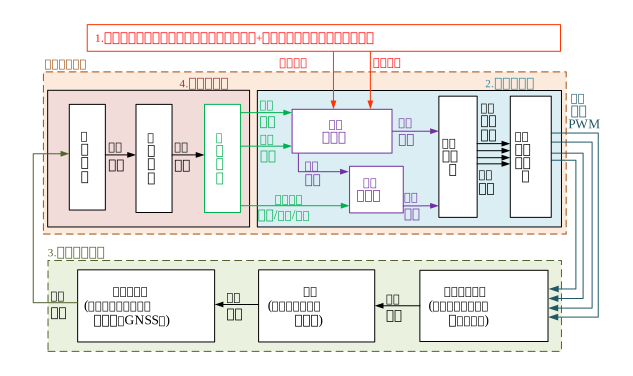
alt text

5.1.1 Filtering Estimation Principles

In intelligent unmanned systems, filters and controllers constitute the two core modules of the low-level control system, directly impacting system stability, accuracy, and autonomy. Specifically, the controller is responsible for real-time adjustment of the unmanned system’s spatial position and attitude, enabling it to follow a predefined trajectory or target; the filter fuses data from multiple sensors to provide accurate state estimation (including pose, velocity, etc.), compensating for noise and errors, thereby delivering reliable state feedback to the controller. These two technologies complement and collaborate with each other, ensuring the unmanned system efficiently and stably executes tasks in complex, dynamic environments.

A typical automatic control system comprises three core components: the plant, the controller, and the feedback loop. The controller computes control commands based on the deviation between the desired value and the actual output; the plant executes corresponding actions according to the control commands; the feedback loop measures the actual state of the plant via sensors and feeds this information back to the controller, forming a closed-loop control system.

5.1.2 Controller Design Fundamentals

In the field of unmanned systems, common control algorithms include PID control, fuzzy control, adaptive control, and sliding mode control. Among them, PID control is widely adopted due to its simple structure and ease of implementation. A PID controller consists of three components—proportional (P), integral (I), and derivative (D)—which collectively regulate the error based on its past, present, and future trends to achieve precise control of the plant.
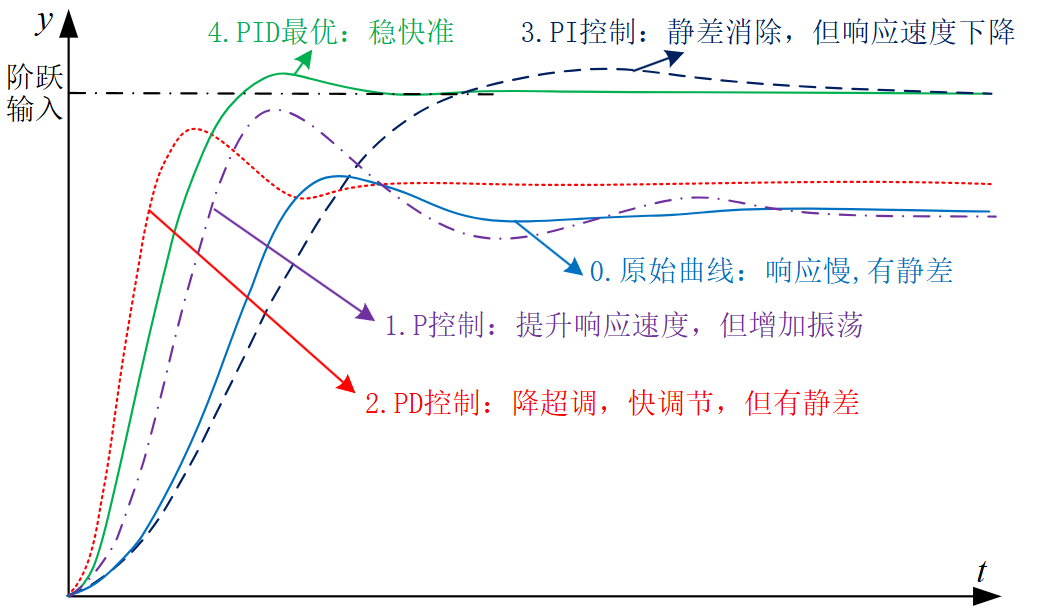
alt text

For multi-rotor UAVs, a typical control architecture employs a cascaded control scheme: the outer loop handles position control, while the inner loop manages attitude control. The position controller calculates the desired attitude angles based on the target position; the attitude controller then computes motor control commands based on the desired attitude angles, ultimately driving the motors via electronic speed controllers (ESCs) to generate the required thrust and torque.
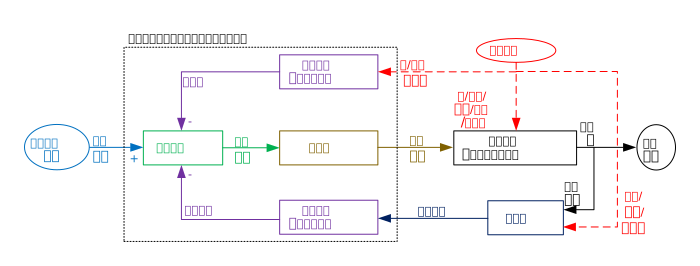
alt text


5.2 Framework and Interfaces

RflySim adopts the Model-Based Design (MBD) methodology for unmanned system control and safety testing. It implements a complete workflow from design to verification through five stages: modeling, controller design, software-in-the-loop simulation (SIL), hardware-in-the-loop simulation (HIL), and actual flight testing.
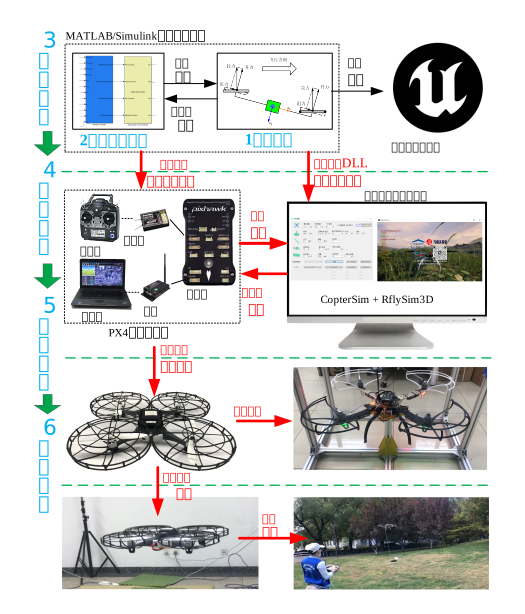
alt text

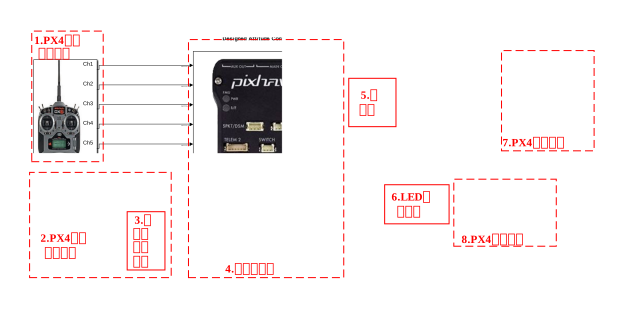
MATLAB/Simulink provides interfaces for multi-rotor controller design, enabling users (including beginners, students, and engineers) to rapidly design and validate controllers using their existing knowledge. The platform offers a rich library of modules covering core functionalities such as sensor data processing, filter design, attitude control, and position control.
alt text

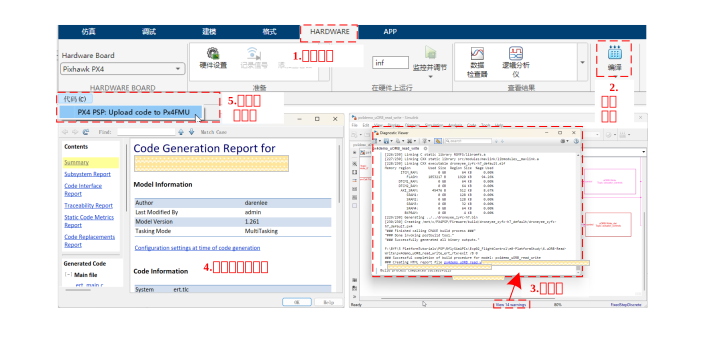
Leveraging MATLAB/Simulink’s automatic code generation technology, the controller can be conveniently downloaded to hardware for HIL simulation and actual flight testing. The development process is as follows: first, design and simulate the controller in Simulink; then, use the PX4PSP toolbox to generate C/C++ code; next, compile the generated code into the PX4 autopilot firmware; finally, automatically deploy it to the flight controller hardware using the download functionality provided by the toolchain.

5.2.2 Code Generation and Firmware Deployment

After completing the controller design, the RflySim toolchain provides code generation and download functionality, enabling the generated Simulink control algorithm to be converted into C/C++ code, compiled into the PX4 autopilot firmware, and automatically downloaded to the autopilot. The toolchain also supports hardware-in-the-loop simulation testing, allowing users to conduct preliminary flight performance simulations on real Pixhawk autopilot hardware, thereby identifying and resolving potential issues before actual flight tests.
alt text

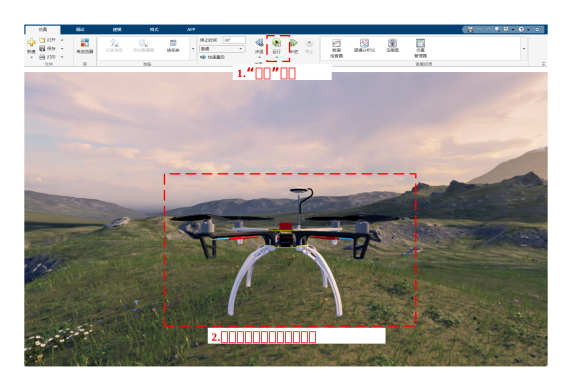
After successful testing, the Pixhawk autopilot can be mounted onto the multi-rotor hardware system to conduct indoor and outdoor flight experiments, evaluating the performance of the designed control algorithm through experimental validation.

5.2.3 Sensor Interface and Data Acquisition

For sensor calibration and filter design, acquisition of raw sensor data is required. RflySim provides a complete sensor interface. For controller operation, filtered attitude and position information, along with remote controller input commands, are needed to generate motor control laws. The toolchain supports real-time acquisition of autopilot internal state data—including raw sensor data, filtered state estimates, and control commands—via the MAVLink protocol.
alt text


5.3 Showcase of Representative Cases

Autopilot Low-Level Control Development Series Course:

Feisi X150 Aircraft Bench Experiment:

Degraded Control for Quadcopter with Three-Motor Failure:


Public Lecture Replay (Session 4: Filtering Estimation and Low-Level Control):

5.5 Chapter Experiment Cases

The related verification experiments and guided cases for this chapter are stored in the [Installation Directory]\RflySimAPIs\5.RflySimFlyCtrl folder.

5.5.1 Interface Learning Experiments

Stored in the 5.RflySimFlyCtrl\0.ApiExps folder, covering foundational platform interface tutorials and general introductions to various tools.

Experiment 1: Installation of Low-Level Flight Controller Development Resource Files

📝 Experiment Overview: Introduces driver software and learning resources required for RflySim experiments, including installation and configuration of the 3DR-X 6-channel telemetry driver and standard documentation for Pixhawk 6X/6C flight controller hardware.

Experiment 2: Automatic Code Generation for SITL Full-Throttle Motor Control

📝 Experiment Overview: Learn automatic code generation using Simulink TLC language, converting controller models into PX4 flight controller code, and verifying the correctness of the generated full-throttle motor control code in the RflySim SITL simulation environment.

Experiment 3: Software-in-the-Loop Simulation Experiment

📝 Experiment Overview: Software-in-the-loop simulation experiment based on the Simulink/RflySim3D platform. Learn to use a Simulink controller to arm and remotely control a quadcopter, gaining familiarity with core modules such as controller subsystems, attitude control, and motor allocation.

Experiment 4: Real-Time Parameter Adjustment via QGC
  • 📦 Version Requirement: Free Edition

    📝 Experiment Overview:
    Observe flight status in real time using QGroundControl (QGC) and tune Pixhawk flight controller parameters SL_RFLY_FLT and SL_RFLY_INT to achieve optimal control performance.

Experiment 5: Flight Controller State Data Acquisition

📝 Experiment Overview:
Acquire key vehicle state data—including attitude, battery status, sensor fusion, GPS, and IMU data—via RflySim’s low-level development interface. Learn to monitor flight controller status using uORB message reading interfaces.

Experiment 6: Autopilot CPU Usage Monitoring

📝 Experiment Overview:
This experiment demonstrates how to monitor the CPU usage of the PX4 autopilot system via the Mavlink console in QGroundControl. Learn to use the top command and px4_simulink_app-related commands to monitor flight controller load, avoiding experiment failure due to CPU overload caused by overly complex algorithms.

Experiment 7: Resource Usage Comparison of Simulink Function Blocks

📝 Experiment Overview:
Compare resource usage of M-Function and S-Function blocks in Simulink on flight controller hardware. By running an accumulation algorithm on the Pixhawk6C, this experiment demonstrates that S-Function consumes less CPU and memory resources than M-Function.

Experiment 8: RC Receiver Signal Processing Module

📝 Experiment Overview:
Validate RC receiver signal processing functionality, including the InputRcCali calibration module, InputRcNorm normalization module, and RCOverCtrlAPI manual control override feature, ensuring accurate and reliable flight control via the remote controller.

Experiment 9: Actuator Control Signal API Experiment

📝 Experiment Overview:
Drive the inPWMs input of CopterSim by sending actuator_outputs_rfly messages, enabling PWM control, normalized control, 4D/6D torque-thrust control, and PWM/AUX output testing. This validates the control performance of Simulink-based controllers in actual flight scenarios.

Experiment 10: Offboard Control API Validation Experiment

📝 Experiment Overview:
Learn various control modes in Offboard mode—including position, velocity, acceleration, Euler angle, and attitude rate control—by utilizing interfaces such as OffboardAdvCtrlAPI and OffboardAttCtrlAPI to validate external computer-based drone control.

Experiment 11: Mavros Communication API Simulation Control

📝 Experiment Overview:
Learn to use the Mavros communication interface, including hardware-in-the-loop (HIL), software-in-the-loop (SIL) simulations, and C++ testing experiments in both ROS 1 and ROS 2 environments.

Experiment 12: VTOL PWM Output Hardware-in-the-Loop Testing

📝 Experiment Overview:
Based on the Pixhawk 6X flight controller running PX4 firmware v1.15.0, this experiment achieves real PWM output during hardware-in-the-loop simulation, synchronously controlling actual motors and servos to validate vertical-takeoff-and-landing (VTOL) aircraft experiments in a hybrid virtual-physical setup.

Experiment 13: Automatic Code Generation for Attitude Controller
  • 📦 Version Requirement: Free Edition

    📝 Experiment Overview: Learn to use the Simulink TLC mechanism for automatic code generation of attitude controllers, and verify the generated flight control code in the RflySim platform’s SITL simulation environment.

Experiment 14: PSP Toolbox Hardware-in-the-Loop Simulation

📝 Experiment Overview: Familiarize yourself with experiment resources provided by PSP. Through the px4demo_input_rc.slx experiment, understand the hardware-in-the-loop simulation workflow, and master methods of accessing flight controller internal parameters via the PSP toolbox for parameter tuning and testing.

Experiment 15: Quadcopter Real-Flight Output Signal Verification

📝 Experiment Overview: This experiment helps users diagnose issues where motors do not spin after arming a quadcopter. It verifies PWM and AUX output interfaces using the Pixhawk 6X flight controller, and teaches the distinction between I/O and FMU, as well as motor drive debugging techniques.

Experiment 16: RePX4Block Controller Switching Experiment

📝 Experiment Overview: This experiment uses the RePX4Block module and RC auxiliary channel (ch8) to achieve real-time switching between the PX4 official controller and a custom Simulink controller, while verifying the corresponding switch prompt logs in QGC.

Experiment 17: Attitude Controller SIL/HIL Real-Flight Experiment

📝 Experiment Overview: Through a complete attitude controller development process, master PID controller design, Simulink Software-in-the-Loop (SIL) simulation, Hardware-in-the-Loop (HIL) simulation, and real-flight verification techniques, completing the full-cycle learning of multirotor attitude control.

Experiment 18: Offboard Forward Control Automatic Code Generation

📝 Experiment Overview: Learn automatic code generation using Simulink TLC language, and master methods for verifying Pixhawk flight controller auto-generated code within the RflySim platform’s SITL simulation environment.

Experiment 19: QGC Flashing Flight Controller Firmware

📝 Experiment Overview: Flash PX4 flight controller firmware using QGC software, familiarize yourself with methods and procedures for firmware restoration, and master firmware version selection and compatibility knowledge.

Experiment 20: Binary Log Recording Module Experiment

📝 Experiment Overview: Use the binary_logger module to write and read flight data in .bin and .ulg formats, gaining familiarity with the underlying operation logic of the PX4 flight controller.

Experiment 21: Custom uORB Message Read/Write

📝 Experiment Overview: Implement read/write functionality by creating custom uORB messages, mastering the internal data exchange mechanism of the PX4 uORB messaging system. Includes experiments on message reading, function-triggered reading, message publishing, and handling inconsistencies between message IDs and filenames.

Experiment 22: Custom uORB Message Creation

📝 Experiment Overview: Implement read/write functionality by creating custom uORB messages, gaining familiarity and mastery of the PX4 uORB messaging system, including message definition, subscription to actuator_armed, and publishing of rfly_px4 messages.

Experiment 23: Mavlink Message Feedback Experiment
  • 📦 Version Requirement: Free Edition

    📝 Experiment Overview: Echoes RC transmitter status via the mavlink_log uORB message to display system runtime status in real time.

Experiment 24: External Parameter Tuning for PX4

📝 Experiment Overview: Sends external rfly_ctrl messages as RC input to achieve hardware-in-the-loop (HITL) simulation of the PX4 flight controller. Covers configuration of external communication interfaces, switching among three control modes, and data exchange methods between Simulink/Python and the flight controller.

Experiment 25: ROS1 Hardware-in-the-Loop Simulation

📝 Experiment Overview: Conducts hardware-in-the-loop simulation in a ROS1 environment. Communicates with the PX4 flight controller via Msg2SimulinkRosAPI.py, observes MAVLink message exchanges, and learns communication methods between ROS1 and the flight controller.

Experiment 26: ROS1 Hardware-in-the-Loop Simulation

📝 Experiment Overview: Conducts software-in-the-loop (SITL) simulation in a ROS1 environment. Uses Msg2SimulinkRosAPI.py and the PX4MavCtrlV4ROS library to exchange data with the Pixhawk flight controller, observing ROS1 message exchange mechanisms.

Experiment 27: ROS1 C++ Communication Test

📝 Experiment Overview: Observes ROS 1 data exchange via a C++ program in the WSL Ubuntu environment, learning the principles and methods of communication between the PX4 flight control system and the ROS interface.

Experiment 28: ROS2 Hardware-in-the-Loop Simulation

📝 Experiment Overview: Conducts hardware-in-the-loop simulation in a ROS2 environment. Communicates with the PX4 flight controller via Msg2SimulinkRosAPI.py, observes ROS2 message exchanges, and learns ROS2 communication interfaces and HITL testing methods.

Experiment 29: ROS2 Software-in-the-Loop Simulation

📝 Experiment Overview: Conducts software-in-the-loop simulation in a ROS 2 environment. Uses the PX4MavCtrlV4ROS library to communicate with and control the PX4 flight controller, mastering data exchange methods between ROS 2 and the flight controller.

Experiment 30: ROS2 C++ Test Experiment

📝 Experiment Overview: Uses a C++ program in the WSL Ubuntu environment to communicate with the PX4 flight controller via MAVLink in ROS 2, achieving data exchange. Supports both SITL and HITL simulation modes. Covers MAVROS interface development, ROS 2 node–flight controller connection configuration, and troubleshooting techniques.

Experiment 31: RflySim Multirotor Frame Type Configuration

📝 Experiment Overview: Selects different multirotor frame types (e.g., Tricopter, Quadrotor, Hexarotor, Octorotor) for simulation by modifying the ModelParam_uavType parameter in Init.m.

Experiment 32: RflySim Multirotor Frame Type Configuration
  • 📦 Version Requirement: Free Edition

    📝 Experiment Overview: Simulate different multi-rotor frame types (Tricopter, Quadrotor, Hexarotor, Octorotor, etc.) by modifying the ModelParam_uavType parameter in Init.m.

Experiment 33: RflySim Multi-Rotor Frame Type Configuration

📝 Experiment Overview: Simulate different multi-rotor frame types (Tricopter, Quadrotor, Hexarotor, Octorotor, etc.) by modifying the ModelParam_uavType parameter in Init.m.

Experiment 34: RflySim Multi-Rotor Frame Type Configuration

📝 Experiment Overview: Simulate different multi-rotor frame types (Tricopter, Quadrotor, Hexarotor, Octorotor, etc.) by modifying the ModelParam_uavType parameter in Init.m.

Experiment 35: RflySim Multi-Rotor Frame Type Configuration

📝 Experiment Overview: Simulate different multi-rotor frame types (Tricopter, Quadrotor, Hexarotor, Octorotor, etc.) by modifying the ModelParam_uavType parameter in Init.m.

5.5.2 Basic Usage Experiments

Stored in the 5.RflySimFlyCtrl\1.BasicExps folder, providing a complete set of supplementary teaching materials for beginners.

Experiment 1: FlightEval Power System Design Experiment

📝 Experiment Overview: Learn the multi-rotor drone power system design process via the FlightEval website, analyze the impact of key parameters (e.g., motors, propellers, batteries) on flight performance, and develop skills in power system selection and design.

Experiment 2: Fixed-Wing UAV Flight Control Design Experiment

📝 Experiment Overview: Master aerodynamic parameter identification and calculation, flight control structure design, and parameter tuning through six-degree-of-freedom dynamic modeling and control system design for fixed-wing UAVs, while gaining a deeper understanding of flight principles, control methods, and simulation techniques.

Experiment 3: Fixed-Wing UAV Equilibrium Point and Modal Analysis

📝 Experiment Overview: This experiment uses MATLAB to analyze equilibrium point calculation, linearization of the state-space model, and modal analysis of fixed-wing UAVs, helping users master UAV stability analysis methods.

Experiment 4: Fixed-Wing UAV Vision-Based Control and Ring Crossing

📝 Experiment Overview: Implement target recognition and autonomous flight control for fixed-wing UAVs based on computer vision, mastering vision-based control algorithm design and ring-crossing strategies. Modeling is performed using MATLAB/Simulink, with support for integration with multiple simulation environments, including RflySim3D and FlightGear.

Experiment 5: Fixed-Wing UAV Waypoint Tracking Control

📝 Experiment Overview: Achieve waypoint tracking control for fixed-wing UAVs along a predefined trajectory, mastering the design of waypoint tracking control algorithms and Offboard-mode control methods.

Experiment 6: Dynamic Modeling and Parameter Analysis of Multirotor UAVs

📝 Experiment Overview:
Analyze the effects of total mass, moments of inertia, and propeller thrust/thrust coefficients on flight performance. Build a complete quadrotor UAV model in MATLAB/Simulink, and gain familiarity with rigid body kinematics/dynamics models as well as attitude representations using Euler angles, quaternions, and rotation matrices.

Experiment 7: Camera Image Acquisition Experiment

📝 Experiment Overview:
Acquire RGB, grayscale, and depth images from three cameras via the Python interface; learn about visual sensor configuration, data transmission, and display settings.

Experiment 8: Simulink-Based Cluster Control of Fixed-Wing UAVs

📝 Experiment Overview:
Implement position control and cooperative swarm simulation for four fixed-wing UAVs using MATLAB/Simulink and the RflySwarmAPI module; master SITL and HITL simulation configuration methods.

Experiment 9: System Identification of Fixed-Wing UAVs

📝 Experiment Overview:
Learn to use the MATLAB System Identification Toolbox to preprocess flight log data and identify transfer function models for the velocity, heading, and altitude channels of a fixed-wing UAV; master the methodology for constructing guidance models.

Experiment 10: Aerodynamic Parameter Identification for Fixed-Wing UAVs

📝 Experiment Overview:
Using the pitch moment channel as an example, identify aerodynamic parameters via least squares and stepwise regression methods; compare and analyze identification performance under different amplitudes and durations of bipolar square-wave excitation signals; learn the process and methodology of aerodynamic parameter identification.

Experiment 11: System Identification of Fixed-Wing UAV Roll Moment Channel

📝 Experiment Overview:
Learn to model the roll moment channel of a fixed-wing UAV using the MATLAB System Identification Toolbox; master data preprocessing, least squares, and stepwise regression techniques for system identification; complete aerodynamic parameter identification and model validation.

Experiment 12: RflySim Sensor Calibration Experiment

📝 Experiment Overview:
Collect accelerometer and gyroscope data using a data acquisition model and flight controller; design complementary and Kalman filters; perform three-axis accelerometer calibration using the Levenberg–Marquardt (LM) algorithm; independently calibrate the magnetometer; understand the impact of filter parameters on filtering performance.

Experiment 13: Fixed-Wing UAV Attitude Control

📝 Experiment Overview:
Build a fixed-wing UAV attitude controller and conduct model-in-the-loop simulation in Simulink; learn cascade PID control architecture and plot attitude response curves.

Experiment 14: Fixed-Wing Flight Control Analysis Experiment

📝 Experiment Overview:
Tune PID controller parameters for the pitch channel of a fixed-wing UAV; plot Bode diagrams to analyze system stability margins; perform control performance analysis and optimization for lateral-directional and altitude/velocity channels.

Experiment 15: Fixed-Wing UAV Attitude Control System Design
  • 📦 Version Requirement: Free Edition

    📝 Experiment Overview: Learn to establish a transfer function model for the attitude control channel of a fixed-wing UAV using MATLAB/Simulink, design a compensator via the Control System Designer to meet performance criteria such as steady-state error, crossover frequency, and phase margin.

Experiment 16: Small Fixed-Wing UAV Attitude Control Simulation Experiment

📝 Experiment Overview: Implement PID control for the altitude and velocity channels of a fixed-wing UAV in hardware-in-the-loop (HIL) simulation, observe step-response tracking performance, and verify the stability of the compensated control system.

Experiment 17: Filter Design Experiment

📝 Experiment Overview: Learn to design complementary and Kalman filters to fuse gyroscope and accelerometer data for attitude angle estimation. Compare results with PX4’s built-in algorithm and analyze the impact of filter parameters on filtering performance.

Experiment 18: Fixed-Wing UAV Path Following Control Experiment

📝 Experiment Overview: Master the principles and implementation of the L1 straight-line following and offset-circle following algorithms for fixed-wing UAVs. Build a path-following control module in MATLAB/Simulink and verify the algorithm’s effectiveness via software-in-the-loop (SIL) simulation.

Experiment 19: Fixed-Wing UAV Dubins Path Planning Experiment

📝 Experiment Overview: Master the principles and implementation of the Dubins path planning algorithm, learn to handle obstacle avoidance and straight-tunnel constraints in path planning, and implement complex-environment path planning via MATLAB programming.

Experiment 20: Fixed-Wing UAV Path Planning and Simulation Experiment

📝 Experiment Overview: Master state-machine-based path-following control methods. Perform path planning simulation in MATLAB/Simulink, convert control algorithms into C code using code generation techniques, and validate the complete path planning and following system via software-in-the-loop simulation.

Experiment 21: Fixed-Wing UAV Hardware-in-the-Loop Simulation

📝 Experiment Overview: Learn to flash control algorithm code onto the Pixhawk flight controller, master hardware-in-the-loop (HIL) simulation methodology on the RflySim platform, and verify the runtime performance of control algorithms on actual flight controller hardware.

Experiment 22: Attitude Controller Design Experiment

📝 Experiment Overview: Design an attitude control system for a quadcopter, including Simulink simulation replication, step-response testing, Bode plot frequency sweeping analysis, PID parameter tuning, and hardware-in-the-loop validation to achieve stable control of both attitude angular rate and angle loops.

Experiment 23: Basic Attitude Controller Design Experiment

📝 Experiment Overview: Design a quadcopter PID attitude controller in Simulink, analyze the role of the control allocator, draw Bode plots to assess stability margins, and complete both software-in-the-loop and hardware-in-the-loop simulations.

Experiment 24: Attitude Control Analysis
  • 📦 Version Requirement: Free Edition

    📝 Experiment Overview:
    Tune PID controller parameters to improve multirotor attitude control performance, record overshoot and settling time; perform frequency sweeping to generate Bode plots for analyzing system amplitude-frequency response and stability margins, thereby mastering the principles of attitude PID control and RflySim hardware-in-the-loop (HIL) simulation.

Experiment 25: Attitude Controller Design

📝 Experiment Overview:
Establish a transfer function model for the attitude control channel, design a PID compensator, and use Bode plots to ensure the angular velocity loop achieves a phase margin >65° and cutoff frequency >10 rad/s, while the attitude loop achieves a phase margin >60° and cutoff frequency >5 rad/s; verify the design via hardware-in-the-loop simulation.

Experiment 26: Attitude Controller Flight Test

📝 Experiment Overview:
Learn attitude controller design and conduct actual flight tests; master Pixhawk firmware flashing, remote controller configuration, and flight log analysis methods.

Experiment 27: Differential Flatness Control Experiment

📝 Experiment Overview:
Understand the principles of differential flatness control, master the relationship between desired trajectories and control inputs; build a differential flatness control module based on the coordinated flight model in Simulink and conduct software-in-the-loop (SIL) simulation to verify tracking performance for simple trajectories in the ENU coordinate system.

Experiment 28: Trajectory Generation Algorithms—Bezier Curves and B-Splines

📝 Experiment Overview:
Learn the principles and MATLAB implementation of Bezier curves and B-spline curves; master the design methods for control point vectors and knot vectors; observe trajectory variation patterns by adjusting parameters.

Experiment 29: Path Planning and Trajectory Tracking for Fixed-Wing UAVs

📝 Experiment Overview:
Perform path planning based on the artificial potential field method, generate smooth flight trajectories using B-splines, and achieve precise trajectory tracking for fixed-wing UAVs via differential flatness control.

Experiment 30: Hardware-in-the-Loop Simulation Verification for Fixed-Wing UAVs

📝 Experiment Overview:
Implement hardware-in-the-loop simulation for fixed-wing UAVs using Simulink; master the complete workflow of control algorithm code generation, deployment onto the Pixhawk flight controller, and automatic route flight verification.

Experiment 31: Point-Position Controller Design Experiment

📝 Experiment Overview:
Replicate the quadrotor Simulink simulation, analyze XY-axis decoupling characteristics, implement point-position control through PID parameter tuning and compensator design, conduct frequency sweeping analysis, and validate via actual flight tests.

Experiment 32: Quadrotor Position Control Fundamentals

📝 Experiment Overview:
Replicate the quadrotor Simulink simulation, analyze x/y-axis channel decoupling; perform frequency sweeping to generate Bode plots and analyze the stability margins of the closed-loop position control system; complete hardware-in-the-loop simulation.

Experiment 33: PID Parameter Tuning and Bode Plot Analysis for Point-Position Control

📝 Experiment Overview:
Improve position control performance by tuning PID controller parameters, record overshoot and settling time; perform frequency sweeping to generate Bode plots and analyze amplitude-frequency response, phase-frequency response, and stability margins.

Experiment 34: RflySim Position Control Design
  • 📦 Version Requirement: Free Edition

    📝 Experiment Overview: Use MATLAB ControlSystemDesigner to establish a transfer function model for the position control channel, design a compensator controller to achieve a phase margin >75° and cutoff frequency >2.0 rad/s for the velocity control loop, and a phase margin >60° and cutoff frequency >1 rad/s for the position control loop. Perform software-in-the-loop (SIL) and hardware-in-the-loop (HIL) simulation verification.

Experiment 35: Multirotor Position Holding Control Flight Test

📝 Experiment Overview: Implement position-holding control flight for the X450 drone using the RflySim toolchain. Learn firmware flashing, remote controller configuration, and aerial hover operations.

Experiment 36: Image-Based Servo Control for Fixed-Wing Aerial Refueling Docking

📝 Experiment Overview: Study the principles of the image-servo-based aerial refueling docking simulation platform, understand the functions of modules such as the tanker, receiver, drogue, and probe, develop image-servo control code to conduct docking experiments, and master visual navigation and control techniques.

Experiment 37: Comparative Experiment of Image-Servo and Position-Servo Docking Control

📝 Experiment Overview: Compare and analyze the aerial refueling docking performance of Image-Based Visual Servo (IBVS) and Position-Based Visual Servo (PBVS) under Level I/II turbulence, and investigate the impact of camera mounting errors on the disturbance rejection capabilities of the two control methods.

Experiment 38: Docking Speed Control for Fixed-Wing Aircraft

📝 Experiment Overview: Design an image-servo controller with the receiver’s relative ground velocity as the top-level control interface. Conduct fixed-wing aircraft docking validation on the RflySim simulation platform, and implement velocity control mode using the LQR method.

Experiment 39: Hardware-in-the-Loop Simulation of Fixed-Wing Aerial Refueling

📝 Experiment Overview: Model the tanker’s motion using MATLAB/Simulink, employ the YOLOv5 vision detection algorithm to identify the drogue, and conduct a hardware-in-the-loop simulation experiment where the fixed-wing aircraft autonomously locates and docks with the tanker’s drogue. Master PX4 flight controller HIL configuration and visual navigation control algorithms.

Experiment 40: Semi-Autonomous Control Mode Design

📝 Experiment Overview: Learn the design and switching of three semi-autonomous control modes for quadrotors (attitude stabilization, altitude hold, and position hold). Master multirotor control techniques through Simulink controller simulation and hardware-in-the-loop experiments.

Experiment 41: Basic Semi-Autonomous Control Experiment

📝 Experiment Overview: Analyze the attitude and position response characteristics of a quadrotor on the Simulink platform. Conduct software-in-the-loop and hardware-in-the-loop simulations to observe horizontal position drift when the desired attitude is zero and altitude response during throttle stick centering, thereby mastering semi-autonomous control methods for quadrotors.

Experiment 42: Semi-Autonomous Altitude Hold Control

📝 Experiment Overview: Unlock the multirotor via remote controller for manual control. When the throttle stick is centered, the quadrotor maintains stable altitude, with attitude behavior identical to that of the attitude stabilization mode. The experiment includes both software-in-the-loop and hardware-in-the-loop simulation components.

Experiment 43: Semi-Autonomous Position Hold Control

📝 Experiment Overview: Implement position hold mode based on attitude stabilization mode, understand the differences between the two modes, utilize a three-position switch for mode switching, and complete software-in-the-loop and hardware-in-the-loop simulation experiments.

Experiment 44: Semi-Autonomous Control Mode Switching for Quadrotors

📝 Experiment Overview: Use a remote controller to switch among three semi-autonomous control modes for a quadrotor: attitude stabilization, altitude hold, and position hold. Master the configuration and switching methods for flight control modes.

Experiment 45: Formation Flight of Fixed-Wing UAVs

📝 Experiment Overview: Conduct a formation flight experiment for seven fixed-wing UAVs using Simulink. Learn the leader-follower formation control architecture and fixed-wing guidance models, and master methods for fixed-wing UAV formation flight.

Experiment 46: Impact Analysis of Noise and Delay on Fixed-Wing UAV Formation Flight

📝 Experiment Overview: Analyze the effects of noise and time delays on fixed-wing UAV formation flight through Simulink simulation. Observe formation control performance under various interference conditions and evaluate the robustness of the control method.

Experiment 47: Virtual-Pipeline-Based Formation Flight Control for Fixed-Wing UAVs

📝 Experiment Overview: Conduct a formation flight control experiment for fixed-wing UAV swarms based on the virtual pipeline method. Compare and analyze various interference scenarios, including noise-free and delay-free, noisy, and delayed conditions. Master control strategies for UAVs operating in constrained spaces.

Experiment 48: Failsafe Logic Design Experiment

📝 Experiment Overview: Implement failsafe logic for UAV return-to-home and landing in a Simulink simulation environment, and conduct hardware-in-the-loop simulation. Learn the design of failsafe mechanisms for multirotor UAVs.

Experiment 49: Failsafe Logic Design Experiment

📝 Experiment Overview: Introduce the principles and design of failsafe mechanisms for multirotor UAVs, including switching from manual control mode to return-to-home or landing mode. Through step-by-step experiments, help readers master the design and analysis of state transition conditions, enabling automatic return-to-home and landing upon remote controller signal loss.

Experiment 50: Failsafe Logic Design Experiment

📝 Experiment Overview: Introduce the principles and design of failsafe mechanisms for multirotor UAVs. Through foundational, analytical, and design-oriented experiments, guide readers progressively to understand multirotor failsafe concepts, and implement switching from manual control mode to return-to-home or landing mode.

Experiment 51: Failsafe Logic Design Experiment

📝 Experiment Overview: Learn the principles and design of failsafe mechanisms for multirotor UAVs, and implement switching from manual control mode to return-to-home/landing mode. Master the automatic return-to-home and landing function upon remote controller signal loss.

Experiment 52: Failsafe Logic Design Experiment

📝 Experiment Overview: Implement failsafe logic for automatic return-to-home and landing of quadrotors upon remote controller signal loss, and master the design of safe return mechanisms for UAVs.

Experiment 53: PX4 Module Replacement Experiment

📝 Experiment Overview: Replace the PX4 flight controller’s attitude control module by blocking the uORB message actuator_controls_0 and sending it from a Simulink controller. Master low-level flight control development techniques.

Experiment 54: Aerodynamic Parameter Identification for Fixed-Wing UAVs
  • 📦 Version Requirement: Free Edition

    📝 Experiment Overview:
    Collect flight data of a fixed-wing UAV via Pixhawk hardware-in-the-loop (HIL) simulation, perform aerodynamic parameter identification using least squares and recursive regression methods, and master UAV aerodynamic modeling and parameter identification techniques.

Experiment 55: Fixed-Wing UAV Swarm Hardware-in-the-Loop Simulation

📝 Experiment Overview:
Validate fixed-wing UAV formation flight control algorithms via hardware-in-the-loop (HITL) simulation; learn virtual-pipe-based flight controller design; master the leader-follower formation control architecture and RflySim simulation platform usage.

Experiment 56: Fixed-Wing UAV Height Channel Guidance Model Identification HIL Experiment

📝 Experiment Overview:
Conduct system identification of the height channel guidance model for a fixed-wing UAV using the Pixhawk autopilot in a hardware-in-the-loop (HIL) environment; learn usage of the MATLAB System Identification Toolbox.

Experiment 57: Fixed-Wing UAV Level Flight Performance Evaluation

📝 Experiment Overview:
Use MATLAB to plot required and available thrust curves for a fixed-wing UAV, calculate maximum level flight speed, endurance speed, and maximum range speed; analyze the effects of weight, wing area, aspect ratio, and zero-lift drag on flight performance; and design UAV parameters to meet a 15 kg cargo transportation mission.

Experiment 58: Fixed-Wing UAV System Identification

📝 Experiment Overview:
Learn to use the MATLAB System Identification Toolbox for fixed-wing UAV aerodynamic parameter identification, including data preprocessing, basic guidance model identification, aerodynamic derivative identification for pitch and roll moment channels, and hardware-in-the-loop simulation verification.

Experiment 59: Fixed-Wing UAV Attitude Control Experiment

📝 Experiment Overview:
Build a fixed-wing UAV attitude controller and conduct model-in-the-loop simulation in Simulink, including PID control for pitch and roll channels, coordinated turn control analysis, and hardware-in-the-loop simulation of PID control for altitude and velocity channels; adjust PID parameters to improve control performance and analyze system stability margins.

Experiment 60: Fixed-Wing UAV Image-Based Servoing Docking Control Experiment

📝 Experiment Overview:
Master the principles of an image-servoing-based aerial refueling docking simulation platform; become familiar with the functions of the tanker, receiver, drogue-and-pipe, environment, and visualization modules; develop image-servoing control algorithms; and complete a fixed-wing UAV docking mission.

Experiment 61: Flask REST API Example

📝 Experiment Overview:
This experiment demonstrates how to use Flask to create a REST API to expose the YOLOv5s model; learn to install dependencies, run the service, and obtain JSON-formatted object detection results via HTTP requests.

Experiment 62: Flask REST API Object Detection Service
Experiment 63: Flask REST API YOLOv5 Model Deployment

📝 Experiment Overview:
Learn to create a REST API using Flask to expose the YOLOv5s object detection model, and master the method of performing model inference via HTTP requests and retrieving JSON-formatted results.

Experiment 64: Flask REST API Object Detection Service Example

📝 Experiment Overview:
This example demonstrates how to use Flask to create a REST API exposing the YOLOv5s model for object detection, and teaches how to obtain model inference JSON results via API calls.

Experiment 65: Guide to Integrating Weights & Biases with YOLOv5

📝 Experiment Overview:
Introduces how to integrate Weights & Biases (W&B) with YOLOv5, covering initial setup, experiment monitoring, advanced usage, and more, to help optimize machine learning workflows.

Experiment 66: Integrating Weights & Biases with YOLOv5

📝 Experiment Overview:
Learn how to integrate Weights & Biases (W&B) with YOLOv5 for tracking, visualizing, collaborating on, and reproducing machine learning experiments, including initial setup, viewing runs, dataset versioning, and other advanced features.

Experiment 67: Integrating Weights & Biases with YOLOv5

📝 Experiment Overview:
Learn how to integrate Weights & Biases (W&B) with YOLOv5 to accomplish real-time monitoring of model training, data visualization, dataset version management, and model evaluation.

Experiment 68: Integrating Weights & Biases with YOLOv5

📝 Experiment Overview:
Introduces the usage of Weights & Biases (W&B) with YOLOv5, including initial setup, real-time training monitoring, model performance visualization, dataset version management, and evaluation, to help optimize machine learning workflows.

5.5.3 Advanced Development Experiments

Stored in the 5.RflySimFlyCtrl\2.AdvExps folder, these experiments further familiarize users with configurations of certain underlying firmware ecosystems.

Experiment 1: LQR Controller Design
  • 📦 Version Requirement: Free Edition

    📝 Experiment Overview: Learn the design of a quadrotor attitude controller based on LQR (Linear Quadratic Regulator), including system identification, state-space modeling, pole placement, and state feedback gain computation, thereby enhancing the disturbance rejection capability of the drone’s low-level controller.

Experiment 2: Simplified Tiltrotor PID Control Hardware-in-the-Loop Experiment

📝 Experiment Overview: Design a tiltrotor control model, build a custom PID controller, and integrate tilt-transition strategies to achieve hardware-in-the-loop simulation and control of tiltrotor UAVs across helicopter, fixed-wing, and transition modes.

Experiment 3: Helicopter PID Controller Attitude Control Experiment

📝 Experiment Overview: This experiment designs a helicopter control model based on PID controllers, implementing attitude control through Simulink modeling, firmware compilation and flashing, and hardware-in-the-loop simulation.

Experiment 4: LQR Attitude Controller Design Experiment

📝 Experiment Overview: This experiment designs an LQR attitude controller based on a quadrotor state-space model, covering MATLAB gain computation, HITL simulation validation, PX4 source code modification, and QGC parameter tuning, achieving optimized control of the roll and pitch channels.

Experiment 5: RflySim Low-Level Control Algorithm Development

📝 Experiment Overview: Conduct low-level controller design based on MATLAB/Simulink and PX4 flight controller. Validate control law feasibility via software-in-the-loop simulation, then deploy to Pixhawk hardware using automatic code generation, realizing a complete V-shaped development workflow from algorithm design to real-flight testing.

Experiment 6: Helicopter PID Controller Position Control Experiment

📝 Experiment Overview: Design a helicopter control model based on PID controllers, and implement position control using the RflySim toolchain and Pixhawk flight controller hardware, mastering PID control and position control techniques.

Experiment 7: Helicopter PID Controller Path Mode Control Experiment

📝 Experiment Overview: This experiment designs a helicopter control model based on a BSC controller, utilizing the RflySim toolchain and Pixhawk flight controller hardware to achieve path mode control, learning PID control and 3D path planning applications.

5.5.4 Advanced Development Experiments

Stored in the 5.RflySimFlyCtrl\3.CustExps folder, these are custom development experiments for advanced users.

Experiment 1: PX4 Advanced Interface Experiment

📝 Experiment Overview: Perform advanced PX4 development on the RflySim platform, including experiments on custom屏蔽 module output, application renaming, application loading, and creation of multiple PX4 applications.

Experiment 2: Flight Controller Design Based on Extended State Observer

📝 Experiment Overview: Design an Extended State Observer (ESO) to estimate the system state and total uncertainty of the aircraft, enabling online compensation for disturbances and uncertain conditions by the controller. Validate the design via SITL, HITL, and real-flight experiments for elliptical trajectory tracking.

Experiment 3: Optimal Control Flight Controller Design Based on Reinforcement Learning
  • 📦 Version Requirement: Full Version

    📝 Experiment Overview:
    This experiment employs a reinforcement learning method based on approximate policy iteration, integrating an extended state observer (ESO) to estimate uncertainties. An actor-critic neural network is used to approximate the optimal value function and control policy, while a safety feedback term is designed to ensure closed-loop system safety. Validation can be conducted via SITL, HITL, and real-flight tests.

Experiment 4: MCC Model Compensation Controller Design Experiment

📝 Experiment Overview:
This experiment focuses on designing a Model Compensation Control (MCC) controller for a quadrotor, covering attitude control, altitude hold, position hold, and semi-autonomous control tasks. It includes the complete workflow from controller design to SITL, HITL, and real-flight validation.

Experiment 5: ADRC Attitude Controller Design Experiment

📝 Experiment Overview:
This experiment designs an Active Disturbance Rejection Control (ADRC) attitude controller for a quadrotor, covering controller design, SITL, HITL, and real-flight validation. Its core idea is to uniformly compensate for both internal and external disturbances.

Experiment 6: Custom Tiltrotor Control Model Design Experiment

📝 Experiment Overview:
This experiment conducts numerical simulation and hardware-in-the-loop (HIL) experiments for a simplified PID control model of a tiltrotor aircraft, and teaches the design and tuning methodology for multi-mode PID controllers for tiltrotors.

Experiment 7: Tailsitter UAV Controller Design Experiment

📝 Experiment Overview:
This experiment designs a PID controller for a tailsitter vertical takeoff and landing (VTOL) UAV, enabling control across rotor mode, fixed-wing mode, and transition mode. Tracking performance is validated through numerical simulation, HIL, and real-flight tests.

Experiment 8: Helicopter BSC Attitude Control Experiment

📝 Experiment Overview:
This experiment designs a helicopter attitude controller based on the backstepping (BSC) method, implements and deploys it in MATLAB/Simulink onto the Pixhawk flight controller, and conducts HIL simulation for helicopter attitude control.

Experiment 9: Helicopter PID Attitude Control Experiment

📝 Experiment Overview:
This experiment designs a helicopter control model using PID controllers. By configuring the RflySim toolchain and Pixhawk flight controller, it achieves helicopter attitude control, providing hands-on experience with PID application in flight control.

Experiment 10: Helicopter SMC Attitude Control Experiment

📝 Experiment Overview:
This experiment designs a helicopter control model based on sliding mode control (SMC), implementing attitude control via MATLAB/Simulink, the RflySim toolchain, and the Pixhawk flight controller, offering practical experience in applying SMC to helicopter control.

Experiment 11: ADRC Attitude Controller Design

📝 Experiment Overview:
This experiment implements quadrotor attitude control using the ADRC algorithm, covering its three core components: the tracking differentiator (TD), the extended state observer (ESO), and the nonlinear state error feedback (NLSEF). It includes three versions: simulation (Sim), hardware-in-the-loop (HIL), and real-flight.

Experiment 12: MCC Attitude Controller Design Experiment
  • 📦 Version Requirement: Full Version

    📝 Experiment Overview:
    This experiment designs a Model Compensation Control (MCC) controller for quadrotor attitude control, comprising a high-order differentiator, a compensation function observer, and a model compensation control module. The experimental workflow covers SITL digital simulation, HITL (Hardware-in-the-Loop) testing, and real-flight validation.

Experiment 13: Custom Masking of PX4 Module Output

📝 Experiment Overview:
This experiment masks PX4 module outputs by replacing the uORB message actuator_controls_0 in PX4’s attitude angular rate loop, enabling successful takeoff of a Simulink-based multirotor attitude control model.

Experiment 14: Numerical Simulation of PID Control for Tail-Sitter UAV

📝 Experiment Overview:
Validates PID control performance and mode-switching strategies for a tail-sitter UAV in both rotor-mode and fixed-wing-mode using Simulink.

Experiment 15: Numerical Simulation of PID Control for Tiltrotor UAV

📝 Experiment Overview:
Designs a simplified control model for a tiltrotor (encompassing helicopter-mode, fixed-wing-mode, and transition-mode), builds a custom PID controller, and conducts numerical simulations to observe and tune channel responses.

Experiment 16: MCC Altitude Hold Controller Design Experiment

📝 Experiment Overview:
Designs an MCC (Model Compensation Control) controller for quadrotor altitude hold, covering the complete workflow from simulation to real-flight implementation.

Experiment 17: Helicopter BSC Position Control Experiment

📝 Experiment Overview:
Designs a helicopter position controller based on the Backstepping method. Through Simulink modeling and hardware-in-the-loop simulation, it achieves hover control of the helicopter, while teaching nonlinear system backstepping design methodology.

Experiment 18: Helicopter PID Position Control Experiment

📝 Experiment Overview:
Designs a helicopter control model based on PID control, and implements position control via the RflySim toolchain and Pixhawk flight controller in hardware-in-the-loop simulation, teaching PID control and position control techniques.

Experiment 19: Helicopter SMC Position Control Experiment

📝 Experiment Overview:
Designs a helicopter control model based on Sliding Mode Control (SMC), implements position control in Simulink, and learns helicopter SMC control methods and hardware-in-the-loop simulation workflows.

Experiment 20: Renaming PX4 Application Name

📝 Experiment Overview:
Learns how to rename the default px4_simulink_app application to a custom name and create a new application, based on the PX4 software architecture and MATLAB automatic code generation.

Experiment 21: Hardware-in-the-Loop Experiment for Tiltrotor Tail-Rotor
  • 📦 Version Requirement: Full Version

    📝 Experiment Overview:
    Migrate the PID controller tuned via numerical simulation into the automatic code generation template, flash it onto the Pixhawk flight controller, and realize hardware-in-the-loop (HIL) simulation and flight control for a tailsitter UAV.

Experiment 22: Tiltrotor PID Control Hardware-in-the-Loop Experiment

📝 Experiment Overview:
Learn to flash a PID controller, tuned via numerical simulation, into the flight controller using an automatic code generation template, thereby achieving hardware-in-the-loop simulation and verifying the controller’s performance on the actual flight controller.

Experiment 23: Custom PX4 Application Loading and Firmware Compilation

📝 Experiment Overview:
Learn to load a custom PX4 application into the flight controller firmware within the RflySim platform, and master the workflow of loading, compiling, and flashing PX4 applications.

Experiment 24: Helicopter BSC Controller Path Mode Control Experiment

📝 Experiment Overview:
Design a helicopter control model based on the BSC (Backstepping Sliding Control) controller to achieve path mode control for the helicopter. Learn the Backstepping nonlinear control method and its application in 3D path control for helicopters.

Experiment 25: Helicopter PID Controller Path Mode Control Experiment

📝 Experiment Overview:
Design a helicopter control model based on the BSC controller, and using the MATLAB/Simulink, RflySim toolchain, and Pixhawk flight controller, implement path mode control for the helicopter. Learn PID control and helicopter path tracking.

Experiment 26: Helicopter SMC Controller Path Mode Control Experiment

📝 Experiment Overview:
Design a helicopter control model based on Sliding Mode Control (SMC), and implement helicopter path mode control using the RflySim toolchain. This involves firmware compilation, parameter configuration, and flight simulation operations.

Experiment 27: MCC Position Holding Controller Design

📝 Experiment Overview:
Design an MCC (Model Compensation Control) model compensation controller to achieve position-holding control for a quadrotor, including Simulink simulation, HITL (Hardware-in-the-Loop), and real-flight validation.

Experiment 28: Creating Multiple PX4 Applications

📝 Experiment Overview:
Learn to rename px4_simulink_app and create new PX4 applications based on the PX4 multi-process architecture, using MATLAB automatic code generation to enable concurrent execution of multiple applications.

Experiment 29: MCC Semi-Autonomous Controller Design Experiment

📝 Experiment Overview:
Conduct Model Compensation Control (MCC) experiments using a Higher-Order Differentiator (HOD), a Compensation Function Observer (CFO), and an MCC module to achieve semi-autonomous flight control for a quadrotor.

Experiment 30: PX4 Function Replacement and Switching
  • 📦 Version Requirement: Full Version

    📝 Experiment Overview: Replace the PX4 controller module, intercept and replace input/output signals, and support switching between the Simulink controller and the original PX4 mode at any time, enabling debugging and algorithm comparison.

Experiment 31: Development of Control Algorithms for a Hexacopter

📝 Experiment Overview: Based on the RflySim platform, extend the quadcopter’s low-level control algorithm framework to a hexacopter. Learn PX4 mixer file definitions and control allocation principles, and implement stable flight for the hexacopter.