ExamplePrintFcn Module Documentation
Toolbox: Miscellaneous Utility Blocks
Introduction
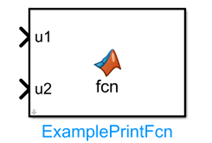
One-line Description: Demonstrates how to call C language print functions via MATLAB Coder in a PX4 embedded environment, enabling the printing of Simulink input signal data to the PX4 Nuttx console terminal.
This module belongs to the Miscellaneous Utility Blocks library in the RflySim toolchain. It serves as an embedded code generation example module for secondary development of PX4 firmware, illustrating how to call external C functions during the process of generating embedded PX4 code from MATLAB/Simulink. The module utilizes coder.ceval() to invoke the C standard library printf() function, while incorporating target environment detection to ensure that printing operations are executed only when running on the PX4 embedded target, thereby avoiding interference with Simulink simulation.
The typical use case for this module is embedded-side debugging during PX4 flight control algorithm development. Developers can modify this example to customize the format and output method of debugging data to be printed, and finally view real-time debugging data of the flight control on the PX4 Nuttx console. Coupled with the code generation and firmware compilation workflow of the RflySim toolchain, this module enables direct integration of debugging print logic into the PX4 firmware, with the debug output displayed directly on the PX4 console terminal—facilitating developers' localization of algorithmic issues during embedded runtime.
Port Descriptions
Input Ports (Inputs)
| Port Name | Data Type | Dimension | Description |
|---|---|---|---|
u1 |
double |
1×1 |
First integer value to be printed, input from the Simulink model |
u2 |
double |
1×1 |
Second integer value to be printed, input from the Simulink model |
Output Ports (Outputs)
This module has no output ports.
Parameter Configuration (Parameters)
This module has no configurable parameters.
Parameter Settings Description
None
Module Characteristics (Block Characteristics)
| Characteristic | Value |
|---|---|
| Supported Data Types | double, single, int8, int16, int32, uint8, uint16, uint32 |
| Direct Feedthrough | Yes |
| Sample Time | Inherited |
| Code Generation Support | Yes |
Data Communication Protocol
This module does not involve network communication.
Related Modules
| Module Name | Description |
|---|---|
CpxInt32ToVehicle |
Sends Simulink integer values to custom C code on the PX4 onboard side |
VehicleDataToSimulink |
Outputs values from custom C code on the PX4 onboard side to the Simulink simulation environment |
GetPX4Time |
Retrieves the current runtime time on the PX4 onboard side, in seconds |
ReadAirframeParams |
Reads a specified parameter value from the PX4 onboard parameter table |
WriteAirframeParams |
Writes a specified parameter value to the PX4 onboard parameter table |
Px4GpioSet |
Controls the GPIO pin level of the PX4 flight control hardware |
Px4PwmOut |
Sets the PWM output value for a specified channel on the PX4 flight control |
SimplePx4FmuI2cRead |
I2C reads data from external devices (FMU-side only) |
SimplePx4FmuI2cWrite |
I2C writes data to external devices (FMU-side only) |
SaveInt32ToLog |
Saves a specified 32-bit integer variable to the PX4 log file |
SaveFloatToLog |
Saves a specified single-precision floating-point variable to the PX4 log file |
GetPx4LocalPosition |
Reads the current local position and velocity estimate from PX4 |
GetPx4GlobalPosition |
Reads the current global position and altitude estimate from PX4 |
GetPx4Attitude |
Reads the current attitude estimate and angular velocity from PX4 |
GetPx4InputRC |
Reads the RC receiver input data from PX4 |
SetPx4ActuatorOutput |
Directly sets the PX4 actuator output values for custom mixing |
SetPx4VehicleCmd |
Sends a PX4 drone control command to the onboard flight controller |
ViconDataSendToPX4 |
Sends pose data obtained from the simulation environment to PX4 for position fusion |
OptiTrackDataSendToPX4 |
Sends actual pose data obtained from OptiTrack to PX4 for position fusion |
Usage Example
For related usage examples, please refer to the following path:
Please refer to
Readme.pdfin the above path for complete example descriptions and operational steps.
Notes and Common Issues
- Initialization Order: This module takes effect only when generating embedded code and deploying it to the PX4 flight control hardware. It does not perform printing operations in the MATLAB/Simulink simulation environment; therefore, do not expect printing output from this module during the simulation phase.
- Data Type Matching: By default, the module passes input signals as integers to the
printffunction. To print other data types, the format string and input signal data type must be modified accordingly; otherwise, garbled output or memory access errors may occur. - Printing Frequency Limitation: Avoid frequently calling this module to print data in high-frequency control loops. Excessively high printing frequency consumes Nuttx console bandwidth and may interfere with the normal execution of core flight control tasks.
- Code Generation Condition: The module restricts printing to the code generation phase via the condition
strcmp(coder.target, 'rtw'). Do not remove this condition, or Simulink simulation will encounter errors. - Output Viewing Method: Printed output appears only on the PX4 Nuttx console terminal. To view it, connect to the flight controller via serial port or simulation terminal; it will not appear in the MATLAB command window.
Changelog
v4.10(2024-08-13): Initial release. Provides an example function for printing Simulink input signals on the PX4 Nuttx embedded console, demonstrating the development method of calling C languageprintf()viacoder.ceval().