DistSim
DistSim is the distributed node management and deployment tool within the RflySim toolchain, designed to address the issues of "single-machine performance limitations" and "how to collaboratively start and run across multiple devices." It is neither a simulator nor a ground station, but rather an orchestration and scheduling layer for multi-node experiments.
Software Positioning
DistSim becomes essential when experiments enter the following scenarios:
- Simultaneous simulation of multiple drones
- Load distribution of
CopterSim,RflySim3D, and algorithm programs across multiple hosts - Mixed deployment across Windows, Linux, WSL, Jetson, etc.
- Need for remote batch script execution and unified node status monitoring
Thus, DistSim primarily addresses not how to perform flight simulation, but rather how to coordinate multiple devices to perform simulation together.
Why DistSim Is Needed
Single-Machine Bottleneck
A typical single-machine RflySim setup may concurrently run:
- Multiple
CopterSiminstances - One or more
RflySim3Dinstances - PX4 SITL
- Python/ROS perception and control programs
As the number of vehicles increases or the visual closed-loop becomes more complex, CPU, GPU, memory, and network resources can all become bottlenecks.
RflySim's Inherently Distributed Nature
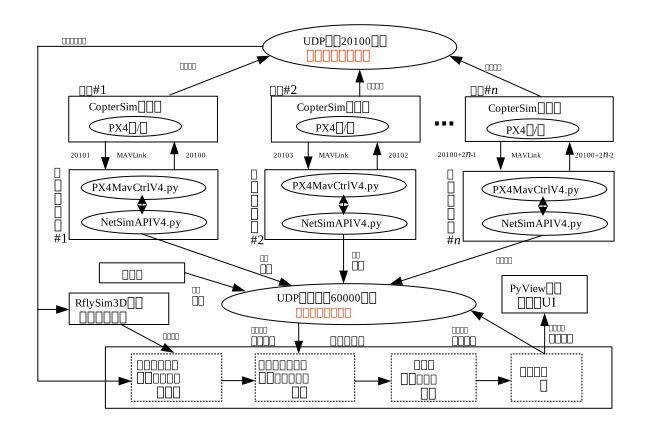
The RflySim toolchain is inherently designed with process separation and network-based interconnection:
- Dynamics computation and 3D rendering are decoupled
- Flight controller simulation and ground station are decoupled
- External control and vision algorithms can be deployed independently
The value of DistSim lies in transforming this "naturally separable" architecture into a functional, operational cluster.

Role in the Toolchain
DistSim can be viewed as an experiment scheduler within a local area network:

Compared with other core software:
| Software | Primary Responsibility |
|---|---|
CopterSim |
Solves vehicle dynamics and interfaces with flight controllers |
RflySim3D |
3D rendering and sensor generation |
QGroundControl |
Monitoring, mission planning, and parameter configuration |
SimCreate |
Generates configuration and startup scripts for single experiments |
DistSim |
Manages cross-host nodes and distributes scripts |
Overview of Distributed Architecture
In a typical distributed deployment, different hosts assume distinct roles:

| Node Role | Typical Responsibilities |
|---|---|
| Master Node | Runs DistSim GUI, monitors online status, issues commands |
| Dynamics Node | Runs multiple CopterSim instances |
| Rendering Node | Runs RflySim3D / RflySimUE5 |
| Algorithm Node | Runs Python / ROS / MATLAB control and perception programs |
| Embedded Node | Runs Jetson / Linux-side algorithms or services |
If visual workload is heavy, the rendering node is often deployed separately; if only large-scale flight controller swarm simulation is needed without image transmission, computational resources are better allocated to CopterSim nodes.
Core Features
Automatic Node Discovery
The most critical capability of DistSim is enabling automatic mutual discovery among nodes within the same LAN. This eliminates the need for users to manually maintain complex node lists, allowing them to instantly know which machines are online and which roles have joined the cluster.
Network Interface and Network Health Management
In real-world lab environments, many machines simultaneously have:
- Wired network interfaces
- Wi-Fi
- VMware / Hyper-V virtual network interfaces
- VPN / proxy network interfaces
A practical value of DistSim is its ability to automatically filter out unsuitable virtual interfaces and prioritize physical interfaces capable of participating in LAN-based simulation.
Remote Command and Script Execution
It can send the following to target nodes:
- Direct commands
- BAT / Shell scripts
- Multi-file packaged execution chains
This makes it particularly suitable for extending scripts generated by SimCreate to multi-machine execution.
Node Information Management
In large-scale experiments, knowing "which machine is which" is crucial. DistSim maintains node names, operating system types, MAC addresses, and UAV ID ranges, facilitating troubleshooting within the cluster.
Operating Modes
GUI Mode
Suitable for:
- Lab debugging
- Online node monitoring
- Manual command issuance
- On-site cluster status verification
Daemon Mode
Suitable for:
- Jetson, servers, or headless nodes
- Linux auto-start services
- Background node discovery and execution agents
In real distributed clusters, both modes often coexist: GUI runs on the master machine, while daemon mode runs on edge nodes.
Configuration and Execution Workflow
Five-Stage Approach
DistSim experiments are typically executed in stages, for example:
- Start simulation components
- Check if the environment is ready
- Launch control scripts
- Execute manual or mission phases
- Clean up and terminate the experiment
The value of this staged design lies in transforming multi-machine systems from "first-come-first-served" into a controllable process with defined order and dependencies.
Integration with SimCreate
For many projects, a more robust workflow is:
- Use
SimCreateto generate standard scripts - Use
DistSimto distribute these scripts to different nodes - Let each node execute its corresponding local components
This approach separates "experiment description" from "distributed execution."
Typical Deployment Scenarios
Multiple Windows PCs
This is the most common lab deployment, suitable for:
- Multi-vehicle formation
- Multi-vehicle HITL / SITL
- Split architecture: one rendering node, one dynamics node, one algorithm node
Windows + WSL / Linux
Suitable for:
- PX4 SITL running on WSL
- Algorithms running on Linux
- GUI and management components retained on Windows
Windows + Jetson NX
Suitable for:
- Integrating embedded algorithm nodes into the simulation cluster
- Simulating onboard computing environments
- Using Jetson as a vision or control edge node
Large-Scale Pure Simulation
If visual links are not prioritized and the focus is on large-scale swarm control, DistSim can organize multiple hosts into a large-scale CopterSim cluster.
Vision-Centric Distributed Simulation
If each vehicle carries cameras or LiDARs, RflySim3D's GPU load increases significantly. In this case, DistSim's main value lies in distributing rendering and algorithm workloads across multiple hosts.
Usage Recommendations and Common Issues
Recommended Practices
- First, establish a minimal closed-loop on two machines
- Then scale to three or more nodes
- Initially separate dynamics and rendering nodes
- Prefer wired networks; avoid complex Wi-Fi environments initially
Common Issues
| Issue | Likely Cause | Troubleshooting Approach |
|---|---|---|
| Nodes not discovered | Incorrect subnet, firewall, or network interface selection | First verify connectivity using the simplest LAN setup |
| Nodes frequently disconnect | Unstable network or incorrect network interface sending heartbeats | Fix the physical network interface environment first |
| Scripts sent but not executed | Incorrect permissions or working directory | Validate the execution chain using simple commands first |
| Multi-machine vision is laggy | Rendering load concentrated on one host | Add rendering nodes or reduce per-host sensor load |
| Large-scale cluster desynchronization | Insufficient network bandwidth or node load capacity | Reduce per-host instance count and simplify data transmission patterns |
Related Examples
DistSim Communication and Interfaces
- HelloWorld Communication Test: [RflySim Installation Path]\RflySimAPIs\10.RflySimSwarm\3.CustExps\e0.CustApiExps\2.DistSimCommAPIExps\1.HelloWorldTestExp
- Four-UAV DistSim Communication Example: [RflySim Installation Path]\RflySimAPIs\10.RflySimSwarm\3.CustExps\e0.CustApiExps\2.DistSimCommAPIExps\2.FourUAVSwarmDistSim
Distributed Control Deployment
- Four-UAV Distributed Deployment: [RflySim Installation Path]\RflySimAPIs\10.RflySimSwarm\3.CustExps\e2.PyDISCtrlUAVsSim\e4_FourUAVSwarmDistSim
- Windows + WSL: [RflySim Installation Path]\RflySimAPIs\10.RflySimSwarm\3.CustExps\e2.PyDISCtrlUAVsSim\e2_FourUAVSwarmTrackWSL
- Windows + Linux VM: [RflySim Installation Path]\RflySimAPIs\10.RflySimSwarm\3.CustExps\e2.PyDISCtrlUAVsSim\e3_FourUAVSwarmTrackVM
- Windows + Jetson NX: [RflySim Installation Path]\RflySimAPIs\10.RflySimSwarm\3.CustExps\e2.PyDISCtrlUAVsSim\e5_FourUAVSwarmTrackNx
Large-Scale Clusters
- 30-Vehicle No-Flight-Controller Cluster: [RflySim Installation Path]\RflySimAPIs\10.RflySimSwarm\3.CustExps\e4.NoPX4GMLSSwarm\e2_NoPX4SITLSwarm\1.NoPX4SITL30Swarm
- 100-Vehicle No-Flight-Controller Cluster: [RflySim Installation Path]\RflySimAPIs\10.RflySimSwarm\3.CustExps\e4.NoPX4GMLSSwarm\e2_NoPX4SITLSwarm\2.NoPX4SITL100Swarm
- 200-Vehicle Dual-PC Cluster: [RflySim Installation Path]\RflySimAPIs\10.RflySimSwarm\3.CustExps\e4.NoPX4GMLSSwarm\e2_NoPX4SITLSwarm\3.NoPX4SITL200Swarm2PC
Scripts and Batch Startup
- Multi-Vehicle Batch Startup: [RflySim Installation Path]\RflySimAPIs\10.RflySimSwarm\0.ApiExps\e9.MultVehiclesStart
- BAT Script Main Entry: [RflySim Installation Path]\RflySimAPIs\BatScripts