binary_logger Module Documentation
Toolbox: Miscellaneous Utility Blocks
Introduction
One-sentence description: A tool module tailored for PX4 flight controller development, enabling offline logging of double-type input data vectors in binary format to the SD card on PX4 hardware.
This module is an auxiliary tool developed specifically for PX4 flight controller within the RflySim toolchain. It facilitates offline recording of various algorithmic data, sensor data, and control signals during flight when developing custom PX4 flight control algorithms using Simulink. The generated code can be deployed directly onto PX4 flight controller hardware, with data stored on the SD card according to specified configurations, simplifying subsequent offline data analysis and algorithm tuning.
The module supports configurable memory caching to balance SD card access frequency and memory usage. It also supports bundling multiple signals into a vector for batch logging. The generated binary log files include a standard header format, facilitating parsing and reading by downstream tools. It is a commonly used logging tool in Simulink-based PX4 flight controller development.
Port Descriptions
Input Ports (Inputs)
| Port Name | Data Type | Dimension | Description |
|---|---|---|---|
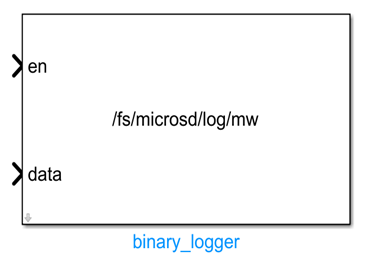
en |
double |
Scalar (1×1) | Enable signal; effective only when Cache in Memory is enabled: the file is opened and data logging begins when en is high; when en transitions to low, buffered data is written to the SD card and the file is closed |
data |
single |
1×N | Input signal vector to be logged; all input signals must be of single-precision floating-point type, supporting concatenation of multiple signals for batch logging |
Output Ports (Outputs)
This module has no output ports.
Parameter Configuration (Parameters)
The following parameters can be configured in the Mask dialog box opened by double-clicking the module:
| Parameter Name | Type | Default Value | Available Values / Range | Description |
|---|---|---|---|---|
Directory Path |
string |
/fs/microsd/log |
- | Directory path for storing log files; must point to a subdirectory under the SD card path /fs/microsd/ |
Cache in Memory |
boolean |
enabled |
enabled / disabled |
Whether to enable memory caching functionality |
Max Record Count |
int |
10000 |
>0 |
Maximum number of records allowed in memory cache |
Output ULG Format |
boolean |
disabled |
enabled / disabled |
Whether to output ULG format log files; by default, custom binary format logs are output |
Parameter Setting Notes
Directory Path
This parameter specifies the storage path for log files. It must be set to a valid subdirectory under the SD card path /fs/microsd/, e.g., /fs/microsd/log/mw; otherwise, the PX4 hardware will be unable to access the storage location properly.
Cache in Memory
When enabled, data is first buffered in memory and written to the SD card in one batch either when the en signal transitions to low or when the number of buffered records reaches Max Record Count. This reduces the frequency of SD card accesses and lowers I/O load. When disabled, data is written frame-by-frame directly to the SD card, avoiding additional memory usage but increasing the access frequency of the storage device.
Max Record Count
This parameter takes effect only when Cache in Memory is enabled. It limits the maximum number of records in the cache to prevent excessive memory usage and potential program exceptions. Once the number of cached records reaches this value, the module automatically flushes the buffered data to the SD card.
Module Characteristics (Block Characteristics)
| Characteristic | Value |
|---|---|
| Supported Data Types | double, single |
| Direct Feedthrough | Yes |
| Sample Time | Inherited |
| Code Generation Support | Yes |
Data Communication Protocol
This module does not involve network communication.
Related Modules
| Module Name | Description |
|---|---|
quad_rotor_px4_sitl |
Implements SITL simulation of the quadrotor PX4 firmware, providing data sources for flight logs |
read_binary_log |
Reads binary log files generated by the binary_logger module for post-processing and analysis |
px4_uorb_publisher |
Publishes Simulink simulation data as PX4 uORB topics, which can be logged in conjunction with the logging module |
px4_uorb_subscriber |
Subscribes to PX4 uORB topic data, which can be output to this module for logging |
Usage Example
For related usage examples, refer to the following path:
Please refer to
Readme.pdfin the path above for complete example descriptions and operational procedures.
Notes and Common Issues
- Initialization Sequence: This module is applicable only to PX4 flight controller hardware deployment scenarios. It must be used in conjunction with the SD card driver within the PX4 environment to ensure the SD card is fully mounted before the flight controller starts the logging process; otherwise, file opening failures may occur.
- Storage Path Requirements: The
Directory Pathparameter must point to a subdirectory under the SD card mount directory/fs/microsd/. Do not specify the root directory or the flight controller’s internal Flash storage path directly, as this may prevent log file creation or damage the flight controller’s storage system. enSignal Operation Rules: If theCache in Memoryoption is enabled, theeninput must transition from high to low before simulation/flight ends to trigger the log file closure process. Ifenremains high throughout, the log file will stay open and cannot be recognized or parsed by subsequent reading tools.- Input Data Type Requirements: All signals input via the
dataport must be single-precision floating-point (single) type and must be packed into a vector of consistent dimensionality. Mixed-type multi-signal recording is unsupported, as it may produce malformed log files. - Cache Parameter Settings: After enabling the
Cache in Memoryoption, theMax Record Countparameter determines the memory size consumed by the cache. Avoid setting excessively large values, as this may cause memory overflow on the PX4 flight controller, leading to system crashes and restarts. - Sampling Time Matching: The module’s sampling time must match the update rate of the input data. If the sampling time is significantly shorter than the data update rate, excessive duplicate data will be recorded, wasting SD card storage space. If the sampling time is significantly longer than the data update rate, data frames will be lost.
- Direct Write Mode Usage Tips: When
Cache in Memoryis disabled, the module writes directly to the SD card on every scheduling cycle, increasing SD card access frequency and potentially affecting the real-time performance of the flight control loop. This mode is recommended only for low-frequency logging scenarios; for high-frequency logging, the caching mode is preferred.
Changelog
v4.10(2024-08-13): Initial release of thebinary_loggerdata logging module, supporting caching or direct writing of double-precision data vectors to binary log files on the PX4 flight controller’s SD card.