uORB Write Module Documentation
Toolbox: uORB Read and Write
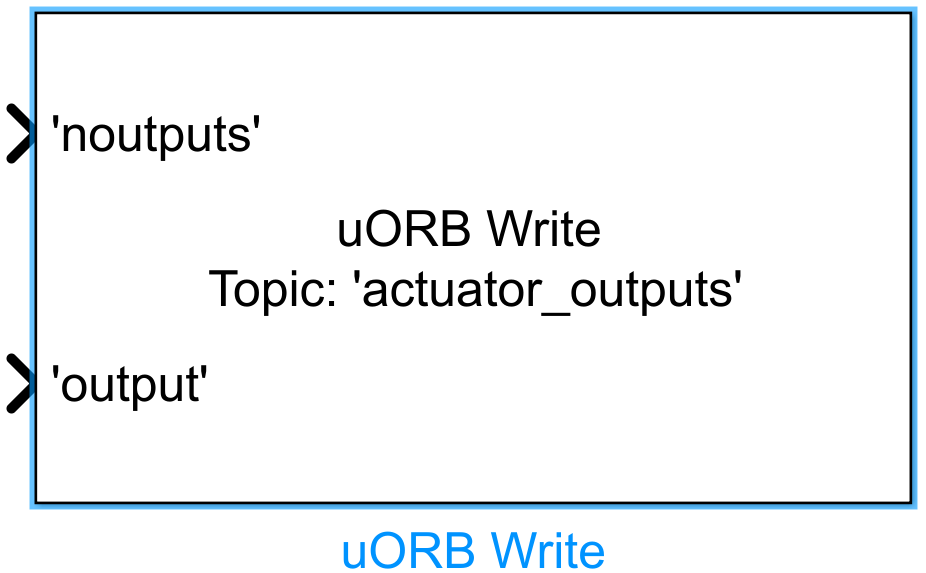
Introduction
One-sentence Description: A uORB data publishing interface module for publishing messages of a specified format to PX4 uORB topics.
This module belongs to the RflySim toolchain's uORB communication interface library. It enables users to publish custom computation results or control data—formatted according to PX4 uORB message specifications—to corresponding topics within the Simulink simulation environment. The module supports configurable input ports, allowing it to match the field structure of any predefined uORB topic; during code generation, the corresponding uORB topic definition file is automatically included.
Typical applications include user-defined flight control algorithm development. When used in conjunction with the uORB Read module, it facilitates uORB message exchange between Simulink-level algorithms and the PX4 flight control stack, enabling co-simulation with CopterSim, RflySim3D, and PX4. Users can directly publish custom messages to the PX4 flight controller, thereby simulating and validating custom control logic.
Port Descriptions
Input Ports (Inputs)
The input ports of this module are dynamically generated based on the configuration in the uORB Parameter Names and Data Type region. Each port corresponds to a message field of the uORB topic. A typical configuration format is as follows:
| Port Name | Data Type | Dimension | Description |
|---|---|---|---|
| Custom Field Name | User-specified | User-specified | Value of the corresponding field in the uORB message to be published |
Output Ports (Outputs)
This module has no output ports.
Parameter Configuration (Parameters)
The following parameters can be configured in the Mask dialog box opened by double-clicking the module:
| Parameter Name | Type | Default Value | Available Values/Range | Description |
|---|---|---|---|---|
uORB Topic |
string |
vehicle_attitude |
Any valid uORB topic name | Name of the uORB topic to which the message will be published |
uORB Parameter Names and Data Type |
Table configuration | Empty | - | Configure the names, data types, and dimensions of all message fields to be published |
Sample time (s) |
double |
0.01 |
>0 |
Module sampling time |
Parameter Configuration Details
uORB Topic
Specifies the name of the uORB topic to which the message will be published. The name must exactly match the filename (excluding the .msg extension) of a topic definition file in the PX4 firmware's msg directory. Click the Open.msg file button to view the field requirements of the currently selected topic's definition file, or click Open.msg folder to open the folder containing all defined uORB topics.
uORB Parameter Names and Data Type
This region uses a table to configure all message fields to be published; each row corresponds to one input port:
- Name: Must exactly match the field name in the topic's
.msgdefinition file. - Data Type: Must match the data type of the corresponding field in the topic's
.msgdefinition file. Supported types includedouble,single,int8,int16,int32, etc. - Dimension: Must match the dimension of the corresponding field in the topic's
.msgdefinition file. Enter1for scalars, or the array length for arrays.
Sample time (s)
Specifies the sampling interval (in seconds) at which the module publishes messages to uORB.
Module Characteristics (Block Characteristics)
| Characteristic | Value |
|---|---|
| Supported Data Types | double, single, int8, int16, int32, uint8, uint16, uint32, etc. |
| Direct Feedthrough | Yes |
| Sample Time | Discrete |
| Code Generation Support | Yes |
Data Communication Protocol
This module does not involve network communication.
Related Modules
| Module Name | Description |
|---|---|
uORB Read |
Reads message data from a specified uORB topic and outputs each field to corresponding ports |
Usage Example
For usage examples, refer to the following path:
Please consult
Readme.pdfin the above path for complete example descriptions and step-by-step instructions.
Notes and Common Issues
- Initialization Order: This module must run only after the RflySim initialization configuration module has completed initialization. Do not connect the uORB Write module's inputs/outputs directly to logic preceding PX4 flight controller startup; otherwise, topic registration may fail and message publishing may become ineffective.
- Topic Definition Matching: The specified uORB Topic name must exactly match the topic name defined in the PX4 firmware
msgdirectory. Each input port's field name, data type, and dimension configured in the module must precisely match the corresponding fields in the topic's.msgdefinition file; otherwise, compilation errors or anomalous message publishing may occur. - Custom Topic Handling: If using a newly added custom uORB topic, first place the custom
.msgfile into the PX4 firmware'smsgdirectory, recompile the PX4 firmware, and refresh it before the module can recognize and use the custom topic. Otherwise, the custom topic definition will not load. - Sample Time Matching: The configured module sample time should match the update frequency of the corresponding uORB topic. Avoid setting a sample time significantly longer than the topic's designed update frequency to prevent unnecessary resource consumption. When used with the
uORB Readmodule, ensure both modules' sample times align with application requirements to avoid data publishing and reading synchronization issues. - Duplicate Publishing: Do not add multiple uORB Write modules in the same Simulink model to publish data to the same uORB topic simultaneously; this will cause topic data conflicts and unpredictable read/write errors.
Changelog
v4.20(2024-08-09): Initial release. Provides basic uORB topic message publishing functionality with support for configurable input ports mapping to uORB message fields.