RosTrans
RosTrans is a ROS multi-protocol conversion gateway in the RflySim toolchain. It converts external UDP, serial, shared memory, or MAVLink byte streams into ROS1/ROS2 Topics/Services, and can also reversely pack ROS control messages and send them to the simulator, flight controller, or UE4, thus allowing standard ROS algorithm ecosystems to seamlessly integrate into the RflySim simulation loop.
In a nutshell: RosTrans is a rule-driven, plugin-based multi-protocol gateway. It is not bound to any specific protocol itself but uses unified forwarding rules to describe "where it comes from, where it goes, and how to convert."

Software Positioning
When an experiment requires integrating RflySim data into the ROS ecosystem, RosTrans becomes important. Typical scenarios include:
- Controlling CopterSim or PX4 simulated aircraft using the standard MAVROS-style interface (
/mavros/...) - Publishing visual data such as images, depth, point clouds, LiDAR from RflySim3D/UE4 as ROS
sensor_msgs - Allowing ROS Offboard algorithm nodes to directly send position/velocity/attitude commands to the simulated aircraft
- Transparently routing MAVLink from a real Pixhawk (serial) or PX4 SITL (UDP) to QGC and MAVROS
Therefore, RosTrans solves not "how to simulate," but "how to establish bidirectional data flow between simulation data and the ROS algorithm ecosystem."
Role in the Toolchain
RosTrans sits between the RflySim simulation components and the ROS algorithm ecosystem, acting as a bidirectional bridge (see topology above).
Forward Direction: External data sources (UDP / Serial / Mem / MAVLink / UE4 / CopterSim) are received/transmitted via Transport → a link is selected by ForwardRule → encoded/decoded by Codec → published/subscribed/served via ROS Adapter → ROS1/ROS2 algorithm ecosystem.
Reverse Direction: ROS control messages are received by the Adapter, encoded into target protocol bytes by the Codec, and then sent via Transport to CopterSim / PX4 / UE4 / QGC / external devices.
I. Working Principle
1. Core Idea: Decoupling Four Concerns
The most critical design of RosTrans is to completely separate the following four concerns, making them independent of each other:
| Concern | Responsible Component | Problem Solved |
|---|---|---|
| Transport | Transport (UDP/Serial/Shared Memory/Byte Routing) | Asynchronous send/receive for byte streams |
| Protocol Conversion | Codec (Encoder/Decoder) | External protocol bytes ↔ ROS serialized messages |
| ROS Version Differences | ROS Adapter (ROS1/ROS2) | Hides the publish/subscribe differences between roscpp and rclcpp |
| Business Rule Generation | Business Plugins (DllModel/MavRos/Vision/UE) | Translates specific scenarios into dynamic forwarding rules |
Because of this decoupling, adding a new protocol usually does not require modifying the main program; you only need to write a Codec and generate a rule.
2. Overall Architecture

- ParamManager: Reads
rostrans.paramandrostrans.filter, determines which business plugins, ports, and topics to enable. - PluginManager: Dynamically loads ROS adapters and business plugins based on priority using the Qt plugin mechanism.
- DataTransCore: The forwarding core, containing
RosTransManager(rules/threads/lifecycle),MessageProcessor(Topic/Service pipelines), andBytesRouter(transparent byte routing).
Why Plugin-based?
The dependencies, initialization methods, and runtime contexts of ROS1's roscpp and ROS2's rclcpp are different. RosTrans uses a unified BaseROSAdapter interface, compiling ROS1/ROS2 adapters into independent dynamic libraries, loaded based on the current ROS_VERSION/ROS_DISTRO environment. This way, the core forwarding layer does not directly depend on either ROS1 or ROS2, avoiding symbol conflicts and environmental coupling.
3. Forwarding Rule Model: ForwardRule
ForwardRule is the core configuration object of RosTrans, describing "how one input is converted and derives multiple outputs":
ForwardRule
  rule_id          Unique rule ID for logging and monitoring
  enable           Whether enabled
  direction        Forwarding direction (see table below)
  ros_version      ros1 / ros2 / all
  udp_listen_ip    UDP listen IP
  udp_listen_port  UDP listen port
  links[]          One input can derive multiple output links (LinkConfig)

LinkConfig
  link_name
  codec                   Which codec to use
  send_ros_config.topic   Target topic and message type for external -> ROS direction
  udp_dst_ip / udp_dst_port   Target address for ROS -> external direction
  serial_port            Serial target
  rate_limit             Per-link rate limiting
Rules come from two sources: Static YAML (ros_trans_config.yaml, basic capabilities) and dynamic generation by business plugins at runtime (most business links are generated here).
Supported forwarding directions:
| direction | Function |
|---|---|
udp_to_rostopic |
Listens to UDP, decodes, and publishes to ROS Topic |
rostopic_to_udp |
Subscribes to ROS Topic, encodes, and sends via UDP |
udp_to_rosservice |
Listens to UDP, requests ROS Service, optionally sends response back to UDP source |
rosservice_to_udp |
Provides a virtual Service to ROS, forwards UDP request upon call and waits for response |
mem_to_rostopic |
Reads shared memory data, decodes, and publishes to ROS Topic |
serial_to_ros |
Reads serial bytes, decodes, and publishes to ROS Topic |
ros_to_serial |
Subscribes to ROS Topic, encodes, and writes to serial port |
bytes_route |
Completely bypasses ROS and Codec for transparent UDP/serial byte routing |
One Rule, Multiple Links
A single UDP input packet often contains multiple business fields. RosTrans allows the same input packet to be decoded by multiple Codecs into different ROS messages. For example, a single frame of CopterSim data can simultaneously publish /mavros/local_position/pose, velocity_local, global_position/global, odom, and other topics. This reduces the number of sockets and centralizes processing of the same source within one rule.
4. Four-Layer Pipeline
Data flows through the bound pipeline, passing through four layers sequentially:
Transport Layer
| Transport | Characteristics |
|---|---|
| UDPTransport | Boost.Asio asynchronous UDP, supports unicast/multicast; receive buffer 8 MB for image/point cloud bursts; one listen socket can be reused by multiple processors |
| SerialTransport | Asynchronous serial send/receive; internally can segment complete frames based on MAVLink v1/v2 frame headers (0xFE/0xFD); write serial with lock to avoid interleaving bytes from multiple sources |
| MemTransport | Shared memory, mainly for RflySim3D images/point clouds; polls based on flag protocol (2=to read/3=reading/4=read) |
| BytesRouter | Transparent byte path completely bypassing ROS and Codec, used for MAVLink/QGC/MAVROS/Pixhawk scenarios |
Codec Layer
Codec is the protocol boundary of RosTrans, exposing only two core methods: decode() (external bytes → ROS serialized message) and encode() (ROS message → external bytes). All Codecs are globally registered and created via CodecFactory, accessed by the link.codec name.
ROS Adapter Layer
BaseROSAdapter unifies interfaces like subscribe / advertise / publish / callService / advertiseService / spin; ROS1Adapter uses ShapeShifter to send/receive messages of any type; ROS2Adapter uses typed or generic publish/subscribe, and supports direct publish function caching for high-frequency topics to reduce latency.
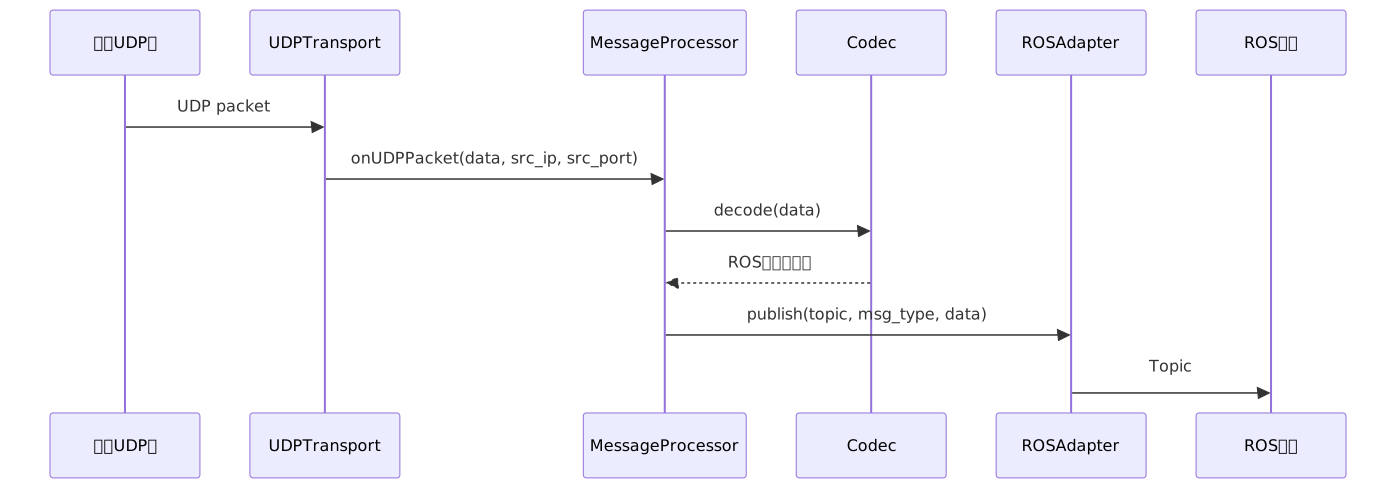
5. Business Plugins
Four business plugins translate specific scenarios into dynamic rules. Upon activation, they read parameters → determine ROS version → trim features based on filters → generate ForwardRule and add it to the core:
| Plugin | Positioning | Main Content |
|---|---|---|
| DllModelAssistant | Maps CopterSim's custom UDP protocol to MAVROS-compatible topics/services | Telemetry uplink (pose/vel/gps/odom), control downlink (setpoint series), /mavros services (arming/set_mode/takeoff/land) + 1 Hz /mavros/state |
| MavRosAssistant | Standard MAVLink ↔ MAVROS bridge, supports PX4 SITL (UDP) and Pixhawk (serial) | MAVLink→ROS (pose/imu/gps/state/battery…), ROS→MAVLink (setpoint/rc_override…), MAVROS services (COMMAND_LONG, etc.) |
| VisionAssistant | Connects RflySim3D/UE4 vision sensors, IMU, and gimbal to ROS | Generates image/point cloud/radar/infrared topics based on sensor list in Config.json, gimbal status and control, shared memory or UDP reception |
| Sim3DUEAssistant | UE4 scene control and feedback bridge | ROS→UE4 control commands (pose, tags, attachment, etc.), UE4→ROS feedback (collision, data requests, etc.) |
6. High-Performance Mechanisms
For high-frequency MAVLink, IMU, images, and point clouds, RosTrans implements hot-path optimizations:
- MAVLink Fast Path: The Codec declares interested msgids via
getTargetMsgIds(). When a match is found, it bypasses the queue and worker thread, publishing directly, reducing thread switching and lock overhead. - General Queue Path: Protocols without target msgids go through a queue (upper limit ~64 packets, drops oldest on overflow), preventing unbounded latency accumulation from high-bandwidth input.
- Direct Publish Function Caching:
ROS2Adaptercaches publish lambdas during initialization, avoiding per-packettopic string → map lookup → lockoperations. - Rate Limiting: Each link can set
rate_limit, discarding packets exceeding the limit within a 1-second window (Vision IMU defaults to 200 Hz limit).
II. Usage Instructions
1. Startup Methods
Basic startup:
Recommended for headless environments (server/WSL):
Specify a topic filter file simultaneously:
rostrans.param uses key=value format. Command-line arguments take precedence over the configuration file:
2. Common Parameters: rostrans.param
| Parameter | Default Value | Description |
|---|---|---|
enable_monitor |
false |
Whether to print forwarding statistics |
monitor_interval |
5 |
Statistics printing interval (seconds) |
enable_vision |
false |
Enable VisionAssistant |
enable_mavros |
false |
Enable MavRosAssistant |
enable_dllModel |
false |
Enable CopterSim/DllModelAssistant |
enable_ue3d |
false |
Enable Sim3DUEAssistant |
router_enable |
false |
Enable MAVLink/byte routing |
3. Topic Filtering rostrans.filter
The filter in v1.0.3 operates in blacklist mode:
- Topics/services not appearing in
rostrans.filterare enabled by default; - Those configured as
falseare disabled, those configured astrueare explicitly enabled; - Applies to both Topics and Services.
Supports exact match, wildcards, prefix, and regex:
# Exact match
/mavros/state=true
# Wildcards (* and ?)
/rflysim/sensor*/gimbal_*=true
# Prefix match
prefix:/rflysim/sensor0/=false
# Regex match
regex:^/mavros[0-9]*/imu/.*=false
re:^/rflysim/sensor[0-9]+/img_.*=false
Match priority: Exact match highest → Pattern match in file order, latter overrides former → Unmatched enabled by default.
Tip
It is recommended to only set high-bandwidth topics that need to be disabled to false (e.g., images, point clouds, raw IMU), and leave the rest enabled by default.
4. Vision Topic List
Vision-related topics are based on the current implementation. Common configuration:
# Images and point clouds
/rflysim/sensor*/img_rgb=true
/rflysim/sensor*/img_depth=true
/rflysim/sensor*/img_gray=true
/rflysim/sensor*/img_Segmentation=true
/rflysim/sensor*/fisheye=true
/rflysim/sensor*/img_cine=false
/rflysim/sensor*/img_Infrared_Gray=true
/rflysim/sensor*/img_Infrared=true
/rflysim/sensor*/range=true
/rflysim/sensor*/Depth_Cloud=true
# LiDAR
/rflysim/sensor*/vehicle_lidar=true
/rflysim/sensor*/global_lidar=true
/rflysim/sensor*/livox_lidar=true
/rflysim/sensor*/mid360_lidar=true
# Gimbal/Camera
/rflysim/sensor*/camera_data=false
/rflysim/sensor*/gimbal_status=true
/rflysim/sensor*/gimbal_ctrl=true
/rflysim/sensor*/pod/vision_sensor_req=false
# IMU and Odometry
/rflysim/imu=true
/rflysim/uav*/global/odom=true
/rflysim/uav*/local/odom=true
ROS 2 QoS Note
The ROS 2 publishing side of RosTrans uses Best Effort. External nodes or test scripts must also use Best Effort when subscribing; otherwise, DDS will report incompatible QoS: RELIABILITY, resulting in no data reception.
Below is the link for UE4 images/point clouds entering ROS (two paths: shared memory or UDP):

5. MAVLink Byte Routing (MavRouter / BytesRouter)
v1.0.3 includes a built-in transparent byte router, usable for MAVLink as well as regular UDP/serial byte streams. The routing layer does not parse or modify data content.
| Mode | Description | Typical Use Case |
|---|---|---|
UDP <-> UDP |
Learns FCU address from UDP source, forwards to multiple UDP endpoints | SITL/simulator connecting to QGC, MavROS |
Serial -> UDP |
Reads flight controller data from serial port and broadcasts to UDP endpoints | Real Pixhawk connecting to QGC |
Serial <-> UDP |
Bidirectional transparent forwarding between serial and UDP | Requires YAML bytes_route configuration with upstream listening port |

Working logic: The first batch of non-endpoint source data is considered the FCU source and recorded; downstream data is broadcast to all endpoints; upstream data from endpoints is sent back to the learned FCU source; the entire process does not decode or pass through the ROS Adapter.
UDP Routing
router_source=0.0.0.0:14560: RosTrans listens on local port 14560;- After the simulator/flight controller sends MAVLink to 14560, the router learns the FCU source address;
- Data is forwarded to all
router_endpoints; multiple endpoints are separated by commas:
Serial Routing
Note
The CLI serial mode of rostrans.param currently defaults to Serial -> UDP downstream broadcast. If UDP -> Serial upstream return is needed, please use the YAML bytes_route configuration and set udp_listen_port > 0.
Multi-Vehicle Port Rules
When mavros_copter_count > 1, UDP routing creates multiple routing instances with +2 per vehicle:
| Vehicle | Router Listen Port | QGC Port | MavROS Port |
|---|---|---|---|
| 1 | 14560 |
14550 |
20101 |
| 2 | 14562 |
14550 |
20103 |
| 3 | 14564 |
14550 |
20105 |
14550, 14555, 18570 are considered common ground station ports and remain non-incremental in multi-vehicle mode; other endpoint ports increment by +2.
YAML bytes_route Example
forward_rules:
  - rule_id: mavlink_router_udp
    enable: true
    direction: bytes_route
    udp_listen_ip: 0.0.0.0
    udp_listen_port: 14560
    links:
      - link_name: qgc
        udp_dst_ip: 127.0.0.1
        udp_dst_port: 14550
III. Testing and Troubleshooting
1. Test Scripts
Gimbal ROS 2 Test (QoS already adapted to publishing side):
MAVRouter UDP Test: First ensure router_enable=true and router_source=0.0.0.0:14560, router_endpoints=127.0.0.1:14550, then run:
python3 test/python/test_mavrouter.py
# Custom ports
python3 test/python/test_mavrouter.py --router-port 14560 --endpoint 127.0.0.1:14550
The script verifies downstream arrival, upstream return to the learned FCU source, and completeness of multi-packet burst forwarding.
MAVRouter Serial Test (Linux PTY virtual serial port, testing Serial -> UDP):
2. Common Issues
| Issue | Possible Cause | Solution |
|---|---|---|
GimbalStatus not received |
ROS 2 QoS mismatch | Use Best Effort on subscriber side |
| MAVRouter not forwarding | router_enable=false or port mismatch |
Check router_source, router_endpoints |
| UDP upstream cannot return to FCU | Router has not learned FCU source | First send a packet from FCU/simulator to router_source |
| Serial downstream works, upstream fails | CLI serial mode has no UDP listening port | Switch to YAML bytes_route and configure udp_listen_port |
| Serial port open failure | Insufficient permissions or incorrect device name | On Linux, check dialout group permissions and /dev/tty* path |
Running .sh on Linux reports $'\r' |
Script uses CRLF line endings | Use dos2unix to convert to LF (repository .gitattributes already enforces pack/**/*.sh eol=lf) |
3. Configuration File Overview
| File | Purpose |
|---|---|
rostrans.param |
Master switches, ports, IPs, vehicle count, serial, router parameters |
rostrans.filter |
Topic/service granular enable/disable |
plugins_config.ini |
Plugin loading, initialization, priority |
ros_trans_config.yaml |
General static forwarding rules |
Config.json |
Vision sensor list, types, resolutions, SendProtocol |
fastdds_wsl2.xml |
ROS2 DDS/WSL2 network-related configuration |
Feature Missing Troubleshooting Order
Static YAML provides only basic capabilities; most business chain routes are dynamically generated by plugins based on parameters. When troubleshooting a non-working feature, check in this order: ① Whether the corresponding business plugin is enabled (e.g., enable_mavros=true) → ② Whether the current ROS environment is correct and the matching Adapter is loaded → ③ Whether rostrans.filter has disabled the topic/service → ④ Whether the corresponding codec is registered successfully → ⑤ Whether ports/IPs/serial ports are consistent with the external system.
Extending New Protocols
Thanks to the decoupled design, adding a new protocol usually does not require modifying the main program:
- Define a new
Codec, implementingdecode()andencode(); for ROS1 custom messages, also implementgetMD5()andgetMsgDefinition(); - Call
CodecFactory::registerCodec("name", creator)in the adapter codec file or business plugin; - Generate a
ForwardRulein YAML or business plugin, pointinglink.codecto the new codec; - If a business switch is needed, add the parameter to
rostrans.param; if a ROS service is needed, implementServiceBaseand register it withServiceFactory.
Minimum working model:
registerCodec("my_codec", ...)

ForwardRule:
  direction: udp_to_rostopic
  udp_listen_ip: 0.0.0.0
  udp_listen_port: 9000
  links:
    - topic: /my/topic
      msg_type: std_msgs/msg/String
      codec: my_codec
Grasping one main thread is enough to understand RosTrans: Every function ultimately falls onto one or more
ForwardRule, each rule binds the corresponding Transport, Codec, and ROS Adapter, and at runtime, data flows with low latency through this bound pipeline.