SimpleCtrl4D Module Documentation
Toolbox: RflySim Swarm
Introduction
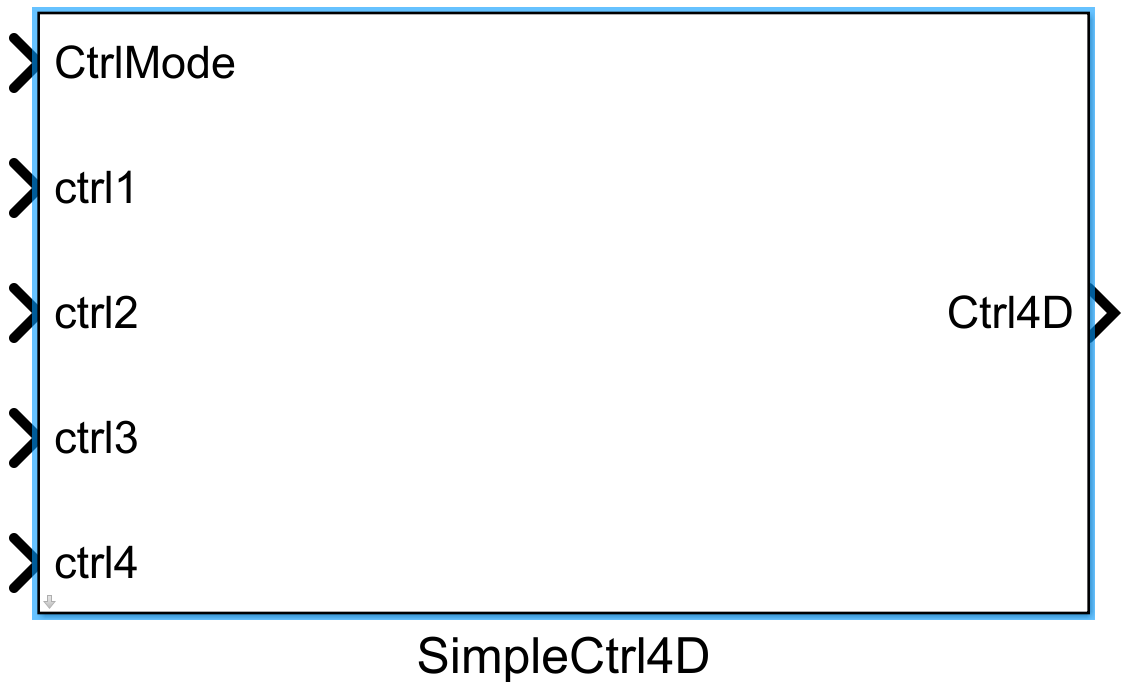
One-sentence Description: This module is a foundational control interface module for swarm UAV simulation provided by the RflySim Swarm interface library, enabling rapid development of multi-UAV four-dimensional control logic.
This module serves as a core interface component of the RflySim toolchain for swarm UAV simulation development, primarily targeting Simulink-based simulation development of multi-UAV cooperative control algorithms. It supports developers in quickly interfacing with multi-UAV control requirements within Simulink and flexibly customizing cooperative mission logic for swarm UAVs. During simulation, this module can cooperate with CopterSim to perform multi-UAV flight control dynamics simulation, synchronize simulation state information to RflySim3D for 3D visualization of swarm UAV missions, and interface with PX4 flight control firmware to validate swarm UAV missions in hardware-in-the-loop or pure simulation scenarios.
Port Descriptions
Input Ports (Inputs)
| Port Name | Data Type | Dimension | Description |
|---|---|---|---|
CtrlInput |
double |
1×4 |
Four-channel UAV control input, typically corresponding to roll, pitch, yaw, and throttle control signals |
Output Ports (Outputs)
| Port Name | Data Type | Dimension | Description |
|---|---|---|---|
ActuatorOut |
double |
N×1 |
UAV actuator output signal; dimension N corresponds to the number of rotors, supporting quadcopters and other multi-rotor UAVs [To be confirmed] |
Parameter Configuration (Parameters)
The following parameters can be configured in the Mask dialog box opened by double-clicking the module:
| Parameter Name | Type | Default Value | Available Values/Range | Description |
|---|---|---|---|---|
CopterID |
int |
1 |
1~255 |
ID number of the current UAV within the swarm |
ControlMode |
enum |
Attitude |
Attitude/Rate |
Control mode selection: Attitude for attitude control mode, Rate for angular rate control mode |
UseIndividualGain |
bool |
false |
true/false |
Whether to use custom PID control gains |
RollKp |
double |
4.0 |
>0 |
Roll channel proportional gain; effective only when custom gains are enabled |
RollKi |
double |
0.05 |
>=0 |
Roll channel integral gain; effective only when custom gains are enabled |
RollKd |
double |
0.02 |
>=0 |
Roll channel derivative gain; effective only when custom gains are enabled |
PitchKp |
double |
4.0 |
>0 |
Pitch channel proportional gain; effective only when custom gains are enabled |
PitchKi |
double |
0.05 |
>=0 |
Pitch channel integral gain; effective only when custom gains are enabled |
PitchKd |
double |
0.02 |
>=0 |
Pitch channel derivative gain; effective only when custom gains are enabled |
YawKp |
double |
2.5 |
>0 |
Yaw channel proportional gain; effective only when custom gains are enabled |
YawKi |
double |
0.05 |
>=0 |
Yaw channel integral gain; effective only when custom gains are enabled |
YawKd |
double |
0.01 |
>=0 |
Yaw channel derivative gain; effective only when custom gains are enabled |
Parameter Setting Descriptions
CopterID
Specifies the ID number of the UAV corresponding to the current module within the swarm, used to match the state feedback and actuator output channels of the corresponding UAV in the simulation environment. Different UAV modules must be assigned distinct IDs for differentiation.
ControlMode
Selects the operational mode of the control interface:
- In attitude control mode, the four inputs correspond to: desired roll angle (deg), desired pitch angle (deg), desired yaw rate (deg/s), and desired throttle percentage.
- In angular rate control mode, the four inputs correspond to: roll rate (deg/s), pitch rate (deg/s), yaw rate (deg/s), and desired throttle percentage.
UseIndividualGain
When disabled (default), the module uses globally configured PID gains for the simulation. When enabled, it allows setting individual PID gains for the three attitude channels (roll, pitch, yaw) for this specific UAV, accommodating tuning requirements for heterogeneous UAVs.
Module Characteristics (Block Characteristics)
| Characteristic | Value |
|---|---|
| Supported Data Types | double, single |
| Direct Feedthrough | Yes |
| Sample Time | Inherited |
| Code Generation Support | No |
Data Communication Protocol
This module communicates with the RflySim swarm simulation core via UDP, receiving simulation state data and transmitting four-dimensional control commands.
- Default receive port: 9000 + (UAV ID - 1) * 10
- Default send port: 8000 + (UAV ID - 1) * 10
Received data format:
Sequence of UAV n state (16 double elements):
1. Position in NED frame (North, East, Down)
2. Body-frame linear velocities (x, y, z)
3. Attitude as quaternion (w, x, y, z)
4. Body-frame angular velocities (p, q, r)
Sent data format:
4 double elements corresponding to the four control channels, typically: throttle, roll, pitch, and yaw commands.
Related Modules
| Module Name | Description |
|---|---|
UAVState4DGet |
Retrieves the four-dimensional state information of a single UAV in the swarm; designed for use with this module |
SwarmInfoGet |
Retrieves fundamental configuration information for the entire UAV swarm |
SimpleGCS_Swarm |
Provides ground station control functionality for swarm simulation |
UDPCommsSwarm |
Implements UDP communication (send/receive) for swarm simulation |
Notes and Common Issues
-
Initialization Order: This module is the RflySim Swarm cluster control module and will only initiate the control output logic after the entire simulation model has completed initialization and the RflySim platform has established cluster communication connections. Do not place this module at an initialization priority higher than the RflySim core cluster communication module; otherwise, abnormal control output or unresponsive drones may occur.
-
Sampling Time Matching: The sampling period of the control output from this module must match the UDP communication transmission/reception cycle of the cluster and the simulation step size of RflySim. It is recommended to set the sampling time of this module to be identical to that of the cluster communication module to prevent control command update delays or packet loss due to sampling rate mismatches, which could degrade cluster control performance.
-
Drone ID Matching: The 4D control commands output by this module correspond to drones with a specified ID. The target drone's cluster ID must be correctly entered in the module parameters. Incorrect ID entry will cause control commands to be sent to the wrong drone, resulting in chaotic cluster control logic.
-
Control Dimension Explanation: This module only supports generating four-dimensional standardized control commands. To output higher-dimensional control quantities or custom control commands, switch to the general cluster control module in the RflySim Swarm library; this module does not support custom extension of control dimensions.
-
Simulation Pause/Resume Issue: If the number of cluster drones is changed during simulation, the entire simulation model must be reinitialized. This module does not automatically update its internal state in response to changes in cluster size, potentially leading to module output errors.
Changelog
v4.10(2024-12-09): Initial release, supporting four-dimensional drone swarm control interface functionality.