RePX4Block Module Documentation
Toolbox: RflySim APIs
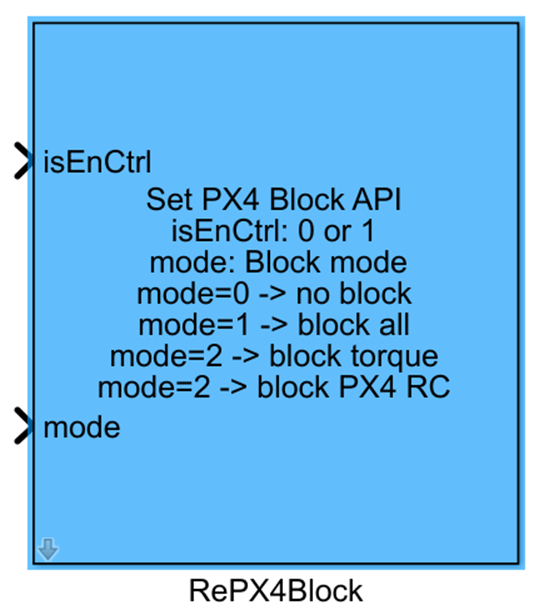
Introduction
One-sentence Description: This module enables online dynamic masking of different output layers of PX4, supporting real-time switching between PX4's native control outputs and user-defined controls in both simulation and real-flight scenarios.
This module belongs to the RflySim APIs library and serves as the PX4 custom control extension interface provided by the RflySim toolchain. It is automatically integrated into the PX4 side via the one-click firmware deployment script. The module works in conjunction with CopterSim and PX4 to perform software-in-the-loop (SIL), hardware-in-the-loop (HIL) simulation, and real-flight control. It transmits user-defined control configurations to PX4, and the resulting control outputs are delivered to CopterSim's DLL model interface, enabling visualization and simulation within RflySim3D.
The module supports four masking modes to accommodate diverse development needs: it can fully take over PX4's motor/servo output layer, replace only the force and torque control layer of PX4's native control, replace custom RC input signals to prevent signal conflicts and jitter, and is compatible with various vehicle types including multirotors, fixed-wing aircraft, and ground vehicles. It also supports special ESC protocols such as DShot, making it suitable for typical scenarios involving the development of custom flight control algorithms and the extension of specialized control functionalities.
Port Descriptions
Input Ports
| Port Name | Data Type | Dimension | Description |
|---|---|---|---|
isEnCtr |
boolean |
1×1 |
Control enable input. When set to true, the custom masking mode is enabled and operates according to the configuration of the mode port; when false, custom masking is disabled. |
mode |
uint8 |
1×1 |
Masking mode selection input. Different numeric values correspond to different masking operation modes. |
Output Ports
| Port Name | Data Type | Dimension | Description |
|---|---|---|---|
CtrlS |
double |
1×16 |
Control signal output, which will be sent to the inPWM interface of CopterSim's DLL model. |
Parameter Configuration
The following parameters can be configured in the Mask dialog box opened by double-clicking the module:
| Parameter Name | Type | Default Value | Optional Values / Range | Description |
|---|---|---|---|---|
Sample Time(s) |
double |
0.001 |
>0 |
Module sampling time, determining the simulation computation period. |
Parameter Setting Description
Sample Time(s)
This parameter defines the update interval for the module's output signals, in seconds. Typically, it should be set according to the flight controller's control cycle; the default value of 1 ms is suitable for most real-time simulation scenarios.
Mode Descriptions
The module supports four operational modes:
Mode 0 (0): No masking mode. PX4 receives its native control outputs normally:actuator_outputs(for SIL/HIL simulation) andactuator_controls_0(force and torque interface), preserving the standard motor control logic.Mode 1 (1): Full masking mode. During SIL/HIL simulation, PX4 no longer receivesactuator_outputs; instead, it receives theactuator_outputs_rflymessage, which must be published by the HIL16CtrlsPWM or HIL16CtrlsNorm modules. In real-flight scenarios, the underlying motor/servo control code of PX4 is masked, and control outputs from thePWM_outputandAux_outputmodules are used instead. Special protocols such as DShot are not supported.Mode 2 (2): Intermediate force and torque layer masking mode. Supported in both SIL/HIL simulation and real-flight scenarios. PX4 no longer receivesactuator_controls_0; instead, it receives force and torque control commands fromactuator_controls_rfly, which must be sent by the TorqueThrustCtrls module. This mode supports special ESC protocols such as DShot and UartESC, and is compatible with multirotors, fixed-wing aircraft, ground vehicles, and other vehicle types.Mode 3 (3): RC signal masking mode. Themanual_control_setpointmessage sent by PX4 is masked, and RC signals can be replaced via the RCOverCtrlAPI interface to prevent control jitter caused by conflicts between Simulink-generated RC signals and PX4's native signals.
Block Characteristics
| Characteristic | Value |
|---|---|
| Supported Data Types | double, single, uint8, boolean |
| Direct Feedthrough | Yes |
| Sample Time | Discrete |
| Code Generation Support | No |
Data Communication Protocol
This module transmits control commands and mode settings to CopterSim's DLL model via interfaces; it does not involve independent external network communication.
Related Modules
| Module Name | Description |
|---|---|
HIL16CtrlsPWM |
Publishes 16-channel PWM control outputs, used in conjunction with Mode 1 (full masking mode). |
HIL16CtrlsNorm |
Publishes normalized 16-channel control outputs, used in conjunction with Mode 1 (full masking mode). |
TorqueThrustCtrls |
Sends force and torque control commands, used in conjunction with Mode 2 (force and torque layer masking mode). |
RCOverCtrlAPI |
Replaces PX4's RC signals, used in conjunction with Mode 3 (RC signal masking mode). |
PWM_output |
Outputs PWM control signals in real-flight scenarios, used in conjunction with Mode 1 (full masking mode). |
Aux_output |
Outputs auxiliary channel control signals in real-flight scenarios, used in conjunction with Mode 1 (full masking mode). |
Usage Example
For relevant usage examples, please refer to the following path:
[RflySim Installation Path]/RflySimAPIs/5.RflySimFlyCtrl/2.AdvExps/e0_AdvApiExps/5.RepPX4Func/Readme.pdf
Please check
Readme.pdfin the path above for complete example descriptions and operational steps.
Notes and Common Issues
- Initialization Sequence: This module relies on a custom interface of the PX4 firmware, which only functions properly after the corresponding firmware has been deployed via the RflySim one-click installation script. Before use, please confirm that the firmware has been correctly deployed; otherwise, the module's functionality will not work.
- Mode Configuration Matching: Different
modevalues correspond to distinct usage scenarios—please avoid mixing configurations: Mode 1 (full masking mode) does not support special ESC protocols such as DShot in real-flight scenarios; when using special ESC protocols or force/torque-level control, select Mode 2; when replacing RC signals, Mode 3 must be used to avoid control signal conflicts. - Sample Time Matching: Set this module's
Sample Timeto match the Simulink control algorithm step size to prevent abnormal control command updates, control jitter, or output failure caused by mismatched sampling intervals. - Complementary Module Requirements: Different modes require specific complementary modules: Mode 1 (simulation scenario) requires the
HIL16CtrlsPWMorHIL16CtrlsNormmodule to publish control messages; Mode 1 (real-flight scenario) requires thePWM_outputandAux_outputmodules for output; Mode 2 requires theTorqueThrustCtrlsmodule to send force/torque control commands; Mode 3 requires theRCOverCtrlAPIinterface. Omitting the corresponding module will result in output failure. - Signal Conflict Issue: When using Mode 3 to replace the remote control signal, the module's masking function must be enabled; otherwise, the custom remote control signal sent by Simulink will conflict with the native PX4 signal, causing control output jitter or even loss of control.
Changelog
v4.1.0(2024-08-07): Initial release of the RePX4Block online module for masking PX4 outputs. Supports 4 distinct masking modes and enables customized PX4 output control for both simulation and real-flight scenarios.