RCOverCtrlAPI Module Documentation
Toolbox: RflySim APIs
Introduction
One-sentence Description: This module sends custom manual control signals to PX4, overriding the original remote controller manual input, and supports flexible configuration of Offboard control modes.
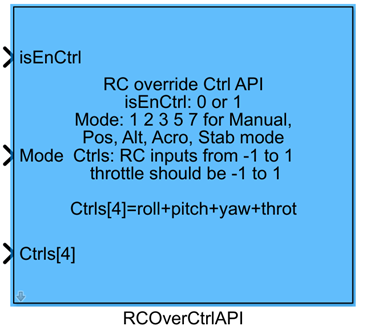
This module belongs to the RflySim APIs toolchain and is primarily used to retransmit the manual_control_setpoint message during Simulink-based custom controller development, thereby overriding PX4's native manual control signals. It supports customizable selection of Offboard attitude control channels and provides features such as automatic arming, PX4 output blocking, and automatic Loiter mode switching. When the isEnCtrl input is true, the module enables Simulink custom control and enters Offboard mode; when false, it automatically switches PX4 to Loiter mode to maintain hover, ensuring simulation safety.
This module is typically used in custom manual control development and drone control algorithm simulation validation scenarios. It works with CopterSim to perform flight control dynamics simulation, interfaces with RflySim3D for visualization, and exchanges control messages with the PX4 flight controller via the MAVLink protocol. It supports customizable switching among manual, altitude-hold, position-hold, acro, and stabilize control modes.
Port Descriptions
Input Ports (Inputs)
| Port Name | Data Type | Dimension | Description |
|---|---|---|---|
isEnCtrl |
boolean/double |
1×1 |
Enable control signal: when input is true, control data is sent and Offboard mode is entered; when input is false, control transmission stops and PX4 automatically switches to Loiter mode; automatic arming is triggered when the signal transitions from false to true |
Mode |
uint8 |
1×1 |
Control mode selection: 1 = manual mode, 2 = altitude hold mode, 3 = position hold mode, 5 = acro mode, 6 = stabilize mode |
Ctrls |
single |
N×1 [to be confirmed] | Control signal vector, corresponding in order to roll, pitch, yaw, throttle, flaps, aux1~aux6 channel signals; all channel data ranges are [-1, 1]; dimension varies based on selected control channels |
Output Ports (Outputs)
This module has no output ports.
Parameter Configuration (Parameters)
The following parameters can be configured in the Mask dialog box opened by double-clicking the module:
| Parameter Name | Type | Default Value | Optional Values/Range | Description |
|---|---|---|---|---|
Enable roll |
bool |
true |
true/false |
Whether to enable roll channel control |
Enable pitch |
bool |
true |
true/false |
Whether to enable pitch channel control |
Enable yaw |
bool |
true |
true/false |
Whether to enable yaw channel control |
Enable throttle |
bool |
true |
true/false |
Whether to enable throttle channel control |
Enable flaps |
bool |
false |
true/false |
Whether to enable flaps channel control |
Enable aux1 |
bool |
false |
true/false |
Whether to enable auxiliary channel 1 control |
Enable aux2 |
bool |
false |
true/false |
Whether to enable auxiliary channel 2 control |
Enable aux3 |
bool |
false |
true/false |
Whether to enable auxiliary channel 3 control |
Enable aux4 |
bool |
false |
true/false |
Whether to enable auxiliary channel 4 control |
Enable aux5 |
bool |
false |
true/false |
Whether to enable auxiliary channel 5 control |
Enable aux6 |
bool |
false |
true/false |
Whether to enable auxiliary channel 6 control |
Auto arm |
bool |
true |
true/false |
Whether to enable automatic arming functionality |
Auto block PX4 |
bool |
true |
true/false |
Whether to enable automatic PX4 output blocking; when enabled, the Simulink-generated controller directly controls the vehicle when isEnCtrl is true |
Auto Loiter |
bool |
true |
true/false |
Whether to enable automatic Loiter mode switching; when enabled, PX4 output blocking is released and the vehicle switches to Loiter mode when isEnCtrl is false |
Sample Time(s) |
double |
0.01 |
>0 |
Module sample time |
Parameter Setting Notes
Control Channel Selection Parameters
Each control channel has an associated enable checkbox. Once a channel is selected, its control signal is included in the transmitted manual_control_setpoint message; unselected channels are omitted. The dimension of the input Ctrls vector matches the number of selected channels.
Auto arm
When enabled, the module automatically sends an arming command to PX4 when isEnCtrl transitions from false to true, eliminating the need for additional manual arming logic.
Auto block PX4
When enabled, the module automatically blocks PX4's native control output when isEnCtrl is true, allowing the Simulink-generated controller to directly control the drone.
Auto Loiter
When enabled, the module automatically releases PX4 output blocking and switches PX4 to Loiter (hover) mode when isEnCtrl is false, ensuring the drone maintains hover after exiting Offboard control and preventing loss of control.
Block Characteristics
| Characteristic | Value |
|---|---|
| Supported Data Types | double, single, uint8 |
| Direct Feedthrough | Yes |
| Sample Time | Discrete |
| Code Generation Support | No |
Data Communication Protocol
This module transmits manual_control_setpoint messages via the MAVLink protocol, communicating with the PX4 flight controller over UDP. By default, it uses the standard MAVLink port for data exchange, and the data format complies with the MAVLink specification:
- The
Modeinput is of typeuint8, corresponding to the following control mode definitions: 1: Manual mode2: Altitude hold mode3: Position hold mode5: Acrobatic mode6: Stabilized mode- The
Ctrls[*]input is asingle-type vector, with each channel's data range being[-1, 1], defined as follows: roll: Roll channel; positive value corresponds to right roll (right side down)pitch: Pitch channel; positive value corresponds to forward movement (nose down)yaw: Yaw channel; positive value corresponds to clockwise yaw rotation when viewed from abovethrottle: Throttle channel; corresponds to 0%–100% throttle; positive value corresponds to upward movementflaps: Flap positionaux1~aux6: Auxiliary channels 1–6
Related Modules
| Module Name | Description |
|---|---|
VehicleStatus |
Outputs status information of the PX4 flight controller |
OffboardCtrlAPI |
Implements PX4 Offboard mode control, directly controlling drone motion |
SetPositionAPI |
Implements sending of position control commands |
VehicleCommandAPI |
Sends MAVLink flight vehicle control commands |
Usage Example
For related usage examples, refer to the following path:
Please refer to
Readme.pdfin the above path for complete example descriptions and operational procedures.
Notes and Common Issues
- Initialization Sequence: This module requires the PX4 flight controller and RflySim simulation environment to complete startup initialization before it can function properly. Do not output the enable signal
isEnCtrl = truebefore the simulation starts; otherwise, it may cause Offboard mode switching failure or the flight controller failing to respond to control commands. - Channel Dimension Matching: The dimension of the input port
Ctrlsmust match the number of control channels selected in the module parameters; otherwise, a dimension mismatch simulation error will occur. Control signal inputs must strictly remain within the range[-1, 1]; exceeding this range may cause abnormal control behavior in the PX4 flight controller. - Avoiding Feature Selection Conflicts: The
Auto block PX4andAuto Loiterfeatures must not be enabled simultaneously, as this will cause conflicts in the flight controller's mode-switching logic, preventing normal switching between Offboard and Loiter modes. - Mode Input Validity: The
Modeport only accepts the legally defined values specified in the documentation (1/2/3/5/6). Inputting undefined mode values will cause the flight controller to fail to recognize the control mode, resulting in no response or flight controller malfunction. - Sample Time Matching: The module's
Sample Timeparameter should be consistent with the PX4 flight controller's control cycle (typically 0.004s~0.01s). An excessively large sample time will cause delayed control signal updates, leading to unstable vehicle control. - Switching Logic Requirements: When
isEnCtrltransitions fromfalsetotrue, ensure the vehicle is in a state ready for arming and flight; otherwise, the automatic arming function may fail. If automatic arming is not required, deselect theAuto armparameter option.
Changelog
v4.1(2024-08-07): Initial version release, implementing RC manual control signal override by retransmitting themanual_control_setpointmessage, supporting custom control channel selection, Auto arm, Auto block PX4, Auto Loiter features, providing multi-mode control and multi-channel control signal input.