OffboardAdvCtrlAPI Module Documentation
Toolbox: RflySim APIs
Introduction
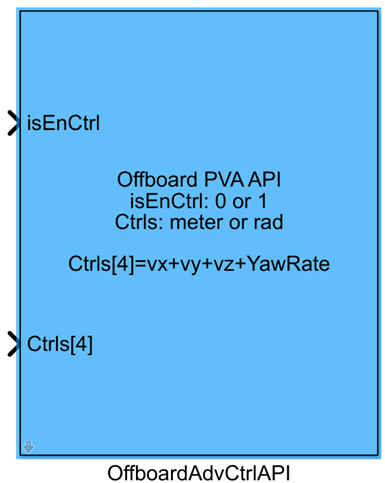
One-sentence description: This module serves as the advanced control interface for PX4 Offboard mode within the RflySim toolchain. It supports custom multi-dimensional control commands, automatically handles arming/disarming and mode-switching logic, enabling Simulink-side custom Offboard control of UAVs.
This module belongs to the RflySim APIs library and facilitates Offboard control interaction between the Simulink simulation environment, the PX4 flight controller, and the CopterSim simulation engine. It allows users to selectively enable control channels for position, velocity, acceleration, yaw angle, and yaw rate. Unselected control channels can be ignored by setting their corresponding values to NaN. This meets developers' needs for designing custom UAV advanced controllers and is suitable for simulation and verification of various Offboard control algorithms, including trajectory tracking control, visual servoing control, and formation control.
The module integrates automated logic such as automatic arming, automatic switching of PX4 outputs, and automatic hover (loiter) when idle: when the control enable input is true, it automatically performs arming, blocks the native PX4 control output, and sends Simulink-generated control commands to the PX4 flight controller via the Offboard interface; CopterSim then performs UAV dynamics simulation and synchronously transmits flight states to RflySim3D for 3D visualization. When the control enable input is false, it automatically switches the PX4 to Loiter mode to ensure UAV state safety during simulation, eliminating the need for developers to manually handle mode transitions and logical interactions.
Port Descriptions
Input Ports
| Port Name | Data Type | Dimension | Description |
|---|---|---|---|
isEnCtrl |
boolean |
1×1 |
Control enable signal: when input is true, control commands are sent and Offboard control is activated; when input is false, control command transmission stops and PX4 switches to Loiter mode |
Ctrls[*] |
double |
N×1, where N is the number of enabled control channels |
Normalized Offboard control commands, following the NED coordinate system protocol. Unselected control channels do not occupy input slots; set corresponding values to NaN if a state is not to be controlled |
Output Ports
This module has no output ports.
Parameter Configuration
The following parameters can be configured in the Mask dialog box opened by double-clicking the module:
| Parameter Name | Type | Default Value | Optional Values / Range | Description |
|---|---|---|---|---|
CopterID |
int |
1 |
1~255 |
ID number of the target UAV |
Enable position x |
bool |
false |
true/false |
Whether to enable the x-position control channel |
Enable position y |
bool |
false |
true/false |
Whether to enable the y-position control channel |
Enable position z |
bool |
false |
true/false |
Whether to enable the z-position control channel |
Enable velocity x |
bool |
false |
true/false |
Whether to enable the x-velocity control channel |
Enable velocity y |
bool |
false |
true/false |
Whether to enable the y-velocity control channel |
Enable velocity z |
bool |
false |
true/false |
Whether to enable the z-velocity control channel |
Enable acceleration x |
bool |
false |
true/false |
Whether to enable the x-acceleration control channel |
Enable acceleration y |
bool |
false |
true/false |
Whether to enable the y-acceleration control channel |
Enable acceleration z |
bool |
false |
true/false |
Whether to enable the z-acceleration control channel |
Enable yaw |
bool |
false |
true/false |
Whether to enable the yaw angle control channel |
Enable yaw rate |
bool |
false |
true/false |
Whether to enable the yaw rate control channel |
Auto arm |
bool |
false |
true/false |
Whether to automatically send the UAV arming command |
Auto block PX4 |
bool |
false |
true/false |
Whether to automatically block the native PX4 controller output and enable Simulink controller output |
Auto Loiter |
bool |
true |
true/false |
Whether to automatically switch PX4 to Loiter mode for hover when control is disabled |
Sample Time(s) |
double |
0.01 |
>0 |
Module sampling time |
Parameter Setting Descriptions
Control Channel Selection Parameters
Users can customize the selection of required Offboard control channels based on control needs. Enabled channels are arranged in a fixed order (x-position → y-position → z-position → x-velocity → y-velocity → z-velocity → x-acceleration → y-acceleration → z-acceleration → yaw angle → yaw rate) in the Ctrls[*] input ports. Unselected channels do not occupy input slots. Control commands use the NED coordinate system, with units conforming to the protocol; set corresponding inputs to NaN if a particular state is not to be controlled.
Auto arm
When this parameter is enabled, the module automatically sends an arming command to the target UAV when isEnCtrl is true, eliminating the need for users to handle arming logic separately.
Auto block PX4
When this parameter is enabled, the module automatically blocks the native PX4 controller output and uses Simulink-generated Offboard control commands to control the UAV when isEnCtrl is true, enabling external controller simulation and verification.
Auto Loiter
When this parameter is enabled, the module automatically releases the PX4 output block and switches the UAV to Loiter mode when isEnCtrl is false, allowing the UAV to automatically hover in place, thereby enhancing simulation safety. If disabled, the UAV will not automatically switch modes after Offboard control is disabled, and users must handle mode-switching logic themselves.
Sample Time(s)
Specifies the frequency at which the module sends Offboard control commands, in seconds. Typically set to 0.01, corresponding to a 100 Hz control frequency, matching the native PX4 Offboard control frequency.
Block Characteristics
| Feature | Value |
|---|---|
| Supported Data Types | double, single |
| Direct Feedthrough | Yes |
| Sample Time | Discrete |
| Code Generation Support | No |
Data Communication Protocol
This block communicates with the PX4 simulation firmware via the UDP protocol, adhering to the MAVLink Offboard control protocol. The input control signal format is described as follows:
All control inputs are based on the NED coordinate system. Valid ranges are: position x/y/z in meters (m), velocity vx/vy/vz in meters per second (m/s), acceleration ax/ay/az in meters per second squared (m/s²), yaw in radians (rad) (range: -π to π), and yaw rate in radians per second (rad/s); setting an input value to NaN indicates that the corresponding state is not being controlled.
Related Blocks
| Block Name | Description |
|---|---|
OffboardCtrlAPI |
Base Offboard mode control block, providing fundamental control interfaces for position, velocity, and yaw. |
VehicleCmdAPI |
General-purpose drone command transmission block, capable of sending basic commands such as takeoff, landing, and mode switching. |
SetpointsGenerator |
Generates reference setpoints for drone flight trajectories and can serve as a control input source for this block. |
Usage Example
For related usage examples, please refer to the following path:
Please refer to
Readme.pdfin the above path for complete example descriptions and operational steps.
Notes and Common Issues
-
Initialization Sequence: This module requires integration with the RflySim simulation environment for proper operation. It is essential to ensure that the PX4 flight controller completes power-on initialization before enabling the
isEnCtrlinput; otherwise, the Offboard mode transition will fail, and the vehicle will not respond to control commands. If theAuto armfeature is enabled, ensure the vehicle meets PX4 arming conditions (e.g., no critical fault warnings and is in ground takeoff conditions) before assertingisEnCtrl; otherwise, arming will fail. -
Input Command Consistency: When customizing control channels, maintain consistency in kinematic relationships. It is not recommended to simultaneously command position, velocity, and acceleration for the same state. If a channel does not require control, its corresponding input must be set to
NaN; otherwise, abnormal control of that channel may cause flight instability or even crashes. All position commands follow the NED coordinate system definition. Note that the z-axis points downward (positive), which is opposite to the conventional ENU coordinate system. Coordinate conversion must be performed before inputting commands to avoid incorrect position command direction. -
Sample Time Matching: Offboard mode requires a stable control command transmission frequency. It is recommended to set the module sample time to no more than 0.1s. An excessively large sample time may cause PX4 to detect Offboard signal loss and automatically exit Offboard mode, switching to Loiter. The module sample time must match the base sample time of the Simulink model to avoid delayed command updates.
-
Mode Switching Safety: If the
Auto Loiterfeature is not enabled, whenisEnCtrlis pulled low to disable Offboard control, the system will not automatically switch to the safe Loiter mode. Users must handle the flight controller mode after exiting themselves; otherwise, there is a risk of vehicle loss of control. If using a custom exit logic, it is recommended to add fail-safe logic to ensure the vehicle can automatically enter hover or landing mode upon Offboard signal loss. -
Auto block PX4 Usage Notes: When
Auto block PX4is enabled, Offboard control fully takes over vehicle output. Ensure that the input control commands are valid and meet dynamic constraints. Excessively large control commands may cause actuator saturation, leading to vehicle loss of control. -
Unit and Range Verification: The yaw angle input range is
-pi~pi. Inputs outside this range will cause abnormal yaw control. Ensure correct units for all physical quantities: position in m, velocity in m/s, acceleration in m/s², angle in rad, angular rate in rad/s. Incorrect units will directly result in abnormal control effects.
Changelog
v4.10(2024-08-07): Initial version release, supporting customizable channel selection for advanced Offboard mode control, with Auto arm, Auto block PX4, and Auto Loiter features, supporting multiple control command inputs including position, velocity, acceleration, yaw angle, and yaw rate.