FaultParamsExtract Module Documentation
Toolbox: RflySim PHM
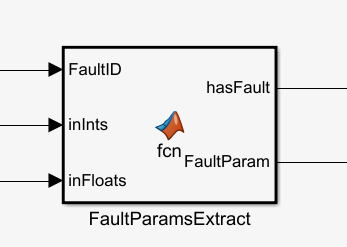
Introduction
One-sentence Description: This module extracts parameters associated with a specified fault ID from input arrays of fault identifiers and corresponding parameters, and outputs a fault presence indicator.
This module serves as a fundamental preprocessing component within the RflySim PHM (Prognostics and Health Management) fault prediction and management toolchain. It enables filtering and parsing of multi-fault information output by the PX4 flight controller. In scenarios involving fault injection and PHM algorithm simulation and verification for unmanned aerial vehicles (UAVs), this module typically interfaces with batch fault data generated by PX4 or CopterSim, extracting parameters for user-specified faults to provide structured input data for subsequent fault diagnosis and health assessment algorithms.
This module can be used in conjunction with the fault injection modules, PX4 flight control simulation environment, and RflySim3D visualization environment of the RflySim platform, enabling rapid completion of information preprocessing for PHM algorithm simulation and verification, and accommodating simulation and verification requirements for various UAV actuators and sensors.
Port Descriptions
Input Ports (Inputs)
| Port Name | Data Type | Dimension | Description |
|---|---|---|---|
FaultID |
double |
1×1 |
Target fault identifier to be detected |
inInts |
double |
1×N |
[To be confirmed] Integer array storing multiple candidate fault identifiers |
inFloats |
double |
1×N |
[To be confirmed] Floating-point array corresponding one-to-one with inInts, storing fault parameters |
Output Ports (Outputs)
| Port Name | Data Type | Dimension | Description |
|---|---|---|---|
hasFault |
double |
1×1 |
Detection result for the target fault: returns 1 (logical true) if the target fault is detected, otherwise returns 0 (logical false) |
FaultParam |
double |
1×20 |
Stores extracted fault parameters. If the target fault is detected, the first 16 elements correspond to the fault parameters, and the last 4 elements are the final 4 values from the inFloats array; if no fault is detected, default zero values are used for padding |
Parameter Configuration (Parameters)
This module has no configurable parameters.
Module Characteristics (Block Characteristics)
| Characteristic | Value |
|---|---|
| Supported Data Types | double, single, int, boolean |
| Direct Feedthrough | Yes |
| Sample Time | Inherited |
| Code Generation Support | No |
Data Communication Protocol
This module does not involve network communication.
Related Modules
| Module Name | Description |
|---|---|
ActuatorFaultInject |
Injects predefined fault signals into actuators of fixed-wing UAVs |
PropFaultInject |
Injects predefined fault signals into motors of multi-rotor UAVs |
SensorFaultInject |
Injects predefined fault signals into sensors of UAVs |
FaultDetectionCheck |
Evaluates the accuracy rate of fault detection results for UAV sensors and actuators |
PHMDataRecv |
Receives raw PHM-related data from the flight controller for fault diagnosis and prediction |
RULCalculate |
Calculates remaining useful life (RUL) for degradation faults and outputs evaluation errors |
HealthIndicatorExtract |
Extracts health indicator signals during UAV system operation |
FaultIDEncode |
Encodes fault IDs and corresponding parameters into a standardized fault data array |
MultipleFaultsExtract |
Extracts parameter information for multiple faults from an encoded multi-fault data array |
IMUOnlineCalibration |
Implements online calibration of IMU in simulation environments |
BarometerOnlineCalibration |
Implements online calibration of barometers in simulation environments |
GPSOnlineCalibration |
Implements online calibration of GPS in simulation environments |
MagnetometerOnlineCalibration |
Implements online calibration of magnetometers in simulation environments |
RangeFinderOnlineCalibration |
Implements online calibration of ranging sensors in simulation environments |
OpticalFlowOnlineCalibration |
Implements online calibration of optical flow sensors in simulation environments |
VIOOnlineCalibration |
Implements online calibration of VIO sensors in simulation environments |
ESCOnlineCalibration |
Implements online calibration of electronic speed controllers (ESCs) in simulation environments |
Quick Start
Minimum steps to use this module in a Simulink model.
- Execute
RegisterMatlabin MATLAB to register the RflySim PHM toolbox. - Locate the
FaultParamsExtractmodule in the RflySim PHM library within the Simulink Library Browser. - Drag the module into your fault diagnosis simulation model and connect input/output signals according to the port definitions.
Usage Examples
Basic Usage: Detecting a Specific Actuator Stiction Fault
% Example model initialization script
% Define the target fault ID to be detected: 1 corresponds to left actuator stiction fault
targetFaultID = 1;

% Example input arrays: list of fault IDs currently present in the simulation
inputInts = [0, 1, 3]; % 0 indicates no fault, 1 indicates left actuator stiction, 3 indicates GPS signal anomaly
% Corresponding fault parameters: left actuator stiction angle is 15 degrees, GPS offset parameters are [2.5, 1.8, 0], additional status parameters are [12, 0, 0, 0]
inputFloats = [0, 15, 2.5, 1.8, 0, 12, 0, 0, 0];
In the Simulink model, after connecting targetFaultID to the FaultID input port and connecting inputInts and inputFloats to their respective input ports, the output hasFault returns true, indicating that the target fault has been detected. The first 16 elements of the FaultParam array store the stuck parameter value 15, and the last 4 elements store the final 4 values of the input inputFloats, i.e., [12, 0, 0, 0].
Multi-Fault Detection Scenario
% Initialization script for sequentially detecting multiple faults
faultIDList = [1, 2, 3]; % List of fault IDs to be detected in sequence
for i = 1:length(faultIDList)
    currentFaultID = faultIDList(i);
    % Input currentFaultID into the FaultParamsExtract module to obtain whether the corresponding fault exists and its parameters
end
Notes and Common Issues
- Input Dimension Matching: The length of the
inIntsarray must not exceed that of theinFloatsarray, and each fault ID ininIntsmust correspond to at least one parameter ininFloats; otherwise, a dimension mismatch error will occur. - Fixed Output Array Length: The
FaultParamoutput is always a floating-point array of fixed length 20, regardless of whether the target fault is detected; unused elements default to 0. - Fault ID Uniqueness: If multiple identical
FaultIDvalues exist ininInts, the module returns the fault parameters corresponding to the first matchingFaultID. - Parameter Storage Rule: For a single fault, if the number of associated parameters exceeds 16, only the first 16 parameters are stored in the first 16 elements of
FaultParam; the remaining parameters are truncated. - Sample Time Matching: This module is a combinatorial logic block; it is recommended to set its sample time to match that of the fault input signals to avoid parameter read errors caused by mismatched simulation step sizes.
Change Log
v4.10(2024-07-24): Added the FaultParamsExtract fault parameter extraction module, supporting extraction of fault parameters corresponding to a specifiedFaultIDfrom input integer and floating-point arrays.