RflySim3D Multimodal Sensor API Documentation
This document describes the parameter definitions for all multimodal sensors in RflySim.
Version Restriction Overview
| Version | Supported TypeIDs | Sensor Quantity Limit | Target Aircraft Limit |
|---|---|---|---|
| Free Edition (CurrentVersion < 6) | 1, 2, 3, 4, 5, 8, 10, 20, 21, 22, 23, 30, 31 | Max 3 (SeqID < 3) | Copter#1 only (except TargetMountType=4) |
| Paid Edition (CurrentVersion ≥ 6) | All 18 types | Unlimited | Unlimited |
Paid Edition Exclusive Sensors: Type 6 (Audio), Type 7 (Depth-to-Pointcloud), Type 9 (Gimbal), Type 40 (Infrared Grayscale), Type 41 (Infrared Pseudo-Color).
Version Note
The table above follows the licensing division already used in this document; different pages of the documentation currently shipped with the SDK are inconsistent regarding the version attribution of some TypeIDs. The Python SDK itself does not perform license checks; the actually available types, quantities, and target vehicle restrictions are subject to the running RflySim3D/RflySimUE5 version and license.
Common Parameter Description (VisionSensorReq / VisionSensorReqNew)
Regular sensors use VisionSensorReq. Type 9 gimbal dynamic control uses VisionSensorReqNew, which adds bitmask; the bitmask in the table below exists only in the latter. The field names in Config.json and the Python attribute names both retain the SDK's Eular spelling.
| Field | Type | Description |
|---|---|---|
checksum |
uint16 |
Request data checksum, fixed to 12345. 12346 is the gimbal status return checksum, not used for sensor requests |
SeqID |
uint16 |
Sensor instance sequence ID (unique identifier) |
bitmask |
uint32 |
Update control bitmask, currently mainly used for Type 9 gimbal; regular VisionSensorReq does not contain this field |
TypeID |
uint16 |
Sensor type ID (core of this document) |
TargetCopter |
uint16 |
Bound target aircraft ID (can be dynamically changed) |
TargetMountType |
uint16 |
Mounting mode (see detailed description below) |
DataWidth |
uint16 |
Data/image width (pixels or number of ray columns) |
DataHeight |
uint16 |
Data/image height (pixels or number of ray rows) |
DataCheckFreq |
uint16 |
Data update frequency (Hz), defaults to 30Hz when 0 |
SendProtocol[8] |
uint16[8] |
Transmission protocol parameters (see detailed description below) |
CameraFOV |
float |
Usually represents camera field of view (degrees); some point cloud sensors reuse this field, see the corresponding TypeID for its specific meaning |
SensorPosXYZ[3] |
float[3] |
Sensor position (meters). When mounted to a vehicle, it is the FRD offset relative to the vehicle center; when world-fixed, it is the world coordinate |
EularOrQuat |
float |
>0.5 uses quaternion, ≤0.5 uses Euler angles. The field name retains the SDK's Eular spelling |
SensorAngEular[3] |
float[3] |
Sensor mounting Euler angles (Roll, Pitch, Yaw, degrees), relative to the vehicle FRD coordinate system |
SensorAngQuat[4] |
float[4] |
Sensor mounting quaternion (w, x, y, z) |
otherParams[16] |
float[16] |
Sensor-specific parameters (see each type description) |
Sensor Mounting Mode (TargetMountType)
| Value | Mode | Description |
|---|---|---|
| 0 | Fixed to Vehicle | Sensor moves with the vehicle (position + attitude follow) |
| 1 | Fixed to Vehicle Bottom | Similar to mode 0, but Z offset subtracts vehicle center height |
| 2 | World Fixed | Sensor position/attitude uses world absolute coordinates, does not follow any vehicle |
| 3 | Attitude World Fixed | Position follows vehicle, but sensor attitude remains in the world coordinate system and does not change with vehicle attitude |
| 4 | Attached to Sensor | Attached to another sensor; TargetCopter represents the target sensor's SeqID |
Data Transmission Mode (SendProtocol)
| Index | Field | Description |
|---|---|---|
[0] |
sendMode |
Transmission mode: 0=Shared Memory; 1=UDP JPEG (images) or custom binary (point clouds/other data); 2=UDP Raw Uncompressed Image; 3=UDP PNG |
[1-4] |
IP Address | When sendMode=1/2/3, specifies the target IP (four segments) |
[5] |
Port Number | When sendMode=1/2/3, specifies the target port |
[6] |
sendModeEx |
UDP fragment size (bytes). Valid range 100–60000, default 60000. Controls the payload size of each UDP packet |
[7] |
Function Flag | Meaning varies by type (see each sensor description) |
Note: sendMode 2 and 3 are only used for image-type sensors. Type 5, 7, 10, 20–23, 30, 31 should only use their respective supported modes 0/1; the Python SDK does not define the receiving behavior of these types under modes 2/3. For the special configuration of Type 6, see its separate description.
Sensor Type Detailed Parameters
Type 1 — RGB Image
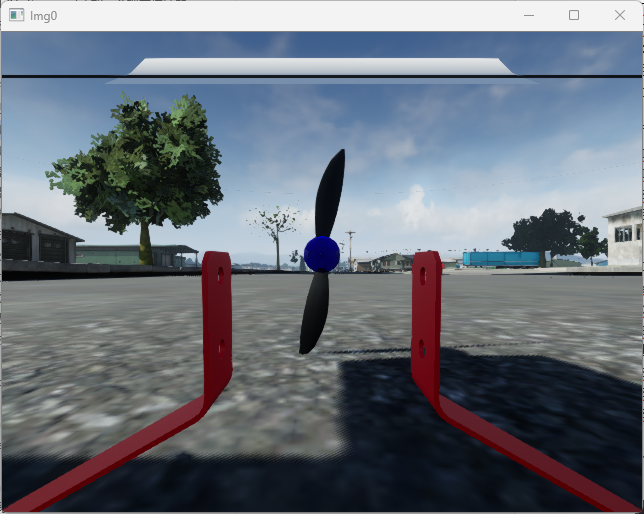
| Item | Description |
|---|---|
| Purpose | Capture color scene images |
| Acquisition Principle | Place a virtual camera at the sensor position, render the full-color image of the current perspective |
| Output Format | RGB color image (W×H×3 bytes) |
| DataWidth / DataHeight | Image resolution (pixels) |
| CameraFOV | Camera field of view (degrees) |
| otherParams | No dedicated parameters |
Config.json Example
{
    "VisionSensors": [{
        "SeqID": 0,              // Sensor sequence number, fill 0 for auto-increment
        "TypeID": 1,             // Sensor type: 1=RGB
        "TargetCopter": 1,       // Bound aircraft ID (Free Edition only supports #1)
        "TargetMountType": 0,    // Mounting mode: 0=Fixed to Vehicle
        "DataWidth": 640,        // Image width (pixels)
        "DataHeight": 480,       // Image height (pixels)
        "DataCheckFreq": 30,     // Data update frequency (Hz)
        "SendProtocol": [0,0,0,0,0,0,0,0], // [0]=0 Shared Memory/1 UDP JPEG/2 Raw Image/3 PNG; [1-4]=IP; [5]=Port; [6]=Fragment size; [7]=Function bit
        "CameraFOV": 90,         // Field of view (degrees)
        "EularOrQuat": 0,        // 0=Euler angles, >0.5=Quaternion
        "SensorPosXYZ": [0.3, 0, 0],     // FRD offset relative to vehicle center (meters)
        "SensorAngQuat": [0,0,0,0],      // Quaternion attitude (w,x,y,z)
        "SensorAngEular": [0,0,0],       // Euler angle attitude (Roll,Pitch,Yaw, degrees)
        "otherParams": [0,0,0,0,0,0,0,0,0,0,0,0,0,0,0,0]  // Dedicated parameters (no need to set for RGB)
    }]
}
Python Image Capture Demo
The following is the common image capture workflow for all image-type sensors (1, 2, 3, 4, 8, 40, 41). Subsequent sensors will only list the differences.
import VisionCaptureApi
import cv2, time, sys

vis = VisionCaptureApi.VisionCaptureApi()  # Can pass RflySim3D IP

# 1. Load Config.json
vis.jsonLoad()                  # Default loads Config.json in the same directory

# 2. Send image capture request to RflySim3D
if not vis.sendReqToUE4():
    sys.exit(0)

# 3. Start image capture thread
vis.startImgCap()

# 4. Update sensor parameters as needed (can also be called repeatedly at runtime)
vs = vis.VisSensor[0]
vs.CameraFOV = 60
vs.SensorPosXYZ = [0.3, 0, 0]
vis.sendUpdateUEImage(vs)

# 5. Loop to read images
while True:
    time.sleep(1/30.0)
    for i in range(len(vis.hasData)):
        if vis.hasData[i]:
            cv2.imshow('Img'+str(i), vis.Img[i])  # vis.Img[i]: np.ndarray (H×W×3, uint8, BGR)
            cv2.waitKey(1)
Python Output: vis.Img[i] → np.ndarray (H×W×3, uint8, BGR color image)
ROS Data
| Topic | Message Type | Encoding |
|---|---|---|
/rflysim/sensor{SeqID}/img_rgb |
sensor_msgs/Image |
bgr8 |
ROS2 Distinction: ROS1 uses
rospy.Publisher; ROS2 usesnode.create_publisher+QoSProfile(depth=10, reliability=RELIABLE). Requires settingVisionCaptureApi.isEnableRosTrans = Trueto enable.
C++ ROS Subscription Demo
ROS1:
#include <ros/ros.h>
#include <sensor_msgs/Image.h>
#include <cv_bridge/cv_bridge.h>
#include <opencv2/highgui.hpp>

void imageCallback(const sensor_msgs::ImageConstPtr& msg) {
    cv::Mat img = cv_bridge::toCvShare(msg, "bgr8")->image;
    cv::imshow("RflySim RGB", img);
    cv::waitKey(1);
}

int main(int argc, char** argv) {
    ros::init(argc, argv, "rflysim_img_sub");
    ros::NodeHandle nh;
    // Modify topic name according to actual SeqID, e.g., /rflysim/sensor0/img_rgb
    ros::Subscriber sub = nh.subscribe("/rflysim/sensor0/img_rgb", 1, imageCallback);
    ros::spin();
    return 0;
}
ROS2:
#include <rclcpp/rclcpp.hpp>
#include <sensor_msgs/msg/image.hpp>
#include <cv_bridge/cv_bridge.h>
#include <opencv2/highgui.hpp>

class ImgSub : public rclcpp::Node {
public:
    ImgSub() : Node("rflysim_img_sub") {
        // ROS2 requires specifying QoS, consistent with the SDK publisher
        auto qos = rclcpp::QoS(10)
            .reliability(rclcpp::ReliabilityPolicy::Reliable)
            .durability(rclcpp::DurabilityPolicy::TransientLocal);
        sub_ = create_subscription<sensor_msgs::msg::Image>(
            "/rflysim/sensor0/img_rgb", qos,
            [this](sensor_msgs::msg::Image::SharedPtr msg) {
                auto img = cv_bridge::toCvShare(msg, "bgr8")->image;
                cv::imshow("RflySim RGB", img);
                cv::waitKey(1);
            });
    }
private:
    rclcpp::Subscription<sensor_msgs::msg::Image>::SharedPtr sub_;
};

int main(int argc, char** argv) {
    rclcpp::init(argc, argv);
    rclcpp::spin(std::make_shared<ImgSub>());
    rclcpp::shutdown();
    return 0;
}
Note: The QoS of the ROS2 subscriber must match that of the SDK publisher (
Reliable+TransientLocal), otherwise messages will not be received. Replacesensor0in the topic name with the actualSeqID.Demo Example (Local Installation Directory):
[Installation Directory]\RflySimAPIs\8.RflySimVision\0.ApiExps\1-UsageAPI\4.SendProtocolAPI
Type 2 — Depth Image
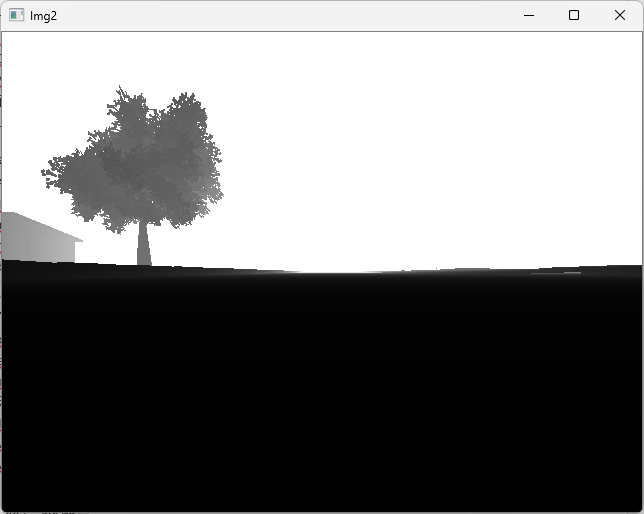
| Item | Description |
|---|---|
| Purpose | Obtain distance information from each pixel in the scene to the camera |
| Acquisition Principle | Place a virtual camera at the sensor location and render scene depth with floating-point precision |
| Output Format | 16-bit depth image (W×H×2 bytes) |
| DataWidth / DataHeight | Image resolution (pixels) |
| CameraFOV | Camera field of view (degrees) |
| otherParams | No dedicated parameters |
Python Output: vis.Img[i] → np.ndarray (H×W, uint16, 16-bit depth values). The image retrieval process is the same as Type 1, simply change TypeID to 2 in Config.json.
ROS: /rflysim/sensor{SeqID}/img_depth · sensor_msgs/Image · Encoding mono16
Demo Example (Local Installation Directory):
[Installation Directory]\RflySimAPIs\8.RflySimVision\0.ApiExps\1-UsageAPI\1.ImgSenorAPI\3.DepthCameraDemo
Type 3 — Grayscale Image
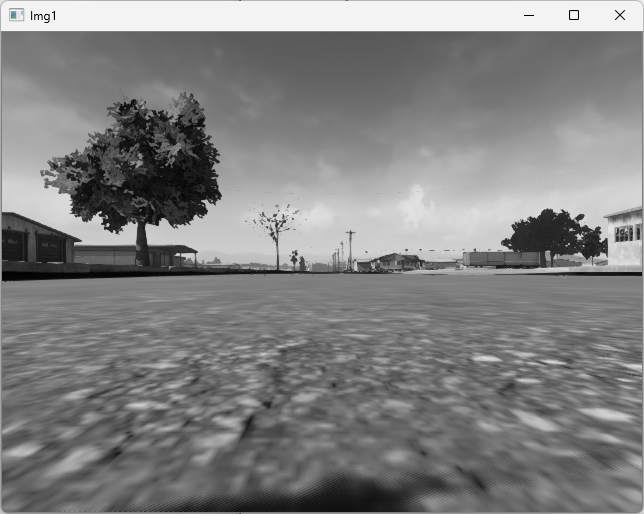
| Item | Description |
|---|---|
| Purpose | Capture single-channel grayscale scene images |
| Acquisition Principle | Place a virtual camera at the sensor location, render a color image, then convert to grayscale |
| Output Format | Single-channel grayscale (W×H×1 bytes) |
| DataWidth / DataHeight | Image resolution (pixels) |
| CameraFOV | Camera field of view (degrees) |
| otherParams | No dedicated parameters |
Python Output: vis.Img[i] → np.ndarray (H×W, uint8, single-channel grayscale). The image retrieval process is the same as Type 1, change TypeID to 3.
ROS: /rflysim/sensor{SeqID}/img_gray · sensor_msgs/Image · Encoding mono8
Demo Example (Local Installation Directory):
[Installation Directory]\RflySimAPIs\8.RflySimVision\0.ApiExps\1-UsageAPI\4.SendProtocolAPI
Type 4 — Segmentation Map
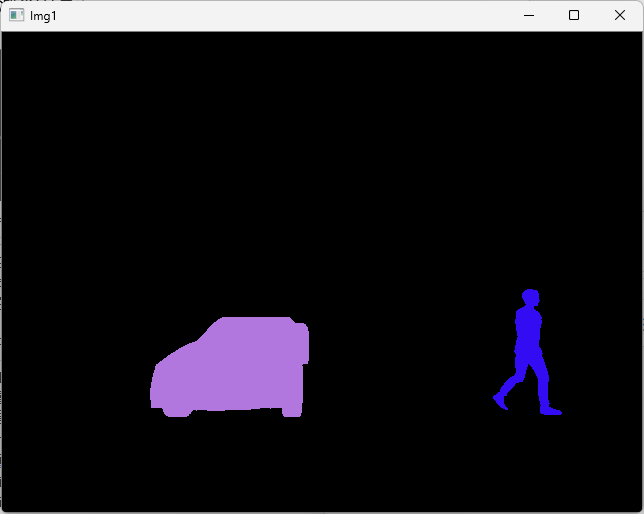
| Item | Description |
|---|---|
| Purpose | Semantic segmentation image where different objects in the scene are assigned different colors based on their annotation values |
| Acquisition Principle | Place a virtual camera at the sensor location and render colors based on the preset segmentation annotation value (CustomDepthStencilValue) of each object |
| Output Format | RGB color image (W×H×3 bytes) |
| DataWidth / DataHeight | Image resolution (pixels) |
| CameraFOV | Camera field of view (degrees) |
| otherParams | No dedicated parameters |
Python Output: vis.Img[i] → np.ndarray (H×W×3, uint8, BGR segmentation map). The image retrieval process is the same as Type 1, change TypeID to 4.
ROS: /rflysim/sensor{SeqID}/img_Segmentation · sensor_msgs/Image · Encoding bgr8
Demo Example (Local Installation Directory):
[Installation Directory]\RflySimAPIs\8.RflySimVision\0.ApiExps\1-UsageAPI\1.ImgSenorAPI\5.SegmentImageDemo
Type 5 — Rangefinder Sensor
| Item | Description |
|---|---|
| Purpose | Single-ray distance measurement (forward) |
| Acquisition Principle | Emit a single ray forward from the sensor position, detect collision with scene objects, and return the distance |
| DataCheckFreq | Ranging frequency (Hz) |
| Shared Memory Size | 1 + 8 + 14×4 = 65 bytes |
otherParams Definition:
| Index | Parameter | Description |
|---|---|---|
[0] |
maxRange |
Maximum ranging distance (meters) |
Output Data Includes:
- Distance: Measured distance (meters), returns -1 if no hit
- disCopterID: CopterID of the hit target (-1 for non-aircraft targets)
- disData[0-2]: Emission point position (NED, meters)
- disData[3-5]: Sensor attitude angles (Roll, Pitch, Yaw, degrees)
- disData[6-8]: Hit point position (NED, meters)
- disData[9-11]: Hit target center position (NED, meters)
Python Output: vis.Img[i] → DistanceSensor object, containing .Distance (meters), .CopterID, .RayStart[3], .AngEular[3], .ImpactPoint[3], .BoxOri[3]. The current decoder also stores .Distance and .CopterID as NumPy arrays of length 1; use [0] when reading scalars. vis.DistanceSensor is only an initialization attribute; the current receiving logic does not write ranging results into it.
The rangefinder sensor is typically mounted on an image sensor using
TargetMountType=4to share its position and attitude.
Config.json Example (Mounted on RGB Camera)
{
    "VisionSensors": [
        {
            "SeqID": 0,
            "TypeID": 1,              // Create RGB camera first
            "TargetCopter": 1,
            "TargetMountType": 0,
            "DataWidth": 640,
            "DataHeight": 480,
            "DataCheckFreq": 30,
            "SendProtocol": [1,0,0,0,0,0,0,0],  // UDP mode
            "CameraFOV": 90,
            "EularOrQuat": 0,
            "SensorPosXYZ": [0.3, 0, 0],
            "SensorAngQuat": [0,0,0,0],
            "SensorAngEular": [0,0,0],
            "otherParams": [0,0,0,0,0,0,0,0,0,0,0,0,0,0,0,0]
        },
        {
            "SeqID": 0,
            "TypeID": 5,              // Rangefinder mounted on the RGB above
            "TargetCopter": 0,
            "TargetMountType": 4,     // MountType=4 attaches to sensor SeqID=0
            "DataWidth": 640,
            "DataHeight": 480,
            "DataCheckFreq": 30,
            "SendProtocol": [1,0,0,0,0,0,0,0],
            "CameraFOV": 90,
            "EularOrQuat": 0,
            "SensorPosXYZ": [0, 0, 0],
            "SensorAngQuat": [0,0,0,0],
            "SensorAngEular": [0,0,0],
            "otherParams": [200,0,0,0,0,0,0,0,0,0,0,0,0,0,0,0]  // maxRange=200m
        }
    ]
}
ROS: Rangefinder sensor data is not published as an independent ROS topic; it is accessed directly via the DistanceSensor object in Python vis.Img[i].
Demo Example (Local Installation Directory):
[Installation Directory]\RflySimAPIs\8.RflySimVision\0.ApiExps\1-UsageAPI\1.ImgSenorAPI\6.RangingImageDemo
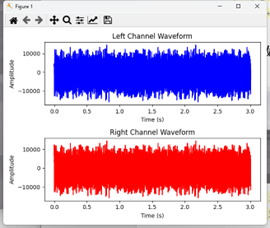
Type 6 — Audio Sensor (Under Development, Full Edition)
| Item | Description |
|---|---|
| Purpose | Environmental audio capture and analysis (e.g., ambient sound monitoring, sound source localization, speech recognition) |
| Acquisition Principle | Capture and output real-time audio data from the RflySim3D scene |
| Output Format | Real-time audio data stream (supports stereo, 48kHz sampling) |
| DataWidth / DataHeight | Invalid |
| CameraFOV | Invalid |
| Shared Memory Size | Shared memory not supported |
otherParams Definition:
| Index | Parameter | Description |
|---|---|---|
[0] |
enableAudio |
1: Enable and send audio data; 0: Stop sending audio data |
Network Communication Configuration (SendProtocol):
| Index | Field | Description |
|---|---|---|
[0] |
sendMode |
The current official Type 6 example sets 0; this type does not use the SDK's generic shared memory reception path, but instead receives independently via a UDP Socket |
[1-4] |
IP Address | IP address of the audio data receiver; the official example uses 127.0.0.1 |
[5] |
Port Number | Destination port number for audio data transmission |
Config.json Example
{
    "VisionSensors": [
        {
            "SeqID": 0,
            "TypeID": 6,                    // Audio sensor
            "TargetCopter": 0,
            "TargetMountType": 0,
            "DataWidth": 0,
            "DataHeight": 0,
            "DataCheckFreq": 30,            // Transmission frequency
            "SendProtocol": [0,127,0,0,1,28003,0,0], // UDP port 28003
            "CameraFOV": 0,
            "EularOrQuat": 0,
            "SensorPosXYZ": [0, 0, 0],
            "SensorAngQuat": [0,0,0,0],
            "SensorAngEular": [0,0,0],
            "otherParams": [1,0,0,0,0,0,0,0,0,0,0,0,0,0,0,0] // 1: Enable transmission
        }
    ]
}
Python Output: Receive UDP data packets via a custom Socket (Buffer Size: 204800, stereo, 48kHz) for audio decoding or processing.
The meaning of
SendProtocol[0]in Type 6 is not defined within the Python SDK. For compatibility with the current engine, please keep the official example's value of 0, and useSendProtocol[1-5]to specify the UDP receiving address and port. Demo Example (Local Installation Directory):[Installation Directory]\RflySimAPIs\4.RflySimModel\3.CustExps\e7_ExternalSensors\e2_Voice_PyRec
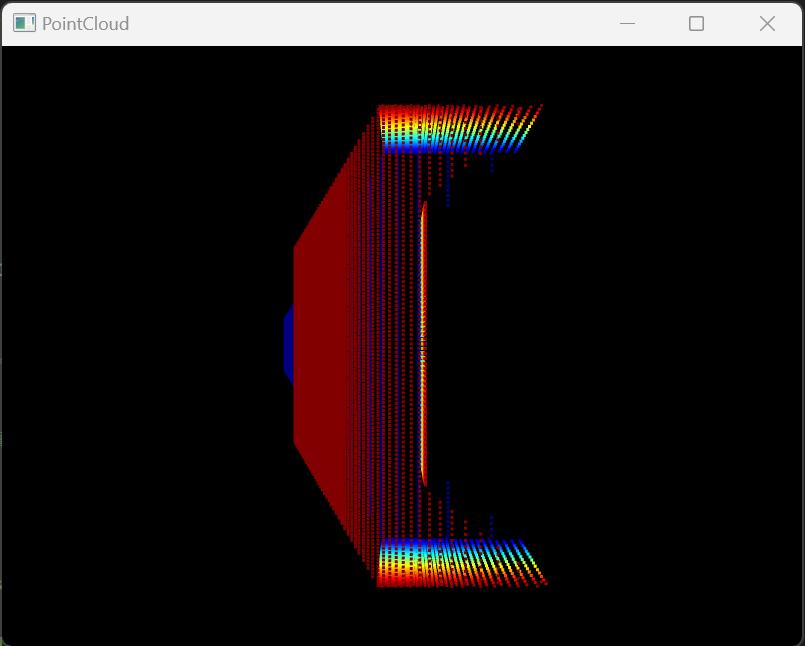
Type 7 — Depth to Point Cloud (Full Edition)
| Item | Description |
|---|---|
| Purpose | Generate 3D point cloud via depth image back-projection |
| Acquisition Principle | First render the scene depth image, then back-project each pixel into a 3D point using camera intrinsics (pinhole model), optionally obtaining semantic annotation colors for each point |
| Transport Layer Format | Int16-encoded XYZ [+ semantic color], 3 or 4 channels per point |
| Coordinate System | FLU (Front-Left-Up), relative to the reference frame set by AxisMask |
| DataWidth / DataHeight | Depth image resolution (pixels), affecting point cloud density |
| CameraFOV | Camera field of view (degrees) |
| Shared Memory Size | 1 + 8 + 9×4 + W×H×C×2 bytes, where C=3 or 4, determined by SendProtocol[7] |
otherParams Definition:
| Index | Parameter | Description |
|---|---|---|
[0] |
maxDepth |
Maximum depth distance (meters); points beyond this value are filtered out |
[1] |
step / debugMode |
When >0, enables debug mode (binds to DebugPlane display) and also serves as the sampling step |
[7] |
AxisMask |
Coordinate system mode (see table below) |
SendProtocol[7] Definition:
| Value | Meaning |
|---|---|
0 |
Output XYZ only (3 channels per point) |
>0 |
Output XYZI (4 channels per point), with the 4th channel being RGB555-encoded semantic color |
AxisMask Definition:
| Value | Mode | Description |
|---|---|---|
0 |
Vehicle Coordinates | Uses the absolute pose of the bound vehicle |
1 |
Sensor Absolute Coordinates | Uses the absolute pose of the sensor itself |
2 |
Sensor Relative Coordinates | Uses the pose change of the sensor relative to its starting point |
Python Output: vis.Img[i] is always an N×4 array. In UDP mode it is float32; in shared memory mode it is currently float64. The first three columns are the scaled XYZ; when the transport layer has only three channels, the fourth column is padded with 0, and when a semantic channel is present, the fourth column retains the raw RGB555 value. Can be displayed in real-time via the Open3DShow module. Image acquisition flow is the same as Type 1, with TypeID changed to 7.
ROS: The SDK has built-in publishing of /rflysim/sensor{SeqID}/Depth_Cloud, with message type sensor_msgs/PointCloud2.
PointCloud2 Layout Limitation of the Current SDK
The Type 7 Python array always has four columns. The current UDP path actually reuses a message with four fields x/y/z/seg and point_step=16; the shared memory path, however, only declares x/y/z and point_step=12, and then writes four columns of float32 data. The shared memory topic may produce point boundary misalignment. It is recommended to prioritize UDP or reading vis.Img[i], and to rely on that topic only after the shared memory publisher is fixed.
Demo Example (Local Installation Directory):
[Installation Directory]\RflySimAPIs\8.RflySimVision\0.ApiExps\1-UsageAPI\3.PointCloudAPI\4.DepthPointCloudDemo
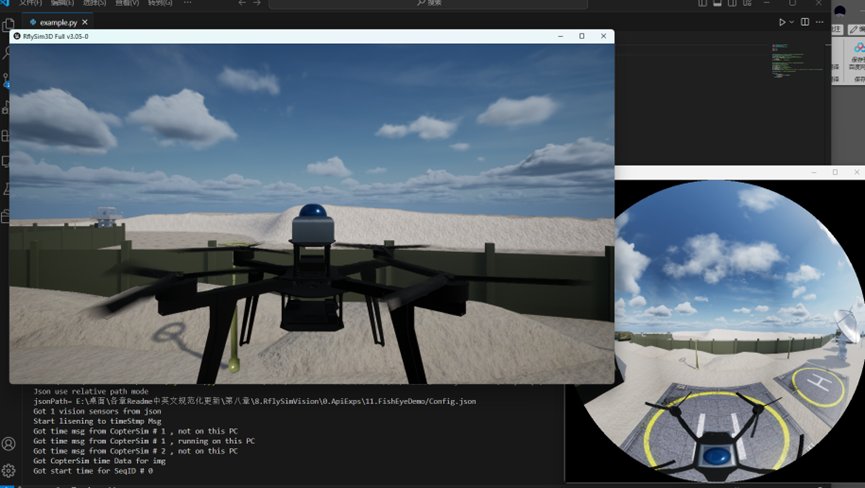
Type 8 — Fisheye Camera
| Item | Description |
|---|---|
| Purpose | Capture ultra-wide-angle / panoramic fisheye images |
| Acquisition Principle | Place a panoramic cube camera at the sensor location, render images in six directions simultaneously, then synthesize them into a single fisheye image using a fisheye projection model |
| Output Format | RGB color image (W×H×3 bytes) |
| DataWidth / DataHeight | Output image resolution |
| CameraFOV | Fisheye field of view |
otherParams Definition:
| Index | Parameter | Description |
|---|---|---|
[0] |
fisheyeType |
Fisheye projection type |
Python Output: vis.Img[i] → np.ndarray (H×W×3, uint8, BGR fisheye image). Image acquisition flow is the same as Type 1, with TypeID changed to 8.
ROS: The UDP reception path publishes /rflysim/sensor{SeqID}/fisheye · sensor_msgs/Image · encoding bgr8. The current shared memory ROS publishing branch does not include Type 8, so do not rely on this built-in topic in shared memory mode.
Demo Example (Local Installation Directory):
[Installation Directory]\RflySimAPIs\8.RflySimVision\0.ApiExps\11.FishEyeDemo
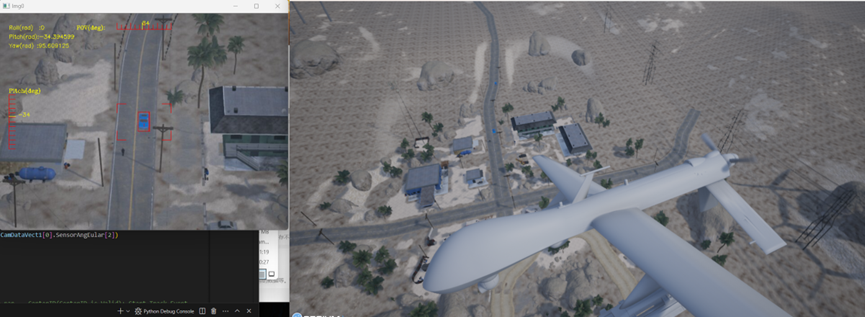
Type 9 — Gimbal Camera (Full Edition)
| Item | Description |
|---|---|
| Purpose | Controllable gimbal camera supporting attitude control, angular velocity control, target tracking, centering, optical zoom, ranging, and AI bounding box selection |
| Acquisition Principle | Uses a cinematic virtual camera to simulate the gimbal, achieving smooth motion via a spring arm component. Supports real-time orientation adjustment via control commands (quaternion Slerp interpolation), and can automatically lock onto a target or GPS coordinate for target tracking |
| Output Format | RGB color image (W×H×3 bytes) |
| DataWidth / DataHeight | Image resolution (pixels) |
| CameraFOV | Initial field of view (degrees), can be dynamically modified during runtime via bitmask |
Initialization Parameters (otherParams):
| Index | Parameter | Description |
|---|---|---|
[4] |
OpitcalBaseNum |
Optical zoom base number (range 4–1000, default 4) |
[5] |
disNum |
Maximum ranging distance (meters, default 200) |
The table above describes the initial parameters in Config.json. At runtime, gimbal control reuses these slots:
otherParams[4]is the optical zoom target,[5]is the tracking target ID,[6]is the ranging switch, and[7]is the image type selection; in the status feedback,[7]can also represent the ranging result. Do not directly apply the initial configuration semantics to control commands or status feedback.
Gimbal Control — bitmask
The gimbal is controlled via the VisionSensorReqNew.bitmask field, with each function corresponding to a bit. Multiple functions can be activated simultaneously.
| Bit | Function | Description |
|---|---|---|
1<<1 |
Field of View (FOV) | Directly sets the value of the CameraFOV field |
1<<2 |
Angle Control | Smoothly rotates the gimbal to the target attitude specified by SensorAngEular / SensorAngQuat, moving via Slerp interpolation at 120°/s |
1<<3 |
Quaternion Mode | Used in conjunction with angle control; specifies the target attitude as a quaternion |
1<<4 |
Focal Length | Directly sets the focal length value (mm), passed via otherParams[0] |
1<<5 |
Center | Smoothly returns the gimbal to its initial mounting attitude (triggered when otherParams[1] > 0) |
1<<6 |
Angular Velocity Control | Continuously rotates at a specified angular velocity, set via otherParams[2] (Pitch) and otherParams[3] (Yaw) in °/s |
1<<7 |
Optical Zoom | Smoothly transitions the focal length to the target value of otherParams[4] × OpitcalBaseNum |
1<<8 |
Target Tracking | Automatically tracks a specified target. When otherParams[5] ≥ 0, tracks by CopterID; when otherParams[5] < 0, tracks by GPS coordinates (otherParams[9-11]) |
1<<9 |
Ranging | Emits a ray from the gimbal lens center, returning the hit distance and hit point coordinates |
1<<10 |
Image Type Switch | Switches the image type output by the gimbal, controlled by otherParams[7] (see table below) |
1<<11 |
AI Bounding Box | Enables AI target detection, controlled by otherParams[8] mode (see table below) |
Image Type Switch (otherParams[7])
| Value | Type | Description |
|---|---|---|
| 0 | RGB Color | Standard visible light image (default) |
| 1 | Infrared Pseudo-Color | Simulates infrared thermal imaging pseudo-color image |
| 2 | Infrared Grayscale | Simulates infrared imaging grayscale image |
AI Bounding Box Mode (otherParams[8])
| Value | Mode | Description |
|---|---|---|
| 0 | Off | No AI detection performed |
| 1 | Full Target Bounding Box | Automatically draws bounding boxes around all Copter objects in the field of view (excluding the own vehicle), returning bounding boxes |
| 2 | Pixel Selection | Detects the object at the pixel coordinates specified by otherParams[9-10], returns the bounding box of that object, and can be used as a tracking target |
Python Output: vis.Img[i] → np.ndarray (H×W×3, uint8, BGR). The gimbal is controlled using the VisionSensorReqNew structure (containing bitmask), with control commands sent via vis.sendUpdateUEImaged(vsrNew). sendUpdateUEImage() only accepts the older VisionSensorReq.
ROS: /rflysim/sensor{SeqID}/img_cine · sensor_msgs/Image · encoding bgr8
Demo Example (Local Installation Directory):
[Installation Directory]\RflySimAPIs\8.RflySimVision\2.AdvExps\e1_CameraKeyDemoOnUbuntu
Type 10 — Optical Flow Sensor
| Item | Description |
|---|---|
| Purpose | Optical flow velocity estimation + ground distance measurement |
| Acquisition Principle | Emits a ray towards the ground to measure ground distance; simultaneously compares pixel displacement between consecutive frames to estimate optical flow velocity. Supports ground truth mode (directly uses velocity data) and OpenCV mode (image feature point tracking) |
| Transmission Method | UDP custom binary payload (34 bytes); the current Python SDK has no shared memory decoding branch for Type 10 |
otherParams Definition:
| Index | Parameter | Description |
|---|---|---|
[0] |
maxRange |
Maximum ground distance measurement range (meters) |
[1] |
OpticalFlowType |
Optical flow calculation method: 0=Ground truth, 1=OpenCV |
[2] |
maxCorners |
(OpenCV only) Maximum number of corner points (default 50) |
[3] |
qualityLevel |
(OpenCV only) Corner quality threshold (default 0.3) |
[4] |
minDistance |
(OpenCV only) Minimum distance between corners (default 7 pixels) |
Output Data (OpticalFlowParams):
| Field | Description |
|---|---|
time_usec |
Timestamp (μs, may be Unix time or time since system boot) |
sensor_id |
Sensor ID (= SeqID) |
flow_x / flow_y |
Optical flow velocity (dpix/frame) |
flow_comp_m_x / flow_comp_m_y |
Optical flow velocity (m/s) |
quality |
Optical flow quality (0–255) |
ground_distance |
Ground distance (meters) |
flow_rate_x / flow_rate_y |
Angular velocity compensation (rad/s) |
Python Output: The SDK decodes the custom payload into vis.OpticalFlowSensor, with object fields consistent with the table above. This data does not go through MAVLink, nor is it stored in vis.imu; when configuring, set TypeID to 10 and use UDP mode.
ROS: The current SDK has no built-in ROS publisher for Type 10; users need to convert vis.OpticalFlowSensor into the required ROS message themselves.
Demo Example (Local Installation Directory):
[Installation Directory]\RflySimAPIs\4.RflySimModel\3.CustExps\e7_ExternalSensors\e3_Opticalflow_UE
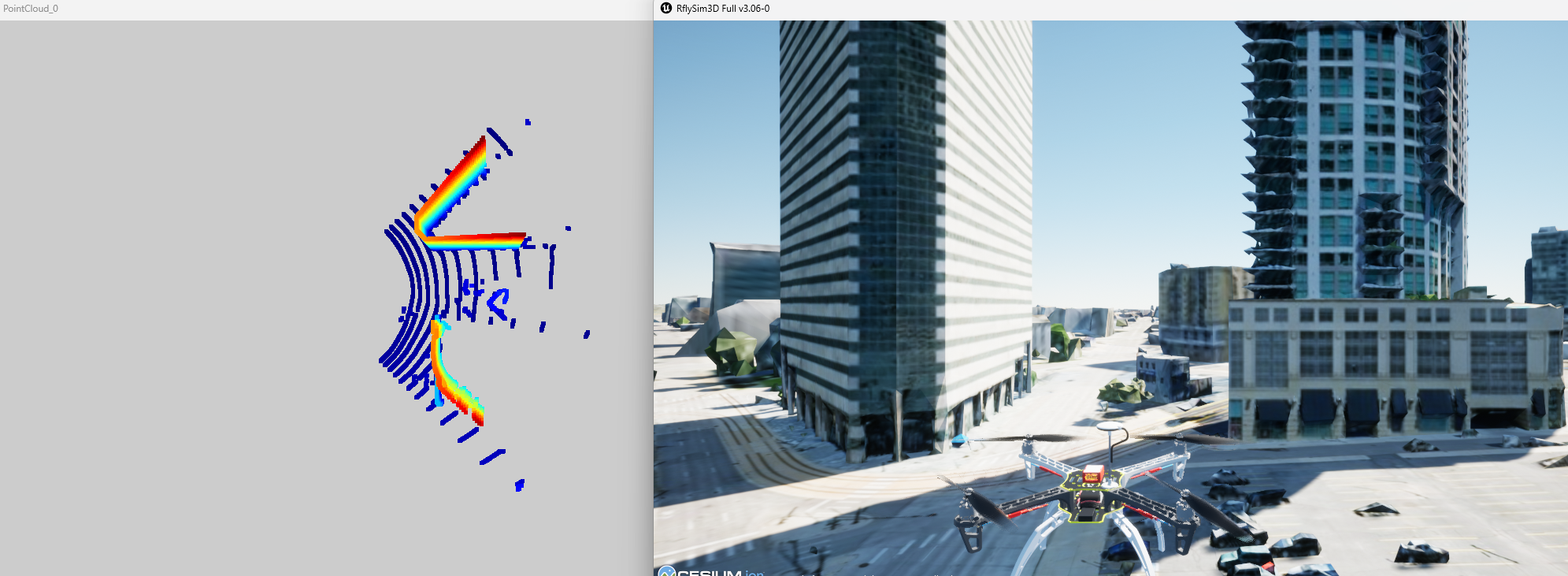
Type 20 — LiDAR (Body Frame)
| Item | Description |
|---|---|
| Purpose | Ray-tracing LiDAR simulation, outputting point cloud in the body frame |
| Acquisition Principle | Emits a large number of rays in parallel for collision detection according to the configured horizontal/vertical angular range and resolution, transforms hit point coordinates to the sensor body frame, and encodes the semantic annotation (RGB555) for each point |
| Transport Layer Format | Int16-encoded XYZ or XYZI, 3 or 4 channels per point |
| Coordinate System | Body frame (sensor body) |
| Shared Memory Size | 1 + 8 + 9×4 + W×H×C×2 bytes, where C=3 or 4, determined by SendProtocol[7] |
otherParams Definition:
| Index | Parameter | Description |
|---|---|---|
[0] |
distRange |
Maximum ranging distance (meters), default 200m |
[1] |
distPrec |
Distance precision (reserved) |
[2] |
levelLeftAng |
Horizontal scan left boundary angle (degrees) |
[3] |
levelRightAng |
Horizontal scan right boundary angle (degrees) |
[4] |
horiDownAng |
Vertical scan lower boundary angle (degrees) |
[5] |
horiUpAng |
Vertical scan upper boundary angle (degrees) |
[6] |
GaussNoise0 |
Gaussian noise parameter 0 (reserved) |
[7] |
AxisMask |
Coordinate system mode (same as Type 7 AxisMask) |
SendProtocol[7] Definition:
| Value | Meaning |
|---|---|
0 |
Output XYZ only (skip intensity channel) |
>0 |
Output XYZI (4th channel is RGB555 semantic color) |
Scan Range: DataWidth columns × DataHeight rows, angular range defined by otherParams[2–5].
Python Output: vis.Img[i] is always an N×4 array. UDP mode uses float32, while shared memory mode currently uses float64; the first three columns are the scaled XYZ, the fourth column is padded with 0 when transmitting three channels, and retains the RGB555 semantic value when transmitting four channels. Displayable via the Open3DShow module. Image retrieval process same as Type 1.
Config.json Example
{
    "VisionSensors": [{
        "SeqID": 0,
        "TypeID": 20,             // LiDAR body frame
        "TargetCopter": 1,
        "TargetMountType": 0,
        "DataWidth": 900,          // Horizontal scan 900 columns
        "DataHeight": 32,          // Vertical scan 32 rows
        "DataCheckFreq": 10,       // 10Hz
        "SendProtocol": [0,0,0,0,0,0,0,0],
        "CameraFOV": 90,
        "EularOrQuat": 0,
        "SensorPosXYZ": [0, 0, -0.3],  // Mounted 0.3m above vehicle
        "SensorAngQuat": [0,0,0,0],
        "SensorAngEular": [0,0,0],
        "otherParams": [200, 0.05, -45, 45, -20, 20, 0, 0, 0,0,0,0,0,0,0,0]
        // [0]=max distance 200m [2-5]=horizontal ±45° vertical -20°~+20°
    }]
}
ROS: The SDK has built-in publishing of sensor_msgs/PointCloud2:
| TypeID | Topic |
|---|---|
| 20 | /rflysim/sensor{SeqID}/vehicle_lidar |
| 21 | /rflysim/sensor{SeqID}/global_lidar |
| 22 | /rflysim/sensor{SeqID}/livox_lidar |
| 23 | /rflysim/sensor{SeqID}/mid360_lidar |
The point cloud message uses four
float32fields. The fourth field is namedsegin the UDP path, while the shared memory path currently usesw; subscriber programs that need to be compatible with both transmission methods should read according to the actual field name.Demo Example (Local Installation Directory):
[Installation Directory]\RflySimAPIs\8.RflySimVision\0.ApiExps\8.LidarAPIDemo\2.UDPDirectClientServer
Type 21 — LiDAR (World Frame)
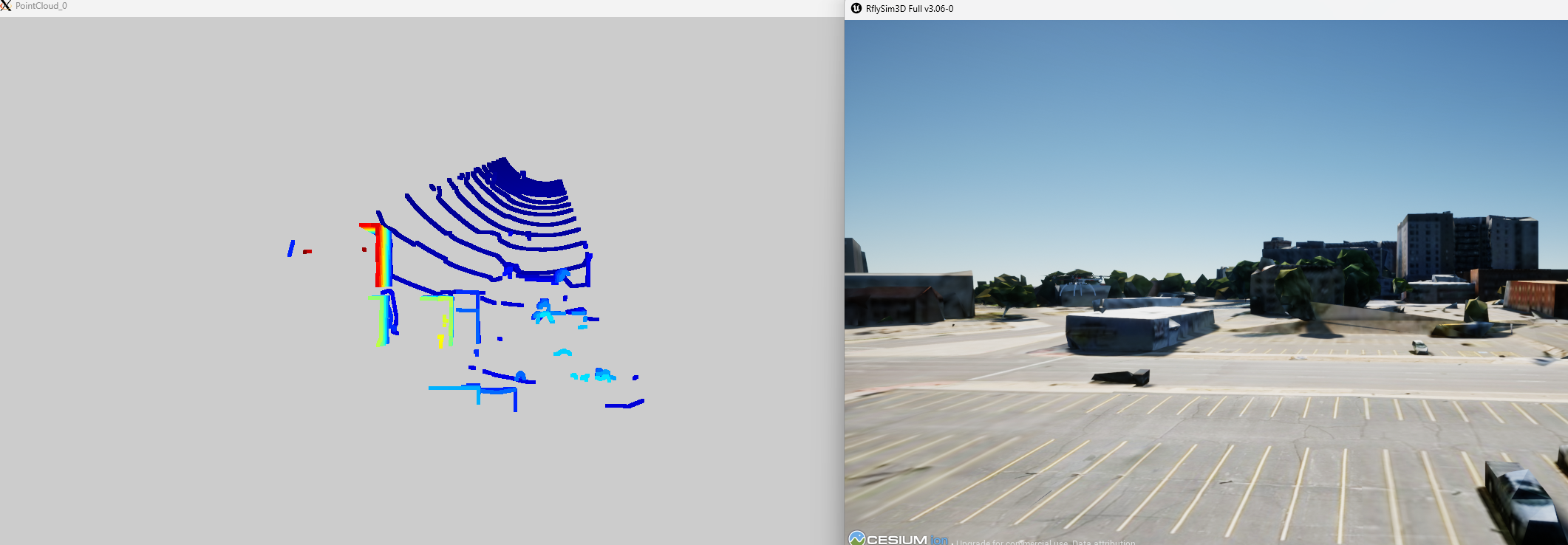
Parameters are identical to Type 20, with the only difference:
| Item | Type 20 | Type 21 |
|---|---|---|
| Output Coordinate System | Body Frame | World Frame |
Python/ROS interface same as Type 20, change TypeID to 21.
Demo Example (Local Installation Directory):
[Installation Directory]\RflySimAPIs\8.RflySimVision\0.ApiExps\8.LidarAPIDemo\3.UDPDirectClientServerType5
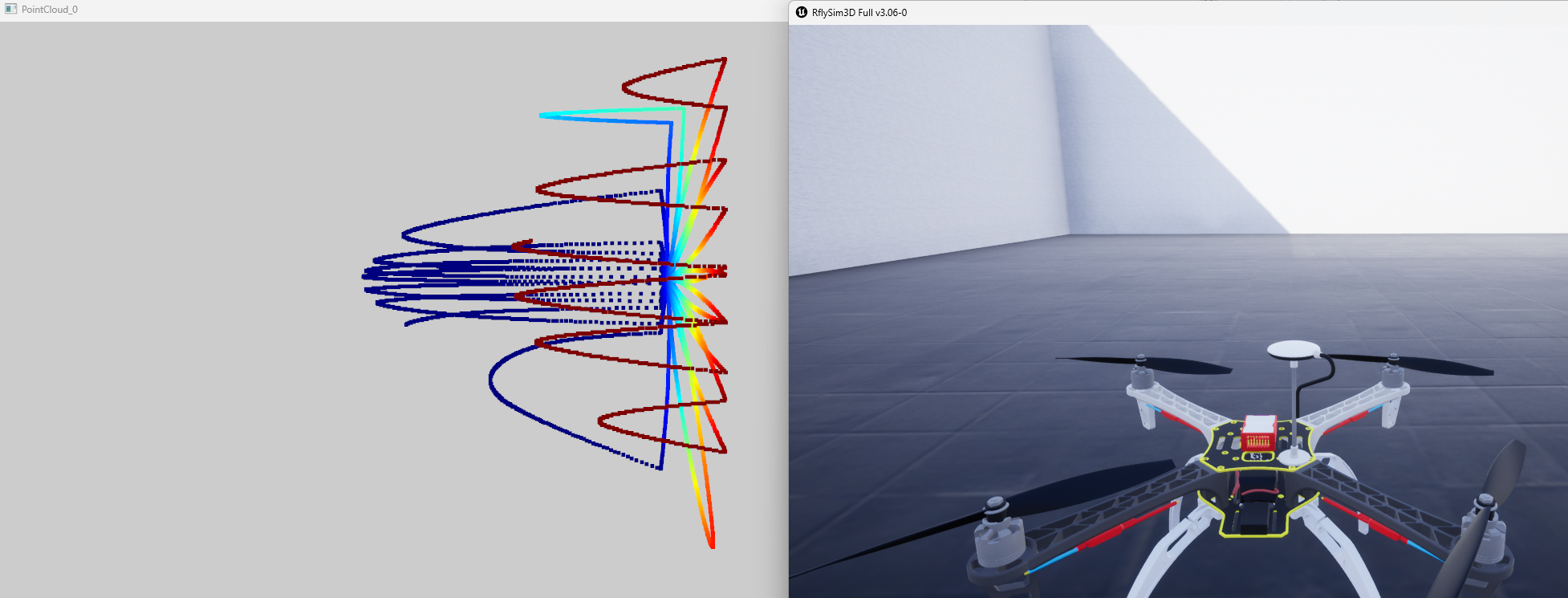
Type 22 — LiDAR (DJI Petal Scan)
| Item | Description |
|---|---|
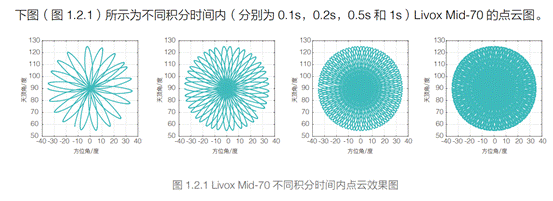
| Purpose | DJI-style non-repeating petal scan LiDAR |
| Acquisition Principle | Simulates the figure-8 petal scan pattern of DJI Livox series, emitting rays along the petal path for collision detection each frame, accumulating multiple frames and outputting point clouds in batches at the set frequency |
| SDK Shared Memory Mapping Capacity | 1 + 8 + 9×4 + W×H×C×2 bytes, where C=3 or 4, determined by SendProtocol[7] |
otherParams Definition:
| Index | Parameter | Description |
|---|---|---|
[0] |
distRange |
Maximum ranging distance (meters), default 200m |
[1] |
d1 |
Arc chord height (difference between highest and lowest arc points) |
[2] |
xCor |
X-direction correction coefficient (default 1.4) |
[3] |
LeftRadCor |
Left arc radius correction coefficient (default 1.18) |
[4] |
EightNum |
Number of figure-8 petals (default 1) |
[5] |
FlowerNum |
Number of figure-8s per petal (default 1) |
[6] |
randAngle |
Random offset angle added to scan pattern (degrees) |
[7] |
AxisMask |
Coordinate system mode (same as Type 7 AxisMask) |
DataWidth / DataHeight Meaning Change:
- DataWidth: Total points per half petal
- DataHeight: Number of petal rows
- Actual scan points per frame = DataWidth × DataHeight × 3
- CameraFOV in this type is used for arc chord length calculation: Half chord length = CameraFOV / 4
Python/ROS interface same as Type 20, change TypeID to 22.
Demo Example (Local Installation Directory):
[Installation Directory]\RflySimAPIs\8.RflySimVision\0.ApiExps\7.LidarLivoxDemo
Type 23 — LiDAR Mid-360
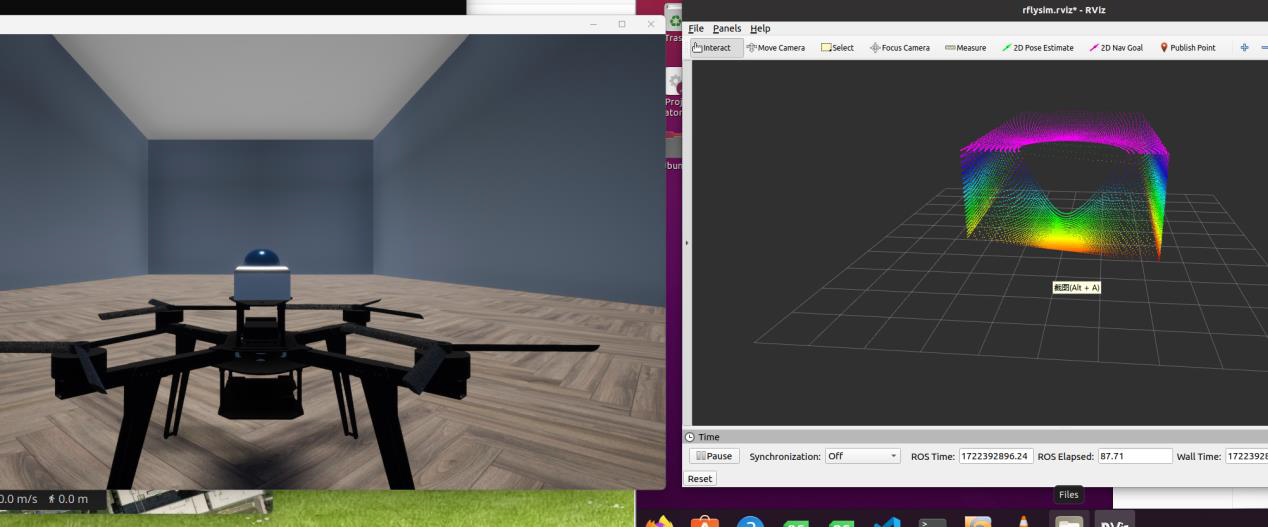
| Item | Description |
|---|---|
| Purpose | Livox Mid-360 style 360° rotating scan LiDAR |
| Acquisition Principle | Simulates the 16-line rotating scan pattern of Livox Mid-360, emitting 17,408 rays (16×272×4) per frame for collision detection, rotating the scan angle frame by frame |
| Forced Resolution | DataWidth = 64, DataHeight = 272 (parameter changes ineffective) |
| Rays Per Frame | 16 × 272 × 4 = 17,408 rays |
| SDK Shared Memory Mapping Capacity | 1 + 8 + 9×4 + W×H×C×2 bytes; current configuration W=64, H=272, C=3 or 4, determined by SendProtocol[7] |
otherParams Definition:
| Index | Parameter | Description |
|---|---|---|
[0] |
distRange |
Maximum ranging distance (meters) |
Python/ROS interface same as Type 20, change TypeID to 23.
Type 22/23 Parameter Basis
The above petal scan formulas, Mid-360 fixed resolution, and rays per frame are part of the RflySim3D/RflySimUE5 engine-side implementation; the Python SDK only receives point clouds according to the number of points returned by the engine. If there are differences between engine versions, the Config examples and actual output of the currently installed version shall prevail.
Demo Example (Local Installation Directory):
[Installation Directory]\RflySimAPIs\8.RflySimVision\0.ApiExps\10.Mid360Demo
Type 30 — Simple Vision Sensor
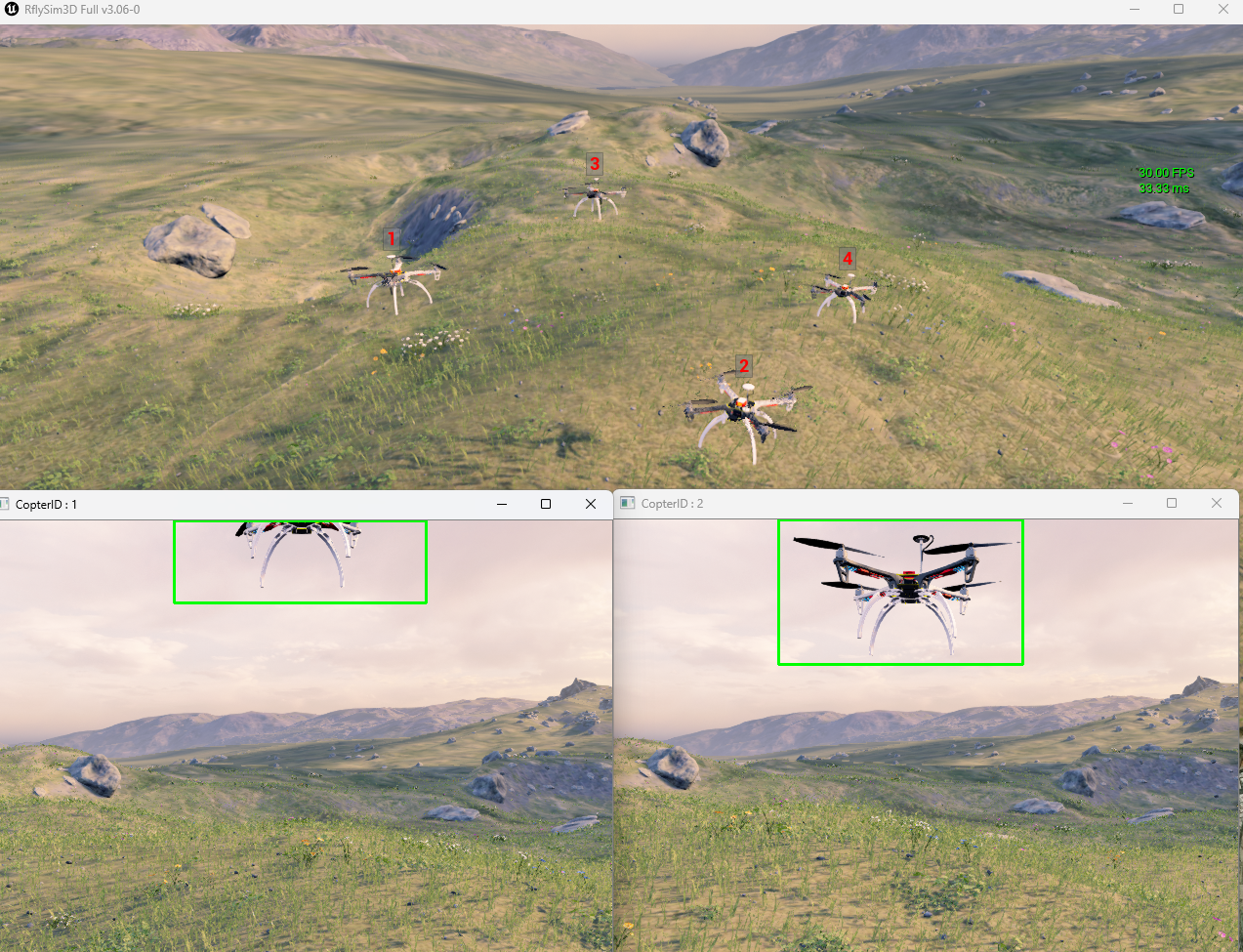
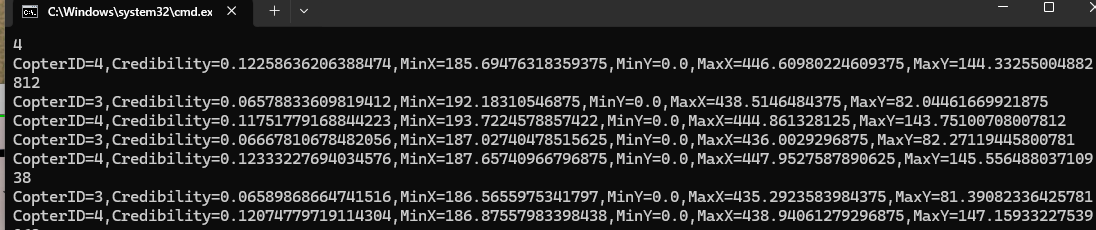
| Item | Description |
|---|---|
| Purpose | Target detection within frustum, outputs 2D bounding boxes |
| Acquisition Principle | Determines target visibility via distance culling, frustum angle culling, and ray visibility checks, then projects the 3D bounding box of visible targets into screen space to output 2D rectangles |
| Shared Memory Size | 1 + 8 + 4 + maxTargets × sizeof(SimpleVisionDataStruct) bytes |
otherParams Definition:
| Index | Parameter | Description |
|---|---|---|
[0] |
maxRange |
Maximum detection distance (meters) |
[1] |
maxTargets |
Maximum number of targets (affects shared memory size) |
Output (SimpleVisionDataStruct):
| Field | Description |
|---|---|
CopterID |
Target aircraft ID |
Credibility |
Target credibility value returned by the engine; the current Python SDK does not provide an additional definition of its calculation formula |
BoxPositionInScreen |
Screen-space 2D bounding box (xMin, yMin, xMax, yMax) |
Python Output: vis.Img[i] is a list of target tuples, each element being (CopterID, Credibility, MinX, MinY, MaxX, MaxY), where the bounding box coordinates correspond to screen pixel positions.
ROS: Detection data is not published via SDK built-in ROS topics; accessed directly via Python vis.Img[i].
Type 30 can be configured and received independently. If visual observation of the detection boxes is needed, a Type 1 RGB camera with the same viewpoint can be additionally configured, but this is not a prerequisite for the SDK to receive Type 30 data.
Demo Example (Local Installation Directory):
[Installation Directory]\RflySimAPIs\8.RflySimVision\2.AdvExps\e7_ObjDetectYolo\SimpleSensorBaseOnYolo
Type 31 — Simple Radar Sensor
| Item | Description |
|---|---|
| Purpose | Omnidirectional target detection, outputs relative target positions |
| Acquisition Principle | Detects all targets within a specified distance range, verifies line-of-sight via ray casting, outputs 3D relative positions of targets in the sensor coordinate system |
| Shared Memory Size | 1 + 8 + 4 + maxTargets × sizeof(SimpleRadarDataStruct) bytes |
otherParams Definition:
| Index | Parameter | Description |
|---|---|---|
[0] |
maxRange |
Maximum detection distance (meters) |
[1] |
maxTargets |
Maximum number of targets (affects shared memory size) |
Output (SimpleRadarDataStruct):
| Field | Description |
|---|---|
CopterID |
Target aircraft ID |
RelativePosition |
Relative position of target in sensor coordinate system (meters) |
Difference from Type 30: No frustum angle limitation (omnidirectional detection), no 2D projection.
Python Output: vis.Img[i] → list of targets, each element is (CopterID, PosX, PosY, PosZ). PosX/PosY/PosZ are the 3D relative positions of the target in the sensor coordinate system, in meters.
ROS: Detection data is not published via SDK built-in ROS topics; accessed directly via Python vis.Img[i].
Config.json Example
Type 31 can be configured independently. The configuration should still retain the standard DataWidth, DataHeight, and CameraFOV fields; otherParams[0] is the maximum detection distance, and otherParams[1] is the maximum number of targets. The following example uses shared memory mode; when switching to UDP, an independent port should be set.
{
    "VisionSensors": [
        {
            "SeqID": 0, // Sensor sequence number; multiple 0s will auto-increment in configuration order
            "TypeID": 31, // 31: Simple Radar
            "TargetCopter": 1,
            "TargetMountType": 0,
            "DataWidth": 640,
            "DataHeight": 480,
            "DataCheckFreq": 10,
            "SendProtocol": [0, 0, 0, 0, 0, 0, 0, 0],
            "CameraFOV": 60,
            "EularOrQuat": 0,
            "SensorPosXYZ": [0.50, 0, 0.5],
            "SensorAngQuat": [0, 0, 0, 0],
            "SensorAngEular": [0, 0, 0],
            "otherParams": [200, 100, 0, 0, 0, 0, 0, 0, 0, 0, 0, 0, 0, 0, 0, 0]
            // [0]=Maximum detection distance (m), [1]=Maximum number of targets
        }
    ]
}
Python Reading Example
import time
import VisionCaptureApi

vis = VisionCaptureApi.VisionCaptureApi()

# 1. Load Config.json containing Type 31
vis.jsonLoad()

# 2. Send sensor request to RflySim3D
if not vis.sendReqToUE4():
    raise RuntimeError("RflySim3D did not respond to sensor request")

# 3. Start shared memory/UDP data reading thread
vis.startImgCap()

# 4. Find the index of the Type 31 sensor in the VisSensor/Img array
radar_idx = next(
    i for i, sensor in enumerate(vis.VisSensor)
    if sensor.TypeID == 31
)

while True:
    time.sleep(0.05)
    if not vis.hasData[radar_idx]:
        continue

    # Type 31 output format:
    # vis.Img[radar_idx] = [
    #     (CopterID, PosX, PosY, PosZ),
    #     ...
    # ]
    # PosX/PosY/PosZ are the relative positions of the target in the sensor coordinate system, in meters.
    with vis.Img_lock[radar_idx]:
        targets = list(vis.Img[radar_idx])

    for copter_id, pos_x, pos_y, pos_z in targets:
        distance = (pos_x ** 2 + pos_y ** 2 + pos_z ** 2) ** 0.5
        print(
            f"CopterID={copter_id}, "
            f"RelativePosition=({pos_x:.2f}, {pos_y:.2f}, {pos_z:.2f}) m, "
            f"Distance={distance:.2f} m"
        )
Output Description
Type 31 is an omnidirectional relative position sensor; it does not perform field-of-view clipping and does not output 2D bounding boxes. If target bounding boxes within the image field of view are needed, please use Type 30 Simple Visual Sensor.
UDP Debug Output Issue in the Current SDK
The current VisionCaptureApi.py Type 31 UDP decoding branch mistakenly uses self.Img[i] when printing CopterID, while the remaining fields use self.Img[idx]. This may cause index errors in multi-sensor configurations; the shared memory path is not affected by this print statement. When fixing the SDK, this location should be unified to self.Img[idx][j][0].
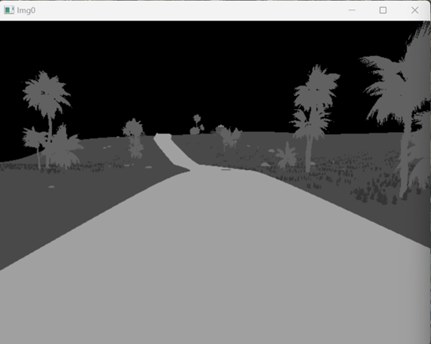
Type 40 — Infrared Grayscale Image (Full Edition)
| Item | Description |
|---|---|
| Purpose | Simulate grayscale images from infrared imaging |
| Acquisition Principle | Place a virtual camera at the sensor location, render the scene as a grayscale image simulating infrared radiation using infrared imaging materials |
| Output Format | Single-channel grayscale (W×H×1 bytes) |
| DataWidth / DataHeight | Image resolution (pixels) |
| CameraFOV | Camera field of view (degrees) |
| otherParams | No dedicated parameters |
Python Output: vis.Img[i] → np.ndarray (H×W, uint8, single-channel infrared grayscale). The image acquisition process is the same as Type 1, with TypeID changed to 40.
ROS: /rflysim/sensor{SeqID}/img_Infrared_Gray · sensor_msgs/Image · encoding mono8
Demo Example (Local Installation Directory):
[Installation Directory]\RflySimAPIs\8.RflySimVision\0.ApiExps\1-UsageAPI\1.ImgSenorAPI\7.InfraredgrayThermalImageDemo
Type 41 — Infrared Pseudo-Color Image (Full Edition)
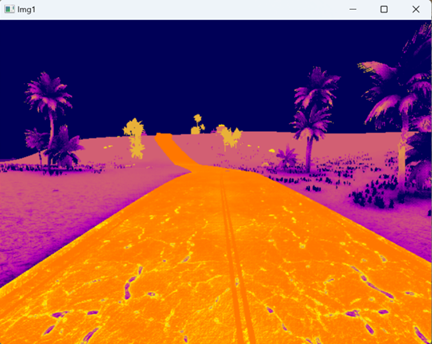
| Item | Description |
|---|---|
| Purpose | Simulate pseudo-color images from infrared thermal imaging (heatmap) |
| Acquisition Principle | Place a virtual camera at the sensor location, render the scene's temperature distribution as a pseudo-color image using infrared thermal imaging materials, with cold and hot areas displayed in different color tones |
| Output Format | RGB color image (W×H×3 bytes) |
| DataWidth / DataHeight | Image resolution (pixels) |
| CameraFOV | Camera field of view (degrees) |
| otherParams | No dedicated parameters |
Python Output: vis.Img[i] → np.ndarray (H×W×3, uint8, BGR infrared pseudo-color image). The image acquisition process is the same as Type 1, with TypeID changed to 41.
ROS: /rflysim/sensor{SeqID}/img_Infrared · sensor_msgs/Image · encoding bgr8
Demo Example (Local Installation Directory):
[Installation Directory]\RflySimAPIs\8.RflySimVision\0.ApiExps\1-UsageAPI\1.ImgSenorAPI\7.InfraredgrayThermalImageDemo
IMU Sensor Data (from CopterSim)
IMU data is not generated by RflySim3D but is obtained via UDP from the CopterSim flight controller simulator. VisionCaptureApi provides a unified request and reception interface.
Data Structure (imuDataCopter)
| Field | Type | Description |
|---|---|---|
checksum |
int |
Checksum, fixed to 1234567898 |
seq |
int |
Message sequence number |
timestmp |
double |
Simulation timestamp (seconds) |
acc[3] |
float[3] |
Three-axis acceleration (m/s²), body coordinate system |
rate[3] |
float[3] |
Three-axis angular velocity (rad/s), body coordinate system |
C++ structure format:
2i1d6f, total size 40 bytes. CopterSim receives requests via UDP port30100 + (copterID-1)*2and sends responses back to port31000 + copterID - 1.
Python Request and Reading
import VisionCaptureApi

vis = VisionCaptureApi.VisionCaptureApi()
vis.jsonLoad()
vis.sendReqToUE4()
vis.startImgCap()

# Request IMU data from CopterSim for aircraft 1 (default 200Hz)
vis.sendImuReqCopterSim(copterID=1)

# Read IMU data
while True:
    if vis.hasIMUData:
        print('Time:', vis.imu.timestmp)       # Simulation time (seconds)
        print('Acceleration:', vis.imu.acc)     # [ax, ay, az] m/s²
        print('Angular Velocity:', vis.imu.rate) # [gx, gy, gz] rad/s
ROS Data
| Topic | Message Type | Description |
|---|---|---|
/rflysim/imu |
sensor_msgs/Imu |
Acceleration + angular velocity, frame_id = "imu" |
ROS Coordinate Mapping (Body → ROS):
| IMU Field | ROS linear_acceleration |
ROS angular_velocity |
|---|---|---|
[0] (x) |
-acc[0] |
rate[0] |
[1] (y) |
acc[1] |
-rate[1] |
[2] (z) |
-acc[2] |
-rate[2] |
ROS2 Distinction: ROS1 uses
rospy.Duration(imuStmp)to set the timestamp; ROS2 usesrclpy.duration.Duration(seconds=imuStmp)and assignsstamp.secandstamp.nanosecseparately.Demo Example (Local Installation Directory):
[Installation Directory]\RflySimAPIs\8.RflySimVision\0.ApiExps\1-UsageAPI\2.ImuSenorAPI
Appendix: Sensor Type Quick Reference Table
Output formats are listed as decoded by the Python SDK; Free Edition markings follow the version table above, and actual authorization is subject to the current engine and license.
| TypeID | Name | Category | Free Edition | Acquisition Method | Output Format |
|---|---|---|---|---|---|
| 1 | RGB Image | Image | ✅ | Virtual camera rendering | BGR, uint8, 3ch |
| 2 | Depth Image | Image | ✅ | Virtual camera depth rendering | uint16, 1ch |
| 3 | Grayscale Image | Image | ✅ | Virtual camera rendering | Gray, 1ch |
| 4 | Segmentation Map | Image | ✅ | Semantic annotation rendering | BGR, uint8, 3ch |
| 5 | Rangefinder | Ray | ✅ | Ray collision detection | DistanceSensor object in vis.Img[i] |
| 6 | Audio | Audio | ❌ | Scene ambient sound capture | Audio stream |
| 7 | Depth Point Cloud | Point Cloud | ❌ | Depth map back-projection | N×4 float array, XYZ + semantic value/0 |
| 8 | Fisheye | Image | ✅ | Panoramic camera + fisheye projection | BGR, uint8, 3ch |
| 9 | Gimbal | Image | ❌ | Controllable gimbal camera | BGR, uint8, 3ch |
| 10 | Optical Flow | Sensor | ✅ | Ray + inter-frame image comparison | vis.OpticalFlowSensor object |
| 20 | LiDAR (Body Frame) | Point Cloud | ✅ | Multi-ray parallel collision detection | N×4 float array, XYZ + semantic value/0 |
| 21 | LiDAR (World Frame) | Point Cloud | ✅ | Multi-ray parallel collision detection | N×4 float array, XYZ + semantic value/0 |
| 22 | LiDAR (DJI) | Point Cloud | ✅ | Petal scanning collision detection | N×4 float array, XYZ + semantic value/0 |
| 23 | Mid-360 | Point Cloud | ✅ | Rotating scanning collision detection | N×4 float array, XYZ + semantic value/0 |
| 30 | Simple Vision | Detection | ✅ | View frustum culling + ray detection | Six-field tuple list, including 2D BBox |
| 31 | Simple Radar | Detection | ✅ | Distance culling + ray detection | Four-field tuple list, including 3D relative position |
| 40 | Infrared Grayscale | Image | ❌ | Infrared imaging material rendering | Gray, 1ch |
| 41 | Infrared Pseudo-Color | Image | ❌ | Infrared thermal imaging rendering | BGR, uint8, 3ch |