OffboardPvaCtrlAPI Module Documentation
Toolbox: RflySim APIs
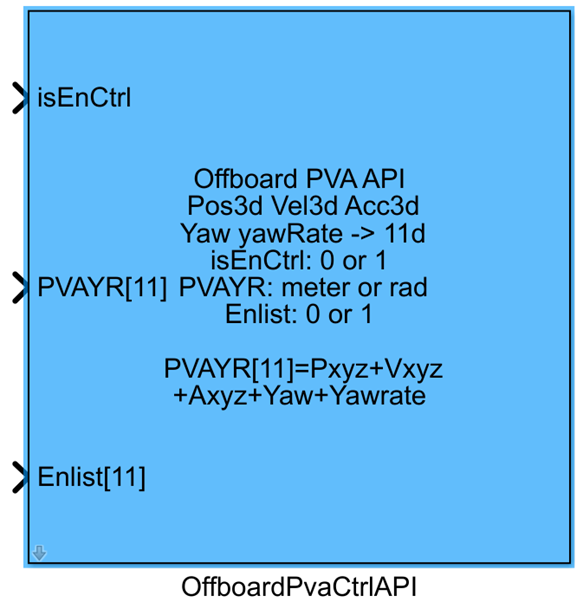
Introduction
One-sentence description: This module serves as the position-velocity-acceleration (PVA) control interface for PX4 Offboard mode, supporting switching among multiple control modes and enabling the transmission of control commands generated by Simulink to the PX4 flight controller to achieve vehicle motion control.
This module belongs to the RflySim APIs library and is a core component of the RflySim toolchain for custom Offboard control development. It primarily targets simulation development scenarios requiring autonomous development of position-, velocity-, or acceleration-level controllers. The module supports automatic disarming and automatic control mode switching, and allows flexible enabling/disabling of Simulink-based custom control via an enable signal: when control is enabled, the module sends position, velocity, acceleration, yaw angle, and yaw rate commands generated by the custom controller to the PX4 flight controller via the MAVLink protocol, while blocking PX4’s native control outputs to enable vehicle control using the Simulink controller; when control is disabled, the module automatically lifts the block and switches the vehicle to PX4’s Loiter hover mode to ensure flight safety.
The final control signal output by this module is transmitted to the CopterSim DLL interface, enabling interaction with the PX4 flight controller and the RflySim3D visualization environment. This allows users to rapidly validate custom Offboard control algorithms in Simulink without modifying the underlying source code of the PX4 flight controller, facilitating flexible switching among different control modes and adapting to various development scenarios such as trajectory tracking and motion control.
Port Descriptions
Input Ports
| Port Name | Data Type | Dimension | Description |
|---|---|---|---|
isEnCtrl |
boolean |
1×1 |
When the input is true, the module sends control data and switches the vehicle to Offboard mode; when the input is false, the module stops sending control data, and PX4 automatically switches to Loiter mode; when the input transitions from false to true, the module automatically disarms the vehicle and enters Offboard mode. |
PVAYR |
single/double |
1×11 |
11-dimensional Offboard control command vector, with dimensions in the following order: NED coordinate system x-position, y-position, z-position, x-velocity, y-velocity, z-velocity, x-acceleration, y-acceleration, z-acceleration, yaw angle, yaw rate. Channels not under control can be set to NaN. |
EnList |
boolean |
1×11 |
11-dimensional control enable vector, where each dimension corresponds to a control channel in PVAYR. When the corresponding dimension is true, PX4 responds to that channel’s control command; when false, it ignores that channel. |
Output Ports
| Port Name | Data Type | Dimension | Description |
|---|---|---|---|
CtrlS |
double |
1×16 |
Generated Offboard control command output, which must be connected to the inPWM input port of the CopterSim DLL model. |
Parameter Configuration
The following parameters can be configured in the Mask dialog box opened by double-clicking the module:
| Parameter Name | Type | Default Value | Optional Values / Range | Description |
|---|---|---|---|---|
Auto arm |
boolean |
false |
true/false |
When checked, the module automatically sends the vehicle disarming command when the isEnCtrl input is true. |
Auto block PX4 |
boolean |
false |
true/false |
When checked, the module sends a signal to block PX4’s native output, allowing the Simulink controller output to control the vehicle when isEnCtrl is true. |
Auto Loiter |
boolean |
false |
true/false |
When checked, the module lifts the block on PX4’s output and automatically switches to PX4’s native Loiter mode when isEnCtrl is false, ensuring the vehicle maintains hover in mid-air. |
Sample Time(s) |
double |
0.01 |
>0 |
Module sampling time in seconds. |
Parameter Setting Notes
Auto arm
This feature automates the disarming process. When enabled, there is no need to add separate disarming command blocks in the Simulink model; disarming is automatically performed when Offboard control is enabled, simplifying model design.
Auto block PX4
When using a custom controller developed in Simulink for Offboard control, this option must be enabled to block PX4’s native controller output and allow the custom controller output to take effect. If this option is not enabled, PX4’s native controller output will superimpose with the custom controller output, resulting in abnormal control behavior.
Auto Loiter
When Offboard control is disabled (isEnCtrl is false), enabling this option automatically switches the vehicle to PX4’s native Loiter hover mode, preventing the vehicle from descending or losing control due to loss of Offboard command, thereby enhancing simulation safety.
Sample Time(s)
This parameter must match the fixed step size of the Simulink model. Typically, PX4 simulation uses a 10 ms (i.e., 0.01 s) sampling period; if the model step size is modified, this parameter must be updated accordingly.
Block Characteristics
| Characteristic | Value |
|---|---|
| Supported Data Types | double, single, boolean |
| Direct Feedthrough | Yes |
| Sample Time | Discrete |
| Code Generation Support | No |
Data Communication Protocol
This module outputs a 16-dimensional CtrlS signal, converting the input control commands into the appropriate format and sending them to the inPWM input port of the CopterSim DLL model. The input PVAYR control command protocol format is as follows:
The input is an 11-dimensional control vector in the NED coordinate system, with the following meanings for each dimension:
- x: Position control (unit: m)
- y: Position control (unit: m)
- z: Position control (unit: m)
- Vx: Velocity control (unit: m/s)
- Vy: Velocity control (unit: m/s)
- Vz: Velocity control (unit: m/s)
- Ax: Acceleration control (unit: m/s²)
- Ay: Acceleration control (unit: m/s²)
- Az: Acceleration control (unit: m/s²)
- Yaw: Yaw angle control (unit: rad, range:
-πtoπ) - Yawrate: Yaw rate control (unit: rad/s)
If a channel is not under control, the corresponding position in PVAYR must be set to NaN, and the corresponding dimension in EnList specifies whether that channel is enabled.
Related Modules
| Module Name | Description |
|---|---|
SetControlGroupAPI |
Configures the enablement status of PX4 flight control channels for Offboard mode control setup |
OffboardAttiCtrlAPI |
Attitude angle control API module for Offboard mode |
OffboardRateCtrlAPI |
Angular rate control API module for Offboard mode |
VehicleCmdPublisher |
API module for publishing general vehicle control commands |
Usage Examples
For relevant usage examples, please refer to the following path:
Please refer to
Readme.pdfin the above path for complete example descriptions and operational steps.
Notes and Common Issues
- Initialization Sequence: After simulation startup,
isEnCtrlmust first be set tofalseto complete PX4-side initialization, and then switched totrueto enable Offboard control; otherwise, PX4 will not correctly respond to Offboard mode switching. If the Auto arm feature is enabled, the disarming command is automatically sent only whenisEnCtrltransitions fromfalsetotrue; directly settingisEnCtrltotrueat simulation startup will not trigger automatic disarming. - Control Command Consistency: In the PVAYR input vector, if a dimension’s corresponding control is disabled (i.e., the corresponding bit in
EnListisfalse), the corresponding position in PVAYR must be set toNaN; arbitrarily filling in fixed values will cause abnormal PX4 control logic. When enabling multiple control layers simultaneously (e.g., enabling both position and corresponding-axis velocity control), ensure control commands satisfy kinematic consistency to avoid control conflicts leading to vehicle attitude divergence. - Sampling Time Matching: The module’s sampling time must match the heartbeat period requirement of PX4 Offboard control. A sampling time greater than 0.2s is not recommended, as PX4 will automatically exit Offboard mode and revert to Loiter mode due to timeout. Additionally, the sampling time must match the base sampling time of the Simulink model to avoid data update asynchrony causing control command jumps.
- Mode Switching Safety Settings: It is recommended to enable the Auto Loiter option. When
isEnCtrlis set tofalse, the module automatically switches to PX4’s native Loiter mode to maintain hover, preventing vehicle loss of control. If Auto Loiter is disabled, you must design your own safety handling logic for when Offboard is disabled. - Coordinate System Convention: The position, velocity, and acceleration inputs of the module’s PVAYR all use the NED coordinate system. If using control commands in the ENU coordinate system, coordinate system conversion must be performed before inputting to the module; otherwise, control direction reversal will occur. The yaw angle input range is
-πtoπ; if it exceeds this range, normalization must be performed first to avoid abnormal yaw control. - Enable Bit Configuration: The EnList input vector must correspond to control requirements. Only enable the control channels you need to use; for unused control channels, the corresponding enable bit must be set to
falseto prevent PX4 from responding to invalid control quantities and causing flight instability. For example, in pure position control, only enable the xyz position and yaw channels, and set the enable bits for other channels tofalse.
Changelog
v4.1.0(2024-08-07): Initial release of the PVA multi-mode switchable control interface module for Offboard mode, supporting combined switching of position, velocity, and acceleration control modes, with automatic disarming and automatic mode switching functionality.