Chapter 1: Introduction and System Architecture
Intelligent Unmanned Systems (IUS), as an interdisciplinary integration of cutting-edge technologies—including artificial intelligence, machine vision, and swarm intelligence—serve as a concentrated embodiment of contemporary technological advancement. This chapter systematically reviews the foundational theoretical framework and control principles of intelligent unmanned systems, introduces the basic architecture of the RflySim toolchain, and, taking multi-rotor drones as an example, outlines their assembly and debugging procedures, laying a solid theoretical and conceptual foundation for your subsequent in-depth learning.
1.1 Background and Theory
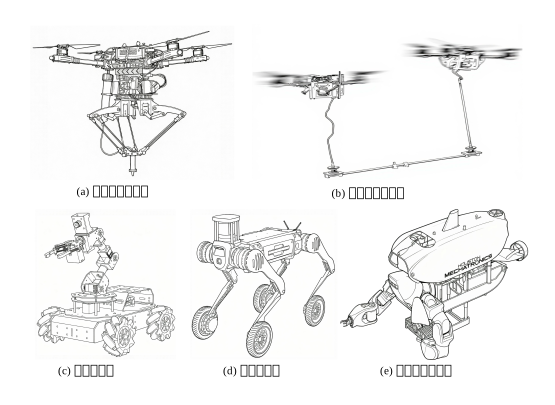
With the rapid development of cutting-edge technologies such as artificial intelligence, robotics, embodied intelligence, and autonomous driving, related concepts continue to emerge. Intelligent Unmanned Systems (IUS) build upon traditional unmanned systems by integrating artificial intelligence, endowing them with autonomous capabilities—including perception, reasoning, decision-making, and execution. Based on system scale and organizational complexity, IUS can be categorized into single-unit, formation, and swarm-cooperation systems, operating across underwater, terrestrial, and aerial platforms.
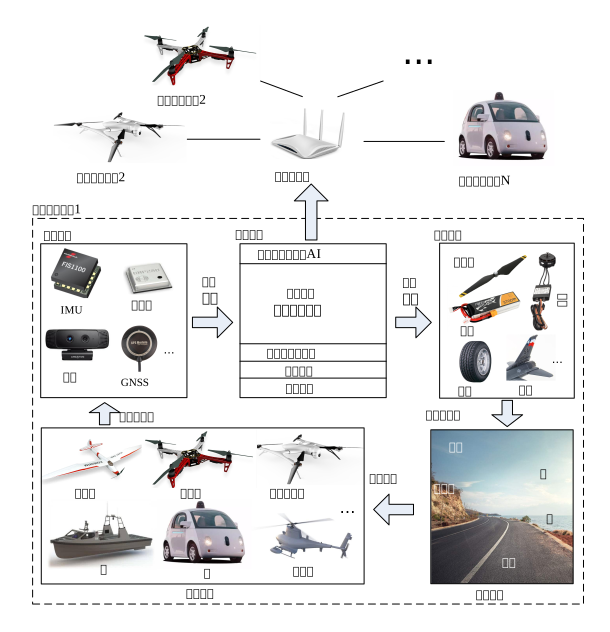
Despite the diversity of intelligent unmanned systems, their underlying concepts and architectures remain highly unified. Scientifically, they can be divided into six core modules: the airframe structure layer, the perception and localization layer, the control and decision-making layer, the actuation and execution layer, the environmental interaction layer, and the swarm collaboration layer. In spatial attitude estimation and control law design, the local navigation coordinate systems (NED / ENU) and the onboard front-right-down (FRD) coordinate system are widely adopted, with vehicle 3D spatial attitude precisely described using Euler angles or quaternions.
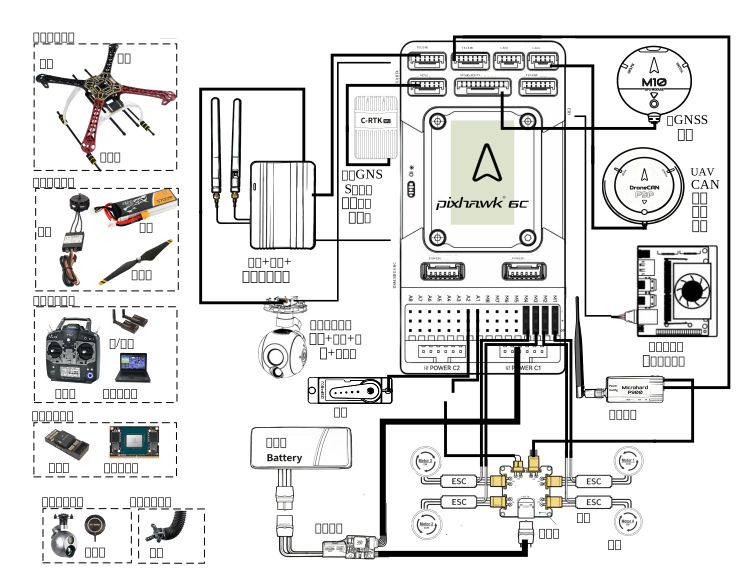
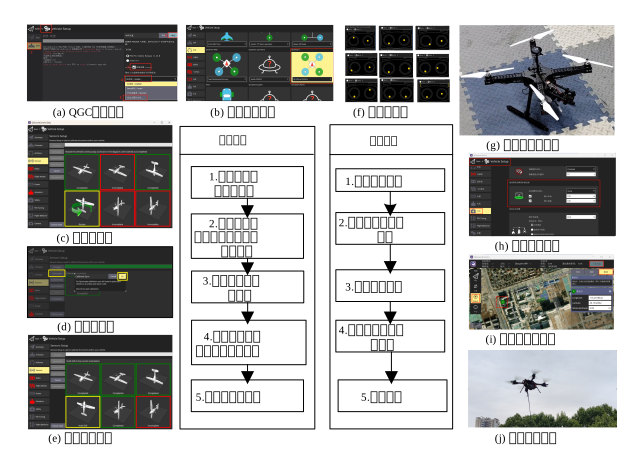
Taking multi-rotor drones as an example, a typical physical system comprises an airframe structure, a propulsion system (motors and propellers), a perception system (IMU and GNSS), an autopilot (flight control system), and a data link communication system. After assembly, the system must undergo rigorous steps—including firmware flashing, sensor calibration, power system testing, and field test flights—before it can be deployed for formal R&D experiments.
1.2 Framework and Interfaces
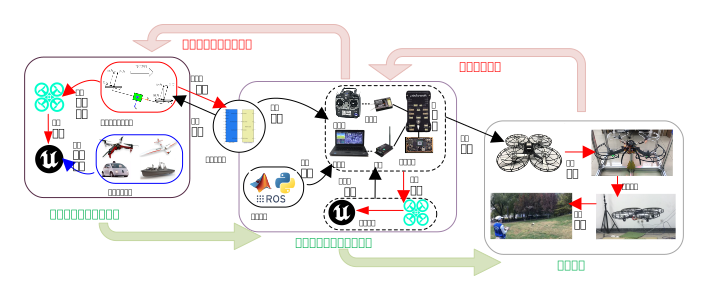
The RflySim toolchain supports full-stack development—from low-level control filtering to high-level intelligent perception—and enables smooth transitions (Sim2Real) from pure-software simulation (SITL) to hardware-in-the-loop simulation (HITL) and real hardware deployment.
1.2.1 Overview of the RflySim Toolchain
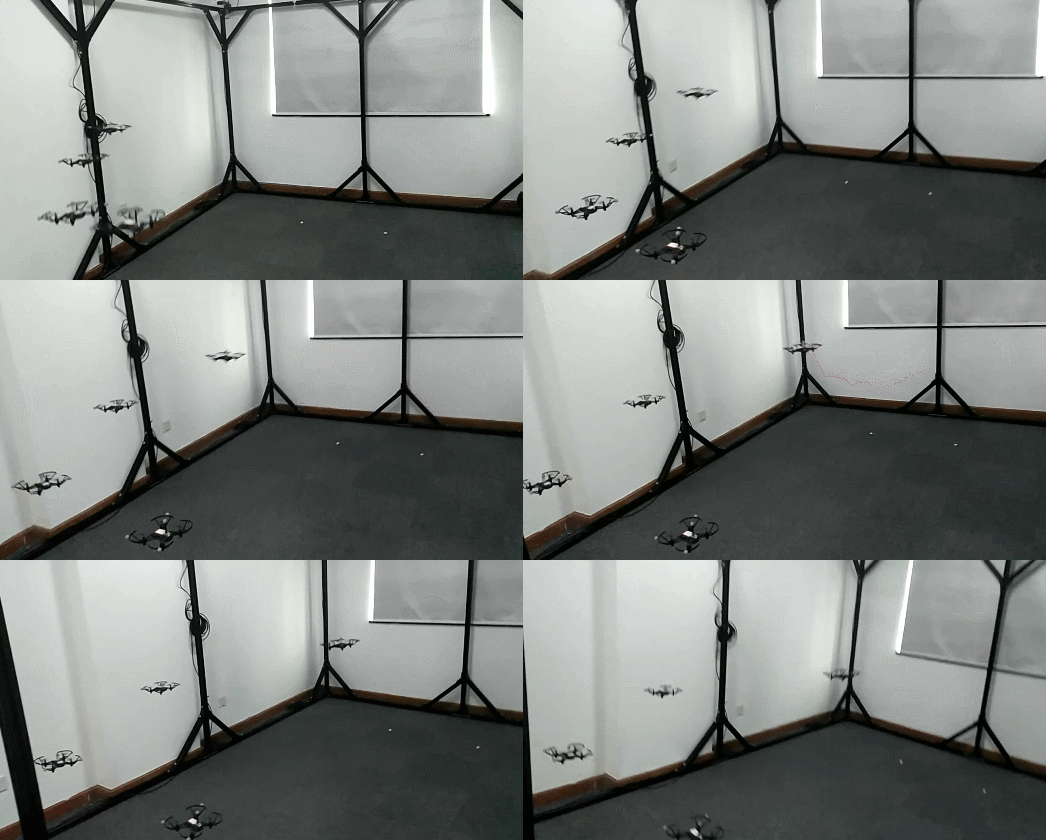
RflySim is a professional, open, and research- and education-oriented simulation and development toolchain for intelligent unmanned systems. Adhering to the core principles of Model-Based Design (MBD) and full hardware-in-the-loop coverage, it provides developers with an integrated development framework supporting multi-rotor, fixed-wing, and unmanned ground vehicle platforms, and natively supports large-scale swarm distributed adversarial simulations involving over 100 nodes.
1.2.2 Core Components and Interfaces
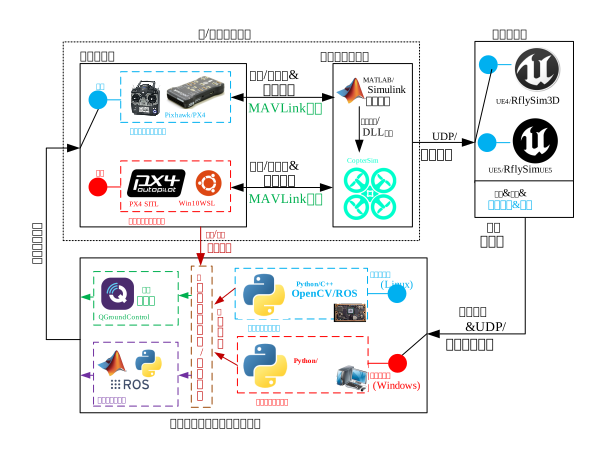
The daily operation of RflySim relies on the collaboration of multiple software components: the core simulation engine is CopterSim, a kinematic simulation engine; high-fidelity visual and physical simulation environments are built upon Unreal Engine / RflySim3D; and mission planning and low-level monitoring are handled by the QGroundControl ground station.
For developers, the platform offers not only a firmware-level automatic code generation channel—PX4PSP—based on MATLAB/Simulink for low-level development, but also a rich set of Python / ROS interface libraries (RflySimSDK) for upper-layer AI validation and development.
1.2.3 Recommended Learning Path
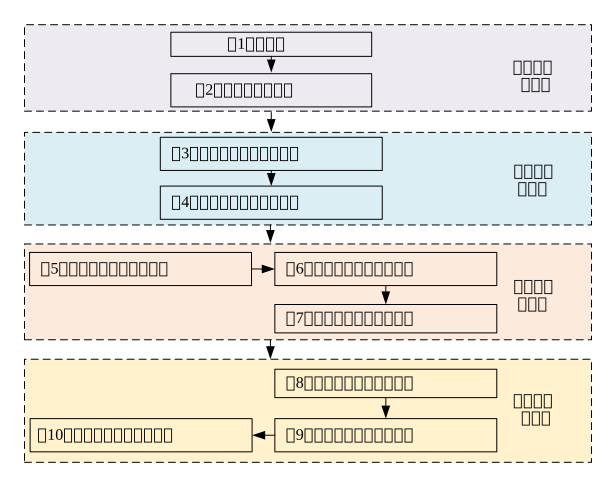
This course begins with foundational system theory and software operation (Chapters 1–2), guiding you into the construction of high-fidelity 3D environments and mathematical models for various vehicle platforms (Chapters 3–4). After mastering low-level filter design and the core flight control closed-loop (Chapters 5–7), you will advance to high-level practical applications—including multimodal perception, visual mapping, and swarm coordination and game-theoretic adversarial scenarios (Chapters 8–10).
1.3 Showcase of Advanced Cases
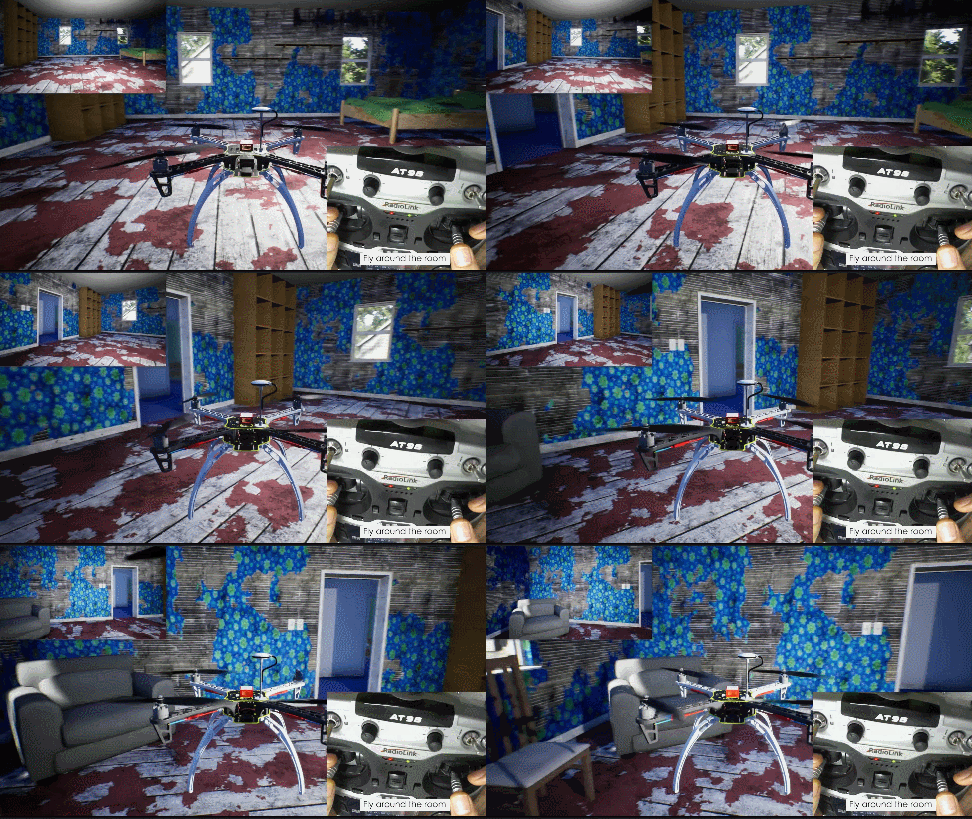
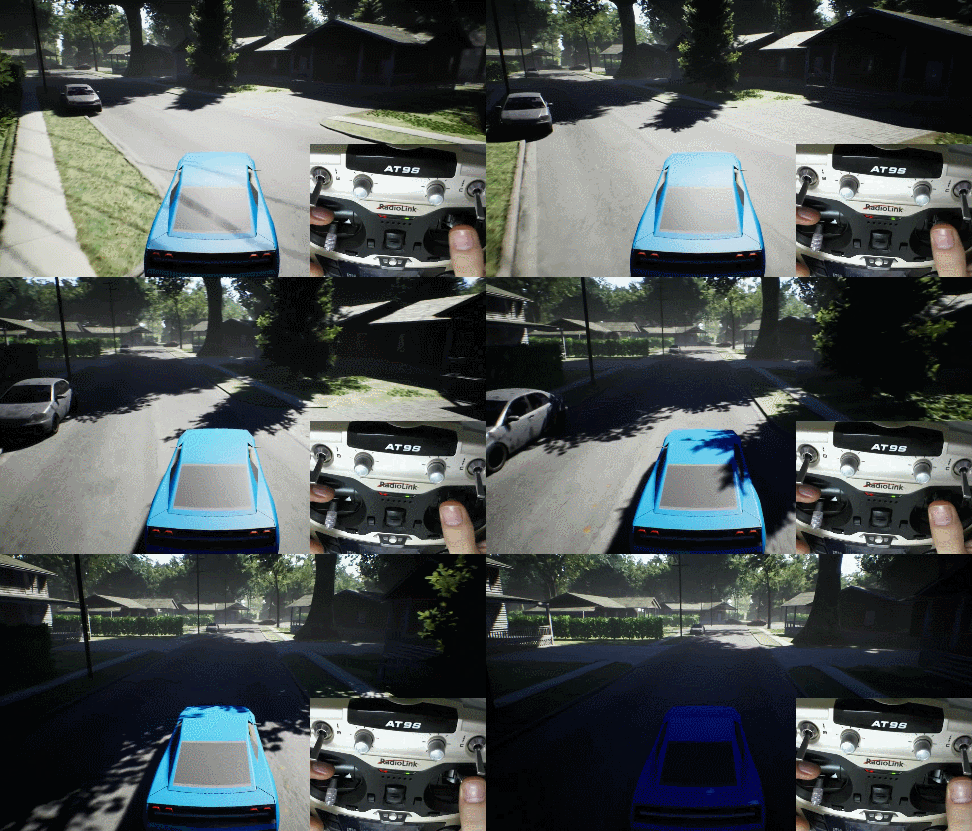
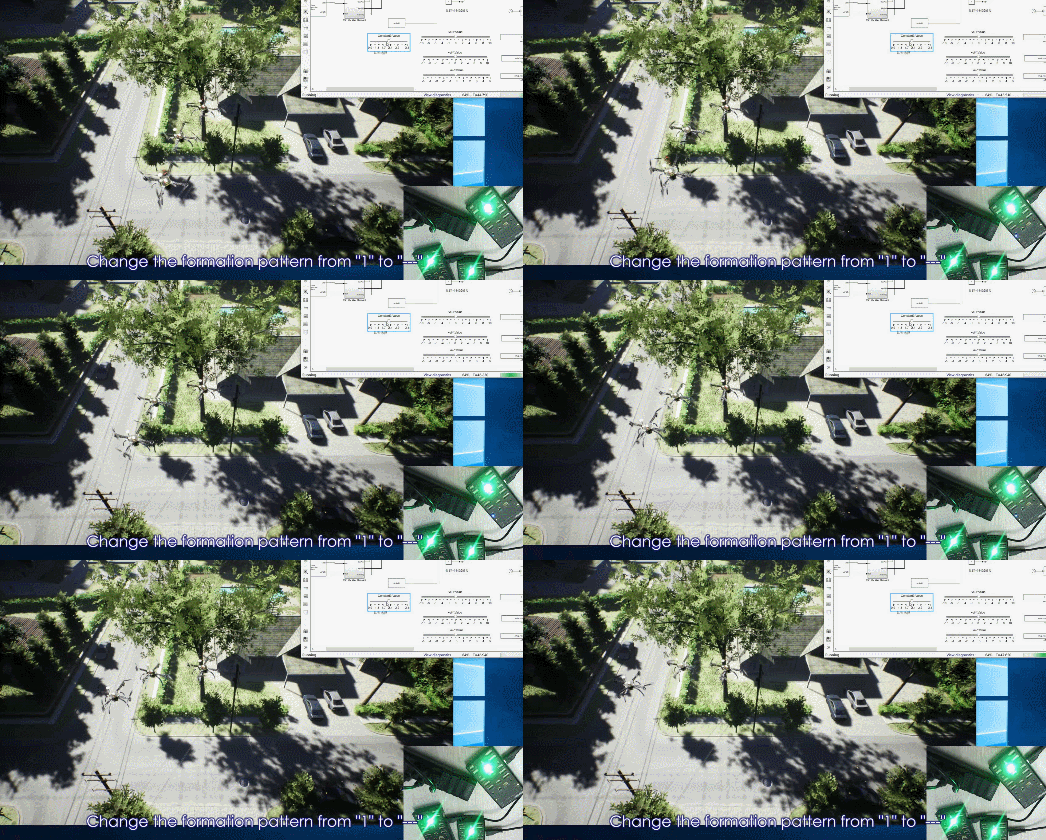
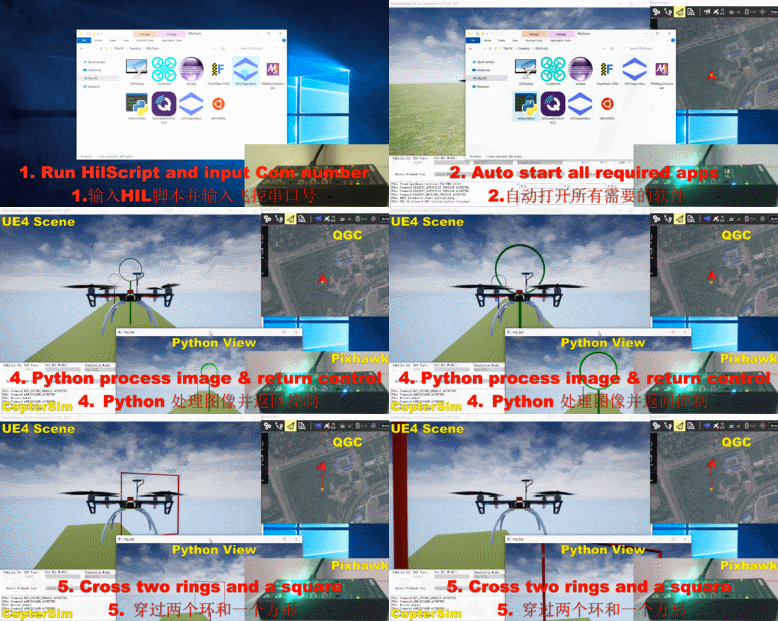
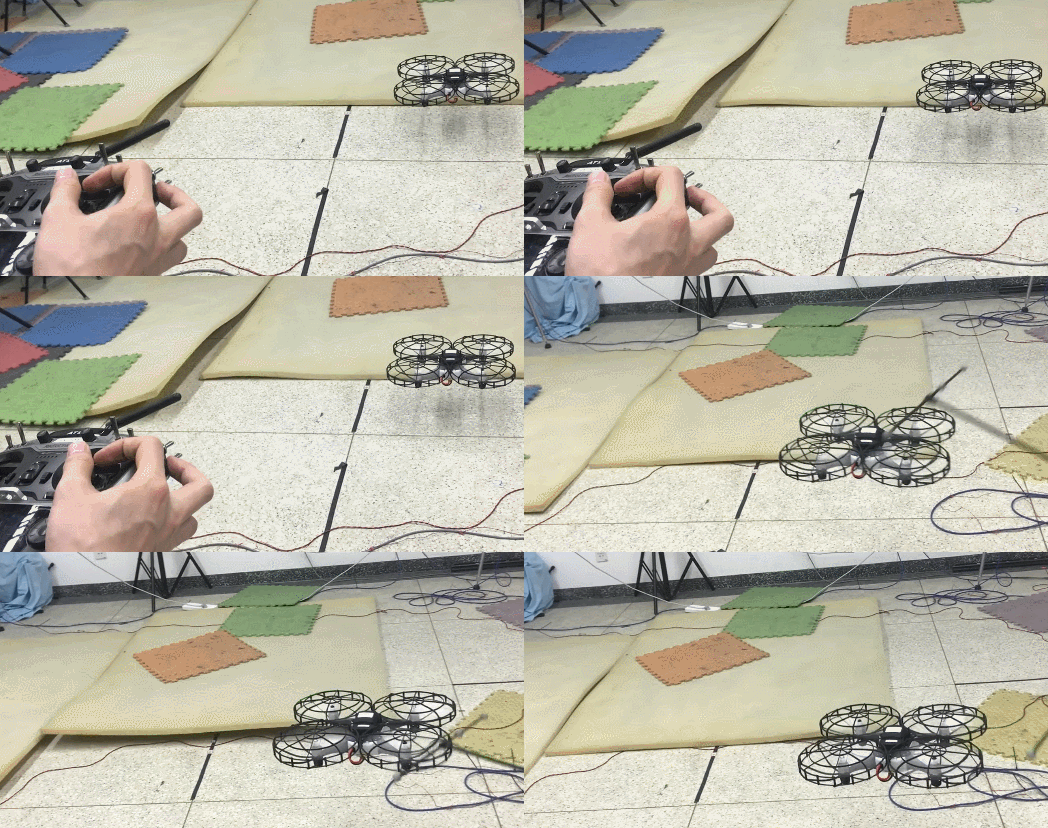
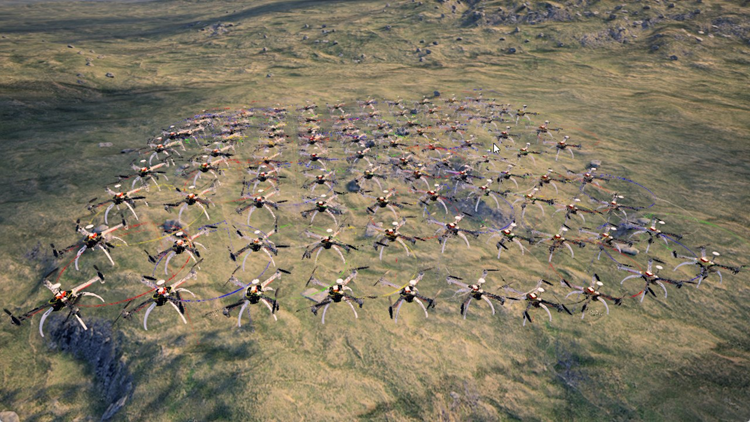 

1.4 Course-Related Video Lectures
Lecture recordings for this chapter:
1.5 Chapter Experiment Cases
The verification experiments and guided case studies related to this chapter are located in the [Installation Directory]\RflySimAPIs\1.RflySimIntro folder.
1.5.1 Interface Learning Experiments
Located in the 1.RflySimIntro\0.ApiExps folder, these experiments cover foundational platform interface tutorials and general introductions to each tool.
Experiment 1: RflySim Toolchain Flight Controller Hardware Configuration
- 📦 Version Requirement:
Free Edition - 📁 File Path: 1.RflySim_SupportBook/Readme.pdf
📝 Experiment Overview: Introduces the RflySim platform and its companion textbooks, covering foundational knowledge of multi-rotor aircraft design, modeling, and control, aimed at cultivating comprehensive problem-solving abilities.
Experiment 2: PDF Document Collection and Merging Experiment
- 📦 Version Requirement:
Free Edition - 📁 File Path: 10.PDF_File_Processing/Readme.pdf
📝 Experiment Overview: This experiment guides users through using Python scripts to automatically collect, archive, and merge PDF documents from multiple experiment folders, adding logical indexes and bookmarks. Learn file system operations, PDF processing, natural sorting, and robust code design.
Experiment 3: Learning PX4 & Pixhawk Flight Control Systems
- 📦 Version Requirement:
Free Edition - 📁 File Path: 2.PX4&Pixhawk_Tutorials/Readme.pdf
📝 Experiment Overview: Introduces the basic concepts, usage methods, and open-source resources of the PX4 flight control system, QGroundControl ground station, and MAVLink communication protocol, helping learners quickly get started with flight control system development.
Experiment 4: Python Beginner's Tutorial
- 📦 Version Requirement:
Free Edition - 📁 File Path: 3.Python_Tutorials/Readme.pdf
📝 Experiment Overview: A Python programming introductory tutorial designed for absolute beginners, systematically covering core knowledge—including basic syntax, data structures, control flow, functions, library usage, file operations, exception handling, and object-oriented programming—through 17 experiments.
Experiment 5: MATLAB and Simulink Basics Tutorial
- 📦 Version Requirement:
Free Edition - 📁 File Path: 4.MATLAB&Simulink_Tutorials/Readme.pdf
📝 Experiment Overview: Designed for absolute beginners, this experiment enables learners to master MATLAB basic syntax, matrix computation, script writing, plotting, as well as Simulink modeling, simulation, and combined usage workflows through hands-on practice, laying the foundation for subsequent control system and drone simulation experiments.
Experiment 6: Visual Studio Basic Functions and Usage
- 📦 Version Requirement:
Free Edition - 📁 File Path: 5.MicrosoftVisualStudio_Tutorials/Readme.pdf
📝 Experiment Overview: Learn the basic functions, installation and configuration, project management, and debugging techniques of the Microsoft Visual Studio integrated development environment.
Experiment 7: 3Ds Max and Unreal Engine 3D Scene Construction
- 📦 Version Requirement:
Free Edition - 📁 File Path: 6.3DsMax&Unreal-Engine_Tutorials/Readme.pdf
📝 Experiment Overview: Learn the basic operations of 3Ds Max and Unreal Engine, mastering 3D modeling, rendering, and scene construction skills, and understanding their collaborative workflow.
Experiment 8: Linux Operating System Basics
- 📦 Version Requirement:
Free Edition - 📁 File Path: 7.Linux_Tutorials/Readme.pdf
📝 Experiment Overview: Learn the basic concepts, characteristics, and development history of the Linux operating system, mastering fundamental Linux knowledge and basic operations.
Experiment 9: ROS Tutorial
- 📦 Version Requirement:
Free Edition - 📁 File Path: 8.ROS_Tutorials/Readme.pdf
📝 Experiment Overview: Master the basic concepts and installation configuration of the ROS robot operating system, and understand the communication principles between MAVROS and the PX4 flight control system.
Experiment 10: RflySim Hardware System Configuration
- 📦 Version Requirement:
Free Edition - 📁 File Path: 9.HardwareSys_Introduction/Readme.pdf
📝 Experiment Overview: Introduces the configuration methods for Pixhawk series flight controller hardware (Pixhawk 2.4.8/6C/6X) and remote controllers (Tian Di Fei ET10, Foxeer FS-i6S) and other accessories, helping users master the basics of UAV hardware selection and setup.
1.5.2 Basic Usage Experiments
Located in the 1.RflySimIntro\1.BasicExps folder, these experiments provide a comprehensive set of supplementary textbook resources for beginners.
Experiment 1: Multicopter Design and Control Theory
- 📦 Version Requirement:
Free Edition - 📁 File Path: e1_MulticopterTheory/Readme.pdf
📝 Experiment Overview: Learn multicopter design, dynamic modeling, state estimation, and control theory, covering fundamental knowledge in aerodynamics, motor circuits, and structural materials.
Experiment 2: Multicopter Design and Control Practice
- 📦 Version Requirement:
Free Edition - 📁 File Path: e2_MulticopterPractice/Readme.pdf
📝 Experiment Overview: Conduct multicopter flight vehicle design and control experiments using the RflySim toolchain. This includes eight progressive experiments covering power system design, dynamic modeling, sensor calibration, filtering, attitude control, position control, semi-autonomous control, and fail-safe mechanisms, enabling mastery of the complete multicopter design and control workflow.
Experiment 3: Multicopter Flight Vehicle Design and Flight Experiment
- 📦 Version Requirement:
Free Edition - 📁 File Path: e3_MulticopterDesighFly/Readme.pdf
📝 Experiment Overview: Study the textbook "Multicopter Flight Vehicles: From Principles to Practice", mastering fundamental concepts, flight principles, and system composition of multicopters, as well as becoming familiar with setting up simulation environments and configuring parameters in the RflySim toolchain.
Experiment 4: Multicopter Flight Vehicle Remote Control Practice
- 📦 Version Requirement:
Free Edition - 📁 File Path: e4_MulticopterRemoteCtrl/Readme.pdf
📝 Experiment Overview: By reading the textbook and accompanying course materials, learn the design objectives, communication links, and control system implementation approaches for multicopter remote control systems, and practice using the RflySim simulation platform.
Experiment 5: Small Fixed-Wing UAV Flight Control Practice
- 📦 Version Requirement:
Free Edition - 📁 File Path: e5_SmallAircraftCtrlPractice/Readme.pdf
📝 Experiment Overview: A hands-on course on flight control for small fixed-wing UAVs. Through eight experiments covering UAV design, modeling, control, planning, and vision algorithms, it trains full-stack flight control development engineers using the RflySim toolchain.
Experiment 6: Python Beginner's Tutorial
- 📦 Version Requirement:
Free Edition - 📁 File Path: e6_OverviewPython/Readme.pdf
📝 Experiment Overview: Designed for learners with no prior experience, this experiment introduces the RflySim toolchain and the installation and configuration of VSCode, as well as Python environment setup and example code execution methods, enabling readers to understand and modify the RflySim educational edition example source code.
Experiment 7: Running a Python Project
- 📦 Version Requirement:
Free Edition - 📁 File Path: e7_RunPythonProject/Readme.pdf
📝 Experiment Overview: Through the case study of a drone visually tracking a red ball, learn Python basic syntax, data structures, control flow, functions, and library usage, covering image processing, target recognition, and drone control.
Experiment 8: Linux System Fundamentals
- 📦 Version Requirement:
Free Edition - 📁 File Path: e8_IntroductionLinux/Readme.pdf
📝 Experiment Overview: Introduce the characteristics, kernel versions, distributions, and file system structure of the Linux operating system, and guide learners through installing and using Ubuntu's GUI and Windows WSL.
Experiment 9: Linux Command Line
- 📦 Version Requirement:
Free Edition - 📁 File Path: e9_LinuxCommandLine/Readme.pdf
📝 Experiment Overview: This experiment introduces how to use the WinWSL environment to execute Python or shell scripts in Ubuntu, enabling seamless integrated development between Windows and Linux environments.
Experiment 10: Assembly and Debugging of a Quadcopter Drone
- 📦 Version Requirement:
Free Edition - 📁 File Path: e10.DroneAssTutorial/1.QuadUAVAss/Readme.pdf
📝 Experiment Overview: This experiment aims to help students understand and master the assembly and debugging process of quadcopter UAVs, including the composition and functionality of core subsystems such as the airframe structure, power system, flight control, and communication remote control. Learn component selection, installation, and configuration methods, and acquire fundamental flight operation skills and safety protocols.
Experiment 11: Fixed-Wing UAV Assembly and Simulation
- 📦 Version Requirement:
Free Edition - 📁 File Path: e10.DroneAssTutorial/3.FWAss/Readme.pdf
📝 Experiment Overview: Introduce the fixed-wing UAV assembly process, covering three scenarios: Software-in-the-Loop (SIL) simulation, Hardware-in-the-Loop (HIL) simulation, and physical assembly. Learn to use the RflySim toolchain for fixed-wing UAV testing.
1.5.3 Advanced Development Experiments
Stored in the 1.RflySimIntro\2.AdvExps folder, these experiments further familiarize users with the configuration of certain low-level firmware ecosystems.
Experiment 1: Pixhawk Flight Controller ETH Port Configuration
- 📦 Version Requirement:
Free Edition - 📁 File Path: e9.ConfigTools/e1.FCUETH_NetConfig/Readme.pdf
📝 Experiment Overview: This experiment introduces the Ethernet port configuration method for the Pixhawk V6X flight controller, used in hardware-in-the-loop simulation environments. It enables high-speed communication between the flight controller and simulation software via a router, supporting multi-vehicle swarm simulation.
Experiment 2: RflySim Remote Controller Hardware Configuration
- 📦 Version Requirement:
Free Edition - 📁 File Path: e1.RCIntro/Readme.pdf
📝 Experiment Overview: Introduces the hardware system configuration and usage methods for remote controllers on the RflySim platform, covering configuration steps, connection testing, and common issues for models such as the Foxeer FS-i6S, Tian Di Fei ET10, and AT9S Pro. The goal is to master communication and interaction between the remote controller and the RflySim toolchain.
Experiment 3: RflySim Toolchain Flight Controller Hardware Configuration
- 📦 Version Requirement:
Free Edition - 📁 File Path: e2.FCUIntro/Readme.pdf
📝 Experiment Overview: This experiment aims to help students understand the principles of hardware-in-the-loop simulation, master the methods for restoring flight controller firmware and loading parameters in the RflySim toolchain, and learn to use QGroundControl to configure the Pixhawk 6X flight controller, enabling the hardware-in-the-loop simulation startup process for quadrotor and fixed-wing UAVs.
Experiment 4: Feisi Swarm Simulation Unit Hardware-in-the-Loop Simulation Configuration Experiment
- 📦 Version Requirement:
Free Edition - 📁 File Path: e9.ConfigTools/e2.FeisiSwarmBox_Config/Readme.pdf
📝 Experiment Overview: This experiment aims to configure the ETH port of the Pixhawk V6X flight controller in the Feisi Swarm Simulation Unit to enable multi-vehicle swarm simulation in a hardware-in-the-loop (HITL) simulation environment, covering steps such as router configuration, flight controller firmware restoration, network parameter settings, and simulation startup.
Experiment 5: Modifying Vehicle Frame via Ethernet Port Experiment
- 📦 Version Requirement:
Free Edition - 📁 File Path: e9.ConfigTools/e3.FCUETH_ModifyParam/Readme.pdf
📝 Experiment Overview:
This experiment modifies the SYS_AUTOSTART parameter of the PX4 flight controller through the MAVLink network interface to achieve dynamic switching of UAV vehicle types, and masters the methods of using Python scripts for automated flight controller parameter configuration and hardware-in-the-loop simulation validation.
Experiment 6: RflySim Python Environment Configuration
- 📦 Version Requirement:
Free Edition - 📁 File Path: e3.PythonConfig/Readme.pdf
📝 Experiment Overview: Learn the Python dependency principles of the RflySim simulation environment, master the methods for configuring RflySim-specific Python packages and runtime environments in VSCode or PyCharm, and understand the working mechanism of the RflySim Python API.
Experiment 7: Recommended Computer Configuration for Running RflySim
- 📦 Version Requirement:
Free Edition - 📁 File Path: e4.ComputerIntro/Readme.pdf
📝 Experiment Overview: Introduces the computer hardware and software configuration requirements for the RflySim toolchain (such as Windows version, CPU, graphics card, memory, etc.), including three configuration schemes—standard, low-level development, and optimal—to help users select an appropriate runtime environment.
Experiment 8: RflySim Toolchain UAV Configuration
- 📦 Version Requirement:
Free Edition - 📁 File Path: e5.UAVConnfig/Readme.pdf
📝 Experiment Overview: Introduces the recommended UAV hardware system configuration and usage methods based on the RflySim platform, including the Feisi MiniQuad150 development platform, flight controller connection, and hardware-in-the-loop simulation steps.
Experiment 9: Visual Studio Installation and Configuration
- 📦 Version Requirement:
Free Edition - 📁 File Path: e6.VisualStudioInstall/Readme.pdf
📝 Experiment Overview: This experiment provides a detailed explanation of the installation methods for Visual Studio 2017 and 2022 Community editions, as well as how to configure MATLAB with the VS compiler, ensuring that C/C++ code generation and DLL packaging functionality in the RflySim toolchain work properly.
Experiment 10: RflySim Toolchain WSL and GUI Usage Instructions
- 📦 Version Requirement:
Free Edition - 📁 File Path: e7.WslGUI/Readme.pdf
📝 Experiment Overview: Learn how to enter and use the built-in WinWSL environment of the RflySim toolchain, master the process of executing Python or shell scripts in the Ubuntu environment, as well as the methods for starting, exiting, and running example programs in the WslGUI graphical interface, and understand the basic interconnection methods between ROS1/ROS2, mavros, Simulink, and the RflySim toolchain.
Experiment 11: RflySim Toolchain WSL and VS Code Joint Development Environment Configuration
- 📦 Version Requirement:
Free Edition - 📁 File Path: e8.WslVsCode/Readme.pdf
📝 Experiment Overview: Learn to use VS Code to connect to the Ubuntu system in WSL, install plugins, map Windows paths, select the Python interpreter, and run RflySim example programs to achieve cross-platform development and debugging.
Experiment 12: RflySim Toolchain Flight Controller Ethernet Simulation Configuration
- 📦 Version Requirement:
Free Edition - 📁 File Path: e9.ConfigTools/Readme.pdf
📝 Experiment Overview: This experiment guides users through completing Pixhawk flight controller parameter configuration, swarm simulation unit networking, and vehicle frame parameter modification via Ethernet, mastering the networking debugging and batch configuration methods in hardware-in-the-loop simulation.
Experiment 13: WSL2 GPU Acceleration Configuration
- 📦 Version Requirement:
Free Edition - 📁 File Path: e11.WSL2_GPUAccConfig/Readme.pdf
📝 Experiment Overview: This experiment guides users in configuring GPU-accelerated computing in the WSL2 environment, including CUDA toolkit installation, PyTorch GPU version deployment, Docker GPU invocation, and validates the performance advantages of GPU over CPU through matrix multiplication tests.
Experiment 14: ROS2 Shared Memory Zero-Copy Functionality Validation Experiment
- 📦 Version Requirement:
Free Edition - 📁 File Path: e12.ROS2SharedMem/Readme.pdf
📝 Experiment Overview: This experiment compares the performance of traditional network transmission and shared memory zero-copy transmission in image transmission within ROS2, validating the advantages of shared memory in reducing latency and CPU resource consumption, and mastering the ROS2 shared memory configuration method.
Experiment 15: WinWSL2-GPU Environment Installation and Configuration Experiment
- 📦 Version Requirement:
Free Edition - 📁 File Path: e13.WinWSL2-GPU/Readme.pdf
📝 Experiment Overview: This experiment aims to help students master the key skills of installing and configuring the WSL2 environment on Windows systems to support GPU acceleration, including understanding the differences between WSL1 and WSL2, installing the WinWSL2-GPU incremental environment, validating GPU acceleration functionality, and becoming familiar with the development toolchain in the WSL2 environment.
Experiment 16: Local Large Language Model Deployment and Invocation Experiment
- 📦 Version Requirement:
Free Edition - 📁 File Path: e14.LocalLLMDepUse/Readme.pdf
📝 Experiment Overview: Deploy Ollama locally and offline via WinWSL2-GPU, invoke lightweight large language models for inference, and establish the UAV mission control interface on the SITL/HITL simulation chain, demonstrating the end-to-end practical workflow of local large model inference.
Experiment 17: RflySim AI Skill Installation and Usage Experiment
- 📦 Version Requirement:
Free Edition - 📁 File Path: e15.RflySim_Skills/Readme.pdf
📝 Experiment Overview: This experiment focuses on the 5 AI Skills accompanying RflySim, completing installation and deployment, directory inspection, environment validation, and typical usage demonstrations, to understand their auxiliary role in development and usage.
Experiment 18: Log Acquisition Experiment
- 📦 Version Requirement:
Free Edition - 📁 File Path: e10.Log-GetAnalysis/1.LogGet/Readme.pdf
📝 Experiment Overview: Download UAV flight log files via QGroundControl and use log analysis tools to evaluate UAV performance and flight quality, identifying potential issues.
Experiment 19: Real-Time Acquisition of UAV Flight Status Based on Python
- 📦 Version Requirement:
Free Edition - 📁 File Path: e10.Log-GetAnalysis/10.UAVsStatusRTGet_Py/Readme.pdf
📝 Experiment Overview: This experiment implements real-time acquisition, storage, and analysis of flight logs based on Python, learning to use the RflySim platform's true data listening interface and mastering data collection methods in software-in-the-loop simulation.
Experiment 20: Real-Time Acquisition of UAV Flight Status Based on Simulink Experiment
- 📦 Version Requirement:
Free Edition - 📁 File Path: e10.Log-GetAnalysis/11.UAVsStatusRTGet_Mat/Readme.pdf
📝 Experiment Overview: This experiment implements real-time acquisition, storage, and analysis of flight logs based on Simulink, covering both software-in-the-loop and hardware-in-the-loop simulation modes, aiming to evaluate the performance of control algorithms in simulation and actual hardware environments.
Experiment 21: Custom uORB Message for Recording Controller Variable Logs
- 📦 Version Requirement:
Free Edition - 📁 File Path: e10.Log-GetAnalysis/12.CusuORBmsgLog/Readme.pdf
📝 Experiment Overview: This experiment uses custom uORB messages to record controller variable logs in the PX4 system, and completes firmware generation, HIL simulation, log download, and parsing to analyze system runtime behavior and optimize the controller.
Experiment 22: Flight Review Log Analysis
- 📦 Version Requirement:
Free Edition - 📁 File Path: e10.Log-GetAnalysis/2.LogAnalysis_Wed/Readme.pdf
📝 Experiment Overview: Learn to use the Flight Review website to upload and analyze UAV flight logs, evaluating flight performance and PID tuning status through data such as attitude curves and motor outputs.
Experiment 23: Flight Log Analysis Based on CMD Command Line
- 📦 Version Requirement:
Free Edition - 📁 File Path: e10.Log-GetAnalysis/3.LogAnalysis_CMD/Readme.pdf
📝 Experiment Overview: Learn to use the Flight Review website and the pyulog tool to convert .ulg log files to .csv format via the CMD command line, and analyze UAV flight data.
Experiment 24: MATLAB-Based Log Analysis Experiment
- 📦 Version Requirement:
Free Edition - 📁 File Path: e10.Log-GetAnalysis/4.LogAnalysis_Mat/Readme.pdf
📝 Experiment Overview:
Learn to use RflySim's ulog2csv function and MATLAB's Flight Log Analyzer application for flight log data conversion, attitude angle comparison chart plotting, and graphic saving.
Experiment 25: Python-Based Flight Controller Log Analysis
- 📦 Version Requirement:
Free Edition - 📁 File Path: e10.Log-GetAnalysis/5.LogAnalysis_Py/Readme.pdf
**
Experiment 1: Multicopter Design and Control Theory
- 📦 Version Requirement:
Free Edition - 📁 File Path: e1_MulticopterTheory/Readme.pdf
📝 Experiment Overview: Learn multicopter design, dynamic modeling, state estimation, and control theory, covering fundamental knowledge in aerodynamics, motor circuits, and structural materials.
Experiment 2: Multicopter Design and Control Practice
- 📦 Version Requirement:
Free Edition - 📁 File Path: e2_MulticopterPractice/Readme.pdf
📝 Experiment Overview: Conduct multicopter flight vehicle design and control experiments using the RflySim toolchain. This includes eight progressive experiments covering power system design, dynamic modeling, sensor calibration, filtering, attitude control, position control, semi-autonomous control, and fail-safe mechanisms, enabling mastery of the complete multicopter design and control workflow.
Experiment 3: Multicopter Flight Vehicle Design and Flight Experiment
- 📦 Version Requirement:
Free Edition - 📁 File Path: e3_MulticopterDesighFly/Readme.pdf
📝 Experiment Overview: Study the textbook "Multicopter Flight Vehicles: From Principles to Practice", mastering fundamental concepts, flight principles, and system composition of multicopters, as well as becoming familiar with setting up simulation environments and configuring parameters in the RflySim toolchain.
Experiment 4: Multicopter Flight Vehicle Remote Control Practice
- 📦 Version Requirement:
Free Edition - 📁 File Path: e4_MulticopterRemoteCtrl/Readme.pdf
📝 Experiment Overview: By reading the textbook and accompanying course materials, learn the design objectives, communication links, and control system implementation approaches for multicopter remote control systems, and practice using the RflySim simulation platform.
Experiment 5: Small Fixed-Wing UAV Flight Control Practice
- 📦 Version Requirement:
Free Edition - 📁 File Path: e5_SmallAircraftCtrlPractice/Readme.pdf
📝 Experiment Overview: A hands-on course on flight control for small fixed-wing UAVs. Through eight experiments covering UAV design, modeling, control, planning, and vision algorithms, it trains full-stack flight control development engineers using the RflySim toolchain.
Experiment 6: Python Beginner's Tutorial
- 📦 Version Requirement:
Free Edition - 📁 File Path: e6_OverviewPython/Readme.pdf
📝 Experiment Overview: Designed for learners with no prior experience, this experiment introduces the RflySim toolchain and the installation and configuration of VSCode, as well as Python environment setup and example code execution methods, enabling readers to understand and modify the RflySim educational edition example source code.
Experiment 7: Running a Python Project
- 📦 Version Requirement:
Free Edition - 📁 File Path: e7_RunPythonProject/Readme.pdf
📝 Experiment Overview: Through the case study of a drone visually tracking a red ball, learn Python basic syntax, data structures, control flow, functions, and library usage, covering image processing, target recognition, and drone control.
Experiment 8: Linux System Fundamentals
- 📦 Version Requirement:
Free Edition - 📁 File Path: e8_IntroductionLinux/Readme.pdf
📝 Experiment Overview: Introduce the characteristics, kernel versions, distributions, and file system structure of the Linux operating system, and guide learners through installing and using Ubuntu's GUI and Windows WSL.
Experiment 9: Linux Command Line
- 📦 Version Requirement:
Free Edition - 📁 File Path: e9_LinuxCommandLine/Readme.pdf
📝 Experiment Overview: This experiment introduces how to use the WinWSL environment to execute Python or shell scripts in Ubuntu, enabling seamless integrated development between Windows and Linux environments.
Experiment 10: Assembly and Debugging of a Quadcopter Drone
- 📦 Version Requirement:
Free Edition - 📁 File Path: e10.DroneAssTutorial/1.QuadUAVAss/Readme.pdf
📝 Experiment Overview: This experiment aims to help students understand and master the assembly and debugging process of quadcopter UAVs, including the composition and functionality of core subsystems such as the airframe structure, power system, flight control, and communication remote control. Learn component selection, installation, and configuration methods, and acquire fundamental flight operation skills and safety protocols.
Experiment 11: Fixed-Wing UAV Assembly and Simulation
- 📦 Version Requirement:
Free Edition - 📁 File Path: e10.DroneAssTutorial/3.FWAss/Readme.pdf
📝 Experiment Overview: Introduce the fixed-wing UAV assembly process, covering three scenarios: Software-in-the-Loop (SIL) simulation, Hardware-in-the-Loop (HIL) simulation, and physical assembly. Learn to use the RflySim toolchain for fixed-wing UAV testing.
1.5.3 Advanced Development Experiments
Stored in the 1.RflySimIntro\2.AdvExps folder, these experiments further familiarize users with the configuration of certain low-level firmware ecosystems.
Experiment 1: Pixhawk Flight Controller ETH Port Configuration
- 📦 Version Requirement:
Free Edition - 📁 File Path: e9.ConfigTools/e1.FCUETH_NetConfig/Readme.pdf
📝 Experiment Overview: This experiment introduces the Ethernet port configuration method for the Pixhawk V6X flight controller, used in hardware-in-the-loop simulation environments. It enables high-speed communication between the flight controller and simulation software via a router, supporting multi-vehicle swarm simulation.
Experiment 2: RflySim Remote Controller Hardware Configuration
- 📦 Version Requirement:
Free Edition - 📁 File Path: e1.RCIntro/Readme.pdf
📝 Experiment Overview: Introduces the hardware system configuration and usage methods for remote controllers on the RflySim platform, covering configuration steps, connection testing, and common issues for models such as the Foxeer FS-i6S, Tian Di Fei ET10, and AT9S Pro. The goal is to master communication and interaction between the remote controller and the RflySim toolchain.
Experiment 3: RflySim Toolchain Flight Controller Hardware Configuration
- 📦 Version Requirement:
Free Edition - 📁 File Path: e2.FCUIntro/Readme.pdf
📝 Experiment Overview: This experiment aims to help students understand the principles of hardware-in-the-loop simulation, master the methods for restoring flight controller firmware and loading parameters in the RflySim toolchain, and learn to use QGroundControl to configure the Pixhawk 6X flight controller, enabling the hardware-in-the-loop simulation startup process for quadrotor and fixed-wing UAVs.
Experiment 4: Feisi Swarm Simulation Unit Hardware-in-the-Loop Simulation Configuration Experiment
- 📦 Version Requirement:
Free Edition - 📁 File Path: e9.ConfigTools/e2.FeisiSwarmBox_Config/Readme.pdf
📝 Experiment Overview: This experiment aims to configure the ETH port of the Pixhawk V6X flight controller in the Feisi Swarm Simulation Unit to enable multi-vehicle swarm simulation in a hardware-in-the-loop (HITL) simulation environment, covering steps such as router configuration, flight controller firmware restoration, network parameter settings, and simulation startup.
Experiment 5: Modifying Vehicle Frame via Ethernet Port Experiment
- 📦 Version Requirement:
Free Edition - 📁 File Path: e9.ConfigTools/e3.FCUETH_ModifyParam/Readme.pdf
📝 Experiment Overview:
This experiment modifies the SYS_AUTOSTART parameter of the PX4 flight controller through the MAVLink network interface to achieve dynamic switching of UAV vehicle types, and masters the methods of using Python scripts for automated flight controller parameter configuration and hardware-in-the-loop simulation validation.
Experiment 6: RflySim Python Environment Configuration
- 📦 Version Requirement:
Free Edition - 📁 File Path: e3.PythonConfig/Readme.pdf
📝 Experiment Overview: Learn the Python dependency principles of the RflySim simulation environment, master the methods for configuring RflySim-specific Python packages and runtime environments in VSCode or PyCharm, and understand the working mechanism of the RflySim Python API.
Experiment 7: Recommended Computer Configuration for Running RflySim
- 📦 Version Requirement:
Free Edition - 📁 File Path: e4.ComputerIntro/Readme.pdf
📝 Experiment Overview: Introduces the computer hardware and software configuration requirements for the RflySim toolchain (such as Windows version, CPU, graphics card, memory, etc.), including three configuration schemes—standard, low-level development, and optimal—to help users select an appropriate runtime environment.
Experiment 8: RflySim Toolchain UAV Configuration
- 📦 Version Requirement:
Free Edition - 📁 File Path: e5.UAVConnfig/Readme.pdf
📝 Experiment Overview: Introduces the recommended UAV hardware system configuration and usage methods based on the RflySim platform, including the Feisi MiniQuad150 development platform, flight controller connection, and hardware-in-the-loop simulation steps.
Experiment 9: Visual Studio Installation and Configuration
- 📦 Version Requirement:
Free Edition - 📁 File Path: e6.VisualStudioInstall/Readme.pdf
📝 Experiment Overview: This experiment provides a detailed explanation of the installation methods for Visual Studio 2017 and 2022 Community editions, as well as how to configure MATLAB with the VS compiler, ensuring that C/C++ code generation and DLL packaging functionality in the RflySim toolchain work properly.
Experiment 10: RflySim Toolchain WSL and GUI Usage Instructions
- 📦 Version Requirement:
Free Edition - 📁 File Path: e7.WslGUI/Readme.pdf
📝 Experiment Overview: Learn how to enter and use the built-in WinWSL environment of the RflySim toolchain, master the process of executing Python or shell scripts in the Ubuntu environment, as well as the methods for starting, exiting, and running example programs in the WslGUI graphical interface, and understand the basic interconnection methods between ROS1/ROS2, mavros, Simulink, and the RflySim toolchain.
Experiment 11: RflySim Toolchain WSL and VS Code Joint Development Environment Configuration
- 📦 Version Requirement:
Free Edition - 📁 File Path: e8.WslVsCode/Readme.pdf
📝 Experiment Overview: Learn to use VS Code to connect to the Ubuntu system in WSL, install plugins, map Windows paths, select the Python interpreter, and run RflySim example programs to achieve cross-platform development and debugging.
Experiment 12: RflySim Toolchain Flight Controller Ethernet Simulation Configuration
- 📦 Version Requirement:
Free Edition - 📁 File Path: e9.ConfigTools/Readme.pdf
📝 Experiment Overview: This experiment guides users through completing Pixhawk flight controller parameter configuration, swarm simulation unit networking, and vehicle frame parameter modification via Ethernet, mastering the networking debugging and batch configuration methods in hardware-in-the-loop simulation.
Experiment 13: WSL2 GPU Acceleration Configuration
- 📦 Version Requirement:
Free Edition - 📁 File Path: e11.WSL2_GPUAccConfig/Readme.pdf
📝 Experiment Overview: This experiment guides users in configuring GPU-accelerated computing in the WSL2 environment, including CUDA toolkit installation, PyTorch GPU version deployment, Docker GPU invocation, and validates the performance advantages of GPU over CPU through matrix multiplication tests.
Experiment 14: ROS2 Shared Memory Zero-Copy Functionality Validation Experiment
- 📦 Version Requirement:
Free Edition - 📁 File Path: e12.ROS2SharedMem/Readme.pdf
📝 Experiment Overview: This experiment compares the performance of traditional network transmission and shared memory zero-copy transmission in image transmission within ROS2, validating the advantages of shared memory in reducing latency and CPU resource consumption, and mastering the ROS2 shared memory configuration method.
Experiment 15: WinWSL2-GPU Environment Installation and Configuration Experiment
- 📦 Version Requirement:
Free Edition - 📁 File Path: e13.WinWSL2-GPU/Readme.pdf
📝 Experiment Overview: This experiment aims to help students master the key skills of installing and configuring the WSL2 environment on Windows systems to support GPU acceleration, including understanding the differences between WSL1 and WSL2, installing the WinWSL2-GPU incremental environment, validating GPU acceleration functionality, and becoming familiar with the development toolchain in the WSL2 environment.
Experiment 16: Local Large Language Model Deployment and Invocation Experiment
- 📦 Version Requirement:
Free Edition - 📁 File Path: e14.LocalLLMDepUse/Readme.pdf
📝 Experiment Overview: Deploy Ollama locally and offline via WinWSL2-GPU, invoke lightweight large language models for inference, and establish the UAV mission control interface on the SITL/HITL simulation chain, demonstrating the end-to-end practical workflow of local large model inference.
Experiment 17: RflySim AI Skill Installation and Usage Experiment
- 📦 Version Requirement:
Free Edition - 📁 File Path: e15.RflySim_Skills/Readme.pdf
📝 Experiment Overview: This experiment focuses on the 5 AI Skills accompanying RflySim, completing installation and deployment, directory inspection, environment validation, and typical usage demonstrations, to understand their auxiliary role in development and usage.
Experiment 18: Log Acquisition Experiment
- 📦 Version Requirement:
Free Edition - 📁 File Path: e10.Log-GetAnalysis/1.LogGet/Readme.pdf
📝 Experiment Overview: Download UAV flight log files via QGroundControl and use log analysis tools to evaluate UAV performance and flight quality, identifying potential issues.
Experiment 19: Real-Time Acquisition of UAV Flight Status Based on Python
- 📦 Version Requirement:
Free Edition - 📁 File Path: e10.Log-GetAnalysis/10.UAVsStatusRTGet_Py/Readme.pdf
📝 Experiment Overview: This experiment implements real-time acquisition, storage, and analysis of flight logs based on Python, learning to use the RflySim platform's true data listening interface and mastering data collection methods in software-in-the-loop simulation.
Experiment 20: Real-Time Acquisition of UAV Flight Status Based on Simulink Experiment
- 📦 Version Requirement:
Free Edition - 📁 File Path: e10.Log-GetAnalysis/11.UAVsStatusRTGet_Mat/Readme.pdf
📝 Experiment Overview: This experiment implements real-time acquisition, storage, and analysis of flight logs based on Simulink, covering both software-in-the-loop and hardware-in-the-loop simulation modes, aiming to evaluate the performance of control algorithms in simulation and actual hardware environments.
Experiment 21: Custom uORB Message for Recording Controller Variable Logs
- 📦 Version Requirement:
Free Edition - 📁 File Path: e10.Log-GetAnalysis/12.CusuORBmsgLog/Readme.pdf
📝 Experiment Overview: This experiment uses custom uORB messages to record controller variable logs in the PX4 system, and completes firmware generation, HIL simulation, log download, and parsing to analyze system runtime behavior and optimize the controller.
Experiment 22: Flight Review Log Analysis
- 📦 Version Requirement:
Free Edition - 📁 File Path: e10.Log-GetAnalysis/2.LogAnalysis_Wed/Readme.pdf
📝 Experiment Overview: Learn to use the Flight Review website to upload and analyze UAV flight logs, evaluating flight performance and PID tuning status through data such as attitude curves and motor outputs.
Experiment 23: Flight Log Analysis Based on CMD Command Line
- 📦 Version Requirement:
Free Edition - 📁 File Path: e10.Log-GetAnalysis/3.LogAnalysis_CMD/Readme.pdf
📝 Experiment Overview: Learn to use the Flight Review website and the pyulog tool to convert .ulg log files to .csv format via the CMD command line, and analyze UAV flight data.
Experiment 24: MATLAB-Based Log Analysis Experiment
- 📦 Version Requirement:
Free Edition - 📁 File Path: e10.Log-GetAnalysis/4.LogAnalysis_Mat/Readme.pdf
📝 Experiment Overview:
Learn to use RflySim's ulog2csv function and MATLAB's Flight Log Analyzer application for flight log data conversion, attitude angle comparison chart plotting, and graphic saving.
Experiment 25: Python-Based Flight Controller Log Analysis
- 📦 Version Requirement:
Free Edition - 📁 File Path: e10.Log-GetAnalysis/5.LogAnalysis_Py/Readme.pdf
📝 Experiment Overview: Learn to use Python to parse ULog format flight controller logs, extract attitude data, and visualize the comparison between actual and expected values, mastering the basic workflow and methods of log analysis.
Experiment 26: PlotJuggler-Based Log Analysis Experiment
- 📦 Version Requirement:
Free Edition - 📁 File Path: e10.Log-GetAnalysis/6.LogAnalysis_PlotJuggler/Readme.pdf
📝 Experiment Overview: Learn to use PlotJuggler software to analyze UAV flight logs, plotting attitude angle comparison curves through quaternion conversion, and mastering basic operations such as log import, custom series creation, and graphic saving.
Experiment 27: Custom Message SD Log Recording and Reading
- 📦 Version Requirement:
Free Edition - 📁 File Path: e10.Log-GetAnalysis/8.CusmsgSDLog/Readme.pdf
📝 Experiment Overview:
Use the binary_logger module on the RflySim platform to implement binary log writing and reading of flight data, becoming familiar with the underlying runtime logic of the PX4 flight controller.
Experiment 28: 4-UAV SIL Simulation Log Acquisition Experiment
- 📦 Version Requirement:
Free Edition - 📁 File Path: e10.Log-GetAnalysis/9.SwarmLogGet/Readme.pdf
📝 Experiment Overview: This experiment uses the RflySim toolchain to conduct software-in-the-loop (SIL) simulation of 4 UAVs, automatically recording and acquiring .ulg format flight logs for analyzing flight performance and behavior, supporting algorithm optimization.
Experiment 29: Radiodetection AT9S Pro Remote Controller Configuration
- 📦 Version Requirement:
Free Edition - 📁 File Path: e1.RCIntro/AT9S_Pro/Readme.pdf
📝 Experiment Overview: Introduces the configuration method for the Radiodetection AT9S Pro 12-channel remote controller, including multi-rotor mode setting, throttle reverse, channel mapping, and remote controller calibration, for UAV flight control.
Experiment 30: Foxeer i6S Remote Controller Configuration
- 📦 Version Requirement:
Free Edition - 📁 File Path: e1.RCIntro/FS_i6S/Readme.pdf
📝 Experiment Overview: Introduces the hardware configuration, functional interfaces, joystick switches, and status indicator usage of the FS-i6S transmitter and FS-iA6B receiver, suitable for learning remote control of multi-rotor and racing drone models.
Experiment 31: Tian Di Fei ET10 Remote Controller Configuration and Flight Mode Settings
- 📦 Version Requirement:
Free Edition - 📁 File Path: e1.RCIntro/WELY_ET10/Readme.pdf
📝 Experiment Overview: Introduces the product features of the Tian Di Fei ET10 remote controller and the calibration method for multi-rotor UAV remote controllers, including channel configuration for SA-SD, SE switches, and the V1 knob, as well as the switching settings for three flight modes: Stabilize, Altitude Hold, and Position Hold.
1.5.4 Advanced Development Experiments
No experiment cases available yet.