Read ADC Channels Module Documentation
Toolbox: ADC and Serial
Introduction
One-sentence Description: Reads and outputs the digital signals converted from specified external ADC channels on the Pixhawk flight controller.
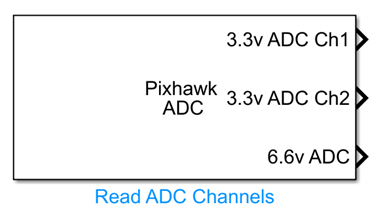
This module belongs to the ADC and Serial interface module group in the RflySim toolchain. It interfaces with the peripheral analog input resources of the PX4 flight controller (Pixhawk hardware), enabling developers to directly obtain Pixhawk's external ADC conversion results within the Simulink simulation development environment. The module allows flexible selection of ADC channels—either the 3.3V-range Channel 1 and Channel 2, or the 6.6V-range channel—and outputs the corresponding integer (int32) conversion results. It also supports both interpreted execution for simulation debugging and code generation for deployment, accommodating diverse development-stage requirements.
Typical applications include custom drone development scenarios requiring analog sensor integration. The module can be used in conjunction with CopterSim to perform closed-loop simulation of onboard algorithms, or directly connected to real Pixhawk hardware to acquire external analog signals—providing convenient hardware interface support for custom drone development that involves analog input readings.
Port Descriptions
Input Ports (Inputs)
This module has no input ports.
Output Ports (Outputs)
| Port Name | Data Type | Dimension | Description |
|---|---|---|---|
ADC_OUT_1 |
int32 |
1×1 |
Conversion result of the first enabled ADC channel |
ADC_OUT_2 |
int32 |
1×1 |
Conversion result of the second enabled ADC channel [To be confirmed] |
ADC_OUT_3 |
int32 |
1×1 |
Conversion result of the third enabled ADC channel [To be confirmed] |
The actual number of output ports is determined by the ADC channel enable configuration in the parameters, and outputs are generated in order corresponding to the selected channels.
Parameter Configuration (Parameters)
The following parameters can be configured in the Mask dialog box opened by double-clicking the module:
| Parameter Name | Type | Default Value | Available Values / Range | Description |
|---|---|---|---|---|
Enable 3.3V ADC Channel 1 |
bool |
false |
true/false |
Whether to enable the first 3.3V ADC channel |
Enable 3.3V ADC Channel 2 |
bool |
false |
true/false |
Whether to enable the second 3.3V ADC channel |
Enable 6.6V ADC Channel |
bool |
false |
true/false |
Whether to enable the 6.6V ADC channel |
Sample time |
double |
0.01 |
>0 |
Module sampling period in seconds |
Simulate using |
enum |
Interpreted execution |
Interpreted execution, Code generation |
Module execution mode |
Parameter Setting Notes
ADC Channel Selection
One or multiple ADC channels can be enabled as needed. Output ports are generated in a fixed order: first 3.3V channel → second 3.3V channel → 6.6V channel, with each enabled channel's conversion result output accordingly. Note that for 3.3V ADC, Channel 1 corresponds to Pixhawk pin 14, and Channel 2 corresponds to Pixhawk pin 15.
Sample time
Specifies the sampling period for ADC data acquisition by the module, in seconds. Setting it to 0 indicates continuous sampling.
Simulate using
Interpreted execution: Executes code using the MATLAB interpreter, allowing immediate execution without compilation. Offers fast debugging and is suitable for model development and testing phases.Code generation: Converts MATLAB code into C code, compiles, and executes it. Provides faster runtime performance and a more hardware-deployment-like environment, suitable for final validation and deployment phases.
Module Characteristics (Block Characteristics)
| Characteristic | Value |
|---|---|
| Supported Data Types | double, single, int32 |
| Direct Feedthrough | No |
| Sample Time | Discrete |
| Code Generation Support | Yes |
Data Communication Protocol
This module does not involve network communication.
Related Modules
| Module Name | Description |
|---|---|
Serial Send |
Sends custom data via serial port to the flight controller or other peripherals |
Serial Receive |
Receives custom data sent from the flight controller or other peripherals via serial port |
Set Serial Baudrate |
Configures the communication baud rate of the PX4 onboard serial port |
PPO Encoder |
Generates PPO encoding signals to drive brushless motor ESCs |
I2C Read Write |
Reads from or writes to external sensors via the I2C bus |
Usage Example
For related usage examples, please refer to the following path:
Please refer to
Readme.pdfin the path above for complete example descriptions and operational steps.
Notes and Common Issues
- Initialization Order: This module relies on the Pixhawk flight controller's low-level driver to initialize the ADC peripheral. Ensure that the flight controller hardware initialization module in the model executes before this module; otherwise, incorrect ADC values may be read.
- Pin Mapping: If reading external ADC signals within the 3.3V range, note that Channel 1 corresponds to Pixhawk pin 14 and Channel 2 corresponds to Pixhawk pin 15. Incorrect pin connections will result in erroneous signal readings.
- Range Matching: Select the appropriate ADC channel based on the maximum input analog voltage: choose the 3.3V ADC channel if the input voltage does not exceed 3.3V; choose the 6.6V ADC channel if the input voltage is between 3.3V and 6.6V. Exceeding the selected range may cause distorted readings and potentially damage the hardware.
- Sampling Time Matching: Do not set the module's sampling time to less than the Pixhawk ADC hardware's minimum sampling interval (recommended ≥ 0.01s). An overly high sampling frequency will result in repeated ADC data, preventing acquisition of the true analog signal variation.
- Execution Mode Selection: For rapid logic validation during simulation, select
interpreted executionmode to accelerate debugging. However, to generate and deploy code onto actual hardware, switch tocode generationmode; otherwise, code compilation will fail. - Output Data Format: This module outputs raw ADC conversion results in
int32format. To obtain actual voltage values, perform manual conversion based on the selected range:
Actual voltage (3.3V range) = (output value / 2^resolution) × 3.3,
Actual voltage (6.6V range) = (output value / 2^resolution) × 6.6.
Changelog
v4.1.0(2024-08-13): Initial release, supporting reading and output of external ADC channel data from Pixhawk.