BAT Script Usage Reference
RflySim has developed numerous batch scripts based on batch processing technology, allowing users to quickly and effortlessly launch multi-vehicle, multi-type, and diverse unmanned system combination simulations, thereby accelerating unmanned system development and simulation workflows.
Script List and Description
Main Directory Scripts [RflySim Installation Directory]\RflySimAPIs\
User-facing one-click launch and environment tool scripts:
SITLRun.bat— One-click launch of any number of quadcopter Software-in-the-Loop simulations (automatically starts after entering the number of aircraft)HITLRun.bat— One-click launch of any number of quadcopter Hardware-in-the-Loop simulations (enter the COM port number as prompted after connecting the flight controller)HITLRunAuto.bat— Hardware-in-the-loop simulation, automatically matches Pixhawk serial ports, no manual COM list input requiredSITLRunDebug.bat— PX4 official SITL single-vehicle debugging modeSITLRunFw.bat— One-click launch of fixed-wing Software-in-the-Loop simulationHITLRunFw.bat— One-click launch of fixed-wing Hardware-in-the-Loop simulationSITLRunChange3D.bat— Software-in-the-loop simulation, allows switching RflySim3D vehicle 3D model stylesHITLRunChange3D.bat— Hardware-in-the-loop simulation, allows switching RflySim3D vehicle 3D model stylesSITLRunLowGPU.bat— Low GPU mode Software-in-the-loop simulation (reduces 3D rendering load, suitable for integrated graphics/remote desktop)HITLRunLowGPU.bat— Low GPU mode Hardware-in-the-loop simulationSITLRunNoUI.bat— Headless background Software-in-the-loop simulation (suitable for servers/batch testing)HITLRunNoUI.bat— Headless background Hardware-in-the-loop simulationSITLRunUE5.bat— Software-in-the-loop simulation using the UE5 version of the 3D programHITLRunUE5.bat— Hardware-in-the-loop simulation using the UE5 version of the 3D programSITLRunLANSwarm.bat— LAN-based networked Software-in-the-loop swarm flight simulation (multi-computer networking)HITLRunLANSwarm.bat— LAN-based networked Hardware-in-the-loop swarm flight simulationSITLRunROS.bat— Software-in-the-loop simulation with automatic MAVROS link startupHITLRunROS.bat— Hardware-in-the-loop simulation with automatic MAVROS link startupAPMSITLRun.bat— One-click launch of any number of ArduPilot (APM) multi-rotor Software-in-the-Loop simulations (APM_SITL_NET mode, launches ArduCopter SITL and MAVProxy in WSL)APMSITLRun_Plane.bat— One-click launch of ArduPilot (APM) fixed-wing (ArduPlane) Software-in-the-Loop simulationAPMSwitchSITL.bat— Switch SITL flight controller stack: PX4 SITL ↔ ArduPilot SITL (via isUseAPM.txt flag)DistSim.bat— Launch distributed simulation manager (multi-machine cluster cross-host deployment)CloseALL.bat— One-click cleanup of all simulation processes and shutdown of WSLUdpPortFree.bat— Check and release occupied simulation UDP/TCP portsRos2ComMode.bat— Switch ROS2 communication mode in WSL (CycloneDDS/FastDDS local or NAT communication, modes 1–4)WinWSL.bat— Open WSL console and start VcXsrv graphics serviceWslGUI.bat— One-click enable WSL GUI graphics interface supportWslSwitch2.bat— WSL1/WSL2 switching and network configurationPython38Env.bat— Open a command line window with the Python 3.8 environment configuredPython38Run.bat— Open the Python 3.8 environment in the script's directory (for running the current example)gpedit.bat— Install Group Policy Editor (gpedit.msc) for Windows Home edition
Advanced Script Library [RflySim Installation Directory]\RflySimAPIs\BatScripts\
Advanced variant scripts for pose initialization, GPS coordinates, SysID binding, and network extension:
SITLPos.bat— Software-in-the-loop simulation, manually input initial position (PosX/PosY) and yaw angle for each vehicle at runtimeHITLPos.bat— Hardware-in-the-loop simulation, manually input initial position and yaw angle for each vehicle at runtimeSITLPosAlt.bat— Software-in-the-loop simulation, manually input initial position with support for air/underwater initial altitudeHITLPosAlt.bat— Hardware-in-the-loop simulation, manually input initial position with support for air/underwater initial altitudeSITLPosStr.bat— Software-in-the-loop simulation, multi-vehicle positions written as strings in the script (suitable for reproducible fixed formations)HITLPosStr.bat— Hardware-in-the-loop simulation, multi-vehicle positions written as strings in the scriptSITLPosAltStr.bat— Software-in-the-loop simulation, position/altitude written as strings in the script for automatic batch initialization (supports air/underwater)HITLPosAltStr.bat— Hardware-in-the-loop simulation, position/altitude written as strings in the script for automatic batch initialization (supports air/underwater)SITLPosStrSel.bat— Software-in-the-loop simulation, string-based positions + selective enabling of a subset of vehiclesSITLPosStrGPS.bat— Software-in-the-loop simulation, initializes positions using latitude/longitude (GPS) coordinate strings (Full version only)HITLPosStrGPS.bat— Hardware-in-the-loop simulation, initializes positions using latitude/longitude (GPS) coordinate strings (Full version only)HITLRunSysID.bat— Hardware-in-the-loop simulation, CopterID automatically determined by flight controller SysIDHITLPosSysID.bat— Hardware-in-the-loop simulation, SysID binding + manual position inputHITLPosSysIDStr.bat— Hardware-in-the-loop simulation, SysID binding + string-based positions (fixed hardware corresponding to fixed formations)SITLRunMAVLinkNoGPS.bat— Software-in-the-loop simulation, MAVLink mode with GPS disabled (suitable for indoor/SLAM/motion capture)HITLRunMAVLinkNoGPS.bat— Hardware-in-the-loop simulation, MAVLink mode with GPS disabledHITLRunPX4Net.bat— Ethernet-based PX4 Hardware-in-the-loop simulation (PX4_HITL_NET)HITLRunExtNet.bat— Hardware-in-the-loop simulation, connects to third-party/external flight controllers via network (EXT_SIM_NET)StartCFclient.bat— Launch Crazyflie ground station cfclientStopBuild.bat— Terminate PX4 compilation-related processes in WSL
Simulation Parameter Configuration
CopterSim Simulation Function Area Parameters

The following parameters are configured in BAT scripts via the SET command and correspond one-to-one with the CopterSim GUI interface:
Parameter 1 · CopterID / START_INDEX
Sets the vehicle ID; used to specify the starting vehicle ID in multi-vehicle simulations.
Parameter 2 · 3DClassID / CLASS_3D_ID
Sets the 3D model style of the vehicle displayed in RflySim3D.
| Value | Meaning |
|---|---|
-1 |
Use the default 3D model (specified by the DLL file) |
ClassID |
Specify vehicle configuration (e.g., quadcopter, fixed-wing), using the default style for that configuration |
Unique3DClassID |
Specify a unique 3D style for a particular configuration |
For 3D style parameter reference, see Platform 3D Model Resource Index
Parameter 3 · Use DLL Model File / DLLModel
Select different DLL dynamic model files (located in *PX4PSP\CopterSim\external\model).
| Value | Meaning |
|---|---|
0 |
Do not use a DLL; use the model built on the CopterSim interface |
≥1 (index or name) |
Use the specified DLL model |
Parameter 4 · Simulation Mode / SimMode
Simulation Mode Values
| Value | Mode Name | Description |
|---|---|---|
0 |
PX4_HITL | PX4 official Hardware-in-the-Loop simulation |
1 |
PX4_SITL | PX4 official Software-in-the-Loop simulation |
2 |
PX4_SITL_RFLY | RflySim-customized SITL, supporting hundreds of vehicles in swarm simulation |
3 |
Simulink&DLL_SIL | Simulink-generated DLL simulation (integrated model) |
4 |
PX4_HITL_NET | Ethernet-based flight controller HIL (Full version only) |
5 |
EXT_HITL_COM | Serial connection to third-party flight controllers (Full version only) |
6 |
EXT_SIM_NET | Network connection to third-party flight controllers (Full version only) |
7 |
APM_SITL_COM | APM (Ardupilot) SITL (Full version only) |
8 |
PX4_SIH_COM | SIH mode via USB connection (Full version only) |
9 |
PX4_SIH_NET | SIH mode via LAN connection (Full version only) |
10 |
PX4_SIH_SITL | SIH Software-in-the-Loop (Full version only) |
11 |
PX4_SIH_FLY | SIH Hardware-in-the-Loop (Full version only) |
Parameter 5 · 3D Display Map / UE4_MAP
Select the 3D scene (located in *PX4PSP\CopterSim\external\map); supports both numeric indices and names.
Parameter 6 · Networked Simulation / IS_BROADCAST
Enable LAN-based networked simulation (also requires pressing the I key in RflySim3D).
| Value | Meaning |
|---|---|
0 |
Local machine only |
1 |
Broadcast to the entire network |
IP address |
Specify a single IP (0=127.0.0.1, 1=255.255.255.255) |
IP1,IP2,... |
Send to multiple IPs |
json |
Configure communication IPs and ports via a JSON file |
Parameter 7 · GPS Coordinates / isPosGps (Full version only)
| Value | Meaning |
|---|---|
0 |
Cartesian coordinate system (default) |
1 |
GPS/LLA coordinate system |
Parameter 8 · Initial Position
SET /a ORIGIN_POS_X=0    :: Initial X position (m)
SET /a ORIGIN_POS_Y=0    :: Initial Y position (m)
SET LatLongAlt=116.3,39.9,50  :: LLA coordinates (Full version only)
Parameter 9 · Yaw / ORIGIN_YAW
Initial heading angle (degrees), relative to true north.
Parameter 10 · Flight Controller Selection
After launching the BAT script, enter the recommended COM port number in the command line.
Parameter 11 · Baud Rate / BaudRate
Serial communication baud rate; default is 921600.
Parameter 12 · Communication Mode / UDPSIMMODE
UDPSIMMODE Communication Mode Values
| Value | Mode | Applicable Scale | Description |
|---|---|---|---|
0 |
UDP_Full | <10 vehicles | Most complete data flow: Python → CopterSim → PX4 |
1 |
UDP_Simple | <100 vehicles | Simplified structure, suitable for large-scale swarms |
2 |
Mavlink_Full | <4 vehicles | Python directly sends MAVLink messages; high data volume but closest to real hardware |
3 |
Mavlink_Simple | <8 vehicles | Filters out some message packets to reduce frequency |
4 |
Mavlink_NoSend | Unlimited | CopterSim does not send MAVLink; requires pairing with telemetry serial port |
5 |
Mavlink_NoGPS | — | Does not send GPS data; suitable for indoor SLAM simulation |
6 |
Mavlink_Vision | — | NoGPS mode + automatically sends EKF2_AID_MASK parameter |
7 |
Redis_Full | — | Full Redis mode (available only in full version) |
8 |
Redis_Simple | — | Simplified Redis mode (available only in full version) |
Other Key Parameters
Frame Configuration
| Parameter | Values | Description |
|---|---|---|
PX4SitlFrame |
Frame name | Corresponds to frame files under Firmware\ROMFS\px4fmu_common\init.d-posix |
Swarm Configuration
| Parameter | Values | Description |
|---|---|---|
TOTOAL_COPTER |
Integer | Total number of vehicles |
IsSysID |
0/1 |
Whether to assign CopterID based on flight controller SysID |
VEHICLE_INTERVAL |
Integer | Inter-vehicle spacing (m) |
GPS Origin Mode
| Parameter | Values | Description |
|---|---|---|
isBatLLAOrin |
0 |
Use default GPS origin from DLL/terrain file |
1 |
Set GPS origin via BAT script |
Vehicle Initial Pose
| Parameter | Description |
|---|---|
PosXStr |
When isPosGps=0: X position list; when isPosGps=1: latitude list |
PosYStr |
When isPosGps=0: Y position list; when isPosGps=1: longitude list |
YawStr |
Yaw angle list (deg) |
RflySim3D Initialization and Startup Configuration
BAT script shortcut key configuration:
BAT script console command configuration:
Main Program and Startup Parameter Configuration
Setting Simulation Scale
REM Max vehicle number 50
SET /a MAX_VEHICLE=50
SET /P VehicleNum=Please input UAV swarm number:
SET /A Evaluated=VehicleNum

if %Evaluated% EQU %VehicleNum% (
  IF %VehicleNum% GTR 0 (
    IF %VehicleNum% GTR %MAX_VEHICLE% (
      ECHO The vehicle number is too large, which may cause a crash
      pause
    )
    GOTO StartSim
  )
  ECHO Not a positive integer
  GOTO Top
) ELSE (
  ECHO Not a integer
  GOTO Top
)
Limits the maximum simulation count (default 50, adjustable). After entering the vehicle count, validation is performed and simulation begins.
Starting the Simulation
:StartSim
SET /A VehicleTotalNum=%VehicleNum% + %START_INDEX% - 1
if not defined TOTOAL_COPTER (
  SET /A TOTOAL_COPTER=%VehicleTotalNum%
)

set /a sqrtNum=1
set /a squareNum=1
:loopSqrt
set /a squareNum=%sqrtNum% * %sqrtNum%
if %squareNum% EQU %TOTOAL_COPTER% ( goto loopSqrtEnd )
if %squareNum% GTR %TOTOAL_COPTER% ( goto loopSqrtEnd )
set /a sqrtNum=%sqrtNum%+1
goto loopSqrt
:loopSqrtEnd
Calculates the total number of vehicles in the swarm and assigns IDs using a recursive algorithm.
REM Start QGC and RflySim3D
tasklist|find /i "QGroundControl.exe" || start %PSP_PATH%\QGroundControl\QGroundControl.exe
tasklist|find /i "RflySim3D.exe" || start %PSP_PATH%\RflySim3D\RflySim3D.exe
choice /t 5 /d y /n >nul
tasklist|find /i "CopterSim.exe" && taskkill /im "CopterSim.exe"
cd %PSP_PATH%\CopterSim
REM Loop to start CopterSim
set /a cntr=%START_INDEX%
set /a endNum=%VehicleTotalNum%+1
set /a portNum=%UDP_START_PORT%+((%START_INDEX%-1)*2)

:loopBegin
set /a PosXX=((%cntr%-1) / %sqrtNum%)*%VEHICLE_INTERVAL% + %ORIGIN_POS_X%
set /a PosYY=((%cntr%-1) %% %sqrtNum%)*%VEHICLE_INTERVAL% + %ORIGIN_POS_Y%
start /realtime CopterSim.exe 1 %cntr% %portNum% %DLLModel% %SimMode% %UE4_MAP% %IS_BROADCAST% %PosXX% %PosYY% %ORIGIN_YAW% 1 %UDPSIMMODE%
choice /t 1 /d y /n >nul
set /a cntr=%cntr%+1
set /a portNum=%portNum%+2
if %cntr% EQU %endNum% goto loopEnd
goto loopBegin
:loopEnd
In the loop, the initial position is calculated for each vehicle and a CopterSim instance is launched.
REM Compile and start PX4 SITL
SET /a ToolChainType=1
SET WINDOWSPATH=%PATH%
if %ToolChainType% EQU 1 (
  wsl echo Starting PX4 Build; cd %PSP_PATH_LINUX%/Firmware; ...
) else (
  cd %PSP_PATH%\CygwinToolchain
  CALL setPX4Env.bat
  bash -l -i -c '...'
)
SET PATH=%WINDOWSPATH%
Ending the Simulation
tasklist|find /i "CopterSim.exe" && taskkill /im "CopterSim.exe"
tasklist|find /i "QGroundControl.exe" && taskkill /f /im "QGroundControl.exe"
tasklist|find /i "RflySim3D.exe" && taskkill /f /im "RflySim3D.exe"
ECHO Start End.
Differences Between HITLRun and SITLRun
HITLRun.bat is largely identical to SITLRun.bat, with the following key differences:
| Difference | HITLRun | SITLRun |
|---|---|---|
| Port Configuration | Requires user input of COM serial port number | Automatically assigns UDP ports |
| QGC Startup Order | Starts after CopterSim (to avoid COM port conflicts) | Starts before CopterSim |
| Firmware Compilation | Not performed | Compiles PX4 in WSL |
Port Configuration (HITLRun-Specific)
1. Retrieve COM Port Information
2. Parse COM Port Information
for /f "tokens=1,2,3 delims=#" %%a in ("%ComInfoStr%") do (
    set ComNumExe=%%a
    set ComNameList=%%b
    set ComInfoList=%%c
)
3. Display Available COM Ports
set remain=%ComInfoList%
echo All COM ports on this computer are:
:loopInfo
for /f "tokens=1* delims=;" %%a in ("%remain%") do (
    echo %%a
    set remain=%%b
)
if defined remain goto :loopInfo
4. Output Recommended Port List
if %ComNumExe% EQU 0 (
    echo Warning: there is no available COM port
) else (
    echo Recommended COM list input is: %ComNameList%
)
5. Input COM Port List
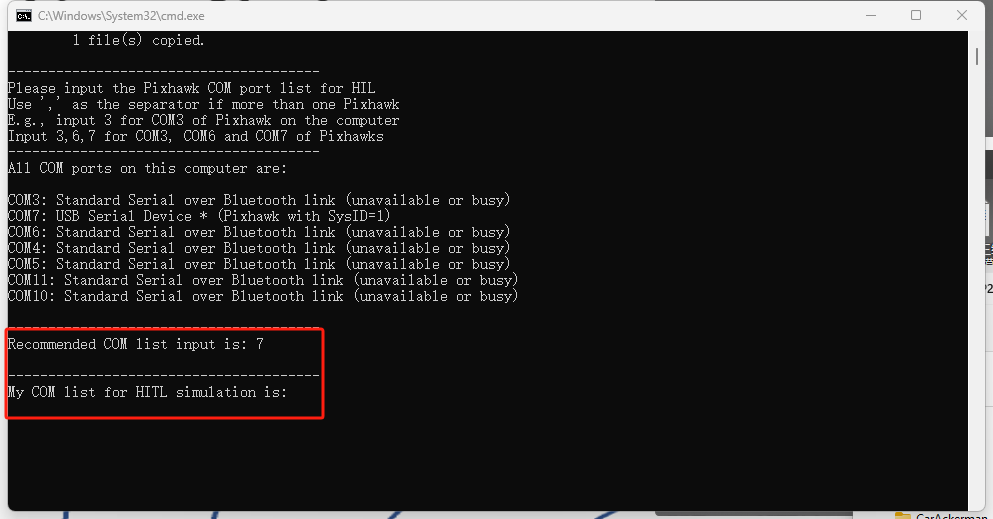
6. Parse and Validate Input
SET string=%ComNum%
set /a VehicleNum=0
:split
    for /f "tokens=1,* delims=," %%i in ("%string%") do (
    set subStr=%%i
    set string=%%j
    )
    set /a eValue=subStr
    if not %eValue% EQU %subStr% (
        echo Error: Input '%subStr%' is not a integer!
        goto EOF
    )
    set /a VehicleNum = VehicleNum +1
if not "%string%"=="" goto split
QGC Startup Order (HITLRun)
QGC is started after CopterSim parameters are configured, to prevent QGC from occupying the COM port.
start /realtime CopterSim.exe 1 %cntr% %CLASS_3D_ID% ... %subStr%:%BaudRate% %UDPSIMMODE% %IsSysID%
...
tasklist|find /i "QGroundControl.exe" || start %PSP_PATH%\QGroundControl\QGroundControl.exe -noComPix
BAT Script Quick Reference Index
The table below lists all available BAT scripts and their key features:
Basic Simulation Scripts
| Script Name | Simulation Type | Feature Description |
|---|---|---|
| HITLRun.bat | HIL | Conventional hardware-in-the-loop; manual COM port input required |
| SITLRun.bat | SIL | Conventional software-in-the-loop; automatically starts based on aircraft count input |
| HITLRunAuto.bat | HIL | Automatically assigns COM ports; no manual input needed |
| SITLRunDebug.bat | SIL | PX4 official single-vehicle SITL debugging |
Position Initialization Scripts
| Script Name | Simulation Type | Feature Description |
|---|---|---|
| HITLPos.bat | HIL | Manual input of PosX/PosY/Yaw |
| SITLPos.bat | SIL | Manual input of PosX/PosY/Yaw |
| HITLPosAlt.bat | HIL | Supports initialization in air or underwater |
| SITLPosAlt.bat | SIL | Supports initialization in air or underwater |
| HITLPosStr.bat | HIL | Position specified as string within script |
| SITLPosStr.bat | SIL | Position specified as string within script |
| HITLPosAltStr.bat | HIL | Automatic input; supports air/underwater initialization |
| SITLPosAltStr.bat | SIL | Automatic input; supports air/underwater initialization |
| SITLPosStrSel.bat | SIL | String-based position + selective subset enabling |
GPS Coordinate Scripts (Full Version Only)
| Script Name | Simulation Type | Feature Description |
|---|---|---|
| HITLPosStrGPS.bat | HIL | Global GPS coordinate initialization |
| SITLPosStrGPS.bat | SIL | Global GPS coordinate initialization |
Key settings: SET isPosGps=1 + SET isBatLLAOrin=1
SysID Binding Scripts
SysID Binding Scripts
| Script Name | Simulation Type | Feature Description |
|---|---|---|
| HITLRunSysID.bat | HIL | CopterID automatically determined by flight controller SysID |
| HITLPosSysID.bat | HIL | SysID + manual position input |
| HITLPosSysIDStr.bat | HIL | SysID + string-based position |
Key setting: SET /a IsSysID=1
Networked & Swarm Scripts
| Script Name | Simulation Type | Feature Description |
|---|---|---|
| HITLRunLANSwarm.bat | HIL | LAN-based networked swarm flight (IS_BROADCAST=1) |
| SITLRunLANSwarm.bat | SIL | LAN-based networked swarm flight |
Special Mode Scripts
| Script Name | Simulation Type | Feature Description |
|---|---|---|
| HITLRunFw.bat | HIL | Fixed-wing mode (DLLModel=FixWingModel) |
| SITLRunFw.bat | SIL | Fixed-wing SITL |
| HITLRunChange3D.bat | HIL | Switch 3D vehicle model style |
| SITLRunChange3D.bat | SIL | Switch 3D vehicle model style |
| HITLRunMAVLinkNoGPS.bat | HIL | No-GPS mode (SLAM) |
| SITLRunMAVLinkNoGPS.bat | SIL | No-GPS mode (SLAM) |
| HITLRunPX4Net.bat | HIL | Network-connected flight controller (PX4_HITL_NET) |
| HITLRunExtNet.bat | HIL | Third-party flight controller (EXT_SIM_NET) |
| HITLRunLowGPU.bat | HIL | Low GPU mode (UE4_MAP=LowGPU) |
| SITLRunLowGPU.bat | SIL | Low GPU mode |
| HITLRunNoUI.bat | HIL | Headless background execution |
| SITLRunNoUI.bat | SIL | Headless background execution |
| HITLRunUE5.bat | HIL | Uses UE5-based 3D program |
| SITLRunUE5.bat | SIL | Uses UE5-based 3D program |
ROS Integration Scripts
| Script Name | Simulation Type | Feature Description |
|---|---|---|
| HITLRunROS.bat | HIL | HIL + automatic MAVROS startup |
| SITLRunROS.bat | SIL | SIL + automatic MAVROS startup |
Utility & Environment Scripts
| Script Name | Function |
|---|---|
| CloseALL.bat | One-click cleanup of all simulation processes + WSL |
| StopBuild.bat | Terminate WSL-related processes |
| DistSim.bat | Launch distributed simulation manager |
| UdpPortFree.bat | Port conflict detection and resolution |
| Python38Env.bat | Open command line with preconfigured Python 3.8 environment |
| Python38Run.bat | Open Python 3.8 environment in current directory |
| StartCFclient.bat | Launch cfclient |
| WinWSL.bat | Open WSL console + VcXsrv |
| WslGUI.bat | One-click enable WSL GUI support |
| WslSwith2.bat | WSL1/WSL2 switching and network configuration |
| gpedit.bat | Install Group Policy Editor on Windows Home edition |
Common Script Parameter Differences
The main flow of different scripts is the same; differences are mainly in simulation mode, position input method, communication link, and background program selection. When modifying a script, first confirm the key variables in the table below, then check ports, maps, and vehicle count.
| Script | Key Variables or Commands | Usage Notes |
|---|---|---|
HITLRun.bat |
SimMode=0 or PX4_HITL, UDPSIMMODE=0, user inputs COM serial port list |
Conventional hardware-in-the-loop; vehicle IDs increment sequentially based on user-input serial port order |
SITLRun.bat |
SimMode=2, PX4SitlFrame=iris |
Conventional software-in-the-loop; after inputting the number of vehicles, automatically starts PX4 SITL and CopterSim |
HITLPos.bat / SITLPos.bat |
SET /P PosXStr, SET /P PosYStr, SET /P YawStr |
Manually input initial position and yaw angle list at runtime |
HITLPosStr.bat / SITLPosStr.bat |
SET PosXStr=..., SET PosYStr=..., SET YawStr=... |
Position and yaw written directly in the script, suitable for repeated experiments with fixed formations |
HITLPosAlt.bat / SITLPosAlt.bat |
Position, yaw, and altitude-related variables | Supports initial state in air or underwater, suitable for in-flight takeover, landing, or water/underwater scenarios |
HITLRunSysID.bat |
SET /a IsSysID=1 |
CopterID automatically determined by flight controller SysID, suitable for fixed hardware numbering and fault localization |
HITLPosSysIDStr.bat |
IsSysID=1, START_INDEX, position string |
Indexes the position list using SysID - START_INDEX, suitable for binding fixed hardware to fixed formations |
HITLPosStrGPS.bat / SITLPosStrGPS.bat |
SET isPosGps=1, SET isBatLLAOrin=1, LatLongAlt |
Initializes position using latitude/longitude; the free version does not support configuring GPS initial position |
HITLRunExtNet.bat |
SimMode=EXT_SIM_NET |
Connects to third-party flight controllers or external flight controller simulators via network |
HITLRunPX4Net.bat |
SimMode=PX4_HITL_NET |
Ethernet-based PX4 hardware-in-the-loop, suitable for flight controller links that do not use serial ports |
HITLRunMAVLinkNoGPS.bat / SITLRunMAVLinkNoGPS.bat |
SET UDPSIMMODE=Mavlink_NoGPS |
Disables GPS-related MAVLink data, suitable for indoor positioning, SLAM, or motion capture scenarios |
HITLRunAuto.bat |
GetComList.exe, 0:%BaudRate% |
After inputting the number of vehicles, automatically matches Pixhawk serial ports, reducing manual COM list input |
HITLRunFw.bat / SITLRunFw.bat |
DLLModel=FixWingModel, PX4SitlFrame=standard_plane |
Fixed-wing simulation scripts, typically use the OldFactory map and Mavlink_Full communication mode |
HITLRunLANSwarm.bat / SITLRunLANSwarm.bat |
IS_BROADCAST=1, RflySim3D -key=I1 |
LAN-based networked swarm flight, requires synchronized configuration of firewall and target host network |
HITLRunLowGPU.bat / SITLRunLowGPU.bat |
UE4_MAP=LowGPU |
Low GPU or remote desktop scenarios, reduces 3D rendering load |
HITLRunNoUI.bat / SITLRunNoUI.bat |
CopterSimNoUI.exe |
Headless background execution, suitable for servers, batch testing, and automated regression |
HITLRunROS.bat / SITLRunROS.bat |
mavros_run.sh %START_INDEX%,%VehicleNum% |
Automatically starts the MAVROS link after simulation launch, typically executes wsl --shutdown at the end |
HITLRunUE5.bat / SITLRunUE5.bat |
%PSP_PATH%\RflySimUE5\RflySim3D.exe |
Uses UE5 version of the 3D program and UE5 scene resources |
UdpPortFree.bat |
netstat -ano, :check_and_kill, :check_and_kill_tcp |
Calculates port ranges based on fixed ports and vehicle numbers, releases residual simulation processes |
Position strings typically use English commas to separate values for multiple vehicles in the same dimension:
For SysID binding scripts, START_INDEX also affects the position list index. For example, when SysID=15 and START_INDEX=11, the 4th offset position in the position list (i.e., 15-11=4) is read, which is the 4th item counting from 0.
Appendix: Common Batch Script Code Snippet Descriptions
1) Self-Elevation to Administrator Privileges
NET SESSION >nul 2>&1 || powershell -Command "Start-Process cmd -ArgumentList '/c, ""%~f0""' -Verb RunAs" && exit /b
NET SESSION can only be executed successfully by an administrator; if it fails, it self-elevates and re-runs the current script.
2) Silent Output and Error Redirection
Suppresses standard output and error output. Common combination: cmd1 || cmd2 (executes the latter only if the former fails).
3) Process Query and Safe Termination
tasklist | find /i "CopterSim.exe" && taskkill /im "CopterSim.exe"
tasklist | find /i "QGroundControl.exe" && taskkill /f /im "QGroundControl.exe"
Check first, then kill, to avoid "process not found" errors. /f forces termination.
4) WSL Environment Management
wsl --shutdown          :: Shuts down all WSL distributions
wsl -d RflySim-20.04    :: Executes in the specified distribution
5) X Server and GUI Launch
6) Path and Working Directory
7) Program Launch and Console Session
/min minimizes the window, /realtime sets high priority, /k keeps the window open, /c exits after execution.
8) Delay and Throttling
Non-interactive wait for 2 seconds to allow processes time to start.
9) Environment Variables and Arithmetic
set /a VEHICLE_INTERVAL=2
setlocal enabledelayedexpansion
echo !var!   :: Delayed expansion, used within loops
%var% expands at parse time, !var! expands at execution time.
10) String and List Parsing
for /f "tokens=1,2,3 delims=#" %%a in ("%ComInfoStr%") do (
  set ComNumExe=%%a
  set ComNameList=%%b
  set ComInfoList=%%c
)
11) Labels and Subroutines
12) Temporary PATH Injection
13) Pipelines and Conditional Execution
Starts a new instance only if the process is not found.
Typical Script Families and Usage Differences
RflySim's BAT scripts are typically organized around simulation mode, initial pose, network environment, 3D engine, and toolchain environment. In addition to the parameters listed earlier, the following table can be used to quickly distinguish common script families.
| Script Family | Typical Scripts | Main Purpose | Common Differences |
|---|---|---|---|
| HITL Launch | HITLRun.bat, HITLPos.bat, HITLRunFw.bat |
Start hardware-in-the-loop simulation workflow | Connects to real flight controllers or external PX4 instances, often includes serial port, network port, or position initialization parameters |
| SITL Launch | SITLRun.bat, SITLPos.bat, SITLRunFw.bat |
Start software-in-the-loop simulation workflow | Automatically starts PX4 SITL and assigns TCP/UDP ports based on vehicle number |
| Pose Initialization | HITLPos.bat, SITLPos.bat, HITLPosAlt.bat, SITLPosAlt.bat |
Set vehicle initial position, attitude, and altitude | Pos focuses on position, Alt additionally specifies altitude, Str supports batch configuration via string format |
| GPS Origin | HITLPosStrGPS.bat, SITLPosStrGPS.bat |
Set GPS origin and multi-vehicle initial pose | Commonly used to replicate real-world latitude/longitude, group takeoff positions, or cross-map scenarios |
| System Identification | HITLRunSysID.bat, HITLPosSysID.bat, HITLPosSysIDStr.bat |
Start data collection simulation suitable for model identification | Typically fixes map, weather, vehicle initial state, and log directory |
| Network Extension | HITLRunExtNet.bat, HITLRunPX4Net.bat, HITLRunLANSwarm.bat, SITLRunLANSwarm.bat |
Cross-host or LAN cluster simulation | Requires configuration of target IP, multicast/unicast strategy, and firewall |
| No GPS / MAVLink | HITLRunMAVLinkNoGPS.bat, SITLRunMAVLinkNoGPS.bat |
MAVLink control or indoor positioning scenarios without GPS | Suitable for external positioning, visual positioning, motion capture input |
| Performance/UI | HITLRunLowGPU.bat, SITLRunLowGPU.bat, HITLRunNoUI.bat, SITLRunNoUI.bat |
Reduce GPU usage or run without UI | Suitable for batch testing, server deployment, remote automation |
| ROS/UE5 | HITLRunROS.bat, SITLRunROS.bat, HITLRunUE5.bat, SITLRunUE5.bat |
Start ROS bridge or UE5 scene | Requires synchronized configuration of ROS, WSL, UE5 project paths |
Choosing Between HITLRun and SITLRun
- Use HITL when a real flight controller or external flight controller hardware is present.
- Use SITL when running only PX4 and the simulator on the computer.
- The port, process, and troubleshooting methods for the two script types differ; mixing them is not recommended.
Main Program Startup Sequence
A typical startup script organizes the main programs in the following order. The actual order can be adjusted based on whether QGC, ROS, UE5, or distributed deployment is used.
| Phase | Typical Action | Description |
|---|---|---|
| 1 | Set PSP_PATH, START_INDEX, TOTOAL_COPTER, SimMode |
Determine toolchain path, starting vehicle number, total vehicle count, and simulation mode |
| 2 | Check serial ports or network ports | HITL checks COMn or /dev/ttyUSBn; SITL checks TCP/UDP ports |
| 3 | Start PX4 SITL or connect to hardware flight controller | SITL scripts start PX4, HITL scripts wait for user to select flight controller port |
| 4 | Start CopterSim | Create motion simulation instances based on CopterID, model, map, and communication mode |
| 5 | Start RflySim3D / UE5 | Load map, objects, and visual sensor configuration |
| 6 | Start QGroundControl, ROS, Python, or other external programs | Connect ground station, algorithm nodes, and control scripts as needed by the task |
COM Port Selection Process
HITL scripts typically first obtain the system's available COM ports, then prompt the user to input the port list for flight controller connection. In multi-flight controller scenarios, the user input order should match the CopterID order.
| Step | Description |
|---|---|
| Get Port String | Read the system serial port list, forming intermediate variables such as ComInfoStr |
| Parse Ports | Use for /f to split port numbers, names, and descriptions by delimiter |
| Display Available Ports | List all candidate COM ports in the command line |
| Check Quantity | If the number of available flight controllers is less than the number of simulated aircraft, prompt to reconnect or reduce the number of aircraft |
| User Input | Input a port list such as 3,4,5, corresponding to COM3, COM4, COM5 |
| Validate Ports | Check whether the input ports exist, are duplicated, and whether the quantity matches |
QGroundControl Startup Order
In multi-vehicle or multi-port simulations, it is recommended to start the PX4/CopterSim communication link first, then start QGroundControl. If QGC occupies port 14550 or related TCP ports first, it may cause CopterSim or the MAVLink forwarding link to fail to connect.
Multi-Vehicle Pose String
Batch position scripts often use strings to describe the initial positions of multiple vehicles:
Here, ; separates different vehicles, and , separates the position components of a single vehicle. Internally, the script typically uses for /f or delayed variable expansion to parse the string.
Troubleshooting Points
- If a port is occupied, first run
UdpPortFree.bator manually check ports in the14550,20100,30100,40100series. - In multi-vehicle scripts,
CopterID, PX4 instance number, CopterSim number, and RflySim3D object number must be consistent. - For WSL-related scripts, confirm the distribution, PX4 path, VcXsrv/graphics forwarding, and firewall rules.
- When starting in batch, it is recommended to keep a 1 to 3 second delay between PX4, CopterSim, RflySim3D, and QGroundControl.