Chapter 2: Experimental Platform Configuration
"Craftsmen must first sharpen their tools"—Given the complexity of the unmanned system development workflow, spanning from low-level flight controllers to high-level AI, this chapter comprehensively introduces the core component architecture and cross-platform usage methodology of the RflySim toolchain; it guides users through the complete process from one-click toolchain environment installation, verification testing, to basic case execution, thereby establishing the essential software ecosystem foundation for subsequent advanced usage.
2.1 Background and Theory
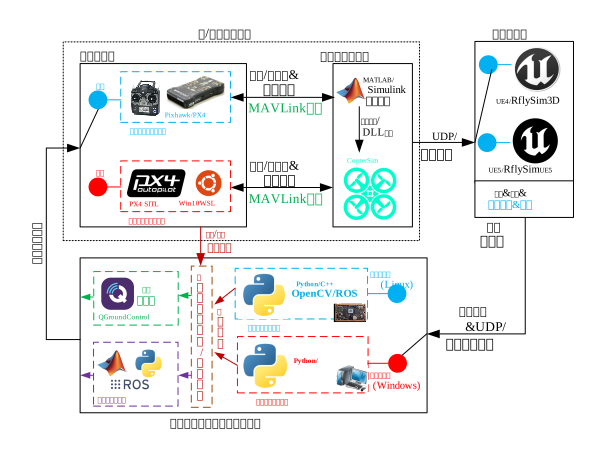
As a professional, fully open, and comprehensive unmanned system development simulation platform, the RflySim toolchain embodies three essential characteristics: cross-ecosystem compatibility, Model-Based Design (MBD), and closed-loop Sim2Real. Whether it is Software-in-the-Loop (SITL) mode—requiring only a PC to validate control theory and upper-layer path planning logic—or Hardware-in-the-Loop (HITL) mode—capable of verifying embedded real-time responsiveness and highly ensuring seamless migration of real-flight code—RflySim provides fully self-consistent automated build tools. To support such high-fidelity simulation and automatic code generation, its architecture involves cross-dependencies across Windows (serving as the host and host for the 3D simulation engine), Ubuntu (primarily serving as the algorithm development platform and ROS communication layer), WSL, and Docker (used for agile cross-platform system bridging). At the control and protocol layer, it is fundamentally built upon the mainstream PX4 flight controller ecosystem and MAVLink communication protocol, significantly lowering the barrier for cutting-edge research involving multiple languages (C++/Python) and multiple middleware (ROS1/ROS2).
2.2 Framework and Interfaces
Building a stable intelligent unmanned system test and development pipeline often demands high hardware specifications and significant time investment. RflySim provides "one-click environment deployment" capability and a rich interface ecosystem at the architectural level.
2.2.1 Core Components Overview
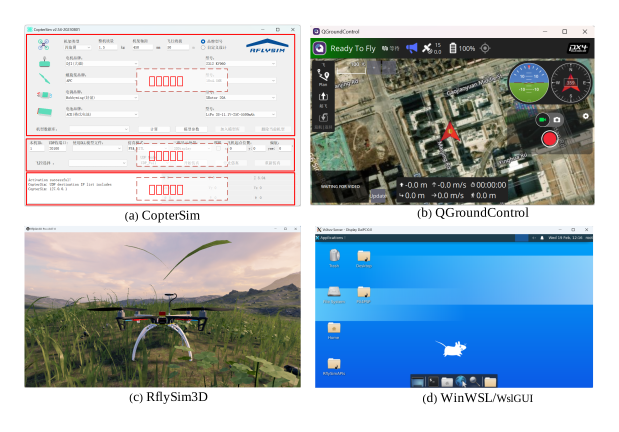
The toolchain encompasses three major systems: CopterSim, running the physical engine on the backend to compute vehicle dynamic responses; RflySim3D (based on UE), responsible for high-fidelity rendering and sensor data generation; and the ground station platform QGroundControl, for global monitoring and telemetry data. Additionally, lightweight tools SimCreate and VisCreate—designed for rapid simulation experiment initialization and pre-configured parameter setup—serve as auxiliary framework supports.
2.2.2 Installation and Verification Process
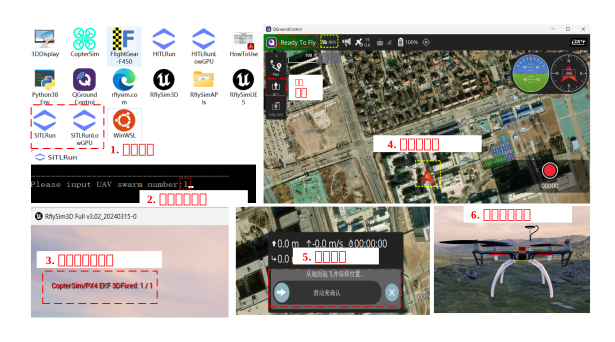
To ensure stable operation of the aforementioned multi-module system, a computer with more than 16 GB RAM and a dedicated GPU of at least RTX 2060 is recommended. After obtaining the complete .iso mounted system image, the development environment supports silent, rapid deployment.
- Infrastructure Configuration: First, run
UbuntuWSL/EnableWSL.batto enable Linux subsystem permissions on Windows. - Core Package Installation: Depending on whether low-level flight controller development is required, decide whether to install MATLAB (by running
OnekeyScript.p) or directly executeOnekeyScript.exefor standalone green-mode installation. - Closed-Loop Environment Verification: After the dual-end compilation toolchain, Cygwin, and Python configurations are ready (the desktop shortcut
RflyToolsis automatically generated), execute theSITLRuncommand set to launch a drone for one-click testing. If the interface successfully enters the3DFixedtakeoff phase, the installation is deemed complete.
2.2.3 Typical Development Workflow and Teaching Tools
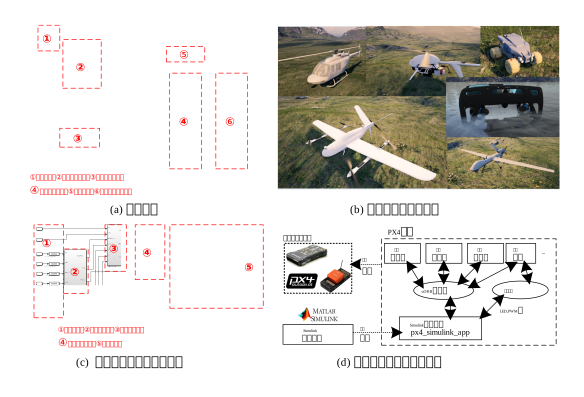
At the interface level, RflySim's typical development paradigm branches into two pathways. For low-level developers, the Simulink Toolbox (PX4PSP) enables the traditional control closed-loop: model building → automatic code generation → PX4 firmware compilation → in-the-loop testing. For high-level AI researchers, invoking the Python RflySimSDK and ROS interface suite allows high-frequency external Offboard mode operations for machine vision and intelligent multi-agent adversarial scenarios. This pathway is directly compatible with recommended teaching hardware (e.g., Pixhawk-series flight controllers and Jetson Orin NX onboard computers).
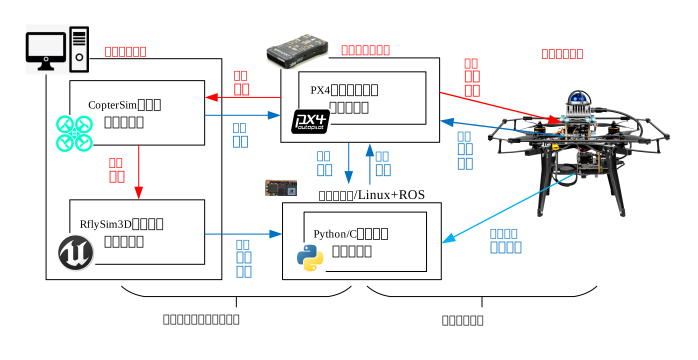
2.3 Showcase of Representative Cases
2.4 Course-Related Video Lectures
Lecture Recordings for This Chapter:
2.5 Chapter Experiment Cases
The verification experiments and guided cases related to this chapter are located in the [Installation Directory]\RflySimAPIs\2.RflySimUsage folder.
2.5.1 Interface Learning Experiments
Located in the 2.RflySimUsage\0.ApiExps folder, covering foundational platform interface tutorials and general introductions to each tool.
Experiment 1: Introduction to RflySim Platform Components
- 📦 Version Requirement:
Free Edition - 📁 File Path: e1_RflySimSoftwareReadme/Readme.pdf
📝 Experiment Overview: Introduces the functions and usage methods of various component software in the RflySim simulation platform, including basic functionality descriptions of modules such as 3DDisplay, CopterSim, drivers, PSP Toolbox, firmware, Python API, and QGroundControl.
Experiment 2: Fixed-Wing UAV Trajectory Flight Simulation
- 📦 Version Requirement:
Free Edition - 📁 File Path: e2_FWConfig/Readme.pdf
📝 Experiment Overview: Plans a fixed-wing UAV trajectory using the QGC ground station, enabling takeoff and flight along a predefined route. Learns Pixhawk frame configuration for fixed-wing UAVs, collaborative operation with the RflySim simulation platform, and QGC mission planning operations.
Experiment 3: Using the ReqCopterSim Interface Library
- 📦 Version Requirement:
Free Edition - 📁 File Path: e3_ReqCopterSim/Readme.pdf
📝 Experiment Overview:
Learn to use the Python-based ReqCopterSim.py interface library to configure initialization parameters for CopterSim simulation, including connection mode, position and attitude, simulation mode, DLL model, and 3D scene settings.
Experiment 4: VM_Ware Virtual Machine Installation and Basic Usage
- 📦 Version Requirement:
Free Edition - 📁 File Path: e4_VMware/Readme.pdf
📝 Experiment Overview: Explains the installation method of VM_Ware virtual machine software, virtual machine image loading, network configuration, and RflySimSDK environment setup, enabling correct installation and basic usage of virtual machines.
Experiment 5: Ubuntu System Installation and Configuration
- 📦 Version Requirement:
Free Edition - 📁 File Path: e5_Ubuntu/Readme.pdf
📝 Experiment Overview: This experiment introduces the installation and configuration methods of the Ubuntu system, including virtual machine installation, dual-boot deployment, software source replacement, and development environment setup, helping users master basic Ubuntu system usage.
Experiment 6: PX4 Environment Deployment and Firmware Compilation
- 📦 Version Requirement:
Free Edition - 📁 File Path: e6_PX4Build/Readme.pdf
📝 Experiment Overview: Explains the deployment of the PX4 development environment, cloning of official source code, firmware compilation, and uploading to the flight controller. Learn how to verify whether the environment installation is correct.
Experiment 7: APM Flight Controller Environment Deployment and Firmware Compilation
- 📦 Version Requirement:
Free Edition - 📁 File Path: e7_ApmBuild/Readme.pdf
📝 Experiment Overview: Explains how to deploy the APM flight controller environment, configure compiler dependencies, clone source code, and use the WAF tool to download and compile firmware. Learn the core architecture of APM and the principle of flight mode switching.
Experiment 8: ROS 1 Environment Deployment, Installation, and Testing
- 📦 Version Requirement:
Free Edition - 📁 File Path: e8_RosInstall/Readme.pdf
📝 Experiment Overview:
Mainly explains the installation and configuration methods of the ROS 1 environment, including installing ROS 1 on Ubuntu, configuring environment variables, and testing the installation correctness using the roscore command and the classic turtle control demo.
Experiment 9: ROS 2 Environment Deployment and Installation Testing
- 📦 Version Requirement:
Free Edition - 📁 File Path: e9_Ros2Install/Readme.pdf
📝 Experiment Overview: Explains the installation and configuration methods of the ROS 2 environment, learns how to verify whether the ROS 2 environment is correctly installed, and masters basic ROS 2 environment testing operations.
Experiment 10: MAVROS UAV Control
- 📦 Version Requirement:
Free Edition - 📁 File Path: e10_Mavros/Readme.pdf
📝 Experiment Overview: Learn MAVROS environment installation and configuration, ROS/ROS 2 communication mechanisms with PX4 flight controllers, and implement offboard control mode setup and autonomous flight for UAVs.
Experiment 11: Docker Installation and GPU Support Configuration
- 📦 Version Requirement:
Free Edition - 📁 File Path: e11_docker/Readme.pdf
📝 Experiment Overview: A hands-on tutorial for quickly setting up Docker, configuring GPU container support, enabling domestic image acceleration, and building a multi-architecture environment with buildx on Windows (WSL 2 + Docker Desktop) and Ubuntu.
Experiment 12: PX4 and ROS2 Communication Configuration
- 📦 Version Requirement:
Free Edition - 📁 File Path: e12_PX4ROS2/Readme.pdf
📝 Experiment Overview: Master the fundamental communication configuration between PX4 and ROS2, learn UDP communication using MicroXRCEAgent, and practice publishing and subscribing to ROS2 topics.
Experiment 13: Gazebo and PX4 Co-simulation
- 📦 Version Requirement:
Free Edition - 📁 File Path: e14_GazeboSim/Readme.pdf
📝 Experiment Overview: Master the general workflow for directly connecting Gazebo with PX4 for simulation on the RflySim platform, and understand the corresponding Gazebo environment configuration and operational mechanisms for different PX4 firmware versions.
Experiment 14: MAVROS Installation and Deployment
- 📦 Version Requirement:
Free Edition - 📁 File Path: e10_Mavros/1.MavrosInstall/Readme.pdf
📝 Experiment Overview: This experiment aims to install and deploy MAVROS 1 and MAVROS 2 packages in an Ubuntu virtual machine environment, enabling mastery of the complete installation process for MAVROS in ROS 1 (Noetic) and ROS 2 (Foxy) environments. It also introduces the role and principles of MAVROS as a MAVLink message communication middleware, and configures support for multi-UAV system connections.
Experiment 15: Cross-Platform Distributed Sensor Data Acquisition and ROS Publishing
- 📦 Version Requirement:
Free Edition - 📁 File Path: e13_VisAPIPyCpp/1.rosCppExps/Readme.pdf
📝 Experiment Overview: Build a distributed machine simulation sensor data processing system: request multi-modal sensor data (RGB, depth, LiDAR) from RflySim 3D via Python interface, and implement high-performance cross-ROS1 and ROS2 reception, processing, and real-time visualization using C++.
Experiment 16: MAVROS Offboard Control Experiment
- 📦 Version Requirement:
Free Edition - 📁 File Path: e10_Mavros/2.Mavros1Offboard/Readme.pdf
📝 Experiment Overview: Implement PX4 UAV offboard control via the MAVROS interface, learn ROS node communication with the PX4 flight controller, and master offboard mode setup, autonomous UAV takeoff procedures, and the role of MAVROS in automated control.
Experiment 17: Python Cross-ROS Version Sensor Data Subscription
- 📦 Version Requirement:
Free Edition - 📁 File Path: e13_VisAPIPyCpp/2.rosPythonExps/Readme.pdf
📝 Experiment Overview: Build a Python-based sensor data subscription and processing system, enabling acquisition of multiple sensor data types from RflySim 3D and publishing them to ROS topics. Supports unified interfaces for ROS 1 and ROS 2, processes multi-modal data such as RGB images, depth images, and LiDAR point clouds, and implements real-time visualization and data format conversion.
Experiment 18: MAVROS2 Offboard Control
- 📦 Version Requirement:
Free Edition - 📁 File Path: e10_Mavros/3.Mavros2Offboard/Readme.pdf
📝 Experiment Overview: Implement UAV offboard control via the MAVROS 2 framework, verify the communication mechanism between ROS 2 and the PX4 flight controller, and learn basic MAVROS 2 usage as well as UAV attitude control and flight operations.
Experiment 19: 3DDisplay UAV 3D Visualization
- 📦 Version Requirement:
Free Edition - 📁 File Path: e1_RflySimSoftwareReadme/3DDisplay/Readme.pdf
📝 Experiment Overview: 3DDisplay is a low-performance version of the RflySim 3D visualization tool, displaying multirotor flight status in 3D graphics with minimap and trajectory display functions, used for UAV simulation visualization under reduced computer performance requirements.
Experiment 20: CopterSim Hardware-in-the-Loop Simulation Software Usage
- 📦 Version Requirement:
Free Edition - 📁 File Path: e1_RflySimSoftwareReadme/CopterSim/Readme.pdf
📝 Experiment Overview: CopterSim is the core hardware-in-the-loop simulation software of the RflySim platform, supporting Pixhawk/PX4 autopilots connected via serial port or network for simulation, with configurable multirotor model parameters and data communication capabilities.
Experiment 21: PX4 Software System Architecture
- 📦 Version Requirement:
Free Edition - 📁 File Path: e1_RflySimSoftwareReadme/Firmware/Readme.pdf
📝 Experiment Overview: Introduces the software architecture, middleware, flight control stack, inter-module communication mechanisms of the PX4 flight controller system, and firmware deployment methods on the RflySim platform.
Experiment 22: FlightGear 2016.1.2 Flight Simulator Manual
- 📦 Version Requirement:
Free Edition - 📁 File Path: e1_RflySimSoftwareReadme/FlightGear 2016.1.2/Readme.pdf
📝 Experiment Overview: Official manual for the FlightGear open-source flight simulator version 2016.1.2, covering software installation, system configuration, flight operations, and advanced feature usage instructions.
Experiment 23: Python38 Virtual Environment Configuration and Usage
- 📦 Version Requirement:
Free Edition - 📁 File Path: e1_RflySimSoftwareReadme/Python38/Readme.pdf
📝 Experiment Overview: Introduces the Python 3.8 virtual environment (Python38Env) integrated with the RflySim platform, including configuration and basic usage of common libraries for unmanned system algorithm development such as pymavlink, OpenCV, and numpy.
Experiment 24: QGroundControl Ground Station Usage Tutorial
- 📦 Version Requirement:
Free Edition - 📁 File Path: e1_RflySimSoftwareReadme/QGroundControl/Readme.pdf
📝 Experiment Overview: Introduces the interface layout, icon functions, software and hardware environment configuration of the QGroundControl UAV ground station, as well as core operation methods such as takeoff, landing, and mission planning.
Experiment 25: RflySim3D Visualization Software
- 📦 Version Requirement:
Free Edition - 📁 File Path: e1_RflySimSoftwareReadme/RflySim3D/Readme.pdf
📝 Experiment Overview: A 3D visualization software based on UE4.27, used for real-time display of UAV status, supporting UDP communication and various shortcut operations.
Experiment 26: RflySimUE5 Visualization Simulation Software Usage Instructions
- 📦 Version Requirement:
Free Edition - 📁 File Path: e1_RflySimSoftwareReadme/RflySimUE5/Readme.pdf
📝 Experiment Overview: A UAV visualization simulation software based on UE5.3, introducing its hardware configuration requirements, installation steps, and operation interface shortcut key usage methods.
Experiment 27: WinWSL Development Environment Configuration
- 📦 Version Requirement:
Free Edition - 📁 File Path: e1_RflySimSoftwareReadme/WinWSL/Readme.pdf
📝 Experiment Overview: Introduces configuring the WSL2 Linux development environment on Windows, including ROS, Gazebo simulation, UAV MAVLink support, and AI toolchain.
Experiment 28: RflySim UAV Driver Installation
- 📦 Version Requirement:
Free Edition - 📁 File Path: e1_RflySimSoftwareReadme/drivers/Readme.pdf
📝 Experiment Overview: Introduces the UAV driver files automatically installed by the RflySim platform, including driver installation and configuration methods for flight controller hardware such as Arduino, ChibiOS, Cube, Holybro, MindPX, NXP, and PX4.
Experiment 29: Pixhawk Hardware Configuration and Simulink Development Environment Setup
- 📦 Version Requirement:
Free Edition - 📁 File Path: e1_RflySimSoftwareReadme/examples/Readme.pdf
📝 Experiment Overview: Learn to configure the Pixhawk flight controller hardware environment, master the MATLAB/Simulink development toolchain on Windows/Linux systems, and complete firmware compilation and application deployment.
Experiment 30: VisCreate Vision Sensor Parameter Configuration Tool
- 📦 Version Requirement:
Free Edition - 📁 File Path: e1_RflySimSoftwareReadme/viscreate/Readme.pdf
📝 Experiment Overview: Learn to use the VisCreate tool to configure UAV vision sensor payloads, master parameter settings for various sensors such as RGB cameras, depth cameras, and LiDAR, and achieve real-time linkage with RflySim 3D.
2.5.2 Basic Usage Experiments
Stored in the 2.RflySimUsage\1.BasicExps folder, these experiments provide a complete set of supplementary instructional materials for beginners.
Experiment 1: CopterSim Model Design and Hardware-in-the-Loop Simulation
- 📦 Version Requirement:
Free Edition - 📁 File Path: e1_CopterSim-Usage/Readme.pdf
📝 Experiment Overview: Familiarize yourself with the model configuration area of the CopterSim main interface. Configure parameters such as total mass (1.5 kg), wheelbase (450 mm), and altitude (0 m), then calculate hover duration and throttle percentage for various configurations (tricopter to octocopter). Master the hardware-in-the-loop (HITL) simulation setup process for hexacopters.
Experiment 2: DLL Model Import into CopterSim Simulation
- 📦 Version Requirement:
Free Edition - 📁 File Path: e2_DLL-Load/Readme.pdf
📝 Experiment Overview: Learn to import custom vehicle kinematics DLL models into CopterSim for software-in-the-loop (SIL) or hardware-in-the-loop (HITL) simulation. Master both manual and automatic DLL loading methods, including configuration experiments for multirotor and fixed-wing models.
Experiment 3: RflySim 3D Keyboard Shortcuts
- 📦 Version Requirement:
Free Edition - 📁 File Path: e3_RflySim3D-Shortcut-Instruct/Readme.pdf
📝 Experiment Overview: Learn keyboard shortcuts and external command switching functionality in RflySim 3D software. Master control of 3D scene viewpoints, object movement, and scene transitions via keyboard shortcuts and CopterSim software to improve simulation operation efficiency.
Experiment 4: Python 3.8 Environment for Reading Flight Controller Logs
- 📦 Version Requirement:
Free Edition - 📁 File Path: e4_Log-Reads-Python38Env/Readme.pdf
📝 Experiment Overview:
Use a Python 3.8 environment to read flight controller .ulg log files. Learn to convert logs to CSV format using the ulog2csv tool for subsequent data analysis.
Experiment 5: Manual Software-in-the-Loop Simulation
- 📦 Version Requirement:
Free Edition - 📁 File Path: e5_Manual-SIL/Readme.pdf
📝 Experiment Overview: Familiarize yourself with the software-in-the-loop (SIL) simulation workflow. Learn to configure CopterSim for PX4_SITL mode, compile PX4 firmware via WSL, and perform basic operations such as drone takeoff control using QGroundControl.
Experiment 6: BAT Script for One-Click Simulation Software Launch
- 📦 Version Requirement:
Free Edition - 📁 File Path: e6_BAT-Startup/Readme.pdf
📝 Experiment Overview:
Use a BAT batch script to launch QGroundControl, RflySim 3D, and CopterSim with one click. Learn to configure simulation environment parameters via SITLRun.bat.
Experiment 7: MATLAB Code Generation for Flight Controller Firmware
- 📦 Version Requirement:
Free Edition - 📁 File Path: e7_Code-Generation/Readme.pdf
📝 Experiment Overview: Based on the RflySim platform, use MATLAB/Simulink's automatic code generation technology to generate PX4 flight controller firmware from a built control model in one click, and download it to the flight controller for execution.
Experiment 8: Simulink Cluster Control Interface Experiment
- 📦 Version Requirement:
Free Edition - 📁 File Path: e8_SwarmAPI/Readme.pdf
📝 Experiment Overview: Conduct a swarm control interface experiment using Simulink S-Function blocks, enabling quadcopters to start up and enter hover mode, while mastering the construction of communication structures and quadcopter control models.
Experiment 9: PX4 Firmware Compilation
- 📦 Version Requirement:
Free Edition - 📁 File Path: e9_Build-Firmware/Readme.pdf
📝 Experiment Overview:
Compile the PX4 firmware using the WinWSL subsystem, learning how to generate firmware files for different flight controller hardware platforms using the make command.
Experiment 10: Firmware Flashing
- 📦 Version Requirement:
Free Edition - 📁 File Path: e10_Firmware-Upload/Readme.pdf
📝 Experiment Overview: Introduce firmware flashing methods for RflySim-generated flight controller firmware, covering both Simulink and QGC approaches, and learn firmware compilation commands and environment configuration for various flight controller models.
Experiment 11: PX4 Onboard Application Development
- 📦 Version Requirement:
Free Edition - 📁 File Path: e12_PX4-App/Readme.pdf
📝 Experiment Overview: Learn the complete development workflow for creating applications (APPs) within the PX4 source code, including template programming, CMake configuration, SITL (Software-In-The-Loop) simulation debugging, and setting up auto-startup on boot.
Experiment 12: Log Data Acquisition
- 📦 Version Requirement:
Free Edition - 📁 File Path: e13_Log-Get/Readme.pdf
📝 Experiment Overview: Learn to record vehicle motion data—including position, velocity, and motor RPM—during simulation using CopterSim, and generate CSV files for subsequent data analysis.
Experiment 13: RflySim 3D Scene Loading
- 📦 Version Requirement:
Free Edition - 📁 File Path: e14_Scene-Load/Readme.pdf
📝 Experiment Overview: Learn scene switching and control methods in RflySim 3D, and master the workflow for developing 3D scenes using Unreal Engine 4 and importing them into the RflySim 3D platform.
Experiment 14: Flight Controller Hardware Compilation Command Recognition
- 📦 Version Requirement:
Free Edition - 📁 File Path: e15_Identify-Hardware-Command/Readme.pdf
📝 Experiment Overview: Connect to flight controller hardware via QGroundControl to identify compilation commands for different Pixhawk-series flight controllers, learn QGC's firmware recognition functionality and PX4 firmware version compatibility—suitable for developers working on low-level flight controller algorithms.
Experiment 15: Route Planning and HITL Simulation
- 📦 Version Requirement:
Free Edition - 📁 File Path: e16_RoutePlanning/Readme.pdf
📝 Experiment Overview: Learn to use QGroundControl's route planning functionality. By setting parameters such as waypoint altitude, hover time, and heading angle, achieve autonomous flight of a Pixhawk flight controller in hardware-in-the-loop simulation.
Experiment 16: USB Remote Controller Software-in-the-Loop Simulation
- 📦 Version Requirement:
Free Edition - 📁 File Path: e17_RCusbSIL/Readme.pdf
📝 Experiment Overview: Learn to connect a WFLY ET10 remote controller via USB, configure gamepad mode and CH5-CH8 channel overrides in QGC, and achieve software-in-the-loop simulation flight control for a UAV.
Experiment 17: PX4 Version and Compilation Command Switching
- 📦 Version Requirement:
Free Edition - 📁 File Path: e18_PX4VersionSwitch/Readme.pdf
📝 Experiment Overview: Learn to switch PX4 firmware versions and compilation commands within the RflySim toolchain, and master the configuration methods for different firmware versions in the flight controller compilation environment.
Experiment 18: Using the VisCreate Sensor Configuration Tool
- 📦 Version Requirement:
Free Edition - **📁 File Path
Experiment 1: RflySim Software Component Navigation
- 📦 Version Requirement:
Free Edition - 📁 File Path: e1_RflySimSoftwareReadme/Readme.pdf
📝 Experiment Overview: Compiles documentation for key RflySim platform components and accompanying software, helping users understand the role of each component within the toolchain and establishing reading entry points from 3D display, flight controller, drivers, ground station to Python/WSL environments, facilitating subsequent in-depth learning as needed.
Experiment 2: Fixed-Wing UAV Trajectory Flight Simulation
- 📦 Version Requirement:
Free Edition - 📁 File Path: e2_FWConfig/Readme.pdf
📝 Experiment Overview: Plans a fixed-wing UAV trajectory using the QGC ground station, enabling takeoff and flight along a predefined route. Master fixed-wing frame configuration, RflySim platform component collaboration, and QGC mission planning operations.
Experiment 3: ReqCopterSim Interface Library Usage
- 📦 Version Requirement:
Free Edition - 📁 File Path: e3_ReqCopterSim/Readme.pdf
📝 Experiment Overview:
Use the Python interface library ReqCopterSim.py to externally reset CopterSim simulation initialization parameters, including connection mode, UDP communication, initial position and attitude, DLL model, and 3D scene, and observe simulation changes.
Experiment 4: VMware Virtual Machine Installation and Basic Usage
- 📦 Version Requirement:
Free Edition - 📁 File Path: e4_VMware/Readme.pdf
📝 Experiment Overview: This experiment explains the installation of VMware virtual machine software, virtual machine image loading, network configuration, and RflySimSDK synchronization, aiming to help users set up an Ubuntu/ROS/PX4 development environment on a Windows host.
Experiment 5: Ubuntu Basic Configuration
- 📦 Version Requirement:
Free Edition - 📁 File Path: e5_Ubuntu/Readme.pdf
📝 Experiment Overview: This experiment explains Ubuntu image download, virtual machine installation, and dual-system configuration methods, covering steps such as installing Ubuntu in VMware, changing software sources, and installing VS Code, aiming to help users set up the RflySim development environment.
Experiment 6: PX4 Environment Deployment and Firmware Download/Compilation
- 📦 Version Requirement:
Free Edition - 📁 File Path: e6_PX4Build/Readme.pdf
📝 Experiment Overview: This experiment explains the deployment method for the PX4 development environment, including dependency installation, source code cloning, submodule synchronization, and firmware compilation, and analyzes the PX4 source code directory structure, laying the foundation for secondary development.
Experiment 7: APM Flight Controller Environment Deployment and Firmware Download/Compilation
- 📦 Version Requirement:
Free Edition - 📁 File Path: e7_ApmBuild/Readme.pdf
📝 Experiment Overview: This experiment explains how to deploy the APM flight controller development environment, including dependency installation, source code cloning, and firmware compilation, and introduces the APM source code architecture and flight mode switching logic.
Experiment 8: ROS1 Environment Deployment and Installation Testing
- 📦 Version Requirement:
Free Edition - 📁 File Path: e8_RosInstall/Readme.pdf
📝 Experiment Overview:
This experiment guides the installation and configuration of the ROS1 environment, verifies the environment using roscore, rostopic, and the classic turtle simulation demo, and also covers the creation and running of ROS C++ example programs.
Experiment 9: ROS2 Environment Deployment and Installation Testing
- 📦 Version Requirement:
Free Edition - 📁 File Path: e9_Ros2Install/Readme.pdf
📝 Experiment Overview: This experiment explains the installation and configuration of the ROS2 environment, verifies the environment by running publisher/subscriber nodes and the turtle simulation, and teaches basic ROS2 commands and workspace creation.
Experiment 10: MAVROS UAV Control Experiment Suite
- 📦 Version Requirement:
Free Edition - 📁 File Path: e10_Mavros/Readme.pdf
📝 Experiment Overview: Learn to use the MAVROS interface to control PX4 UAVs, master the communication mechanism between ROS/ROS2 and the PX4 flight controller, and implement UAV offboard control.
Experiment 11: Docker Installation and GPU Support
- 📦 Version Requirement:
Free Edition - 📁 File Path: e11_docker/Readme.pdf
📝 Experiment Overview: This experiment guides the rapid installation of Docker on Windows (WSL2 + Docker Desktop) and Ubuntu environments, with optional configuration of GPU container support, domestic image acceleration, and multi-architecture build environments to support RflySim development.
Experiment 12: PX4 and ROS2 Direct Connection Environment Configuration and Basic Usage Tutorial
- 📦 Version Requirement:
Free Edition - 📁 File Path: e12_PX4ROS2/Readme.pdf
📝 Experiment Overview: Master the basic communication configuration between PX4 and ROS2, learn to use MicroXRCEAgent for UDP communication, become familiar with ROS2 topic publishing and subscription operations, and be able to control the PX4 SITL simulated aircraft via ROS2.
Experiment 13: Gazebo and PX4 Co-simulation
- 📦 Version Requirement:
Free Edition - 📁 File Path: e14_GazeboSim/Readme.pdf
📝 Experiment Overview: Master the general workflow for directly connecting Gazebo with PX4 for simulation on the RflySim platform, and understand the corresponding Gazebo environment configuration and operational mechanisms for different PX4 firmware versions.
Experiment 14: MAVROS Installation and Deployment
- 📦 Version Requirement:
Free Edition - 📁 File Path: e10_Mavros/1.MavrosInstall/Readme.pdf
📝 Experiment Overview: This experiment aims to install and deploy MAVROS1 and MAVROS2 software packages in an Ubuntu virtual machine, enabling mastery of the MAVROS installation process in ROS1/ROS2 environments, understanding its role as a MAVLink communication middleware, and configuring multi-UAV system connections, laying the foundation for subsequent offboard control experiments.
Experiment 15: Cross-Platform Distributed Sensor Data Acquisition and ROS Publishing Based on Python and C++
- 📦 Version Requirement:
Free Edition - 📁 File Path: e13_VisAPIPyCpp/1.rosCppExps/Readme.pdf
📝 Experiment Overview: Build a distributed robot simulation sensor data processing system, request RflySim3D sensor data via Python interface, use C++ for efficient reception, processing, and forwarding to ROS1/ROS2 topics, supporting real-time visualization of multi-modal data.
Experiment 16: MAVROS1 Offboard UAV Control
- 📦 Version Requirement:
Free Edition - 📁 File Path: e10_Mavros/2.Mavros1Offboard/Readme.pdf
📝 Experiment Overview: Implement offboard control of a PX4 UAV via the MAVROS interface, learning ROS node communication with the flight controller, mode switching, and autonomous takeoff procedures.
Experiment 17: Cross-ROS Version Sensor Data Subscription and Processing Based on Python
- 📦 Version Requirement:
Free Edition - 📁 File Path: e13_VisAPIPyCpp/2.rosPythonExps/Readme.pdf
📝 Experiment Overview: Build a distributed simulation architecture, obtain multi-modal sensor data from RflySim3D via Python interface and publish it to ROS topics, implementing sensor data subscription, processing, and real-time visualization across ROS1/ROS2 versions.
Experiment 18: MAVROS2 UAV Offboard Control
- 📦 Version Requirement:
Free Edition - 📁 File Path: e10_Mavros/3.Mavros2Offboard/Readme.pdf
📝 Experiment Overview: This experiment implements UAV offboard control via the MAVROS2 framework, verifies the communication mechanism between ROS2 and the PX4 flight controller system, and learns attitude control and flight operations.
Experiment 19: 3DDisplay UAV 3D Visualization
- 📦 Version Requirement:
Free Edition - 📁 File Path: e1_RflySimSoftwareReadme/3DDisplay/Readme.pdf
📝 Experiment Overview: 3DDisplay is a low-performance version of the RflySim 3D visualization tool, displaying multirotor flight status in 3D graphics with minimap and trajectory display functions, used for UAV simulation visualization under reduced computer performance requirements.
Experiment 20: CopterSim Hardware-in-the-Loop Simulation Software Usage
- 📦 Version Requirement:
Free Edition - 📁 File Path: e1_RflySimSoftwareReadme/CopterSim/Readme.pdf
📝 Experiment Overview: Introduces the functions of CopterSim as the core software of the RflySim platform, including model configuration, simulation mode selection, communication settings, and parameter configuration, for implementing multirotor UAV hardware-in-the-loop simulation.
Experiment 21: PX4 Software System Architecture
- 📦 Version Requirement:
Free Edition - 📁 File Path: e1_RflySimSoftwareReadme/Firmware/Readme.pdf
📝 Experiment Overview: Introduces the software architecture, middleware, flight control stack, inter-module communication mechanisms of the PX4 flight controller system, and firmware deployment methods on the RflySim platform.
Experiment 22: FlightGear 2016.1.2 Flight Simulator Manual
- 📦 Version Requirement:
Free Edition - 📁 File Path: e1_RflySimSoftwareReadme/FlightGear 2016.1.2/Readme.pdf
📝 Experiment Overview: Official manual for the FlightGear open-source flight simulator version 2016.1.2, covering software installation, system configuration, flight operations, and advanced feature usage instructions.
Experiment 23: Python38 Virtual Environment Configuration and Usage
- 📦 Version Requirement:
Free Edition - 📁 File Path: e1_RflySimSoftwareReadme/Python38/Readme.pdf
📝 Experiment Overview: Introduces the Python 3.8 virtual environment (Python38Env) integrated with the RflySim platform, including configuration and basic usage of common libraries for unmanned system algorithm development such as pymavlink, OpenCV, and numpy.
Experiment 24: QGroundControl Ground Station Usage Guide
- 📦 Version Requirement:
Free Edition - 📁 File Path: e1_RflySimSoftwareReadme/QGroundControl/Readme.pdf
📝 Experiment Overview: Introduces the role of QGroundControl in the RflySim toolchain, covering core functions such as mission planning, flight controller configuration, log analysis, and parameter tuning, helping users build an overall understanding of the main QGC pages.
Experiment 25: RflySim3D Visualization Software
- 📦 Version Requirement:
Free Edition - 📁 File Path: e1_RflySimSoftwareReadme/RflySim3D/Readme.pdf
📝 Experiment Overview: A 3D visualization software based on UE4.27, used for real-time display of UAV status, supporting UDP communication and various shortcut operations.
Experiment 26: RflySimUE5 Visualization Simulation Software Usage Instructions
- 📦 Version Requirement:
Free Edition - 📁 File Path: e1_RflySimSoftwareReadme/RflySimUE5/Readme.pdf
📝 Experiment Overview: A UAV visualization simulation software based on UE5.3, introducing its hardware configuration requirements, installation steps, and operation interface shortcut key usage methods.
Experiment 27: RflySim3D Virtual Laboratory UAV Cognition and Assembly
- 📦 Version Requirement:
Free Edition - 📁 File Path: e1_RflySimSoftwareReadme/RflyVirtualLab/Readme.pdf
📝 Experiment Overview: Guides users through UAV cognition learning, virtual assembly, and flight controller wiring debugging in the RflySim3D virtual laboratory, covering interface navigation, model selection, interaction methods, and standard operating procedures.
Experiment 28: SimCreate Desktop Configuration Tool
- 📦 Version Requirement:
Free Edition - 📁 File Path: e1_RflySimSoftwareReadme/SimCreate/Readme.pdf
📝 Experiment Overview: Learn to use the SimCreate graphical interface to create, configure, save, launch, and export UAV system simulation experiments, covering scenarios such as multi-UAV simulation, software/hardware-in-the-loop, mixed vehicle type deployment, initial position editing, and batch launch script generation.
Experiment 29: WinWSL Environment Usage Instructions
- 📦 Version Requirement:
Free Edition - 📁 File Path: e1_RflySimSoftwareReadme/WinWSL/Readme.pdf
📝 Experiment Overview: Introduces the WinWSL environment provided by the RflySim platform, helping users understand WSL1/WSL2, GUI support, ROS dual-version switching, and common development capabilities, providing a unified Linux runtime environment description for PX4, ROS, vision, and ground station experiments.
Experiment 30: RflySim UAV Driver Installation
- 📦 Version Requirement:
Free Edition - 📁 File Path: e1_RflySimSoftwareReadme/drivers/Readme.pdf
📝 Experiment Overview: Introduces the UAV driver files automatically installed by the RflySim platform, including driver installation and configuration methods for flight controller hardware such as Arduino, ChibiOS, Cube, Holybro, MindPX, NXP, and PX4.
Experiment 31: Pixhawk Hardware Configuration and Simulink Development Environment Setup
- 📦 Version Requirement:
Free Edition - 📁 File Path: e1_RflySimSoftwareReadme/examples/Readme.pdf
📝 Experiment Overview: Learn to configure the Pixhawk flight controller hardware environment, master the MATLAB/Simulink development toolchain on Windows/Linux systems, and complete firmware compilation and application deployment.
Experiment 32: VisCreate Vision Sensor Parameter Configuration Tool
- 📦 Version Requirement:
Free Edition - 📁 File Path: e1_RflySimSoftwareReadme/viscreate/Readme.pdf
📝 Experiment Overview: Learn to use the VisCreate tool to configure UAV vision sensor payloads, master parameter settings for various sensors such as RGB cameras, depth cameras, and LiDAR, and achieve real-time linkage with RflySim 3D.
2.5.2 Basic Usage Experiments
Stored in the 2.RflySimUsage\1.BasicExps folder, these experiments provide a complete set of supplementary instructional materials for beginners.
Experiment 1: CopterSim Model Design Experiment
- 📦 Version Requirement:
Free Edition - 📁 File Path: e1_CopterSim-Usage/Readme.pdf
📝 Experiment Overview: Familiarize yourself with the model configuration area of the CopterSim main interface. Configure multirotor parameters for different frame types, calculate hover duration and throttle percentage, and demonstrate the hardware-in-the-loop (HITL) simulation setup process for a hexacopter.
Experiment 2: DLL Model Import into CopterSim Simulation Experiment
- 📦 Version Requirement:
Free Edition - 📁 File Path: e2_DLL-Load/Readme.pdf
📝 Experiment Overview: Learn to import custom vehicle kinematics DLL models into CopterSim, and implement software/hardware-in-the-loop simulation via manual or bat script methods, covering both multirotor and fixed-wing models.
Experiment 3: RflySim3D Shortcut Commands and External Scene Switching
- 📦 Version Requirement:
Free Edition - 📁 File Path: e3_RflySim3D-Shortcut-Instruct/Readme.pdf
📝 Experiment Overview: This experiment aims to familiarize you with the shortcut commands and external command switching functionality of RflySim3D. Learn to control scene switching via CopterSim and use keyboard shortcuts for viewpoint and scene operations, while verifying control priority.
Experiment 4: Reading Flight Logs with Python38Env
- 📦 Version Requirement:
Free Edition - 📁 File Path: e4_Log-Reads-Python38Env/Readme.pdf
📝 Experiment Overview:
This experiment uses the Python 3.8 environment bundled with the RflySim platform to read .ulg log files from the PX4 flight controller, converts them to .csv format for analysis, and verifies the Python environment and OpenCV configuration.
Experiment 5: Manual Software-in-the-Loop Simulation Configuration
- 📦 Version Requirement:
Free Edition - 📁 File Path: e5_Manual-SIL/Readme.pdf
📝 Experiment Overview: This experiment demonstrates the manual startup of CopterSim, RflySim3D, WinWSL/PX4 SITL, and QGroundControl to complete software-in-the-loop simulation configuration, and covers key knowledge points of SIL, PX4 SITL, and WSL.
Experiment 6: BAT Script for One-Click Simulation Component Launch
- 📦 Version Requirement:
Free Edition - 📁 File Path: e6_BAT-Startup/Readme.pdf
📝 Experiment Overview: Use a BAT script to launch QGroundControl, RflySim3D, and CopterSim with one click. Learn to modify script parameters to configure the simulation environment, enabling multi-vehicle and hardware-in-the-loop simulation.
Experiment 7: MATLAB Automatic Code Generation for Flight Controller Firmware
- 📦 Version Requirement:
Free Edition - 📁 File Path: e7_Code-Generation/Readme.pdf
📝 Experiment Overview: Based on the RflySim platform, learn to generate PX4 flight controller firmware from a Simulink control model with one click, and download it to a Pixhawk flight controller. Master the code generation and firmware flashing workflow.
Experiment 8: Simulink Swarm Control Interface Experiment
- 📦 Version Requirement:
Free Edition - 📁 File Path: e8_SwarmAPI/Readme.pdf
📝 Experiment Overview: Communicate with the RflySim simulation environment through the Simulink swarm control interface module, build a quadcopter circling control model, enable the drone to start and enter circling mode, and learn communication structures and data interaction.
Experiment 9: PX4 Firmware Compilation
- 📦 Version Requirement:
Free Edition - 📁 File Path: e9_Build-Firmware/Readme.pdf
📝 Experiment Overview:
This experiment completes PX4 firmware compilation based on the WinWSL subsystem. Learn to use the make command to generate firmware files for different flight controller hardware platforms, and master compilation result verification and firmware storage paths.
Experiment 10: Flight Controller Firmware Flashing Experiment
- 📦 Version Requirement:
Free Edition - 📁 File Path: e10_Firmware-Upload/Readme.pdf
📝 Experiment Overview: This experiment introduces two firmware flashing methods (QGC and Simulink) in the RflySim platform, covering firmware selection, compilation commands, flashing steps, and HIL configuration, aiming to master the firmware flashing workflow and hardware compatibility.
Experiment 11: PX4 Custom APP Development and Debugging
- 📦 Version Requirement:
Free Edition - 📁 File Path: e12_PX4-App/Readme.pdf
📝 Experiment Overview: Learn to create custom APPs within the PX4 source code, perform compilation, SITL simulation debugging, and hardware firmware flashing, and set up auto-start on boot.
Experiment 12: CopterSim Log Data Acquisition Experiment
- 📦 Version Requirement:
Free Edition - 📁 File Path: e13_Log-Get/Readme.pdf
📝 Experiment Overview: Place CSV files in the CopterSim directory, run multi-vehicle simulation, and record vehicle truth data (position, velocity, motor RPM, etc.). Learn the data recording mechanism and multi-vehicle co-simulation.
Experiment 13: RflySim3D Scene Loading and Switching
- 📦 Version Requirement:
Free Edition - 📁 File Path: e14_Scene-Load/Readme.pdf
📝 Experiment Overview: This experiment aims to learn the loading, switching, and control methods for 3D scenes in RflySim3D, as well as the workflow for developing scenes using UE4 and importing them into RflySim3D.
Experiment 14: Pixhawk Hardware Compilation Command Identification Experiment
- 📦 Version Requirement:
Free Edition - 📁 File Path: e15_Identify-Hardware-Command/Readme.pdf
📝 Experiment Overview: Identify the PX4 compilation command corresponding to the Pixhawk flight controller hardware via the QGroundControl firmware flashing page. Suitable for low-level flight controller firmware development or hardware model confirmation scenarios.
Experiment 15: QGroundControl Route Planning and Hardware-in-the-Loop Simulation
- 📦 Version Requirement:
Free Edition - 📁 File Path: e16_RoutePlanning/Readme.pdf
📝 Experiment Overview: This experiment uses QGroundControl to draw a flight route, combined with a Pixhawk flight controller and the RflySim toolchain for hardware-in-the-loop simulation, enabling the aircraft to fly autonomously along preset waypoints. Learn route planning and HITL simulation methods.
Experiment 16: USB Remote Controller Software-in-the-Loop Simulation
- 📦 Version Requirement:
Free Edition - 📁 File Path: e17_RCusbSIL/Readme.pdf
📝 Experiment Overview: Learn to connect a WFLY ET10 remote controller via USB, configure gamepad mode and CH5-CH8 channel overrides in QGC, and achieve software-in-the-loop simulation flight control for a UAV.
Experiment 17: PX4 Version and Compilation Command Switching
- 📦 Version Requirement:
Free Edition - 📁 File Path: e18_PX4VersionSwitch/Readme.pdf
📝 Experiment Overview: Learn to switch PX4 firmware versions and compilation commands within the RflySim toolchain to adapt to different flight controller hardware, and understand version management conventions.
Experiment 18: VisCreate Sensor Rapid Configuration and Simulation Verification
- 📦 Version Requirement:
Free Edition - 📁 File Path: e19.VisCreateUsage/Readme.pdf
📝 Experiment Overview: Learn to use the VisCreate graphical tool to rapidly configure UAV sensors (RGB camera, depth camera, LiDAR, etc.), understand the impact of key parameters, and master RflySim3D integration and data visualization methods.
Experiment 19: Flexible CopterSim External Communication Configuration Based on Config.json
- 📦 Version Requirement:
Free Edition - 📁 File Path: e20.CopterSimJsonUsage/Readme.pdf
📝 Experiment Overview: This experiment demonstrates configuring CopterSim's UDP communication address via Config.json in multi-computer simulation scenarios, enabling targeted communication with PX4, QGC, and UE to avoid broadcast interference. Master multi-end communication configuration methods.
Experiment 20: SimCreate Software Usage
- 📦 Version Requirement:
Free Edition - 📁 File Path: e21.SimcreateUsage/Readme.pdf
📝 Experiment Overview: Learn to use the SimCreate software to visually create RflySim simulation startup scripts, supporting software/hardware-in-the-loop simulation and multi-vehicle configuration, covering vehicle model configuration, simulation experiment configuration, and experiment operations.
Experiment 21: FlyEval to CopterSim XML Model Import Experiment
- 📦 Version Requirement:
Free Edition - 📁 File Path: e22.flyeval2CopterSim/Readme.pdf
📝 Experiment Overview: Learn to complete multirotor mission requirement design, solution comparison, and forward performance evaluation on the FlyEval website, export the XML model and import it into CopterSim, preparing the vehicle dynamics model for subsequent software-in-the-loop or hardware-in-the-loop verification.
2.5.3 Advanced Development Experiments
Stored in the 2.RflySimUsage\2.AdvExps folder, these experiments further familiarize users with some underlying firmware ecosystem configurations.
Experiment 1: QGC Shared-Memory Image Display
- 📦 Version Requirement:
Free Edition - 📁 File Path: e1_QGCLoadimage/Readme.pdf
📝 Experiment Overview: Implement image display of RflySim 3D simulation sensor data in QGC via shared memory, with configurable camera parameters (pixel count, bound aircraft ID, type, field of view, position and orientation, etc.); master data transmission methods using shared memory and UDP protocols.
Experiment 2: RflySimAPI Usage
- 📦 Version Requirement:
Free Edition - 📁 File Path: e2_RflySimAPIUsage/Readme.pdf
📝 Experiment Overview: Familiarize yourself with the standard interfaces and modules provided by the toolchain through the RflySimSDK documentation, learn methods for retrieving Python and Simulink interface documentation, and invoke the corresponding interfaces to execute tasks or perform secondary development.
Experiment 3: QGC Ground Station Secondary Development Environment Deployment
- 📦 Version Requirement:
Free Edition - 📁 File Path: e3_QGCDevEnvDep/Readme.pdf
📝 Experiment Overview: Learn to configure the QGroundControl development environment (Visual Studio + Qt), master source code cloning, compilation, and customization (e.g., name and logo modifications), and implement the full secondary development deployment workflow for the QGC ground station.
Experiment 4: Mission Planner Ground Station Secondary Development Environment Deployment
- 📦 Version Requirement:
Free Edition - 📁 File Path: e4_MPDevEnvDep/Readme.pdf
📝 Experiment Overview: This experiment guides users through setting up the Mission Planner ground station secondary development environment, including steps such as source code cloning, installation of Visual Studio 2022, source code compilation, and custom logo modifications.
2.5.4 Advanced-Level Development Experiments
No experiment cases available at this time.