Speaker_Tune Module Documentation
Toolbox: Sensors and Actuators
Introduction
One-sentence Description: This module enables PX4-compatible buzzer tone control within the RflySim simulation environment, supporting playback of both predefined and custom tunes.
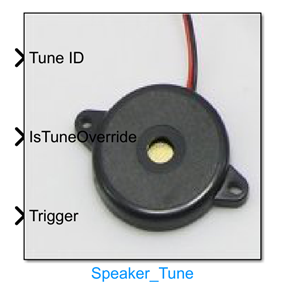
This module is a buzzer actuator component in the Sensors and Actuators interface library of the RflySim toolchain. It interfaces with the PX4 flight controller's buzzer control logic and provides audio feedback for various system states in simulation scenarios. It supports selecting and playing PX4 standard predefined tunes (including power-on, error, low battery, GPS warning, and other common system alerts) via trigger signals, and also allows users to define custom tune strings for personalized prompts.
This module can be used in conjunction with CopterSim to provide audio state feedback for flight controller simulation logic, with results synchronized and visualized in the RflySim3D environment. It is widely applicable to scenarios such as drone flight controller logic development, state machine debugging, and user interaction feature development. It is fully compatible with native PX4 buzzer behavior, enabling developers to validate complete interactive prompt functionality during the simulation phase.
Port Descriptions
Input Ports (Inputs)
| Port Name | Data Type | Dimension | Description |
|---|---|---|---|
Tune ID |
PX4_TUNE_ENUM / int |
1×1 |
Enumerated ID of a predefined tune, used to specify which predefined tune to play |
IsTuneOverride |
char / string |
N×1 |
Custom tune string; used when playing a custom tune to define the content to be played |
Trigger |
double |
1×1 |
Playback trigger signal: when the trigger value becomes 1, the specified predefined tune is played; when it becomes 2, the custom tune is played. Playback is triggered only when the trigger value changes |
Output Ports (Outputs)
This module has no output ports.
Parameter Configuration (Parameters)
This module has no configurable parameters.
Module Characteristics (Block Characteristics)
| Characteristic | Value |
|---|---|
| Supported Data Types | double, single, uint8, PX4_TUNE_ENUM enum |
| Direct Feedthrough | Yes |
| Sample Time | Inherited |
| Code Generation Support | Yes |
Data Communication Protocol
This module does not involve network communication.
Related Modules
| Module Name | Description |
|---|---|
Sonar |
Simulates ultrasonic ranging sensor output for distance data |
GPS_Recording_Playback |
Plays back recorded GPS data to output position information |
Optical_Flow |
Outputs simulated optical flow sensor pixel motion data |
Lidar |
Simulates LiDAR ranging sensor output for distance data |
Trigger_Input |
Reads trigger input signals from the PX4 flight controller |
PWM_Out |
Outputs PWM signals to drive actuators |
Vicon_Out |
Outputs pose data provided by the Vicon motion capture system |
Usage Example
For related usage examples, please refer to the following path:
Please refer to
Readme.pdfin the above path for complete example descriptions and operational steps.
Notes and Common Issues
- Initialization Order: This module relies on the PX4 flight controller firmware's buzzer driver for audio scheduling. It must be placed inside the flight controller task subsystem auto-generated by RflySim to ensure the module initializes after the PX4 firmware system initialization; otherwise, tune playback will not be triggered properly.
- Trigger Rule Matching: Tune playback is triggered only by changes in the
Triggerinput value; maintaining a fixed level will not cause repeated playback. Predefined tune playback requires the Trigger to transition from a non-1 value to 1, and custom tune playback requires the Trigger to transition from a non-2 value to 2. - Enum Input Format Requirements: The
Tune IDinput must be an enum value of typePX4_TUNE_ENUM; direct integer ID input is not supported. If manually connecting a custom signal, it must be converted to the corresponding enum type, otherwise a Simulink type error will occur. - Custom Tune Format Requirements: When using the custom tune feature (i.e., when
IsTuneOverrideinput is valid), the provided string must conform to the official PX4 buzzer tune syntax specification. Non-compliant strings will be ignored and no corresponding tune will be played. - Sample Time Matching: It is recommended to use a sample time consistent with the flight controller control cycle (typically 250 Hz, i.e., 0.004 s). A sample time that is too large may cause the trigger signal change to be missed, resulting in delayed or missed tune playback.
Changelog
v4.10(2024-08-12): Added the Speaker_Tune buzzer tone control module, supporting playback of both predefined and custom tunes.